1. Uvod
This manual provides essential information for the safe and efficient operation of your DALTON KS10Pro Portable Karaoke Machine. Please read this manual thoroughly before using the product and retain it for future reference.
The DALTON KS10Pro is an all-in-one portable karaoke system designed for versatile audio entertainment. It features Bluetooth connectivity, dual wireless microphones, and various input options for music playback and vocal performance.
2. Šta se nalazi u kutiji
Prilikom raspakivanja, molimo Vas da se uvjerite da su sve dolje navedene stavke prisutne i u dobrom stanju:
- 2 UHF bežična mikrofona
- 4 AA Batteries (for microphones)
- 1 Kabl za napajanje
- 1 Storage Box (for microphones)
- 1 Uputstvo za upotrebu (ovaj dokument)
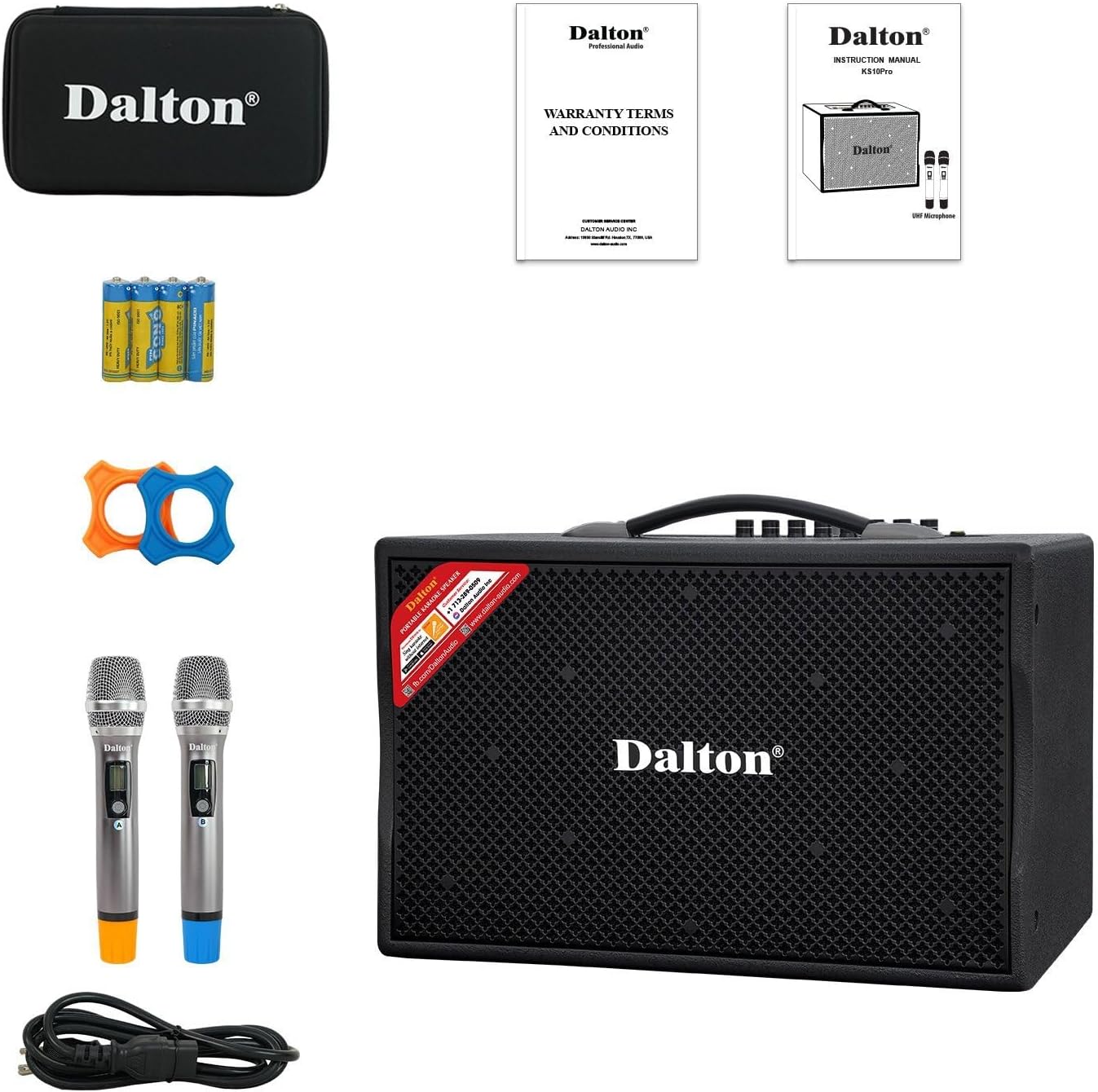
Image: The complete package contents of the DALTON KS10Pro Portable Karaoke Machine, showing the main speaker unit, two wireless microphones, power cable, AA batteries, and a storage case.
3. Vodič za postavljanje
3.1 Početno punjenje
Before first use, fully charge the karaoke machine. Connect the provided power cable to the AC120V/60Hz input on the rear panel of the speaker and plug it into a power outlet. The 'CHARGE' indicator light will illuminate. Charging is complete when the 'CHARGE' light turns off or changes color (refer to specific model indicators if different).
Video: A demonstration of the DALTON KS10Pro Portable Bluetooth Speaker, highlighting its features and portability. This video shows the speaker being moved and its control panel.
3.2 Podešavanje mikrofona
- Insert the 4 AA batteries into the wireless microphones.
- Turn on each microphone using its power switch. The microphones should automatically pair with the speaker.
- Place the non-roll rings on the microphones for added protection and stability.
3.3 Connecting to a Music Source
The KS10Pro offers multiple connectivity options:
- Bluetooth:
- Uključite karaoke aparat.
- Aktivirajte Bluetooth na svom pametnom telefonu, tabletu ili nekom drugom uređaju.
- Traži "Dalton BT03" (or similar, refer to your device's Bluetooth list) and pair.
- Once connected, you can play music wirelessly from your device.
- USB: Umetnite USB disk koji sadrži MP3 files into the USB port on the control panel. The speaker will automatically detect and play the music.
- AUX IN: Connect an external audio device (e.g., TV, MP3 player) using an AUX cable to the AUX IN ports on the rear panel.

Image: The DALTON KS10Pro Portable Karaoke Machine highlighting its connectivity options: Bluetooth, AUX, and USB, indicating versatile music playback.
Video: A demonstration of a karaoke machine playing songs from YouTube, showing the screen interface and song selection. This video illustrates how to select and play music for karaoke.
4. Uputstvo za upotrebu
4.1 Uključivanje/isključivanje
Locate the 'POWER' switch on the control panel. Flip it to 'ON' to power on the device. Flip it to 'OFF' to power off.
4.2 Podešavanje jačine zvuka i efekata
The control panel features various knobs for fine-tuning your audio experience:
- MUZIČKI VOL: Podešava ukupnu jačinu zvuka muzike.
- MUSIC TREBLE/BASS: Controls the treble and bass levels of the music.
- MIC VOL: Podešava jačinu zvuka mikrofona.
- MIC TREBLE/BASS: Controls the treble and bass levels of the microphones.
- ECHO: Adds an echo effect to the microphone vocals.
- KAŠNJENJE: Adjusts the delay of the echo effect.

Slika: Detaljna view of the DALTON KS10Pro control panel, showing all knobs and inputs for adjusting music and microphone settings, including volume, treble, bass, echo, and delay.
4.3 Prijenosna upotreba
The KS10Pro is designed for portability with 360-degree wheels and a sturdy handle, allowing you to easily move it to any location for indoor or outdoor events.

Image: A woman demonstrating the portability of the DALTON KS10Pro karaoke speaker, easily moving it across a floor using its built-in wheels and handle.
5. Održavanje
- čišćenje: Use a soft, dry cloth to clean the exterior of the speaker and microphones. Avoid using harsh chemicals or abrasive materials.
- Skladištenje: Uređaj čuvajte na hladnom i suhom mjestu, dalje od direktne sunčeve svjetlosti i ekstremnih temperatura.
- Održavanje baterije: For optimal battery life, fully charge the unit before long periods of storage and recharge it every 3 months.
6. Otkrivanje problema
| Problem | Mogući uzrok | Rješenje |
|---|---|---|
| Nema struje | Baterija je prazna; Kabel za napajanje nije priključen. | Napunite uređaj; Provjerite je li kabel za napajanje sigurno spojen. |
| Nema zvuka iz zvučnika | Jačina zvuka je preniska; odabran je pogrešan način unosa; uređaj nije uparen (Bluetooth). | Increase MUSIC VOL; Select correct input mode (Bluetooth/USB/AUX); Re-pair Bluetooth device. |
| Nema zvuka iz mikrofona | Microphone off; Batteries depleted; MIC VOL too low. | Uključite mikrofon; Zamijenite baterije; Povećajte jačinu zvuka mikrofona. |
| Loš kvalitet zvuka | Interference; Incorrect TREBLE/BASS settings. | Move away from other electronic devices; Adjust MUSIC/MIC TREBLE/BASS knobs. |
Video: Instructions on how to connect a karaoke machine to a TV using an optical cable. This video demonstrates the process of setting up audio output from a TV to an external speaker.
7. Specifikacije
| Feature | Detalj |
|---|---|
| Brand | DALTON |
| Broj modela | KS10Pro |
| Output Wattage | 300 Watts |
| Veličina woofera | 10 inča |
| Veličina visokotonca | 1 inča |
| Tehnologija povezivanja | AUX, Bluetooth, USB |
| Izvor napajanja | Battery Powered |
| Težina artikla | 33.9 funte |
| Dimenzije proizvoda | 21.3 x 12.6 x 17.6 inča |
| Materijal | Steel, Wooden Cabinet |
| Broj kanala | 2 |
| Kompatibilni uređaji | TV, Guitar, USB, AUX IN, Wireless Microphone |

Image: An exploded diagram of the DALTON KS10Pro speaker, illustrating its internal components including the 300W power output, 10-inch woofer, and 1-inch tweeter for harmonizing sounds.
8. Jamstvo i podrška
For warranty information and customer support, please refer to the documentation included in your product packaging or visit the official DALTON webSačuvajte račun kao dokaz o kupovini za reklamacije u slučaju reklamacije.
Planovi zaštite dostupni su za kupovinu zasebno:
- Dvogodišnji plan zaštite
- Dvogodišnji plan zaštite
- Potpuna zaštita: Jedan plan pokriva sve podobne prošle i buduće kupovine


