Uvod
Hvala na kupoviniasing the SHARP XL-B530 Micro Component System. This system is designed to provide high-quality audio playback from various sources, including Bluetooth wireless streaming, CD, USB, AM/FM radio, and auxiliary input. This manual provides detailed instructions for setting up, operating, and maintaining your new audio system to ensure optimal performance and longevity.
Važne informacije o sigurnosti
- Prije upotrebe pažljivo pročitajte sva uputstva.
- Sačuvajte ovaj priručnik za buduću upotrebu.
- Ne izlažite jedinicu kiši ili vlazi.
- Osigurajte odgovarajuću ventilaciju oko uređaja. Ne blokirajte ventilacijske otvore.
- Ne postavljajte uređaj u blizinu izvora toplote kao što su radijatori, grijalice, peći ili drugi uređaji (uključujući ampLifiers) koji proizvode toplotu.
- Zaštitite kabl za napajanje od gaženja ili priklještenja.
- Koristite samo dodatke/pribor koje je naveo proizvođač.
- Isključite ovaj aparat iz struje tokom oluja sa grmljavinom ili kada se ne koristi duži vremenski period.
- Sav servis prepustite kvalifikovanom serviseru.
Sadržaj paketa
Molimo Vas da provjerite da li se u Vašem paketu nalaze sve sljedeće stavke:
- Main Unit (Micro Component System)
- Zvučnici (x2)
- Daljinski upravljač
- Kabl za napajanje
- FM antena
- AM kružna antena
- Korisnički priručnik (ovaj dokument)
Product Overview
Familiarize yourself with the components and controls of your SHARP XL-B530 system.
Glavna jedinica i zvučnici

Sveukupno view of the SHARP XL-B530 Micro Component System, including the main unit, two speakers, and the remote control.
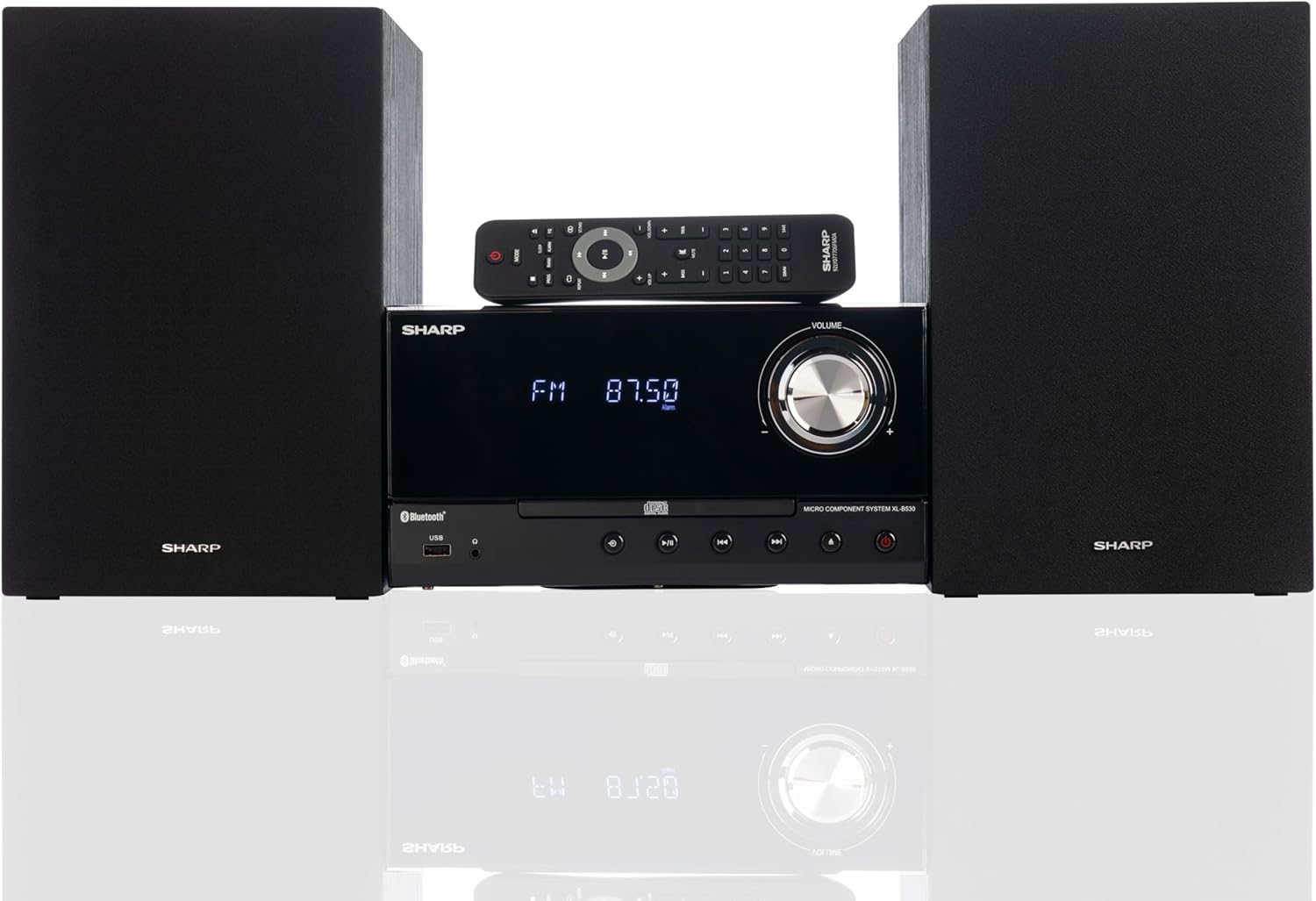
Front panel of the main unit, showing the LCD display, volume knob, CD tray, and control buttons.
Priključci na stražnjoj ploči

The rear panel of the main unit, featuring speaker terminals, FM antenna input, AM antenna input, and auxiliary input ports.
Daljinski upravljač
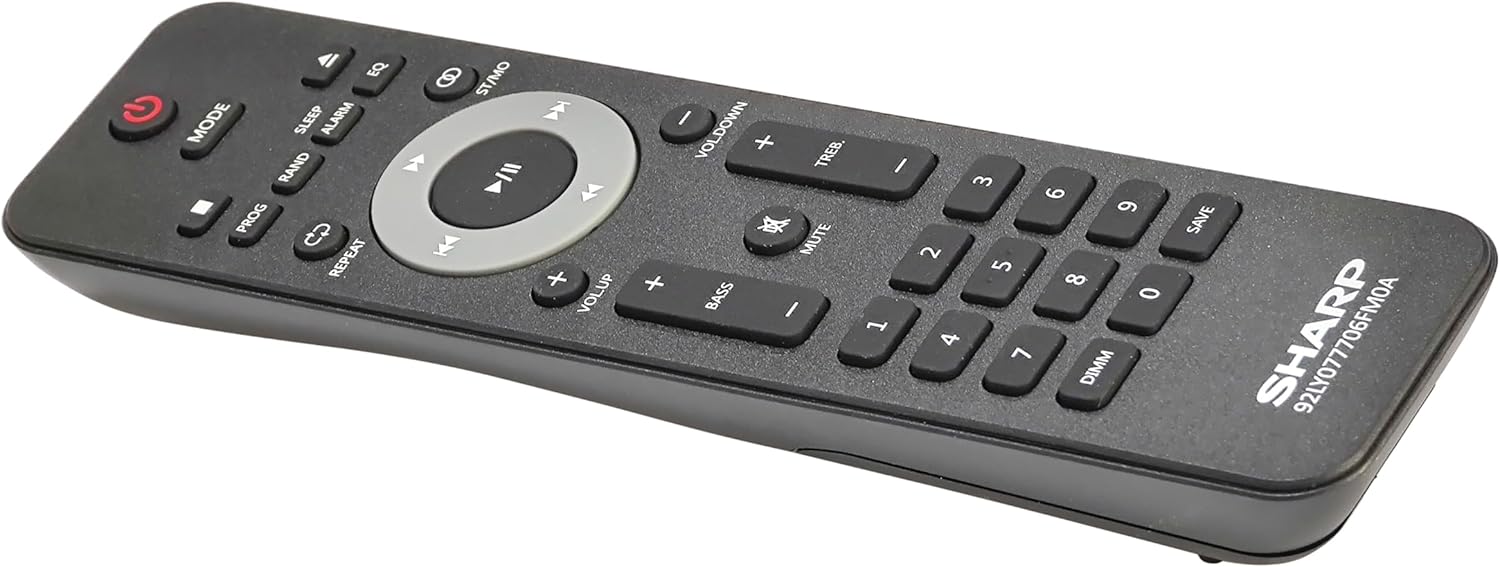
Detaljno view of the remote control, showing various function buttons for power, mode, playback, volume, and sound adjustments.
Setup
Follow these steps to set up your micro component system.
1. Povezivanje zvučnika
- Identify the left and right speaker cables.
- Connect the red (+) wire from each speaker to the red (+) terminal on the main unit's rear panel.
- Connect the black (-) wire from each speaker to the black (-) terminal on the main unit's rear panel.
- Ensure a secure connection for both speakers.
2. Antenska veza
- FM antena: Connect the supplied FM wire antenna to the FM antenna jack on the rear panel. Extend the wire fully for best reception.
- AM antena: Assemble the AM loop antenna and connect its wires to the AM antenna terminals on the rear panel. Rotate the antenna for optimal AM reception.
3. Priključak za napajanje
- Ensure all other connections are made.
- Uključite kabel za napajanje u AC IN priključak na stražnjoj strani glavne jedinice.
- Insert the other end of the power cord into a wall outlet.
Uputstvo za upotrebu
This section details how to use the various functions of your SHARP XL-B530 system.
Uključivanje/isključivanje
- Pritisnite POWER dugme na glavnoj jedinici ili daljinskom upravljaču da biste uključili ili isključili sistem.
Odabir izvora
- Pritisnite MODE button on the main unit or remote control repeatedly to cycle through available sources: CD, Bluetooth, USB, FM, AM, AUX.
CD reprodukcija
- Pritisnite MODE button to select 'CD' mode.
- Pritisnite OPEN/CLOSE dugme da otvorite ležište za CD.
- Place a CD (CD/MP3/WMA/CD-R/CD-RW) with the label side up into the tray.
- Pritisnite OPEN/CLOSE button again to close the tray. Playback will start automatically.
- Koristi PLAY/PAUSE, STOP, SKIP (forward/backward), and TRAŽI dugmad za kontrolu.
Bluetooth uparivanje
- Pritisnite MODE button to select 'Bluetooth' mode. The display will show 'BT' and flash, indicating it's ready for pairing.
- Na vašem Bluetooth uređaju (pametnom telefonu, tabletu itd.) omogućite Bluetooth i potražite dostupne uređaje.
- Select 'SHARP XL-B530' from the list.
- Once paired, the display will stop flashing and show 'BT CONNECTED'. You can now stream audio from your device.
USB reprodukcija
- Umetnite USB fleš disk u USB port na prednjoj ploči.
- Pritisnite MODE button to select 'USB' mode.
- The system will automatically detect and begin playing compatible audio files (MP3/WMA).
- Koristite kontrole reprodukcije slične onima u CD režimu.
AM/FM radio

The SHARP XL-B530 system displaying an FM radio frequency, highlighting its digital tuner capabilities.
- Pritisnite MODE button to select 'FM' or 'AM' mode.
- Automatsko skeniranje: Pritisnite i držite PLAY/PAUSE button to automatically scan and save available stations.
- Ručno podešavanje: Koristite SKIP dugmad za ručno podešavanje željenih frekvencija.
- Unaprijed postavljene stanice: Use the number buttons on the remote to directly select saved preset stations.
Volume and Sound Adjustment

A close-up of one of the SHARP XL-B530 speakers, illustrating the adjustable bass and treble sound output.
- Volumen: Rotirajte VOLUME dugme na glavnoj jedinici ili koristite VOL + / VOL- dugmad na daljinskom upravljaču.
- bas/visoki tonovi: Koristite BASS+ / BASS- i TREB+ / TREB- buttons on the remote control to adjust sound characteristics.
- Glasnost: Pritisnite GLASNOST button on the remote to enhance bass and treble at low volumes.
- EQ: Pritisnite EQ button on the remote to cycle through preset equalizer modes.
Održavanje
Proper care will ensure the longevity of your system.
- čišćenje: Use a soft, dry cloth to clean the exterior of the unit. For stubborn stains, dampen the cloth lightly with water. Do not use abrasive cleaners or solvents.
- CD njega: CD-ove držite za rubove. Zaprljane CD-ove čistite mekom krpom koja ne ostavlja dlačice, brišući od centra prema van.
- ventilacija: Pazite da ventilacijski otvori nisu blokirani prašinom ili ostacima.
- Skladištenje: Ako uređaj skladištite duži period, isključite ga iz električne utičnice i čuvajte ga na hladnom i suhom mjestu.
Rješavanje problema
Ako naiđete na probleme sa sistemom, pogledajte sljedeće uobičajene probleme i rješenja.
| Problem | Mogući uzrok | Rješenje |
|---|---|---|
| Nema struje | Kabl za napajanje nije priključen; Utičnica nije aktivna | Provjerite je li kabel za napajanje sigurno priključen; pokušajte s drugom utičnicom |
| Nema zvuka | Volume too low; Speakers not connected; Incorrect source selected | Increase volume; Check speaker connections; Select correct input source |
| CD se ne reproducira | CD inserted incorrectly; CD is dirty or scratched; Incorrect mode | Insert CD correctly (label side up); Clean or replace CD; Select CD mode |
| Bluetooth se ne uparuje | Bluetooth mode not selected; Device too far; Device already paired to another unit | Select Bluetooth mode; Move device closer; Disconnect from other devices and try again |
| Loš radio prijem | Antena nije povezana ili je loše postavljena; Smetnje | Connect and adjust antenna position; Move unit away from other electronic devices |
| Daljinski upravljač ne radi | Baterije su prazne ili nepravilno umetnute; Prepreka između daljinskog upravljača i uređaja | Replace batteries, check polarity; Remove any obstructions; Ensure remote is pointed at the unit's sensor |
Specifikacije
| Feature | Specifikacija |
|---|---|
| Broj modela | XL-B530(BK) |
| Izlazna snaga | Maksimalno 200 W (100 W RMS) |
| Povezivanje | Bluetooth, USB, Aux Input |
| Kompatibilnost diskova | CD, CD-R/RW, MP3, WMA |
| Tuner | AM/FM Stereo Digital Tuner (50 station presets) |
| Vrsta zvučnika | Stereo |
| Dimenzije proizvoda (D x Š x V) | 25 x 11 x 9.6 inča |
| Težina artikla | 18 funte |
| Boja | Black Oak |
Garancija i podrška
For warranty information and technical support, please refer to the warranty card included with your product or visit the official SHARP webSačuvajte račun kao dokaz o kupovini u slučaju bilo kakvih reklamacija.
For further assistance, you may contact SHARP customer service through their official channels.


