Uvod
This manual provides detailed instructions for the installation, operation, and maintenance of your ANNKE 5MP Wireless Camera System. This system features a 10-channel 5MP Wireless NVR and four 5MP weatherproof IP cameras, designed for reliable surveillance. Please read this manual thoroughly before using the product to ensure proper setup and functionality.
Sadržaj paketa
Before installation, verify that all components are present in your package:
- 1x ANNKE 10-Channel 5MP Wireless NVR
- 4x ANNKE 5MP Weatherproof IP Cameras
- Adapteri za napajanje za NVR i kamere
- USB miš
- Ethernet kabl
- Setovi vijaka za montažu
- Vodič za brzi početak
Note: Hard Disk Drive (HDD) is not included and must be purchased separately if local storage is desired.
Postavljanje i instalacija
Follow these steps for initial setup and installation of your ANNKE Wireless Camera System.
1. Početna veza
The system is designed for true plug-and-play installation. The cameras and NVR are pre-paired at the factory.
- Spojite NVR na električnu utičnicu pomoću priloženog adaptera za napajanje.
- Spojite svaku kameru na utičnicu pomoću odgovarajućeg adaptera za napajanje.
- Wait for the cameras to power on and establish a wireless connection with the NVR. This may take a few minutes.

Figure 1: True Plug and Play Installation Steps
This image illustrates the two primary methods for setting up your ANNKE wireless camera system. The first method involves connecting the cameras and NVR to power, then using the ANNKE Sight app for live viewing. The second method involves connecting the cameras and NVR to power, then linking the NVR directly to a TV or monitor for live viewing.
2. NVR Display Connection
To view the camera feeds directly from the NVR:
- Connect the NVR to a TV or monitor using an HDMI or VGA cable (not included).
- Connect the USB mouse to the NVR's USB port for navigation.
- Follow the on-screen prompts for initial NVR configuration, including setting a password.
3. Mobile App Setup (ANNKE Sight)
For remote monitoring and advanced features, download the ANNKE Sight app:
- Download the "ANNKE Sight" app from your smartphone's app store (iOS App Store or Google Play Store).
- Registrirajte račun i prijavite se.
- Tap the '+' icon to add your device. Scan the QR code on the NVR or manually enter the device ID.
- Follow the in-app instructions to complete the device addition.

Figure 2: Cascading Connection and Auto Pairing
This image illustrates how the ANNKE wireless cameras automatically pair with the NVR and can utilize a cascading connection to extend wireless range within a home environment.
4. Postavljanje kamere
Consider the following when placing your cameras:
- Linija vida: Ensure minimal obstructions between cameras and the NVR for optimal wireless signal.
- Područje pokrivenosti: Position cameras to cover critical entry points and areas of interest.
- Pristup napajanju: Each camera requires a power outlet.
- Zaštita od vremenskih prilika: While IP67 weatherproof, avoid direct exposure to extreme conditions if possible to prolong lifespan.
Uputstvo za upotrebu
This section details the various functions and features of your ANNKE Wireless Camera System.
1. Uživo View i Reprodukcija
- NVR monitor: Use the connected monitor and USB mouse to navigate the NVR interface for live viewing, recording playback, and system settings.
- Mobilna aplikacija: Open the ANNKE Sight app on your smartphone or tablet to view live feeds from all connected cameras. You can also access recorded footage.

Figure 3: Remote Monitoring Across Devices
This image demonstrates the system's capability for remote control and monitoring, allowing users to view live camera feeds on various devices such as laptops, desktop monitors, smartphones, and tablets.
2. Snimanje i pohranjivanje
The system supports continuous recording and motion-triggered recording.
- Lokalna pohrana: Install a compatible HDD (up to 10TB) into the NVR for local video storage. Configure recording schedules and modes via the NVR interface.
- Cloud Storage: Optional cloud storage services may be available through the ANNKE Sight app for off-site backup (subscription may be required).
- H.264+ video kompresija: The system utilizes advanced H.264+ compression to optimize storage space while maintaining video quality.
3. Detekcija pokreta i upozorenja
The system features smart motion detection to alert you to activity.
- Pametno otkrivanje ljudi: The advanced AI can detect and distinguish human movement, reducing false alarms from pets or swaying branches.
- Customizable Motion Areas: Definišite specifična područja unutar kamere view where motion detection should be active. This helps focus alerts on critical zones.
- Trenutna upozorenja: Receive instant app notifications and email alerts with screenshots when motion is detected.

Figure 4: Smart Human Detection Alerts
This image highlights the system's smart human detection feature, which identifies human movement and sends immediate notifications to your email and the ANNKE Sight app, helping to focus on relevant security events.

Figure 5: Customizable Motion Detection Area
This image demonstrates the ability to customize specific zones for motion detection, allowing users to define areas of interest and reduce unnecessary alerts from non-critical zones.
4. Dvosmjerni audio
Each camera includes a built-in microphone and speaker for two-way communication.
- Listen In: Hear audio from the camera's location via the NVR or mobile app.
- Speak Out: Use the app's intercom function to speak through the camera's speaker, allowing you to communicate with visitors or deter intruders.

Slika 6: Dvosmjerna audio komunikacija
This image illustrates the two-way audio feature, showing how a user can communicate with someone at their door, such as a delivery person, directly through the camera system via the mobile app.
5. Noćni vid
The cameras provide clear surveillance even in low-light conditions.
- Noćni vid do 100 metra: Equipped with Smart IR technology, cameras can see up to 100 feet in complete darkness.
- Dan/noćni način rada: The system automatically switches between day (color) and night (black and white infrared) modes based on ambient light.
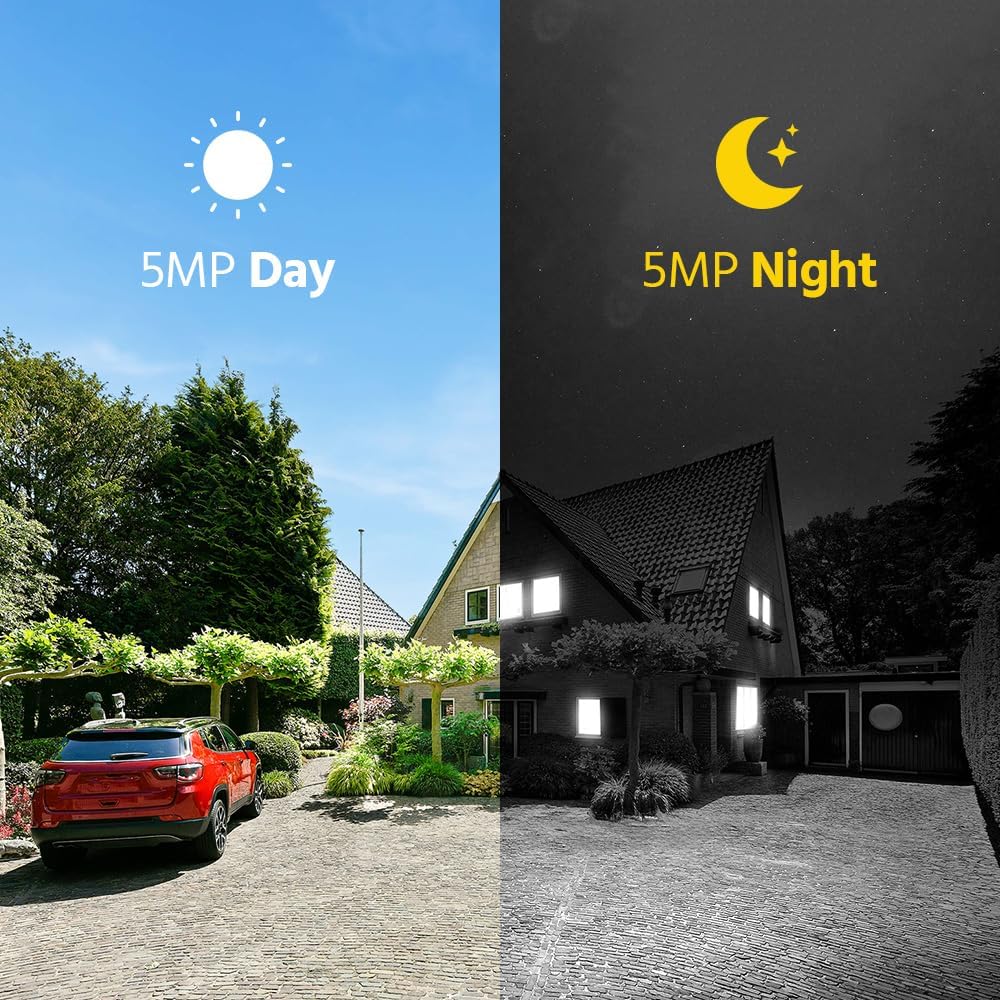
Slika 7: Poređenje dnevnog i noćnog vida
This image visually compares the camera's performance during the day with full color and at night with infrared vision, demonstrating its ability to provide clear 5MP surveillance around the clock.
Održavanje
Redovno održavanje osigurava optimalne performanse i dugotrajnost vašeg sigurnosnog sistema.
- Čišćenje objektiva kamere: Povremeno čistite objektive fotoaparata mekom krpom za čišćenje.amp krpom da biste uklonili prašinu, prljavštinu ili mrlje koje mogu utjecati na jasnoću slike. Ne koristite jake hemikalije.
- Zaštita od vremenskih prilika: Although cameras are IP67 weatherproof, ensure they are securely mounted and protected from direct, prolonged exposure to extreme weather conditions where possible.
- Ažuriranja firmvera: Provjerite ANNKE website or app regularly for firmware updates for your NVR and cameras. Keeping firmware updated ensures the latest features and security patches.
- Provjera napajanja: Ensure all power adapters and cables are securely connected and free from damage.
- Ventilacija NVR-a: Osigurajte da je NVR postavljen u dobro prozračenom prostoru kako biste spriječili pregrijavanje. Ne blokirajte ventilacijske otvore.
Rješavanje problema
Pogledajte ovaj odjeljak za rješenja uobičajenih problema.
- Nema video prikaza:
- Provjerite jesu li NVR i kamere uključeni.
- Verify HDMI/VGA cable connection between NVR and monitor.
- Osigurajte da su kamere unutar bežičnog dometa NVR-a.
- Restart the NVR and cameras.
- Kamere se ne povezuju na NVR:
- Confirm cameras are powered.
- Check for physical obstructions or excessive distance between cameras and NVR.
- If previously paired, try re-pairing cameras to the NVR (refer to NVR manual for specific steps).
- Nema upozorenja o detekciji pokreta:
- Ensure motion detection is enabled in NVR/app settings.
- Verify motion detection areas are correctly configured.
- Check alert notification settings in the ANNKE Sight app.
- Ensure the NVR has internet access for email alerts.
- Loš kvalitet slike:
- Očistite objektive fotoaparata.
- Provjerite ima li jakih izvora svjetlosti direktno okrenutih prema kameri.
- Ensure stable power supply to cameras.
- Problemi s povezivanjem aplikacija:
- Pobrinite se da vaš pametni telefon ima stabilnu internetsku vezu.
- Provjerite je li NVR povezan s internetom.
- Update the ANNKE Sight app to the latest version.
- Restart your router, NVR, and smartphone.
Specifikacije
Key technical specifications for the ANNKE 5MP Wireless Camera System.
| Feature | Specifikacija |
|---|---|
| Brand | ANNKE |
| Tehnologija povezivanja | Bežični |
| Rezolucija video snimanja | 5MP (1920p, 1944p) |
| Posebne karakteristike | Motion Sensor, Night Vision, Waterproof (IP67), Wireless, Two-Way Audio |
| Broj kanala | 10 |
| Izvor napajanja | Corded Electric |
| Noćni vid | 100 stopa |
| Frame Rate | 30 fps |
| Režim snimanja | Kontinuirano, Detekcija pokreta |
| Video ulaz | HDMI, VGA |
| Weatherproof Rating | IP67 |
| Video Compression | H.264 + |
| Max HDD kapacitet | 10TB (HDD not included) |
Garancija i podrška
For warranty information, technical support, or service inquiries, please contact ANNKE customer support.
- Online podrška: Visit the official ANNKE website for FAQs, troubleshooting guides, and support resources.
- Kontakt informacije: Refer to the contact details provided in your product packaging or on the ANNKE official webstranica za direktnu pomoć.
- Registracija proizvoda: Register your product online to receive updates and streamline warranty claims.