1. Proizvod je gotovview
The VIMIN VM-S250501M is a 2.5G Web Managed Ethernet Switch designed for high-performance network environments. It features five 2.5 Gigabit RJ45 ports and one 10 Gigabit SFP+ port, providing flexible connectivity options for various devices. This switch supports multiple speeds (100Mbps, 1Gbps, 2.5Gbps) with intelligent auto-negotiation, making it suitable for 2.5G NAS, gaming PCs, WiFi 6 routers, and 4K video streaming. It incorporates essential Layer 2 management features such as Link Aggregation, IGMP Snooping, Quality of Service (QoS), and VLAN support, all accessible through a user-friendly web-based graphical interface.
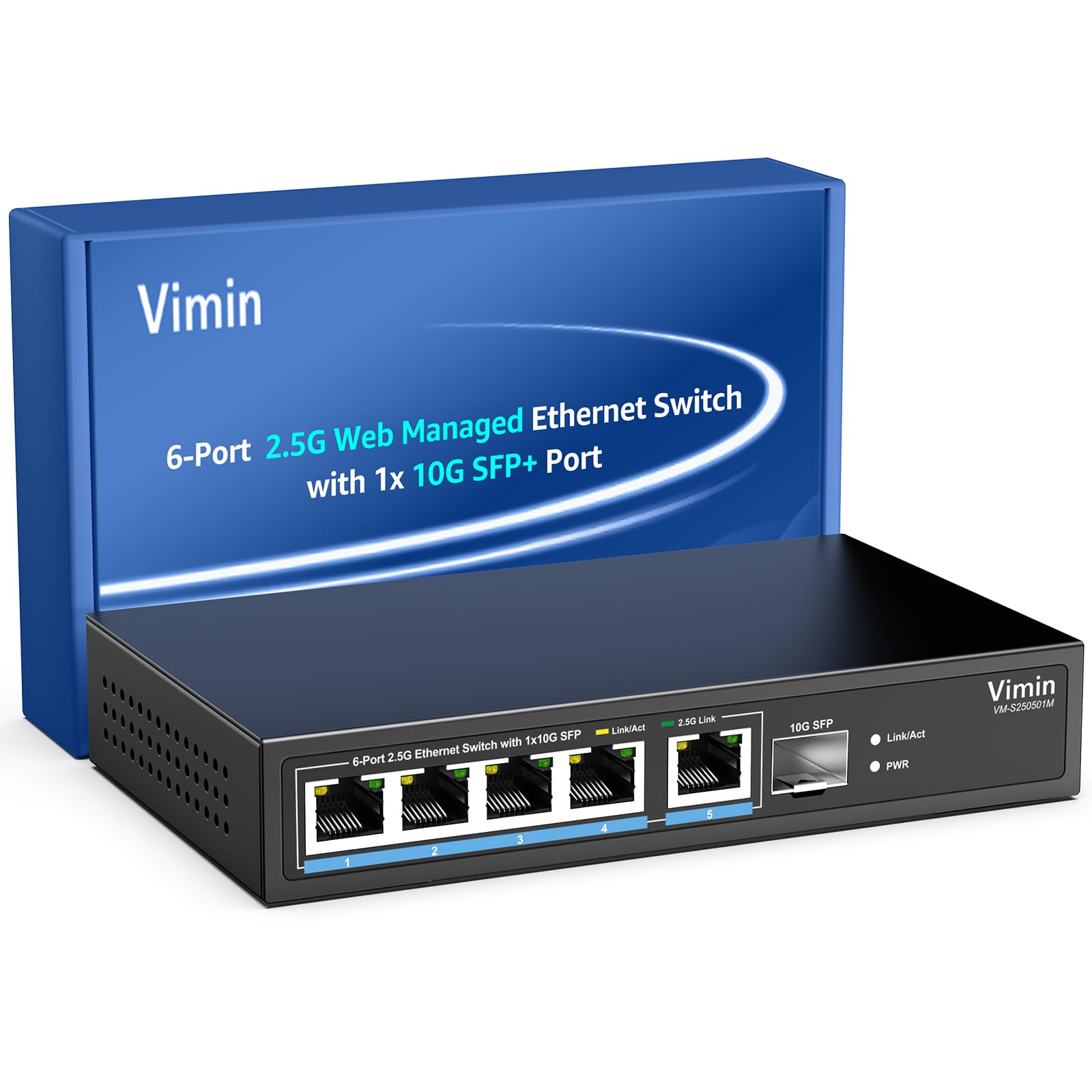
Slika 1: Prednja strana view of the VIMIN VM-S250501M switch, showing the 2.5G RJ45 ports, 10G SFP+ port, and LED indicators.

Figure 2: Illustration highlighting the durability, high compatibility, and versatility of the switch.
2. Upute za postavljanje
2.1 Sadržaj paketa
Provjerite da li se u vašem paketu nalaze sljedeće stavke:
- 1 x VIMIN VM-S250501M 2.5G Web Upravljani Ethernet prekidač
- 1 x adapter za napajanje
- 1 x Uputstvo za upotrebu

Figure 3: The switch, power cable, and user manual are included in the package.
2.2 Fizička instalacija
The switch can be placed on a desktop or mounted on a wall. Ensure proper ventilation around the device.
- Položaj na radnoj površini: Postavite prekidač na ravnu, stabilnu površinu.
- Montaža na zid: The switch features two mounting holes at the base for wall installation. Use appropriate screws (not included) to secure the device to a wall.
2.3 Povezivanje napajanja
- Connect the power adapter to the DC 12V/1A power port on the rear panel of the switch.
- Drugi kraj adaptera za napajanje priključite u standardnu električnu utičnicu.
- The Power LED indicator on the front panel will illuminate when the switch is powered on.
2.4 Povezivanje mrežnih uređaja
Connect your network devices (e.g., computers, NAS, routers, access points) to the switch using appropriate Ethernet cables.
- RJ45 portovi (1-5): Use Category 5e (Cat5e) or Category 6 (Cat6) UTP cables for optimal performance with 1G/2.5G connections. For 100Mbps, Cat5 cables are sufficient.
- SFP+ Port (6): Insert a compatible 1G/2.5G/10G SFP+ optical fiber module (not included) into the SFP+ slot, then connect a fiber optic cable.

Figure 4: Illustrates connecting devices to the switch and recommended cable types for different speeds.
3. Upravljanje prekidačem
3.1 LED indikatori
The front panel LEDs provide real-time status information:
- 5*2.5G Ports (RJ45):
- Yellow: Indicates a 10/100/1000Mbps link or activity.
- Green: Indicates a 2.5Gbps link.
- 1*10G SFP (SFP+ Port):
- Green: Indicates a 1G/2.5G/10G link.
- Flashing: Indicates data transmission.
- PWR (snaga):
- Uključeno: Uređaj je uključen.
- Isključeno: Uređaj je isključen.

Figure 5: Detailed explanation of the LED indicators on the switch.
3.2 Pristup Web Upravljačko sučelje
The switch can be configured and managed via a webgrafički korisnički interfejs (GUI) zasnovan na -.
- Ensure your computer is connected to one of the switch's RJ45 ports.
- Otvori a web preglednik (npr. Chrome, Firefox, Edge).
- In the address bar, enter the default IP address: 192.168.1.199.
- Pritisnite Enter. Pojavit će se stranica za prijavu.
- Unesite zadano korisničko ime i lozinku:
- Korisničko ime: admin
- Lozinka: admin
- Click "Log In" to access the management interface.
Preporučljivo je promijeniti zadanu lozinku nakon početne prijave iz sigurnosnih razloga.

Slika 6: Snimak ekrana web stranica za prijavu na interfejs za upravljanje.
3.3 Basic Management Features
The web interface provides access to various Layer 2 management functions:
- Agregacija linkova: Combine multiple physical links into a single logical link for increased bandwidth and redundancy. Supports static link aggregation.
- Jumbo okvir: Support for larger Ethernet frames (up to 12KB) to improve network efficiency for large data transfers.
- VLAN (Virtualna lokalna mreža): Segment your network into smaller, isolated broadcast domains. Supports up to 32 VLANs (on 4K VLAN IDs), MTU/Port/802.1Q VLAN.
- Kvalitet usluge (QoS): Prioritize network traffic to ensure critical applications receive sufficient bandwidth. Supports port-based, 802.1p, and DSCP priority, with 4 priority queues, rate limiting, and storm control.
- IGMP njuškanje: Optimizirajte isporuku multicast prometa, sprječavajući nepotrebno preplavljivanje svih portova multicast paketima.
- Preslikavanje portova: Copy traffic from one or more source ports to a destination port for network monitoring and analysis.
- Test kabla: A diagnostic tool to check the status and length of connected Ethernet cables.

Slika 7: Gotovoview of the basic management features available through the web interfejs.
4. Održavanje
4.1 Opšta njega
- Keep the switch in a cool, dry environment, away from direct sunlight, heat sources, and moisture.
- Osigurajte dovoljan protok zraka oko uređaja kako biste spriječili pregrijavanje.
- Clean the exterior of the switch with a soft, dry cloth. Do not use liquid cleaners or aerosols.
4.2 Ažuriranja firmvera
Periodically check the VIMIN official webstranica za ažuriranja firmvera. Ažuriranja firmvera mogu pružiti nove funkcije, poboljšanja performansi i sigurnosti. Pažljivo slijedite upute koje ste dobili uz paket ažuriranja firmvera.
4.3 Resetovanje uređaja
If the switch is not functioning correctly or you forget the login credentials, you can reset it to factory default settings. Locate the "Reset" button on the rear panel of the switch. With the switch powered on, use a paperclip or a similar pointed object to press and hold the Reset button for approximately 5-10 seconds until the LEDs flash, then release. The switch will restart with factory default settings.
5. Otkrivanje problema
5.1 Nema napajanja
- Provjerite je li adapter za napajanje sigurno spojen i na prekidač i na ispravnu električnu utičnicu.
- Provjerite da li je utičnica funkcionalna tako što ćete priključiti drugi uređaj.
- Provjerite adapter za napajanje na bilo kakva vidljiva oštećenja.
5.2 No Link/Connectivity
- Check the Ethernet cables connected to the switch and your devices. Ensure they are securely plugged in and not damaged.
- Verify the Link/Act LEDs on the switch for the connected ports. If they are off, there might be a cable issue or the connected device is not powered on/configured correctly.
- Try using a different Ethernet cable or port.
- Ensure the connected device's network adapter is enabled and configured correctly.
5.3 Mala brzina mreže
- Ensure you are using Cat5e or Cat6 cables for 1G/2.5G connections. Lower category cables may limit speed.
- Check the Link/Act LED color for the connected port. A yellow LED on a 2.5G port indicates a 1G or lower connection.
- Verify that your connected devices (e.g., network card, NAS) support 2.5G or 10G speeds.
- Check for network congestion or high traffic on your network.
- Consider updating the switch firmware.
5.4 Nemoguć pristup Web Interface
- Ensure your computer is on the same network segment as the switch. The default IP is 192.168.1.199, so your computer's IP should be in the 192.168.1.x range (e.g., 192.168.1.100) with a subnet mask of 255.255.255.0.
- Verify that the Ethernet cable is properly connected and the Link/Act LED is on.
- Obrišite keš memoriju preglednika ili pokušajte s drugim preglednikom.
- If you have changed the switch's IP address and forgotten it, or forgotten the login password, perform a factory reset (refer to Section 4.3).
6. Specifikacije
| Model | VM-S250501M |
| Standardi | IEEE 802.3/802.3u/802.3ab/802.3bz/802.3x/802.3cb |
| Luke | 5 x 10/100/1000/2500 Mbps RJ45, 1 x 10G SFP+ slot |
| Preklopni kapacitet | 45 Gbps |
| Tabela MAC adresa | 4K |
| Brzina prosljeđivanja paketa | 33.48 Mpps |
| Jumbo okvir | 12 KB |
| Paketni me uspremnik | 8 Mbit |
| Napajanje | 12V/1A DC |
| Network Cable (Max 100m) |
|
| Način montaže | Desktop and Wall Mount |
| Radna temperatura | 0℃ ~ 45℃ (32℉ ~ 113℉) |
| Temperatura skladištenja | -40℃ ~ 70℃ (-40℉ ~ 158℉) |
| Radna vlažnost | 10% ~ 90% bez kondenzacije |
| Vlažnost skladištenja | 5% ~ 95% bez kondenzacije |
| Težina | 380 g |
| Dimenzije (D x Š x V) | 160 x 95 x 30 mm (6.3 x 3.7 x 1.2 inča) |
| Materijal kućišta | Metal |
| Boja | Crna |
7. Garancija i podrška
7.1 Jamstvo za proizvod
The VIMIN VM-S250501M 2.5G Web Managed Ethernet Switch comes with a jednogodišnja garancija od datuma kupovine. Ova garancija pokriva nedostatke u proizvodnji i osigurava da proizvod ispunjava specificirane standarde performansi pri normalnoj upotrebi. Molimo sačuvajte dokaz o kupovini za reklamacije u slučaju kvara.
7.2 Tehnička podrška
VIMIN provides doživotna tehnička podrška for this product. If you encounter any issues or have questions regarding the setup, operation, or troubleshooting of your switch, please contact our support team.
Kontakt informacije:
- Email: support@vimintech.com
Figure 8: VIMIN support information, including email contact.


