Uvod
This manual provides detailed instructions for the GuliKit KK3 Wireless Controller. It covers essential information regarding product features, setup, operation, maintenance, and specifications. Please read this manual thoroughly before using your controller to ensure optimal performance and longevity.

Image: The GuliKit KK3 Wireless Controller in gray, shown with its charging cable and two sets of joystick caps.
Šta je u kutiji
Provjerite da li se sve stavke nalaze u vašem paketu:
- GuliKit KK3 Wireless Controller
- USB-C kabl za punjenje
- Additional Joystick Caps (2 sets)
Ključne karakteristike
- TMR Joystick: Features 1000-level high precision for refined control.
- Analogni okidači Hall efekta: High precision and long-life design.
- Anti-Friction Metal Stick Ring: Enhances control smoothness.
- Taktilna dugmad druge generacije: Provides responsive actuation and improved reliability.
- Continuous Fire Support: Includes Semi-Auto and Full-Auto continuous fire modes.
- Asymmetric Rotor Vibration Motors: Supports 3 adjustable vibration levels.
- Šestoosni žiroskop: Enables immersive motion control.
- Široka kompatibilnost: Compatible with Switch 2, Switch, Switch OLED, Switch Lite, Steam Deck, Android, iOS, macOS, and Windows.

Slika: Krupni plan view of the GuliKit KK3 controller's TMR joystick, highlighting its precision.

Slika: Detaljna view of the GuliKit KK3 controller's Hall Effect triggers, emphasizing their high precision.

Image: An illustration showing the anti-friction metal stick ring component of the GuliKit KK3 joystick, designed for smoother control.
Podešavanje i povezivanje
The GuliKit KK3 controller supports both wired and wireless connections across various platforms. Specific pairing instructions may vary slightly depending on your device.
General Wireless Pairing
- Provjerite da li je kontroler dovoljno napunjen.
- Uključite kontroler pritiskom na dugme Home.
- Activate pairing mode on the controller (refer to specific platform instructions below for button combinations).
- On your device (PC, Switch, Android, iOS), navigate to Bluetooth settings and select the GuliKit KK3 controller from the list of available devices.
- Confirm the connection. The controller's indicator lights will show a solid connection.
Žična veza
Connect the controller to your device using the provided USB-C cable. The controller should be automatically recognized and ready for use.
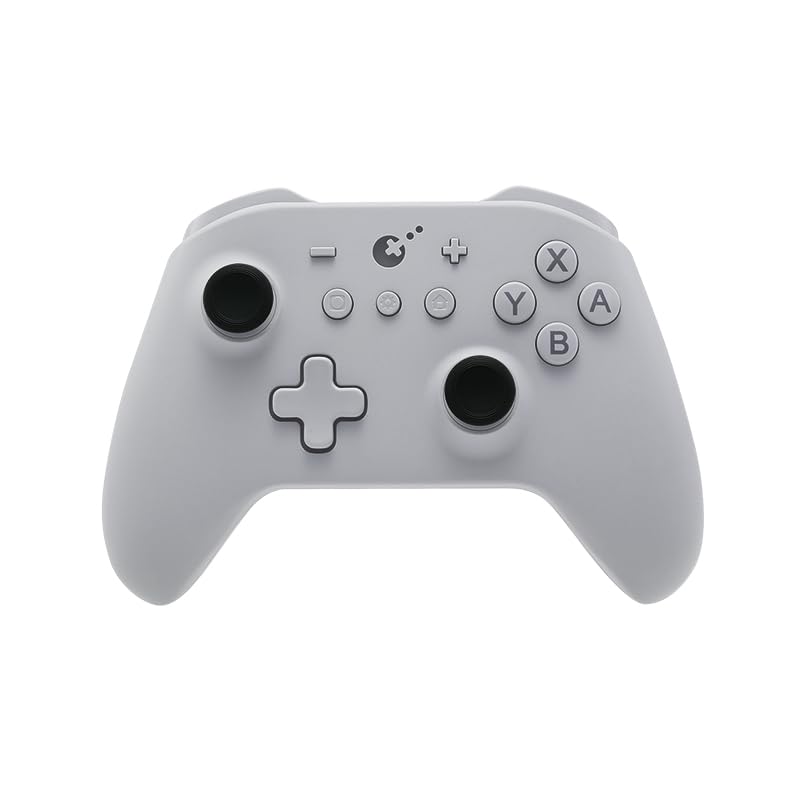
Image: An illustration showing the GuliKit KK3 controller's various modes and compatibility with Switch, PC X-input, iOS, Android, and D-input.
Uputstvo za upotrebu
Joystick and Triggers
- The TMR joysticks offer precise 1000-level control.
- Hall Effect analog triggers provide accurate and durable input.
Continuous Fire Function
The controller supports both semi-auto and full-auto continuous fire. Consult the full product manual or GuliKit's official website for specific button combinations to activate and configure these modes.

Image: The GuliKit KK3 controller shown in use with examples of continuous fire functionality in gaming scenarios.
Vibration Feedback
The asymmetric rotor vibration motors provide tactile feedback. There are 3 adjustable levels of vibration intensity. Refer to the full product manual for instructions on how to change vibration levels.

Image: An illustration of the GuliKit KK3 controller's asymmetric rotor vibration motors and their three adjustable levels.
Šestoosni žiroskop
The integrated six-axis gyroscope allows for immersive motion control in compatible games. This enhances the realism of your gaming experience.

Image: The GuliKit KK3 controller with arrows indicating the six-axis gyroscope's motion control capabilities.
Kompatibilnost
The GuliKit KK3 Wireless Controller offers broad compatibility:
- Igraće konzole: Nintendo Switch, Switch OLED, Switch Lite, Switch 2
- Handheld Gaming: Steam Deck
- Operativni sistemi: Windows, macOS, Android, iOS

Slika: Prekoview of the GuliKit KK3 controller's multi-platform compatibility, including Windows, Switch, Android, and iOS platforms, supporting both wired and wireless connections.
Održavanje
To ensure the longevity and optimal performance of your GuliKit KK3 controller, follow these maintenance guidelines:
- čišćenje: Use a soft, dry cloth to wipe the controller. Avoid abrasive cleaners or solvents.
- Skladištenje: Kontroler čuvajte na hladnom i suhom mjestu, dalje od direktne sunčeve svjetlosti i ekstremnih temperatura.
- Punjenje: Za punjenje koristite samo priloženi USB-C kabel ili certificirani ekvivalent. Izbjegavajte prekomjerno punjenje.
- Rukovanje: Izbjegavajte ispuštanje kontrolera ili njegovo izlaganje jakim udarcima.
Rješavanje problema
If you encounter issues with your GuliKit KK3 controller, consider the following common solutions:
- Problemi sa vezom: Ensure the controller is charged. Re-attempt pairing with your device. For wireless connections, ensure no strong interference sources are nearby. For wired connections, try a different USB port or cable.
- Nereagujući tasteri/džojstici: Check for any physical obstructions. Ensure the controller's firmware is up to date (check GuliKit's official webstranica za ažuriranja).
- Vibracija ne radi: Verify that vibration is enabled in your game settings and on the controller (if adjustable). Check the vibration level settings.
- Kontroler se ne puni: Ensure the USB-C cable is securely connected to both the controller and a power source. Try a different charging cable or power adapter.
If problems persist, please contact GuliKit customer support for further assistance.
Specifikacije
| Feature | Detalj |
|---|---|
| Broj modela | NS37 |
| Težina artikla | 1.55 unce |
| Dimenzije paketa | 6.18 x 5.75 x 2.83 inča |
| Proizvođač | Gulikit |
| First Available | 7. avgusta 2022 |
Garancija i podrška
For warranty information and technical support, please refer to the official GuliKit webweb-mjesto ili direktno kontaktirajte njihovu korisničku službu. Sačuvajte račun kao dokaz o kupovini.
GuliKit is dedicated to providing innovative gaming hardware. For the latest updates, firmware, and support resources, visit the official GuliKit website.


