1. Uvod
This manual provides detailed instructions for the setup, operation, and maintenance of your KTC 32-Inch 2K QHD IPS Monitor, model H32T13. Please read this manual thoroughly before using the monitor to ensure proper functionality and to prevent damage.
The KTC H32T13 monitor features a 32-inch IPS panel with 2K QHD (2560x1440) resolution, a 100Hz refresh rate, and support for FreeSync/G-Sync technologies. It is designed for both office productivity and gaming, offering vibrant colors, wide viewing angles, and eye-care features.
2. Šta se nalazi u kutiji
Provjerite da li su sve komponente prisutne u paketu:
- KTC 32-Inch 2K QHD IPS Monitor (H32T13)
- Stalak za monitor (baza i vrat)
- HDMI kabl
- Kabl za napajanje
- Adapter za napajanje
- Odvijač
- Korisnički priručnik (ovaj dokument)

Image: Contents of the KTC H32T13 monitor package.
3. Proizvod je gotovview
The KTC H32T13 monitor is designed for a superior visual experience. Key features include:
- 32-inch QHD (2560x1440) IPS Panel: Delivers crisp, detailed images with accurate colors and wide viewing angles.
- Brzina osvježavanja od 100Hz: Provides smoother motion for gaming and fast-paced content.
- FreeSync/G-Sync Compatibility: Smanjuje trzanje i trzanje slike na ekranu za fluidno iskustvo igranja.
- HDR podrška: Enhances contrast and color for more realistic visuals.
- Tehnologija za njegu očiju: Features Flicker-Free and Low Blue Light modes to reduce eye strain during prolonged use.
- Svestrano povezivanje: Equipped with multiple HDMI 2.0 and DisplayPort 1.4 inputs.
- Ergonomski dizajn: Offers tilt adjustment and VESA mount compatibility for flexible positioning.
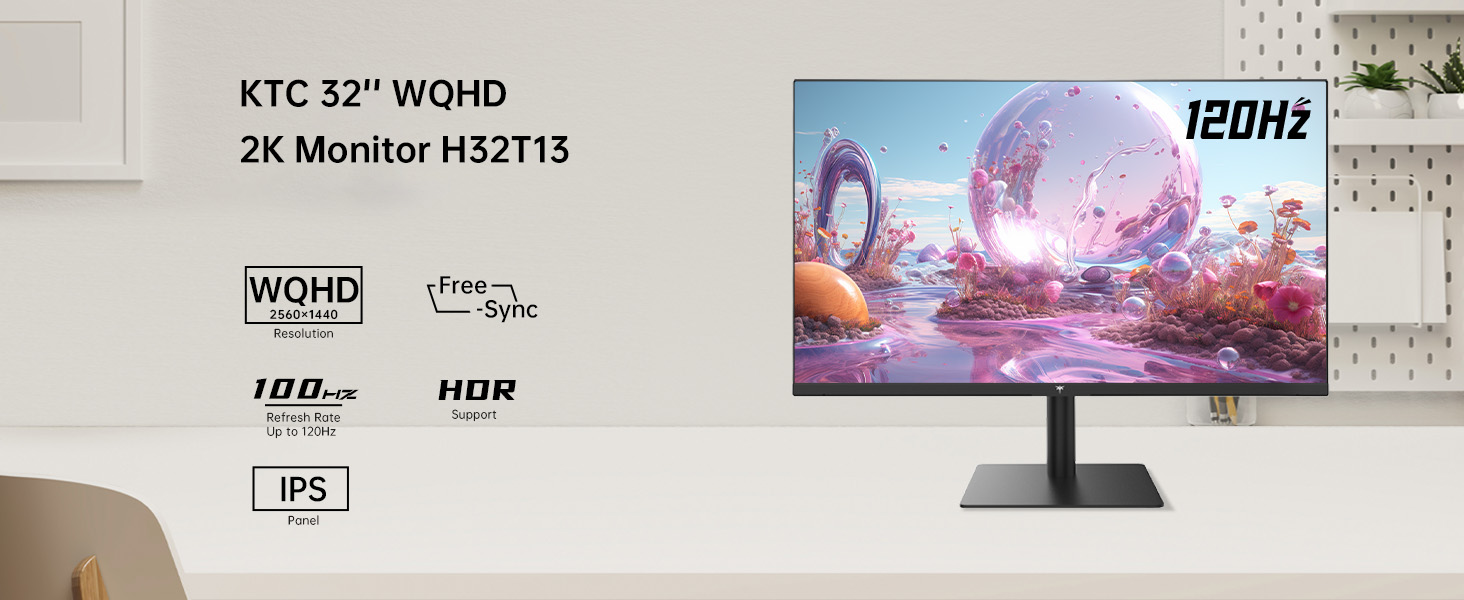
Image: KTC H32T13 monitor showcasing its key display technologies.

Image: The 32-inch screen size of the KTC H32T13 monitor.
4. Podešavanje
4.1 Sastavljanje postolja
- Pažljivo izvadite komponente monitora i postolja iz ambalaže.
- Attach the stand neck to the monitor panel using the provided screws and screwdriver.
- Pričvrstite bazu postolja na vrat postolja.
- Postavite sastavljeni monitor na stabilnu, ravnu površinu.
4.2 VESA montaža (opciono)
The monitor supports VESA 100mm x 100mm mounting. If you wish to use a VESA-compatible arm or wall mount (not included), remove the stand and attach the VESA mount according to its instructions.

Slika: Stražnja strana view of the monitor with VESA 100x100mm mounting points.
4.3 Povezivanje sa računarom
- Provjerite da li su i monitor i računar isključeni.
- Connect one end of the provided HDMI cable to an HDMI port on your computer's graphics card.
- Connect the other end of the HDMI cable to one of the HDMI 2.0 ports on the monitor. Alternatively, use a DisplayPort cable to connect to a DP 1.4 port for higher refresh rates and FreeSync/G-Sync functionality.
- Connect the power adapter to the monitor's DC input and then plug the power cord into a power outlet.
- Uključite računar, a zatim uključite monitor.

Image: Monitor connectivity ports (DC, HDMI 1, HDMI 2, DP 1).
5. Uputstvo za upotrebu
5.1 Uključivanje/isključivanje napajanja
Pritisnite dugme za napajanje koje se nalazi na monitoru da biste ga uključili ili isključili. Indikator napajanja će svijetliti kada je monitor uključen.
5.2 Odabir ulaznog izvora
Use the OSD (On-Screen Display) menu buttons to navigate and select your desired input source (HDMI 1, HDMI 2, or DisplayPort).
5.3 Podešavanje postavki ekrana (OSD meni)
The OSD menu allows you to customize various display settings. Typically, buttons are located on the back or bottom of the monitor. Refer to the quick start guide for specific button functions.
- Svjetlina/kontrast: Podesite ukupnu svjetlinu i omjer kontrasta.
- Postavke boja: Modify color temperature, gamma, and individual RGB levels. The monitor supports 1.07 billion colors and 103% sRGB.
- Način slike: Select from preset modes optimized for different content (e.g., Standard, Game, Movie, Text).
- Brzina osvježavanja: The monitor supports up to 100Hz. Ensure your graphics card settings are configured to match.
- FreeSync/G-Sync: Enable this feature in the OSD menu and your graphics card control panel for adaptive synchronization.
- Eye Care Modes: Activate Flicker-Free and Low Blue Light modes to reduce eye strain.
- HDR: Enable HDR for compatible content and devices.

Image: Monitor displaying enhanced colors and brightness with HDR enabled.

Image: Visual comparison of FreeSync/G-Sync enabled and disabled, demonstrating smoother gameplay.

Image: IPS panel advantages in brightness and color over VA panels.
5.4 Fizička podešavanja
The monitor stand allows for tilt adjustment from -5° to 15° to optimize your viewing kut.

Image: Monitor tilt adjustment range and eye care features.
Video: Krajview of the KTC 2K IPS Office Monitor, highlighting its features and suitability for office use. This video demonstrates the monitor's visual quality and design.
6. Održavanje
6.1 Čišćenje monitora
- Uvijek isključite monitor i iskopčajte kabel za napajanje prije čišćenja.
- Lagano koristite meku krpu koja ne ostavlja dlačice dampvodom ili blagim, neabrazivnim sredstvom za čišćenje ekrana.
- Wipe the screen gently to remove dust and smudges. Avoid applying direct pressure to the screen.
- Ne koristite alkohol, sredstva za čišćenje na bazi amonijaka ili abrazivne materijale, jer oni mogu oštetiti površinu ekrana.
- Očistite monitor casing mekom, suhom krpom.
6.2 Skladištenje
Ako monitor skladištite duži period, provjerite da je isključen iz struje, iskopčan iz struje i uskladišten na hladnom i suhom mjestu, dalje od direktne sunčeve svjetlosti i ekstremnih temperatura. Za najbolju zaštitu koristite originalno pakovanje, ako je dostupno.
7. Otkrivanje problema
| Problem | Mogući uzrok | Rješenje |
|---|---|---|
| Nema slike na ekranu | Monitor not powered on; Incorrect input source; Loose video cable; Computer in sleep mode. | Ensure power is connected and monitor is on. Select correct input source. Check video cable connections. Wake up computer. |
| Slika je mutna ili iskrivljena | Incorrect resolution; Faulty video cable; Graphics driver issues. | Set display resolution to 2560x1440. Try a different video cable. Update graphics drivers. |
| Treperenje ili kidanje slike na ekranu | Refresh rate mismatch; FreeSync/G-Sync not enabled or incompatible. | Ensure refresh rate is set to 100Hz. Enable FreeSync/G-Sync in monitor OSD and graphics card settings. Use DisplayPort for FreeSync/G-Sync. |
| Nema zvuka iz slušalica | Headphones not connected properly; Audio output not set to monitor. | Check headphone connection. Set monitor as default audio output in your computer's sound settings. |
| Dugmad ne reaguju | OSD lock enabled; Temporary software glitch. | Check if OSD lock is active (refer to quick start guide). Power cycle the monitor. |
8. Specifikacije
| Feature | Detalj |
|---|---|
| Broj modela | H32T13 |
| Veličina ekrana | 32 inča |
| Tip panela | IPS |
| Rezolucija | 2560 x 1440 (QHD širokokutni ekran 1440p) |
| Aspect Ratio | 16:9 |
| Refresh Rate | 100Hz |
| Osvetljenost | 350 Candela (typ.) |
| Gamut boja | 103% sRGB |
| Dubina boje | 1.07 milijardi boja |
| HDR podrška | Da |
| Adaptive Sync | FreeSync/G-Sync Compatible |
| Povezivanje | 2x HDMI 2.0, 1x DisplayPort 1.4 |
| Podešavanje nagiba | -5° do 15° |
| VESA Mount | 100mm x 100mm |
| Karakteristike za njegu očiju | Flicker-Free, Eye Protection Mode (Low Blue Light) |
| Dimenzije proizvoda | 5.31 x 32.48 x 21.2 inča |
| Težina artikla | 18.81 funte |
9. Garancija i podrška
9.1 Informacije o garanciji
KTC products are covered by a limited warranty. Please refer to the warranty card included in your product packaging or visit the official KTC webZa detaljne uslove garancije posjetite stranicu. Sačuvajte dokaz o kupovini za slučaj reklamacije.
9.2 Korisnička podrška
For technical assistance, troubleshooting not covered in this manual, or warranty inquiries, please contact KTC customer support through the following channels:
- Online podrška: Visit the KTC official website for FAQs, driver downloads, and support contact forms.
- Podrška putem e-pošte: Refer to your warranty card or the KTC webweb-stranicu za odgovarajuću adresu e-pošte za podršku.
- Amazon podrška: If purchased via Amazon, you can contact the seller directly through your Amazon order history for assistance.
Image: Steps to contact KTC customer support via Amazon.


