1. Uvod
Thank you for choosing the Dexnor Keyboard Case. This manual provides essential information for setting up, operating, and maintaining your new keyboard case. Designed to enhance your Samsung Galaxy Tab experience, this case features a magnetic attachment, a precise multi-touch trackpad, a 7-color backlit QWERTZ keyboard, and convenient S Pen storage. Please read this manual thoroughly before use to ensure optimal performance and longevity of your device.
2. Kompatibilnost
This keyboard case is exclusively designed for the following Samsung Galaxy Tab models:
- Samsung Galaxy Tab S10 Lite (Model SM-X400, SM-X406B)
- Samsung Galaxy Tab S10 FE 10.9" 2025 (Model SM-X520, SM-X526, SM-X526B)
- Samsung Galaxy Tab S9 FE 10.9" 2023 (Model SM-X510/SM-X516B/SM-X518U)
- Samsung Galaxy Tab S9 11" 2023 (Model SM-X710/SM-X716B/SM-X718U)
Note: This case is NOT compatible with Samsung Galaxy Tab S9+/S9 FE+ 12.4" or Samsung Galaxy Tab S11 (2025) 11". Please verify your tablet model before purchase.

Figure 2.1: Compatible and incompatible tablet models.
3. Sadržaj paketa
Molimo Vas da provjerite paket za sljedeće stavke:
- Dexnor Keyboard Case
- USB-C kabl za punjenje
- Vodič za brzi početak
- Korisnički priručnik (ovaj dokument)
4. Podešavanje
4.1 Attaching Your Tablet
The keyboard case features a strong magnetic hinge for secure attachment. Simply align your Samsung Galaxy Tab with the magnetic area on the case. The tablet will snap into place, transforming your device into a laptop-like setup.

Figure 4.1: Magnetic attachment and adjustable viewing kut.
4.2 Uparivanje tastature putem Bluetootha
- Provjerite da li je tastatura dovoljno napunjena.
- Turn on the keyboard by pressing the power button (usually located on the side or top edge of the keyboard). The indicator light will flash, indicating it's in pairing mode.
- Na vašem Samsung Galaxy Tabu idite na Postavke > Povezani uređaji > Bluetooth i UKLJUČITE Bluetooth.
- Your tablet will search for available devices. Select "Dexnor Keyboard" (or similar name) from the list.
- Slijedite upute na ekranu da biste dovršili proces uparivanja. Nakon uparivanja, indikatorska lampica na tastaturi će prestati treptati.
5. Uputstvo za upotrebu
5.1 Podešavanje Viewing Angles
The robust aluminum alloy hinge allows for flexible viewing angles, transforming your tablet into a versatile workstation. Adjust the tablet's position to your preferred angle for typing, reading, or viewing content.

Figure 5.1: Tablet in floating cantilever position for optimal viewing.
5.2 Višestruki dodirni dodir
The integrated high-precision multi-touch trackpad supports various gestures for seamless navigation. Use multi-finger gestures for actions such as scrolling, swiping, and zooming, enhancing your productivity.

Figure 5.2: Multi-touch trackpad for precise control.
5.3 Tastatura sa pozadinskim osvjetljenjem
The keyboard features 7 different backlight colors and 3 adjustable brightness levels for comfortable typing in any lighting condition. Use the dedicated backlight key (often a sun icon or Fn + light key combination) to cycle through colors and adjust brightness.

Figure 5.3: Backlit QWERTZ keyboard with adjustable colors.
Držač za S olovku 5.4
The case provides two convenient locations for your S Pen: an integrated magnetic holder within the keyboard for secure storage and a cutout slot at the rear of the case for charging and additional storage. This design ensures quick access and prevents loss.
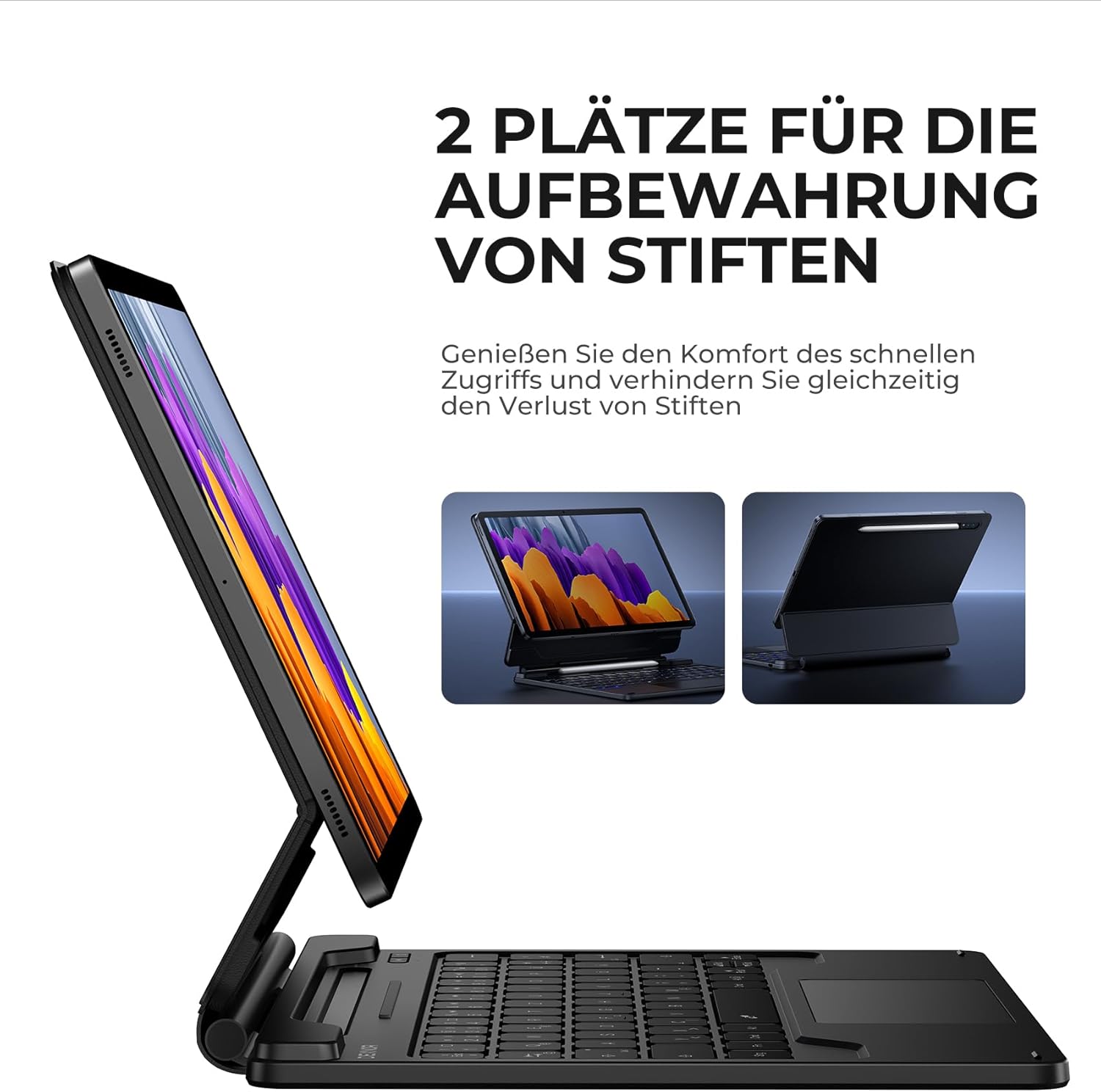
Figure 5.4: Dual S Pen storage options.
5.5 DEX Mode
Combine your tablet with the keyboard case and activate Samsung DEX mode to transform your tablet into a desktop-like experience. This allows for enhanced multitasking and productivity, similar to a traditional laptop setup.
5.6 Tasteri prečica
The keyboard includes a series of convenient shortcut keys for quick control over media playback, volume, and other tablet functions. Refer to the keyboard layout for specific key functions.

Figure 5.5: Keyboard layout with shortcut keys.
5.7 Automatic Sleep/Wake Function
The case supports automatic sleep/wake functionality. Closing the case will put your tablet to sleep, and opening it will wake it up, conserving battery life for both your tablet and the keyboard.
6. Punjenje tastature
The keyboard is equipped with a long-lasting 650 mAh battery. To charge the keyboard:
- Connect the provided USB-C charging cable to the charging port on the keyboard.
- Drugi kraj kabla priključite na USB adapter za napajanje (nije uključen) ili na USB port računara.
- The charging indicator light will illuminate during charging and turn off once fully charged. A full charge takes approximately 3.5 hours.
A single charge provides up to 200 hours of working time and 1200 hours of standby time.

Figure 6.1: USB-C charging port.
7. Održavanje
To ensure the longevity and optimal performance of your Dexnor Keyboard Case:
- čišćenje: Koristite meku, damp cloth to wipe the exterior of the case. For the keyboard keys, use a soft, dry cloth or a specialized keyboard cleaner. Avoid harsh chemicals or abrasive materials.
- Skladištenje: When not in use for extended periods, store the keyboard case in a cool, dry place. Ensure the case is closed to protect the tablet and keyboard.
- Izbjegavajte tečnosti: Držite tastaturu dalje od tečnosti kako biste spriječili oštećenje unutrašnjih komponenti.
- Pažljivo rukujte: While durable, avoid dropping the case or subjecting it to excessive force.
8. Otkrivanje problema
8.1 Tastatura se ne povezuje
- Provjerite bateriju: Provjerite da li je tastatura napunjena.
- Ponovo upariti: Delete the keyboard from your tablet's Bluetooth device list and attempt to pair it again (refer to Section 4.2).
- Ponovo pokrenite uređaje: Ponovo pokrenite i tablet i tastaturu.
- smetnje: Udaljite se od drugih bežičnih uređaja koji mogu uzrokovati smetnje.
8.2 Trackpad ne reaguje
- Provjerite vezu: Provjerite je li tastatura pravilno povezana putem Bluetootha.
- Očistite trackpad: Provjerite je li površina dodirne pločice čista i bez ostataka.
- Ponovno pokretanje: Ponovo pokrenite tastaturu i tablet.
8.3 Pozadinsko osvjetljenje ne radi
- Provjerite bateriju: Slaba baterija može uticati na funkcionalnost pozadinskog osvjetljenja. Napunite tastaturu.
- Uključi/isključi pozadinsko osvjetljenje: Press the backlight key (or Fn + backlight key) to ensure it's not turned off or at the lowest brightness setting.
8.4 Problemi s naplatom
- Provjerite kabl: Ensure the USB-C cable is securely connected to both the keyboard and the power source. Try a different USB-C cable if available.
- Izvor napajanja: Pokušajte s drugim USB adapterom za napajanje ili portom.
9. Specifikacije
| Brand | Dexnor |
| Broj modela | DK005 |
| Tehnologija povezivanja | Bluetooth |
| Posebne karakteristike | Multi-Touch Trackpad, Backlit Keyboard, S Pen Holder |
| Kompatibilni uređaji | Samsung Galaxy Tab S10 Lite 10.9", Samsung Galaxy Tab S9 11", Samsung Galaxy Tab S9 FE/S10 FE 10.9" |
| Sastav baterije | Litijum-jonski |
| Kapacitet baterije | 650 mAh |
| Vrijeme punjenja | Pribl. 3.5 sati |
| Radno vrijeme | Do 200 sati |
| Vrijeme pripravnosti | Do 1200 sati |
| Raspored tipkovnice | QWERTZ (German) |
| Dimenzije proizvoda | 25.9D x 20.5Š x 1.9V cm |
10. Garancija i podrška
Dexnor provides a 1-year manufacturer's warranty for this product. Additionally, lifetime technical support is available.
For warranty claims, technical assistance, or any product-related inquiries, please contact Dexnor customer support through the retailer's platform or visit the official Dexnor webstranica za kontakt informacije.


