PELADN Mini PC WI-6 User Manual
Model: N95/16GB+512GB
Marka: PELADN
1. Uvod
Thank you for choosing the PELADN Mini PC WI-6. This compact and powerful desktop computer is designed for a wide range of applications, from office work and online education to home entertainment. Featuring the 12th Gen Intel Alder Lake-N95 processor, 16GB DDR4 RAM, and a 512GB SSD, it offers efficient performance in a small form factor. This manual provides essential information for setting up, operating, maintaining, and troubleshooting your new Mini PC.
2. Šta se nalazi u kutiji
Molimo Vas da provjerite sadržaj paketa kako biste bili sigurni da su svi artikli prisutni:
- 1 x PELADN WI-6 Mini PC (N95/16GB+512GB)
- 1 x HD kabel
- 1 x VESA nosač sa vijcima
- 1 x adapter za napajanje
- 1 x Uputstvo za upotrebu

Image: All items included in the PELADN Mini PC WI-6 package.
3. Proizvod je gotovview
3.1 Prednji i zadnji portovi
Familiarize yourself with the various ports on your PELADN Mini PC:
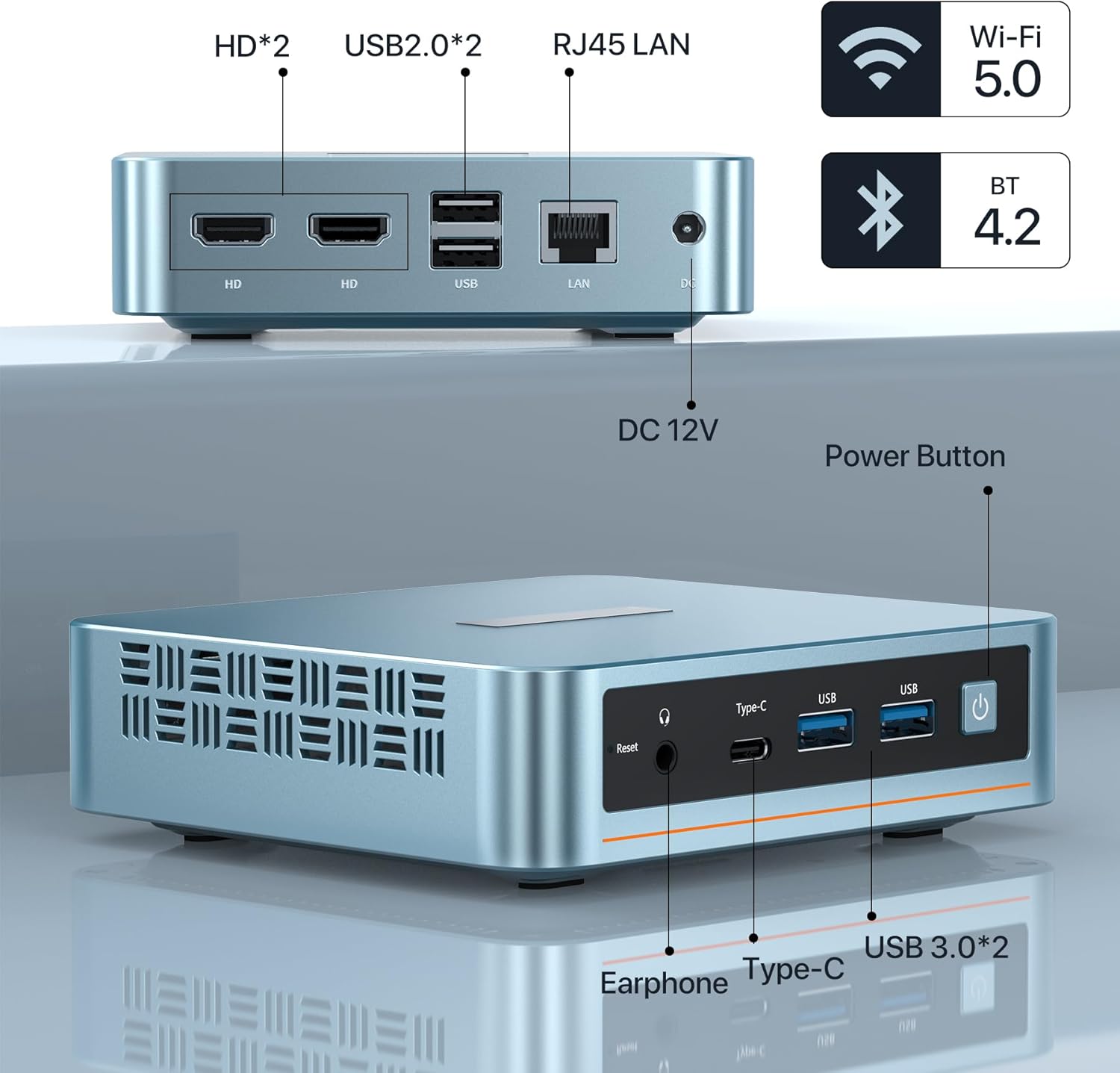
Slika: Prednja i zadnja strana view of the PELADN Mini PC showing all available ports.
- Prednji portovi:
- Audio Jack (HP&MIC): For headphones and microphone.
- Type-C: Multi-functional port for data and video output.
- USB 3.0 (x2): High-speed data transfer ports.
- Power Button: To turn the device on/off.
- Reset Button: For system reset.
- Stražnji portovi:
- HD (x2): For connecting displays via HDMI.
- USB 2.0 (x2): Standard USB ports for peripherals.
- RJ45 1000M LAN: For wired network connection.
- DC Jack: For power input (12V).
3.2 Ključne karakteristike

Slika: Prekoview of the PELADN Mini PC's core specifications.
- procesor: 12th Gen Intel Alder Lake-N95 (4C/4T, up to 3.4GHz, 6W TDP).
- Grafika: Intel UHD Graphics, supporting 4K 60Hz.
- RAM: 16GB DDR4 (3200MHz).
- Skladištenje: 512GB M.2 2280 SSD (supports up to 2TB).
- Povezivanje: WiFi 5, Bluetooth 4.2, RJ45 1000M LAN.
- hlađenje: Efficient fan cooling system for silent operation and performance.
- Operativni sistem: Pre-installed OS, also supports Linux, Ubuntu.
3.3 Unutrašnje komponente

Slika: Eksplodirala view illustrating the internal layout and components of the Mini PC.
The PELADN Mini PC features a well-designed internal structure, including the Alder Lake-N95 processor, a 512GB M.2 2280 SSD, 16GB DDR4 RAM, and an efficient cooling fan to maintain optimal operating temperatures.
4. Podešavanje
4.1 Početno povezivanje
- Priključite napajanje: Plug the power adapter into the DC Jack on the rear of the Mini PC, then plug the adapter into a power outlet.
- Poveži ekran: Use the provided HD cable to connect your monitor to one of the HD ports on the Mini PC. For triple display, use both HD ports and the Type-C port with compatible adapters/cables.
- Povežite periferne uređaje: Plug in your USB keyboard and mouse into the available USB ports.
- Mrežna veza: For a wired connection, plug an Ethernet cable into the RJ45 LAN port. For wireless, ensure Wi-Fi is enabled in the operating system settings after initial boot.
- Uključeno: Pritisnite dugme za napajanje na prednjoj strani Mini PC-a.
4.2 Instalacija VESA nosača
Priloženi VESA nosač vam omogućava da pričvrstite Mini PC na stražnju stranu kompatibilnog monitora ili na zid, štedeći prostor na stolu.

Image: Step-by-step guide for attaching the VESA mount to the Mini PC and a display.
- Attach Bracket to Mini PC: Secure the VESA bracket to the back of the Mini PC using the provided screws.
- Attach to Display/Wall: Fix the bracket to the VESA mounting holes on the back of your display or to a wall using appropriate screws. Ensure it is securely fastened.

Image: Various placement options for the Mini PC, including VESA mount, desktop, and wall mount.
5. Uputstvo za upotrebu
5.1 Uključivanje/isključivanje napajanja
- Za uključivanje: Pritisnite dugme za napajanje na prednjoj strani Mini PC-a. Indikator napajanja će se upaliti.
- Za isključivanje: For safe shutdown, use the operating system's shutdown function. Alternatively, press and hold the power button for 5-7 seconds to force a shutdown (use only when necessary to prevent data loss).
5.2 Povezivanje perifernih uređaja
The Mini PC supports a variety of peripherals via its USB, Type-C, and audio ports. Simply plug in your devices such as external hard drives, USB flash drives, printers, or speakers.
5.3 Triple-Display Setup
The PELADN Mini PC supports up to three 4K displays simultaneously, enhancing your productivity and entertainment experience.

Image: A visual representation of the Mini PC driving three independent displays.
Connect your displays using the two HD ports and the Type-C port. Ensure your cables and monitors support 4K resolution for optimal performance. Once connected, configure display settings within your operating system.
5.4 Scenariji upotrebe
The PELADN Mini PC is versatile and suitable for various applications:

Office Work

Online Education

Kućni bioskop
6. Održavanje
To ensure the longevity and optimal performance of your PELADN Mini PC, follow these maintenance guidelines:
- čišćenje: Regularly clean the exterior of the Mini PC with a soft, dry cloth. Use compressed air to gently clear dust from ventilation openings to prevent overheating. Do not use liquid cleaners directly on the device.
- ventilacija: Osigurajte da se Mini PC nalazi u dobro prozračenom prostoru. Ne blokirajte otvore za ventilaciju. Izbjegavajte postavljanje na mekane površine poput tepiha ili ćebadi koje mogu ometati protok zraka.
- Ažuriranja softvera: Redovno ažurirajte operativni sistem i upravljačke programe na najnovije verzije. To poboljšava sigurnost, performanse i kompatibilnost.
- Sigurno gašenje: Uvijek pravilno isključite Mini PC putem operativnog sistema kako biste spriječili oštećenje podataka.
- temperatura: Operate the Mini PC within recommended temperature ranges. Avoid extreme hot or cold environments.
7. Otkrivanje problema
This section addresses common issues you might encounter with your PELADN Mini PC.
| Problem | Mogući uzrok | Rješenje |
|---|---|---|
| Mini računar se ne uključuje. | Nema napajanja, neispravan adapter za napajanje, labav kontakt. | Check power cable and adapter connection. Ensure power outlet is working. Try a different power outlet. |
| Nema prikaza na monitoru. | Incorrect cable connection, monitor input not selected, faulty cable/monitor. | Ensure HD/Type-C cable is securely connected. Select correct input source on monitor. Test with a different cable or monitor if possible. |
| Spore performanse. | Previše pokrenutih aplikacija, malo prostora na disku, zastarjeli drajveri, pregrijavanje. | Close unnecessary applications. Free up disk space. Update drivers and OS. Ensure proper ventilation. |
| Wi-Fi/Bluetooth ne radi. | Drivers not installed, disabled in OS, hardware issue. | Check device manager for driver status. Ensure Wi-Fi/Bluetooth is enabled in settings. Restart the Mini PC. |
| USB uređaji nisu prepoznati. | Neispravan USB port, problem sa drajverom, nekompatibilnost uređaja. | Pokušajte s drugim USB priključkom. Ažurirajte USB upravljačke programe. Testirajte uređaj na drugom računaru. |
8. Specifikacije
Detailed technical specifications for the PELADN Mini PC WI-6:
| Feature | Specifikacija |
|---|---|
| Procesor | Intel Alder Lake-N95 (4 Cores, 4 Threads, up to 3.4GHz) |
| Grafika | Intel UHD Graphics (4K@60Hz Triple-Display Support) |
| RAM | 16GB DDR4 (3200MHz) |
| Skladištenje | 512GB M.2 2280 SSD (Expandable up to 2TB) |
| Operativni sistem | Pre-installed OS (Supports Windows 11, Linux, Ubuntu) |
| Bežično povezivanje | WiFi 5, Bluetooth 4.2 |
| Žičano povezivanje | 1x RJ45 1000M LAN Port |
| USB portovi | 2x USB 3.0, 2x USB 2.0 |
| Video izlaz | 2x HD 2.0, 1x Type-C |
| Audio port | 1x audio priključak (HP i mikrofon) |
| Power Input | DC 12V |
| Dimenzije (DxŠxV) | 4.88 x 1.38 x 4.41 inča (124 x 35 x 112 mm) |
| Težina | Pribl. 2 funte (0.9 kg) |
| Boja | Plava |
9. Garancija i podrška
Your PELADN Mini PC comes with a 1 godine garancije. For warranty service or technical support, please follow these steps:
- Login to your account on the platform where you purchased the product.
- Navigate to "My Orders".
- Find the order ID for your PELADN Mini PC.
- Click on "Contact Seller" to reach out to PELADN's support team.
PELADN aims to provide professional technical support and typically responds to inquiries within 24 hours. Additionally, the product may be eligible for a 30-day return and exchange policy, depending on the retailer's terms.


