1. Uvod
This manual provides essential information for the safe and efficient operation of your TELLUR Obia PRO 60W Bluetooth Speaker. Please read this manual thoroughly before using the product and retain it for future reference.
2. Sigurnosne informacije
- Ne izlažite zvučnik ekstremnim temperaturama ili direktnoj sunčevoj svjetlosti duži vremenski period.
- Izbjegavajte ispuštanje ili izlaganje zvučnika jakim udarcima.
- Ne pokušavajte rastavljati ili modificirati zvučnik. To će poništiti garanciju.
- Držite zvučnik dalje od medicinskih uređaja.
- Ensure the charging port cover is securely closed when near water to maintain IPX6 water resistance.
- Koristite samo navedeni kabel za punjenje i adapter za napajanje.
3. Sadržaj paketa
Provjerite da li su sve stavke prisutne u paketu:
- TELLUR Obia PRO 60W Bluetooth Speaker
- USB kabl za punjenje
- 3.5 mm AUX audio kabel
- Korisnički priručnik (ovaj dokument)
4. Proizvod je gotovview i kontrole
Upoznajte se s komponentama zvučnika i kontrolnim tipkama.

Slika 4.1: Front view of the TELLUR Obia PRO speaker, showcasing the main grille, control panel, and integrated LED lights on the handle and side woofers.
4.1 Kontrolna tabla

Slika 4.2: Detaljno view of the control buttons located on the top panel of the speaker.
- Smanjivanje jačine zvuka (-) / Prethodna pjesma: Kratko pritisnite za smanjenje jačine zvuka. Pritisnite i držite za prelazak na prethodnu pjesmu.
- Pojačavanje zvuka (+) / Sljedeća pjesma: Press briefly to increase volume. Press and hold to go to the next track.
- LED Light Mode Button: Press to cycle through different LED light modes.
- Dugme za napajanje: Press and hold to power on/off. Briefly press to play/pause music.
- TWS (True Wireless Stereo) Button: Press to activate TWS pairing mode.
- Dugme za način rada (M): Press to switch between Bluetooth, USB, and AUX input modes.
4.2 Ulazno/izlazni portovi
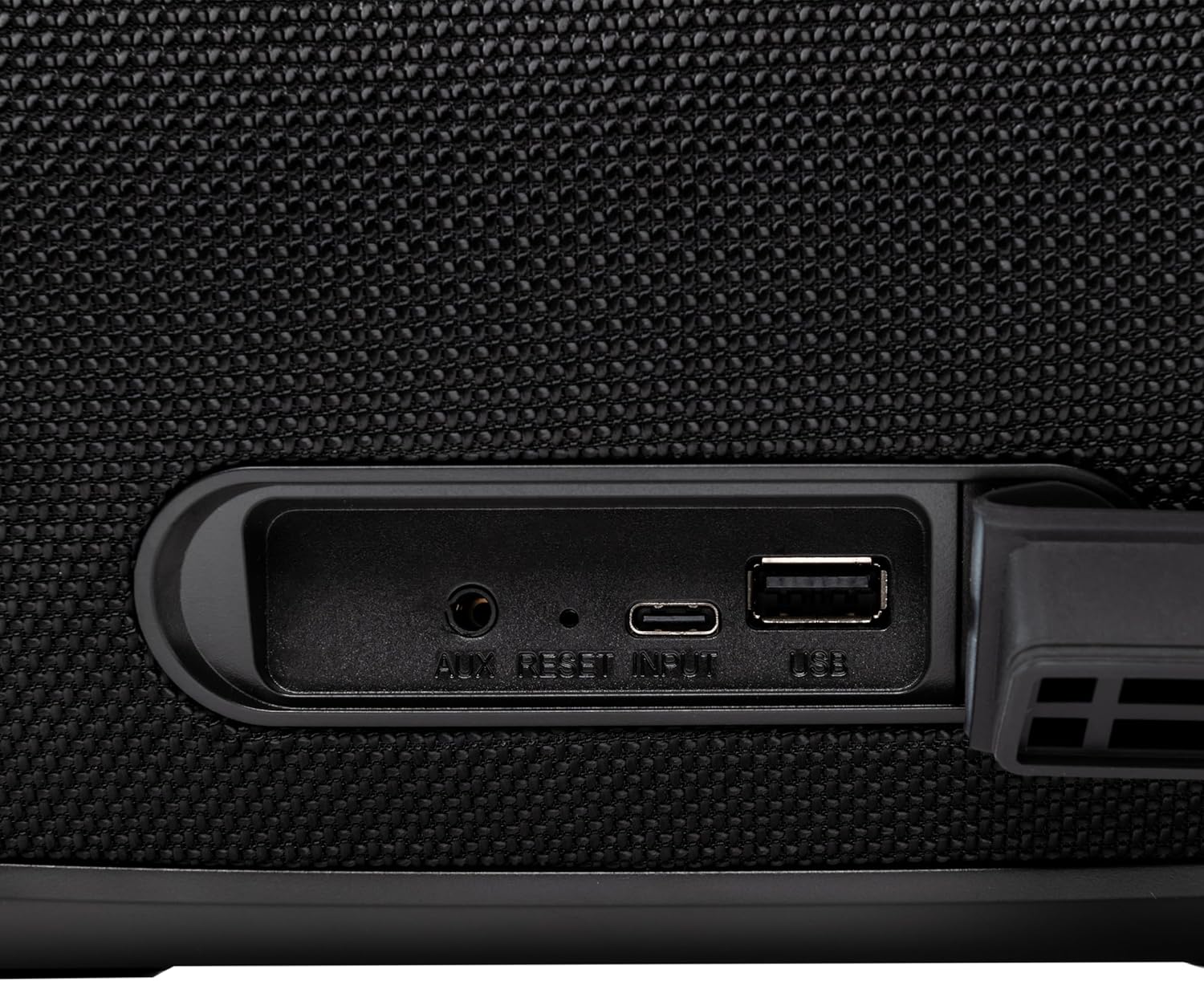
Slika 4.3: Close-up of the protected input/output ports on the rear of the speaker.
- AUX-IN priključak: Za povezivanje eksternih audio uređaja putem 3.5 mm audio kabla.
- Dugme za resetiranje: Use a thin object to press and reset the speaker if necessary.
- USB-C ulaz: Za punjenje zvučnika.
- USB-A port: Za reprodukciju MP3 audio zapisa files from a USB drive or for power bank functionality.
5. Podešavanje
5.1 Punjenje zvučnika
Before initial use, fully charge the speaker. The speaker also functions as a power bank to charge other devices via its USB-A port.
- Connect the USB charging cable to the USB-C input port on the speaker.
- Drugi kraj kabla priključite na kompatibilni USB adapter za napajanje (nije uključen).
- The charging indicator light will illuminate. It will turn off once charging is complete.
- The battery level can be displayed on your connected phone when paired via Bluetooth.
5.2 Uključivanje/isključivanje
- Za uključivanje: Pritisnite i držite Dugme za napajanje for approximately 3 seconds until you hear an audible prompt and the LED lights activate.
- Za isključivanje: Pritisnite i držite Dugme za napajanje for approximately 3 seconds until you hear an audible prompt and the LED lights turn off.
6. Uputstvo za upotrebu
6.1 Bluetooth uparivanje
The speaker uses Bluetooth v5.3 for stable wireless connection up to 10 meters.
- Ensure the speaker is powered on and in Bluetooth mode (indicated by a flashing blue LED). If not, press the Dugme za način rada (M) za prebacivanje u Bluetooth način rada.
- Omogućite Bluetooth na svom mobilnom uređaju (pametnom telefonu, tabletu itd.).
- Traži dostupnih Bluetooth uređaja i odaberite "TELLUR Obia PRO" sa liste.
- Once paired, the speaker will emit an audible confirmation, and the blue LED will stop flashing.
- Zvučnik će se automatski ponovo povezati sa posljednjim uparenim uređajem kada se uključi, ako je dostupan.

Slika 6.1: The TELLUR Obia PRO speaker wirelessly connected to a smartphone, ready for audio playback.
6.2 Funkcija pravog bežičnog stereo sistema (TWS)
TWS allows you to pair two Obia PRO speakers for a stereo sound experience.
- Ensure both Obia PRO speakers are powered on and in Bluetooth mode, but not yet paired with any device.
- Na jednom zvučniku (ovo će biti primarni zvučnik) pritisnite TWS dugme. The speaker will enter TWS pairing mode, indicated by a flashing light.
- The two speakers will automatically connect to each other. Once connected, you will hear an audible confirmation, and the TWS indicator light on both speakers will become solid.
- Now, connect your mobile device to the primary speaker via Bluetooth as described in Section 6.1. The audio will play in stereo across both speakers.
6.3 Multiple Link Technology
This technology allows connecting an unlimited number of Obia PRO speakers wirelessly for a synchronized audio experience. Refer to the manufacturer's website or specific instructions for detailed setup of Multiple Link.
6.4 USB Playback (MP3)
Pustite MP3 audio filedirektno sa USB fleš diska (do 128 GB).
- Umetnite USB fleš disk koji sadrži MP3 fileu USB-A priključak.
- Pritisnite Dugme za način rada (M) to switch to USB mode. The speaker will automatically begin playing music from the USB drive.
- Koristite Pojačavanje/stišavanje zvuka i Dugme za napajanje (for play/pause) to control playback.
6.5 AUX-IN priključak
Connect non-Bluetooth devices using the 3.5mm AUX audio cable.
- Connect one end of the 3.5mm AUX audio cable to the AUX-IN port on the speaker.
- Drugi kraj priključite na audio izlaz vašeg eksternog uređaja (npr. MP3 plejera, laptopa).
- Pritisnite Dugme za način rada (M) za prebacivanje na AUX mod.
- Kontrolirajte reprodukciju i jačinu zvuka sa svog eksternog uređaja.
6.6 Pozivanje bez upotrebe ruku
When connected to a smartphone via Bluetooth, the speaker's built-in microphone allows for hands-free calls.
- Odgovori/Završi poziv: Kratko pritisnite Dugme za napajanje.
- odbiti poziv: Pritisnite i držite Dugme za napajanje na 2 sekunde.
6.7 LED svjetlosnih modova
The speaker features integrated LED lights with multiple display modes.
- Pritisnite Dugme za LED svjetlo to cycle through available light patterns and colors.
- Pritisnite i držite Dugme za LED svjetlo da ugasite ili upalite svjetla.

Slika 6.2: A user interacting with the LED light mode button to change the speaker's lighting effects.
6.8 Equalizer Settings (Indoor/Outdoor)
The speaker allows for equalizer customization for different environments. Specific controls for this are not detailed in the provided data, but typically involve a dedicated button or a combination of existing buttons. Refer to the product's quick start guide or manufacturer's website for precise instructions on adjusting the equalizer.
7. Održavanje
7.1 Čišćenje
- Obrišite zvučnik mekom, suhom krpom.
- Ne koristite abrazivna sredstva za čišćenje, alkohol ili hemijske rastvarače.
7.2 Otpornost na vodu (IPX6)
The Obia PRO speaker is rated IPX6, meaning it is protected against high-pressure water jets from any direction. This makes it suitable for outdoor use and environments where it might be exposed to splashes or rain.
- Ensure the rubber cover for the charging and AUX ports is securely closed before exposing the speaker to water.
- Ne uranjajte zvučnik u vodu.
- After exposure to water, wipe the speaker dry before charging.
7.3 Njega baterija
- Da biste produžili vijek trajanja baterije, izbjegavajte često potpuno pražnjenje baterije.
- Redovno punite zvučnik, čak i ako ga ne koristite, kako biste održali bateriju u ispravnom stanju.
- Čuvajte zvučnik na hladnom i suhom mjestu kada ga ne koristite duži period.
8. Otkrivanje problema
| Problem | Mogući uzrok | Rješenje |
|---|---|---|
| Zvučnik se ne uključuje. | Niska baterija. | Potpuno napunite zvučnik. |
| Nije moguće uparivanje putem Bluetootha. | Zvučnik nije u načinu uparivanja; Bluetooth uređaj isključen; previše udaljen od zvučnika. | Ensure speaker is in Bluetooth mode (flashing LED). Turn on Bluetooth on your device. Move device closer to speaker (within 10m). |
| Nema zvuka. | Jačina zvuka je preniska; odabran je pogrešan način rada; uređaj ne reproducira zvuk. | Increase speaker and device volume. Press Dugme za način rada (M) to select correct input. Ensure audio is playing on the connected device. |
| Uparivanje TWS-a nije uspjelo. | Speakers already paired to a device; not both Obia PRO models. | Disconnect both speakers from any Bluetooth devices. Ensure both speakers are Obia PRO models. Try TWS pairing again. |
| Reprodukcija sa USB-a ne radi. | USB drive not formatted correctly; unsupported file type; drive capacity too large. | Ensure USB drive is formatted to FAT32. Only MP3 files are supported. Max capacity 128GB. |
9. Specifikacije
| Naziv modela | Obia PRO |
| Brand | TELLUR |
| Izlazna snaga | 60W (2x 20W RMS subwoofers, 2x 10W RMS tweeters) |
| Bluetooth verzija | v5.3 |
| bežični domet | Do 10 metara |
| Frekvencijski odziv | 80 MHz (Note: This value is unusual for speaker frequency response and may be a typo in source data. Typically measured in Hz-kHz.) |
| Impedansa | 4 oma |
| Audio modovi | Bluetooth, USB (MP3), AUX-IN |
| USB podrška | USB 2.0/3.0, up to 128GB (MP3 format) |
| Otpornost na vodu | IPX6 |
| Kapacitet baterije | 5400 mAh |
| Vrijeme reprodukcije | Do 12 sati (pri umjerenoj jačini zvuka) |
| Power Bank funkcija | Yes, via USB-A port |
| Dimenzije (D x Š x V) | 37.7 x 17 x 18 cm |
| Težina | 3.48 kg |
| Materijal | Plastika |
| Boja | Crna |
Napomena: Specifikacije su podložne promjenama bez prethodne najave.
10. Garancija i podrška
TELLUR products are manufactured to the highest quality standards. For information regarding warranty terms, technical support, or service, please refer to the warranty card included with your product or visit the official TELLUR website.
Kontakt informacije: Molimo posjetite www.tellur.com za najnovije informacije o podršci.


