1. Uvod
This manual provides detailed instructions for the safe and efficient operation of your Xprinter XP-P323B Portable Thermal Printer. Please read this manual thoroughly before using the device to ensure proper functionality and to prevent damage. The XP-P323B is designed for printing receipts and labels, offering portability and high-speed capabilities for various business needs.
2. Sigurnosne informacije
- Do not expose the printer to water or excessive moisture.
- Izbjegavajte ispuštanje štampača ili njegovo izlaganje jakim udarcima.
- Use only the specified power adapter and accessories.
- Keep the printer away from heat sources and direct sunlight.
- Ne pokušavajte sami rastavljati ili popravljati štampač. Obratite se kvalifikovanom servisnom osoblju.
- Osigurajte odgovarajuću ventilaciju tokom rada.
3. Sadržaj paketa
Provjerite da li su sve stavke prisutne u paketu:
- Xprinter XP-P323B Portable Thermal Printer
- Power Adapter (not explicitly listed but standard)
- USB Cable (not explicitly listed but standard)
- Sample Thermal Paper Roll (not explicitly listed but standard)
- Korisnički priručnik (ovaj dokument)
4. Proizvod je gotovview
The Xprinter XP-P323B is a compact and efficient thermal printer designed for various printing tasks. It supports NV logo download and picture printing (BMP format), along with concentration adjustment for print quality.
4.1. Printer Components

Slika 1: Front view of the Xprinter XP-P323B Portable Thermal Printer, showing the power button, display, and a sample label being printed.
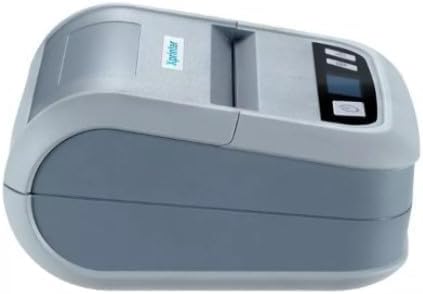
Slika 2: Side view of the Xprinter XP-P323B, highlighting its compact design and the Xprinter logo.
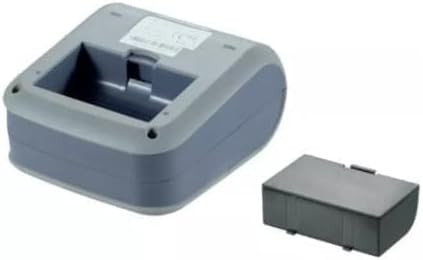
Slika 3: Donja strana view of the Xprinter XP-P323B, showing the base and the removable battery compartment.
5. Podešavanje
5.1. Punjenje baterije
- Connect the power adapter to the printer's charging port.
- Uključite adapter za napajanje u zidnu utičnicu.
- The charging indicator light will illuminate. Allow the printer to charge fully before first use.
5.2. Loading Thermal Paper/Labels
- Open the paper compartment cover by gently pushing the release latch.
- Insert the thermal paper roll with the printing surface facing the print head. Ensure the roll is seated correctly.
- Pull a small amount of paper out past the print head.
- Čvrsto zatvorite poklopac pretinca za papir dok ne klikne na svoje mjesto.
5.3. Povezivanje s uređajem
The XP-P323B supports USB and Bluetooth connectivity.
5.3.1. USB veza
- Povežite štampač sa računarom pomoću priloženog USB kabla.
- Install the necessary printer drivers (available from the Xprinter website or included software).
5.3.2. Bluetooth Connection (for Smartphones/iOS)
- Proverite da li je štampač uključen.
- On your smartphone or iOS device, go to Bluetooth settings and enable Bluetooth.
- Traži available devices and select 'XP-P323B' (or similar name).
- Enter the pairing PIN if prompted (refer to printer documentation for default PIN, often '0000' or '1234').
- Once paired, you can use a compatible printing application to send print jobs.
6. Upravljanje štampačem
6.1. Osnovno štampanje
- Ensure the printer is connected to your device and has paper loaded.
- Open the document or image you wish to print on your connected device.
- Select the print option within your application.
- Choose 'XP-P323B' as the printer.
- Adjust print settings as needed (e.g., paper size, print quality).
- Pokrenite zadatak štampanja.
6.2. NV Logo and Picture Printing
The printer supports downloading and printing NV (Non-Volatile) logos and BMP format pictures. This functionality typically requires specific software or commands. Refer to the advanced programming guide or software documentation for detailed instructions on how to upload and print custom logos or images.
6.3. Adjusting Print Concentration
Print concentration can be adjusted to optimize print quality. This setting is usually accessible through the printer driver software on a computer or within the settings of a compatible mobile printing application. Consult your software's help section for specific steps.
7. Održavanje
7.1. Čišćenje štampača
- Eksterijer: Obrišite vanjski dio štampača mekom,amp tkanina. Nemojte koristiti jake hemikalije ili abrazivna sredstva za čišćenje.
- Glava za štampanje: The thermal print head should be cleaned periodically to ensure optimal print quality. Use a cotton swab lightly dampnatopljen izopropilnim alkoholom. Pažljivo obrišite površinu glave za štampanje. Ostavite da se potpuno osuši prije zatvaranja poklopca i nastavka rada.
- Putanja papira: Uklonite prašinu ili ostatke papira sa putanje papira pomoću meke četke ili komprimiranog zraka.
7.2. Skladištenje
When not in use for extended periods, store the printer in a cool, dry place, away from direct sunlight and extreme temperatures. Remove the paper roll if storing for a very long time to prevent dust accumulation.
8. Otkrivanje problema
| Problem | Mogući uzrok | Rješenje |
|---|---|---|
| Štampač se ne uključuje | Low battery; Power adapter not connected; Faulty power adapter | Charge the battery; Ensure power adapter is securely connected; Try a different power outlet or adapter |
| Nema izlaza za ispis | No paper; Paper loaded incorrectly; Printer not connected; Driver issue | Load paper correctly; Re-establish connection; Reinstall printer drivers |
| Loš kvalitet štampe | Dirty print head; Low print concentration; Low battery | Clean the print head; Adjust print concentration in software; Charge the battery |
| Bluetooth veza nije uspjela | Bluetooth off on device; Incorrect pairing PIN; Printer out of range | Enable Bluetooth; Re-enter correct PIN; Move device closer to printer |
9. Specifikacije
| Brand | Xprinter |
| Broj modela | XP-P323B |
| Dimenzije artikla (D x Š x V) | 15D x 7W x 10H centimetara |
| Tehnologija povezivanja | USB |
| Tehnologija štampača | Thermal |
| Posebne karakteristike | Prijenosni |
| Boja | Grey |
| Kompatibilni uređaji | Smartphones |
| Tip kontrolera | iOS |
| Maksimalna veličina medija | 4 x 6 inča |
| Print Media | Etikete |
| Veličina papira | 4 x 6 inča |
| Izlaz štampača | Monochrome |
| Maximum Print Speed (Black and White) | 40 mm/s (estimated from context) |
| Težina artikla | 300 grama |
10. Garancija i podrška
For warranty information and technical support, please refer to the warranty card included with your product or visit the official Xprinter webSačuvajte račun kao dokaz o kupovini za reklamacije u slučaju reklamacije.


