Uvod
Thank you for choosing the RAINPOINT 2-Outlet Water Timer. This digital sprinkler timer is designed to simplify your watering routine, offering precise control over your garden and lawn irrigation. With its dual-zone programming, rain delay, and manual watering options, you can ensure efficient and effective watering while conserving water.
This manual provides detailed instructions for installation, operation, maintenance, and troubleshooting to help you get the most out of your new water timer.
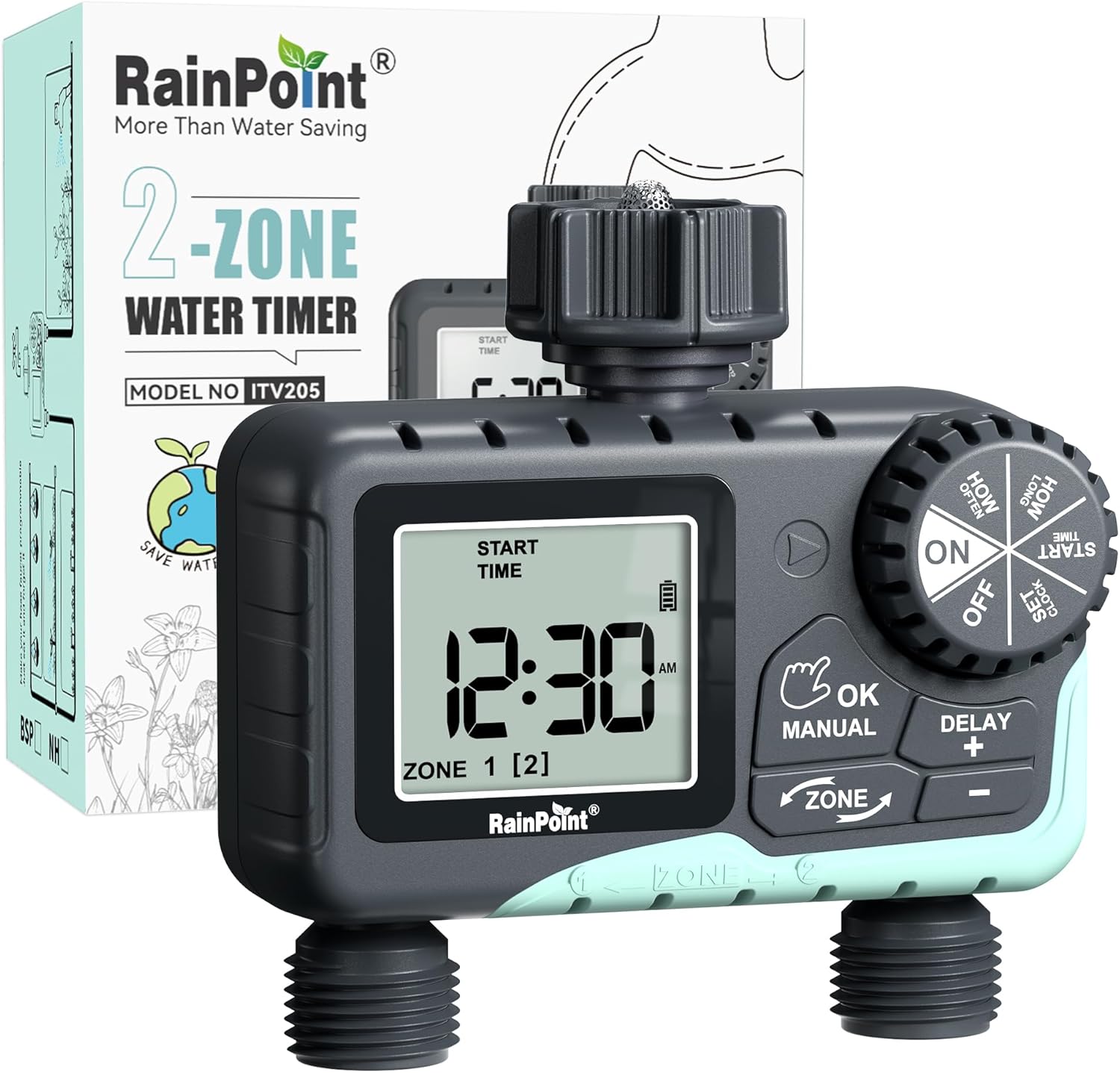
Image: The RAINPOINT 2-Outlet Water Timer, showing the device and its retail packaging. This timer features a digital display and intuitive controls for managing two separate watering zones.
Ključne karakteristike
- Dvozonska kontrola: Independently program two separate watering zones for customized irrigation.
- Fleksibilno programiranje: Set start times, watering duration (1 minute to 3 hours 59 minutes), and frequency (hourly to weekly).
- Ručni način zalijevanja: Instantly water for a specified duration (1 minute to 8 hours) for Zone 1, Zone 2, or both.
- Funkcija odlaganja kiše: Skip watering for 24, 48, or 72 hours to conserve water during rainy periods.
- Veliki LCD ekran: Easy-to-read 2.5-inch screen shows watering time, next irrigation plans, and power status.
- Low Power Auto Shutoff: Alerts when battery is below 5% and automatically closes the valve to prevent water wastage.
- Izdržljiva konstrukcija: Made from IP54 high-impact plastic with a built-in metal filter and 2-generation valve diaphragm for longevity.
- Rotirajući interfejs od 360°: Designed for easy installation and access.

Image: Illustration demonstrating the independent programming capabilities of Zone 1 and Zone 2, allowing for different start times and durations for each watering area.
Sadržaj paketa
Molimo Vas da provjerite sadržaj paketa kako biste bili sigurni da su svi artikli prisutni:
- 1 x RAINPOINT 2-Outlet Water Timer (Model: G-ITV205NH)
- 1 x Uputstvo za upotrebu
- (Batteries not included - requires 2 x AA batteries)
Vodič za postavljanje
1. Instalacija baterije
- Pronađite odjeljak za baterije na stražnjoj strani tajmera.
- Pomaknite poklopac baterije prema dolje da biste ga otvorili.
- Umetnite dvije (2) nove AA alkalne baterije, pazeći na ispravan polaritet (+/-).
- Close the battery cover securely. The added seal ring helps prevent water leaks.
Važno: Replace batteries when the low battery indicator appears on the LCD screen. The valve will automatically close to prevent water wastage when power is critically low.

Image: The water timer display showing a low battery warning, indicating the need for battery replacement to ensure continuous operation.
2. Povezivanje sa slavinom
- Provjerite je li vanjska slavina zatvorena.
- Screw the timer's top connector (with the 3/4" internal thread and built-in filter) onto your standard outdoor faucet. Hand-tighten only. Do not overtighten.
- The 360° rotatable interface allows for easy positioning of the timer.
3. Spajanje crijeva
- Attach your garden hoses to the two NH3/4" outlet fittings at the bottom of the timer.
- Ensure a tight connection to prevent leaks.

Image: The RAINPOINT 2-Outlet Water Timer installed on an outdoor faucet, with two hoses connected to its independent outlets, demonstrating its dual-zone capability.

Image: A detailed diagram labeling the various parts of the RAINPOINT water timer, including the 3/4" internal thread, 2.5" LCD screen, control dial, buttons, and outlet fittings.
Uputstvo za upotrebu
The RAINPOINT water timer features a large dial for mode selection and several buttons for setting parameters. The dial has positions for ON, OFF, HOW OFTEN, HOW LONG, START TIME, and SET CLOCK.
1. Podešavanje sata
- Okrenite točkić na SET CLOCK.
- Koristite + i - dugmad za podešavanje trenutnog vremena.
- Pritisnite OK/MANUAL to confirm and move to the next setting (e.g., AM/PM).
- Once the time is set, turn the dial to ON da sačuvate i izađete.
2. Programming Watering Schedules (Automatic Mode)
You can program independent schedules for Zone 1 and Zone 2. Use the ZONE button to switch between zones.
a. Set Start Time
- Okrenite točkić na VRIJEME POČETKA.
- Pritisnite ZONE button to select either Zone 1 or Zone 2.
- Koristi + i - to set the desired start time for the selected zone.
- Pritisnite OK/MANUAL za potvrdu.
b. Set How Long (Watering Duration)
- Okrenite točkić na KOLIKO DUGO.
- Pritisnite ZONE button to select either Zone 1 or Zone 2.
- Koristi + i - to set the watering duration (from 1 minute to 3 hours 59 minutes).
- Pritisnite OK/MANUAL za potvrdu.
c. Set How Often (Watering Frequency)
- Okrenite točkić na KOLIKO ČESTO.
- Pritisnite ZONE button to select either Zone 1 or Zone 2.
- Koristi + i - to set the watering frequency (e.g., every 12 hours, every 2 days, etc.).
- Pritisnite OK/MANUAL za potvrdu.
Note: After setting all parameters, turn the dial to ON to activate the programmed schedule.

Image: The water timer display showing options for setting watering duration (1 min - 3h 59m) and frequency (1 hour - 7 days), illustrating the flexibility of automatic scheduling.
3. Ručni način zalijevanja
This mode allows for immediate, temporary watering without affecting your programmed schedule.
- Ensure the dial is in the ON pozicija.
- Pritisnite OK/MANUAL button. The display will show "MANUAL".
- Pritisnite ZONE button to cycle through watering options: Zone 1, Zone 2, or BOTH ZONE.
- Koristi + i - to set the desired manual watering duration (from 1 minute to 8 hours).
- Pritisnite OK/MANUAL again to start watering. The timer will count down the duration.
- To stop manual watering early, press OK/MANUAL again or turn the dial to OFF a zatim nazad na ON.
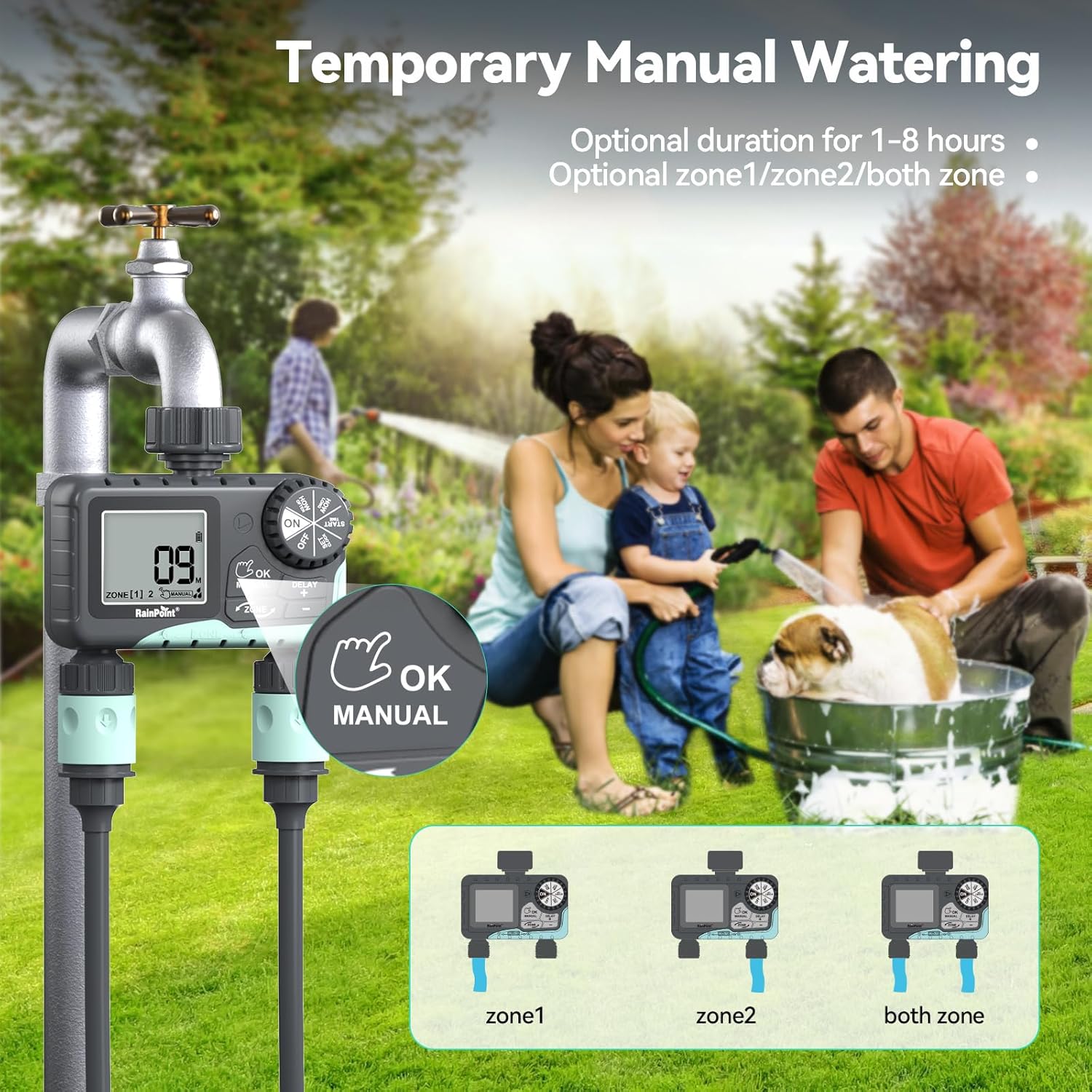
Image: The water timer display showing the manual watering mode, with options to select Zone 1, Zone 2, or both zones for immediate watering, and setting the duration.
4. Funkcija odlaganja kiše
The rain delay function allows you to pause your watering schedule for a set period, preventing overwatering during rainfall.
- Ensure the dial is in the ON pozicija.
- Pritisnite i držite DELAY + button for approximately 3 seconds until "DELAY" appears on the screen.
- Koristite + i - buttons to select the delay duration: 24 hours, 48 hours, or 72 hours.
- Pritisnite OK/MANUAL to confirm the rain delay. The timer will resume its schedule automatically after the delay period.
- To cancel the rain delay, press and hold the DELAY + dugme ponovo na 3 sekundi.
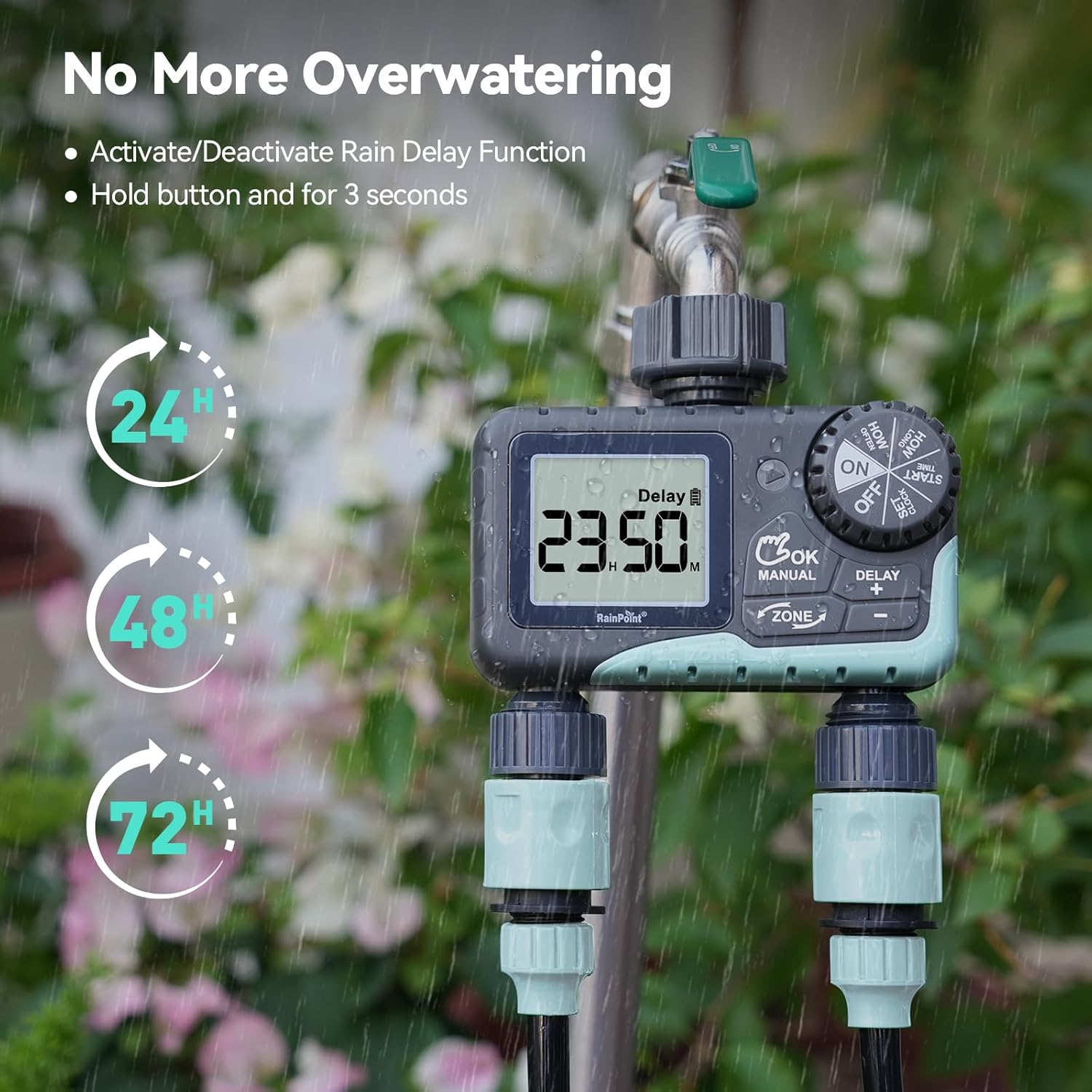
Image: The water timer display showing the rain delay function activated, with options for 24, 48, or 72-hour delays to prevent overwatering during rainy conditions.
5. Isključivanje tajmera
Da biste zaustavili svo zalijevanje i programiranje, okrenite birač na OFF. All active programs will be paused.
Održavanje
1. Čišćenje filtera
The timer has a built-in metal filter to prevent debris from entering the unit. Periodically check and clean this filter to ensure optimal water flow and prevent blockages.
- Unscrew the timer from the faucet.
- Remove the filter screen from the top connector.
- Isperite filter pod mlazom vode kako biste uklonili nakupljene ostatke.
- Vratite čisti filter i ponovo pričvrstite tajmer na slavinu.
2. Zamjena baterije
Zamijenite baterije kada se na LCD ekranu pojavi indikator slabe baterije. Uvijek koristite nove AA alkalne baterije.
- Okrenite točkić na OFF.
- Otvorite odeljak za baterije.
- Remove old batteries and insert new ones, observing polarity.
- Čvrsto zatvorite odeljak za baterije.
- The timer will retain your programming for a short period during battery replacement.
3. Priprema za zimu
To prevent damage from freezing temperatures, remove the water timer from the faucet before the first frost.
- Disconnect the timer from the faucet and hoses.
- Uklonite baterije.
- Store the timer indoors in a dry, frost-free location.
Rješavanje problema
| Problem | Mogući uzrok | Rješenje |
|---|---|---|
| Timer not turning on/display blank. | Prazne ili nepravilno instalirane baterije. | Zamijenite baterije novim AA alkalnim baterijama, pazeći na ispravan polaritet. |
| Nema protoka vode. | Faucet is off; timer is in OFF mode; low battery; clogged filter; incorrect programming. | Turn on faucet; turn dial to ON; replace batteries; clean filter; check programming (start time, duration, frequency). |
| Curenje vode iz priključaka. | Labavi spojevi; istrošene podloške. | Ensure all connections are hand-tight; check and replace rubber washers if damaged. |
| Timer not watering at scheduled time. | Incorrect clock setting; incorrect program settings; rain delay active. | Verify current time; re-check start time, duration, and frequency for each zone; check if rain delay is active. |
| Display shows "LOW BATT". | Baterije su slabe. | Replace batteries immediately to prevent valve closure and program loss. |
Specifikacije
| Broj modela | G-ITV205NH |
| Dimenzije proizvoda | 5.36"D x 5.92"Š x 5.55"H |
| Materijal | High-impact Plastic, Metal |
| Boja | Crno i plavo |
| Izvor napajanja | 2 x AA alkalne baterije (nisu uključene) |
| Raspon pritiska vode | Up to 35 kg (approx. 500 PSI) |
| Flow Rate | 5-35 L/min |
| Trajanje navodnjavanja | 1 minuta do 3 sati i 59 minuta |
| Učestalost zalijevanja | Hourly (up to 12 hours) or Daily (up to 7 days) |
| Trajanje ručnog navodnjavanja | 1 minuta do 8 sati |
| Rain Delay Options | 24, 48, 72 sati |
| Waterproof Rating | IP54 |
Garancija i podrška
RAINPOINT products are designed for durability and performance. For warranty information and customer support, please refer to the official RAINPOINT webweb-mjesto ili direktno kontaktirajte njihovu korisničku službu.
Za dalju pomoć posjetite: www.rainpointonline.com
Or contact customer support via email: support@rainpointonline.com


