Uvod
This manual provides detailed instructions for the setup, operation, and maintenance of your Rapoo M300G Silent Wireless Mouse. Please read this guide thoroughly to ensure proper use and to maximize the performance of your device. The Rapoo M300G offers versatile connectivity options, silent clicking, and adjustable DPI settings for an optimized user experience.
Sadržaj paketa
Provjerite da li su sve stavke prisutne u paketu:
- Rapoo M300G Wireless Mouse x 1
- AA baterija x 1
- USB Receiver x 1 (typically stored inside the mouse)
- Priručnik za proizvode x 1
Product Overview
Familiarize yourself with the components of your Rapoo M300G mouse:

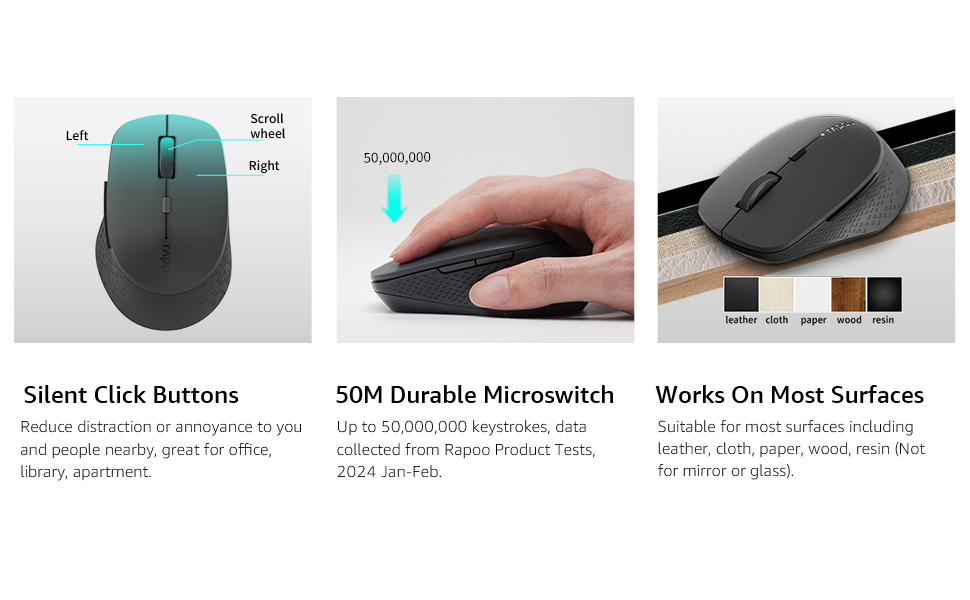
- Lijevo dugme: Standardna funkcija klika.
- Desno dugme: Standardna funkcija desnog klika.
- Točak za pomicanje: For scrolling through documents and web stranice. Može se pritisnuti i za funkcionalnost klika srednjim tasterom miša.
- Dugme za promjenu DPI-ja: Podešava osjetljivost miša (DPI).
- Dugme naprijed: Navigira naprijed u web pretraživači ili file istraživači.
- Dugme za nazad: Navigacija unazad web pretraživači ili file istraživači.
- Multi-function Button Switch (Underside): Used to switch between 2.4GHz and Bluetooth modes, and for Bluetooth pairing.
Setup
1. Instalacija baterije
The Rapoo M300G mouse requires one AA battery (included).
- Pronađite poklopac pretinca za bateriju na donjoj strani miša.
- Otvorite poklopac.
- Umetnite AA bateriju, pazeći da pozitivni (+) i negativni (-) terminali budu pravilno poravnati s oznakama unutar odjeljka.
- Čvrsto zatvorite poklopac odeljka za baterije.

2. Bežična veza od 2.4 GHz
To connect via the 2.4GHz USB receiver:
- Remove the USB receiver from its storage slot inside the mouse's battery compartment.
- Uključite USB prijemnik u slobodan USB port na vašem računaru.
- Uključite miš pomoću prekidača za napajanje na donjoj strani.
- Set the multi-function button switch on the underside of the mouse to the 2.4G mode (indicated by a small icon).
- Vaš računar bi trebao automatski prepoznati i instalirati potrebne upravljačke programe. Miš je spreman za upotrebu.
3. Bluetooth veza
The Rapoo M300G supports Bluetooth 5.0 and 4.0. To connect via Bluetooth:
- Uključite miš pomoću prekidača za napajanje na donjoj strani.
- Set the multi-function button switch on the underside of the mouse to the Bluetooth mode (indicated by a Bluetooth icon).
- Press and hold the multi-function button switch for 3-5 seconds until the indicator light on the mouse starts blinking, indicating it is in pairing mode.
- Na računaru ili uređaju otvorite postavke Bluetootha i potražite nove uređaje.
- Select "Rapoo M300G" from the list of available devices to pair.
- Once paired, the indicator light on the mouse will stop blinking and remain solid for a few seconds, then turn off. The mouse is now connected.

Operacija
1. DPI podešavanje
The Rapoo M300G features 5 adjustable DPI levels: 800, 1000, 1200, 1600, and 2400. To change the DPI:
- Pritisnite DPI prekidač located behind the scroll wheel.
- Each press cycles through the available DPI settings. The mouse cursor speed will change accordingly.

2. Prebacivanje više uređaja
The M300G supports connection to two devices simultaneously (one via 2.4GHz, one via Bluetooth). To switch between connected devices:
- Kratko pritisnite Multi-function Button Switch on the underside of the mouse.
- The mouse will switch between the 2.4GHz connection and the Bluetooth connection.

3. Kompatibilnost s površinama
The advanced optical tracking technology allows the Rapoo M300G to operate effectively on various surfaces without a mouse pad, including leather, cloth, paper, wood, and resin. Performance may vary on glass or mirrored surfaces.

Održavanje
- čišćenje: Za čišćenje miša koristite meku, suhu krpu. Izbjegavajte upotrebu jakih hemikalija ili abrazivnih materijala.
- Zamjena baterije: Replace the AA battery when the mouse performance degrades or the indicator light signals low power.
- Skladištenje: When not in use for extended periods, turn off the mouse to conserve battery life. Store the USB receiver in its dedicated slot to prevent loss.

Rješavanje problema
| Problem | Mogući uzrok | Rješenje |
|---|---|---|
| Miš ne reaguje | Low battery; Mouse turned off; Incorrect connection mode; USB receiver not connected (2.4GHz); Bluetooth not paired (Bluetooth). | Replace battery; Turn on mouse; Switch to correct mode (2.4G or BT); Plug in USB receiver; Re-pair Bluetooth. |
| Kretanje kursora je nestalno | Prljav optički senzor; Neodgovarajuća površina; Slaba baterija. | Clean optical sensor; Use on a suitable surface or mouse pad; Replace battery. |
| Nije moguće prebacivanje između uređaja | Incorrect button press; Device not properly paired. | Ensure a brief press of the multi-function button; Verify both devices are correctly paired/connected. |
| Side buttons not working (Mac OS) | Limited Mac OS compatibility for side buttons. | This is a known limitation. Side buttons may not function on Mac OS. |
Specifikacije
- Model: M300G
- Povezivanje: Bluetooth 5.0, Bluetooth 4.0, 2.4GHz Wireless
- DPI postavke: 800, 1000, 1200, 1600, 2400 (podesivo)
- Dugmad: 6 (Lijevo, Desno, Točkić za pomicanje, DPI prekidač, Naprijed, Nazad)
- Snaga: 1 x AA baterija
- Trajanje baterije: Do 12 mjeseci (pod normalnim uslovima)
- Dimenzije: 4.09 x 2.57 x 0.04 inča (103.91 x 65.43 x 37.29 mm)
- Težina: 2.46 ounces (70g approx.)
- Kompatibilnost: Windows, Mac OS, Linux, iOS, Android, Chrome OS
Garancija i podrška
Your Rapoo M300G Silent Wireless Mouse comes with a Jedna godina garancije od datuma kupovine. Osim toga, 30-day return and refund or replacement policy is offered. For technical support or warranty claims, please refer to the contact information provided on the Rapoo official webweb-mjesto ili kanale podrške vašeg prodavača.


