1. Proizvod je gotovview
This manual provides essential information for the operation and maintenance of your GHUST MR23GA Replacement Magic Voice Remote Control. This remote is designed as a replacement for various LG Smart TV models, offering convenient control without complex setup.

Image 1.1: The GHUST MR23GA Replacement Magic Voice Remote Control.
Ključne karakteristike:
- Direktna zamjena: Functions as a direct replacement for original LG Magic Remote models.
- Nije potrebno programiranje: Ready to use out of the box after battery insertion.
- Izdržljiva konstrukcija: Made of high-quality ABS material for enhanced durability.
- Kompaktan dizajn: Small and ergonomic for comfortable grip.
- Voice Search Capability: Supports voice commands for easier navigation (functionality may vary based on TV model and original remote features).
- Namjenske tipke prečica: Quick access to popular streaming services like Netflix and Prime Video.
2. Postavljanje i instalacija
The MR23GA remote control is designed for immediate use with compatible LG Smart TVs. No complex programming or pairing procedures are required.
2.1. Instalacija baterije
- Pronađite poklopac odeljka za baterije na poleđini daljinskog upravljača.
- Pomaknite poklopac prema dolje ili pritisnite zasun da biste otvorili pretinac.
- Insert two (2) AAA batteries (not included) into the compartment, ensuring the positive (+) and negative (-) terminals align correctly with the indicators inside.
- Zatvorite poklopac odjeljka za baterije tako što ćete ga vratiti na mjesto dok ne klikne sigurno.

Image 2.1: The remote control is designed for ease of use with no setup or programming required after battery installation.
Once batteries are installed, the remote is ready to operate your compatible LG Smart TV.
3. Uputstvo za upotrebu
This section details the basic functions and operation of your MR23GA remote control.
3.1. Osnovne funkcije
- Dugme za napajanje (●): Pritisnite za uključivanje ili isključivanje televizora.
- Brojčani gumbi (0-9): Use to directly input channel numbers.
- Jačina/stišavanje (+/-): Podesite nivo jačine zvuka na televizoru.
- Kanal gore/dolje (▲/▼): Promijenite TV kanale.
- Mute Button (🔇): Mute or unmute the TV's audio.
- Navigacijska tipka (gore, dolje, lijevo, desno, OK): Krećite se kroz menije i birajte opcije.
- Back Button (↶): Povratak na prethodni ekran ili meni.
- Home Button (🏠): Access the TV's Smart Home dashboard.

Image 3.1: The compact size and ergonomic design make the remote easy to hold and operate.
3.2. Upravljanje glasom
Pritisnite i držite Dugme za mikrofon to activate voice control. Speak clearly into the remote to issue commands or search for content. Release the button when finished speaking. Note that voice control functionality may depend on your specific LG TV model and its original features.
3.3. Dedicated Shortcut Buttons
The remote features dedicated buttons for quick access to popular streaming applications:
- Netflix dugme: Directly launch the Netflix application.
- Dugme za Prime Video: Directly launch the Amazon Prime Video application.
- Disney+ dugme: Directly launch the Disney+ application.
- LG Channels Button: Directly launch the LG Channels application.
- Sling Button: Directly launch the Sling TV application.
- Dugme Alexa: Activate Alexa voice assistant (functionality depends on TV model).

Image 3.2: Dedicated shortcut buttons provide quick access to your favorite applications.
3.4. Kompatibilnost
This replacement remote control is compatible with a wide range of LG Smart TV models, including but not limited to:
- LG OLED Series: OLED42C3AUA, OLED42C3PUA, OLED48C3PUA, OLED55C3PUA, OLED65C3AUA, OLED77C3PUA, OLED83C3PUA, OLED55G3PUA, OLED65G3PUA, OLED77G3PUA, OLED83G3PUA, OLED55B3PUA, OLED65B3PUA, OLED77B3PUA
- LG QNED Series: 43QNED75URA, 50QNED75URA, 55QNED75URA, 65QNED75URA, 75QNED75URA, 50QNED80URA, 55QNED80URA, 65QNED80URA, 75QNED80URA, 86QNED80URA
- LG UR9000 Series: 43UR9000PUA, 50UR9000PUA, 55UR9000PUA, 65UR9000PUA, 75UR9000PUA
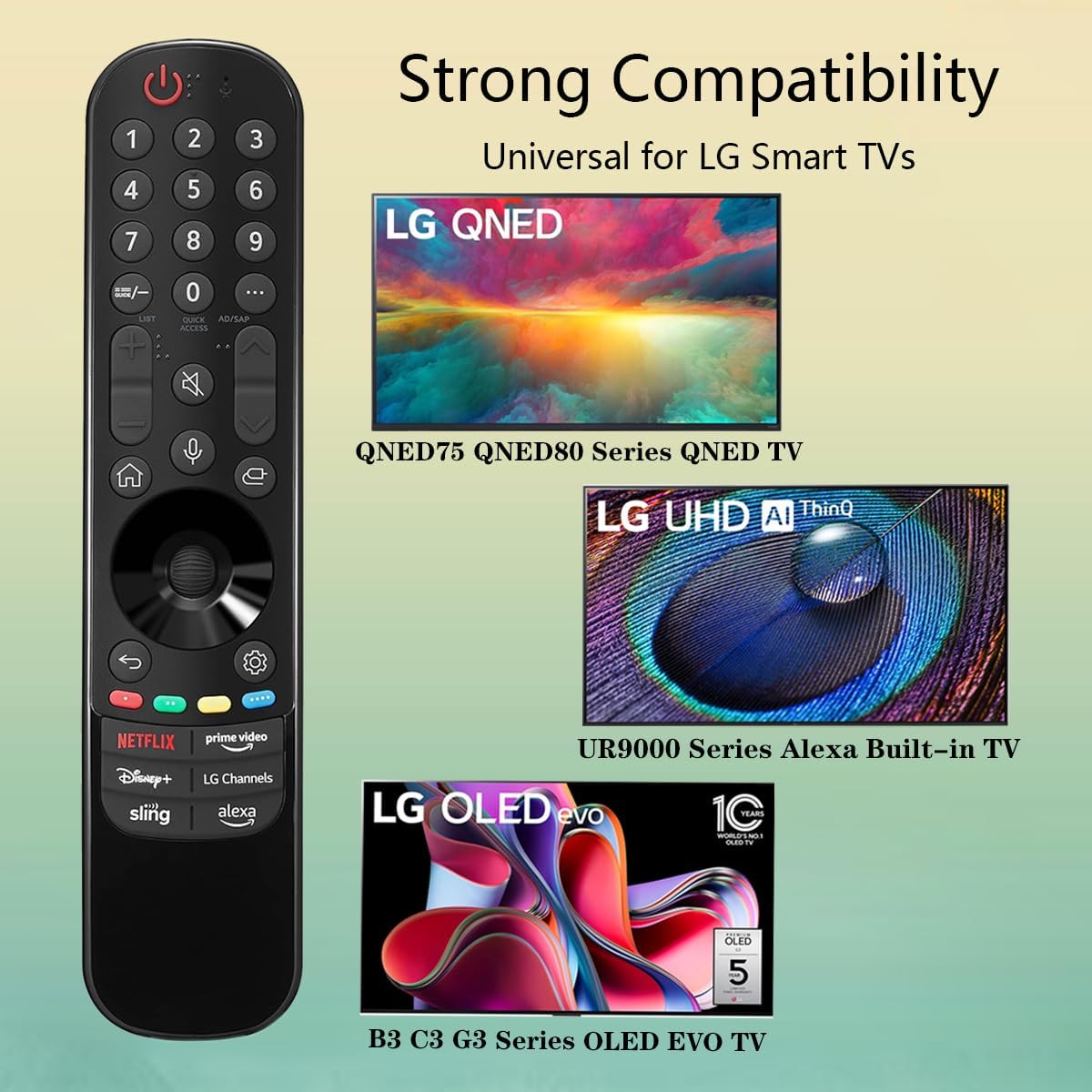
Image 3.3: The remote offers strong compatibility with various LG Smart TV series.
4. Održavanje
Proper care and maintenance will extend the lifespan of your remote control.
4.1. Čišćenje
- Koristite meku, suhu krpu za brisanje površine daljinskog upravljača.
- Za tvrdokornu prljavštinu, lagano dampOperite krpu vodom ili blagim, neabrazivnim sredstvom za čišćenje. Ne prskajte sredstvo za čišćenje direktno na daljinski upravljač.
- Izbjegavajte upotrebu jakih hemikalija, rastvarača ili abrazivnih sredstava za čišćenje, jer oni mogu oštetiti završnu obradu daljinskog upravljača ili unutrašnje komponente.
4.2. Održavanje baterije
- Replace batteries when the remote's responsiveness decreases or it stops functioning.
- Uvijek zamijenite obje baterije istovremeno novima istog tipa (AAA).
- If the remote will not be used for an extended period (e.g., one month or more), remove the batteries to prevent leakage and potential damage to the remote.
- Istrošene baterije odložite u skladu sa lokalnim propisima.
5. Otkrivanje problema
If you encounter issues with your remote control, refer to the following common problems and solutions:
| Problem | Mogući uzrok | Rješenje |
|---|---|---|
| Daljinski upravljač ne reaguje. | Prazne ili nepravilno umetnute baterije. | Zamijenite baterije novim AAA baterijama, pazeći na ispravan polaritet (+/-). |
| Daljinski upravljač radi povremeno. | Low battery power; obstruction between remote and TV; infrared sensor blocked on TV. | Replace batteries. Ensure a clear line of sight to the TV's infrared sensor. Remove any obstructions. |
| Voice control or pointer not working. | This replacement remote may not support all advanced features of the original LG Magic Remote, or your TV model does not fully support these features with a replacement remote. | Verify your TV model's compatibility with replacement remotes for advanced features. Basic functions should still operate. |
| Dedicated app buttons (e.g., Alexa, LG Channels) not working. | Functionality depends on TV model and specific app integration. | Some app buttons may not be universally compatible or require specific TV software versions. Verify if other buttons work. |
Ako problem i dalje postoji nakon isprobavanja ovih rješenja, obratite se korisničkoj podršci.
6. Specifikacije
- Broj modela: MR23GA
- Brand: DUH
- Dimenzije proizvoda: 7.3 x 1.6 x 1.2 inča
- Težina artikla: 2.29 unce
- Izvor napajanja: 2 x AAA baterije (nisu uključene)
- Boja: Crna
- Materijal: Visokokvalitetni ABS
- Kompatibilni uređaji: LG Smart Televisions (specific models listed in Section 3.4)
- Posebna karakteristika: Voice Search (functionality may vary)
7. Garancija i podrška
GHUST is committed to providing high-quality products and excellent customer service.
7.1. Servis nakon prodaje
If you have any questions regarding the quality or functionality of your GHUST MR23GA remote control, please do not hesitate to contact our customer support team. We are dedicated to resolving any issues promptly and ensuring your satisfaction.
For support, please refer to the contact information provided with your purchase or on the official GHUST product page.


