1. Uvod
Welcome to the instruction manual for your TIDRADIO TD-H3 Plus GMRS Radio. This manual provides detailed information on the setup, operation, and maintenance of your device. Please read it thoroughly to ensure proper use and to maximize the performance of your radio.
2. Sadržaj paketa
Provjerite da li se u vašem paketu nalaze sve dolje navedene stavke:
- 1 x TIDRADIO TD-H3 Plus GMRS Radio
- 1 x 2500mAh baterija
- 1 x USB-C Cable & Desktop Charger
- 1 x Standardna antena
- 1 x Slušalica
- 1 x kopča za pojas
- 1 x remen za ruku
- 1 x priručnik
3. Proizvod je gotovview
The TIDRADIO TD-H3 Plus is a versatile GMRS handheld radio designed for reliable communication. It features a compact design with a 1.44-inch TFT display and a full keypad for easy navigation and control.
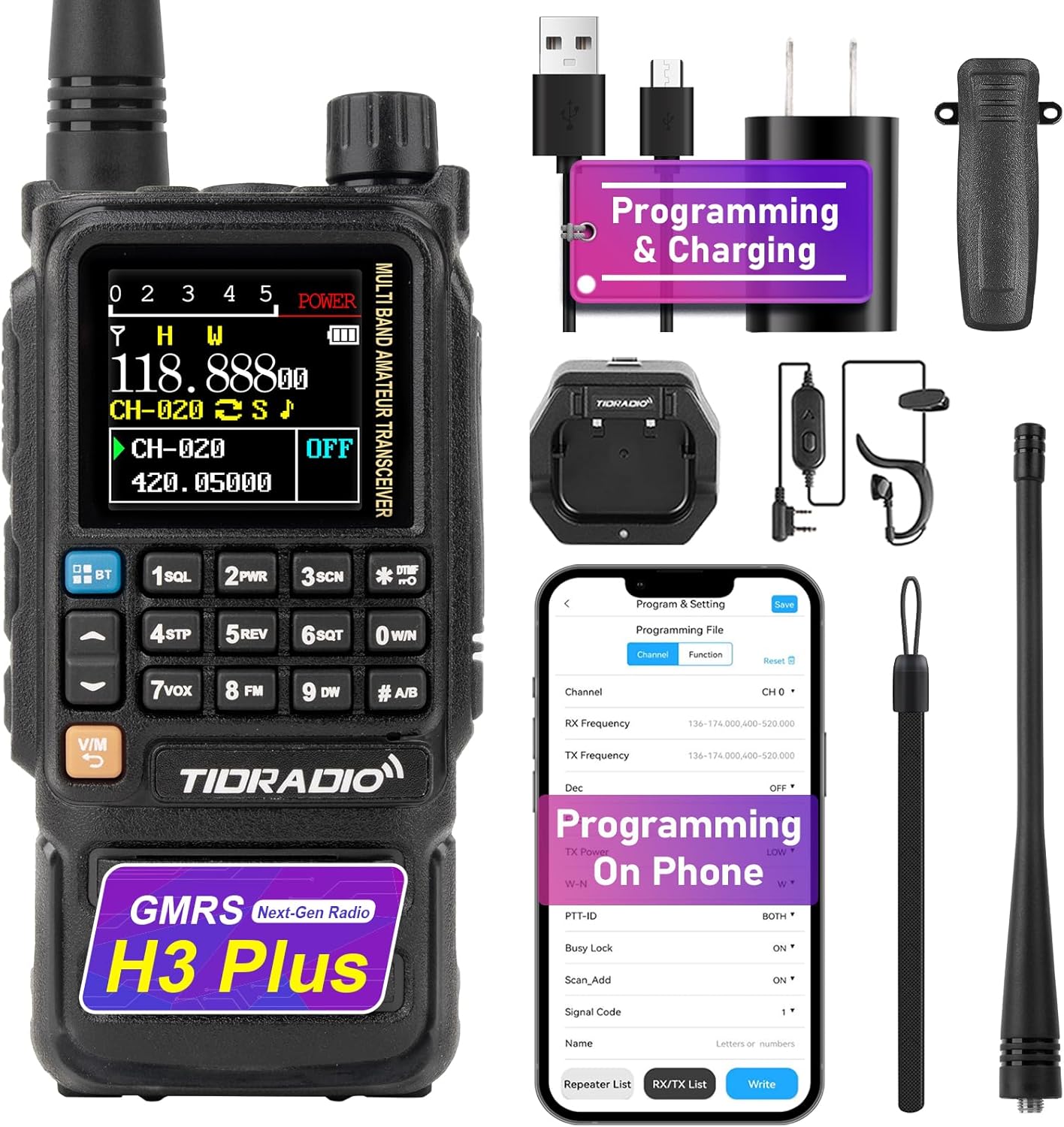
Figure 3.1: TIDRADIO TD-H3 Plus GMRS Radio with its standard accessories.
Key physical features include a multi-band amateur transceiver, a power indicator, and a numeric keypad. The device also includes customizable side keys for quick access to various functions such as FM radio, lamp, tone, alarm, weather, PTT2, and OD PTT.
4. Podešavanje
4.1 Ugradnja i punjenje baterije
The TD-H3 Plus is powered by a 2500mAh battery. For optimal performance, fully charge the battery before first use.
- Insert the 2500mAh battery into the back of the radio, ensuring it clicks securely into place.
- Connect the USB-C cable to the radio's USB-C port or place the radio in the desktop charger.
- Connect the charger to a power source. The charging indicator will show the charging status.
- Once fully charged, disconnect the radio from the charger.

Figure 4.1: The TD-H3 Plus supports multiple charging methods, including desktop base, USB-C battery charging, laptop charging, and car charging.
4.2 Priključak antene
Screw the standard antenna clockwise onto the antenna connector at the top of the radio until it is finger-tight. Do not overtighten.
5. Osnovni rad
5.1 Uključivanje/isključivanje napajanja
Da biste uključili radio, okrenite dugme za napajanje/jačinu zvuka u smjeru kazaljke na satu. Da biste isključili, okrenite ga suprotno od smjera kazaljke na satu dok ne klikne.
5.2 Kontrola jačine zvuka
Adjust the volume by rotating the power/volume knob. The TD-H3 Plus features precise volume control for clear audio.
5.3 Odabir kanala
Use the up/down arrow keys on the keypad to navigate through the 199 available channels. The 1.44-inch TFT display shows channel information clearly. The radio supports 3 display modes and 18 menu colors for user preference.

Figure 5.1: The TD-H3 Plus offers 3 display modes and 18 menu colors for customization.
5.4 Pritisni za razgovor (PTT)
Press and hold the PTT button on the side of the radio to transmit. Release the button to receive. The TD-H3 Plus also features dual PTT buttons for enhanced functionality.
5.5 Customizable Side Keys
The radio includes customizable side keys that can be programmed for quick access to functions such as FM, Lamp, TONE, Alarm, Weather, PTT2, and OD PTT. Refer to the programming section for details on how to customize these keys.
6. Napredne funkcije
6.1 Multi-Band Reception
The TD-H3 Plus GMRS radio operates on pre-programmed GMRS frequencies (462.55000-467.72500MHz RX/TX). It also supports wide-range multi-band scanning (RX Only) for:
- FM broadcasts (87-108MHz)
- AM aviation bands (108-136MHz)
- VHF (136-174MHz, 200-230MHz, 350-370MHz)
- UHF (400-520MHz)
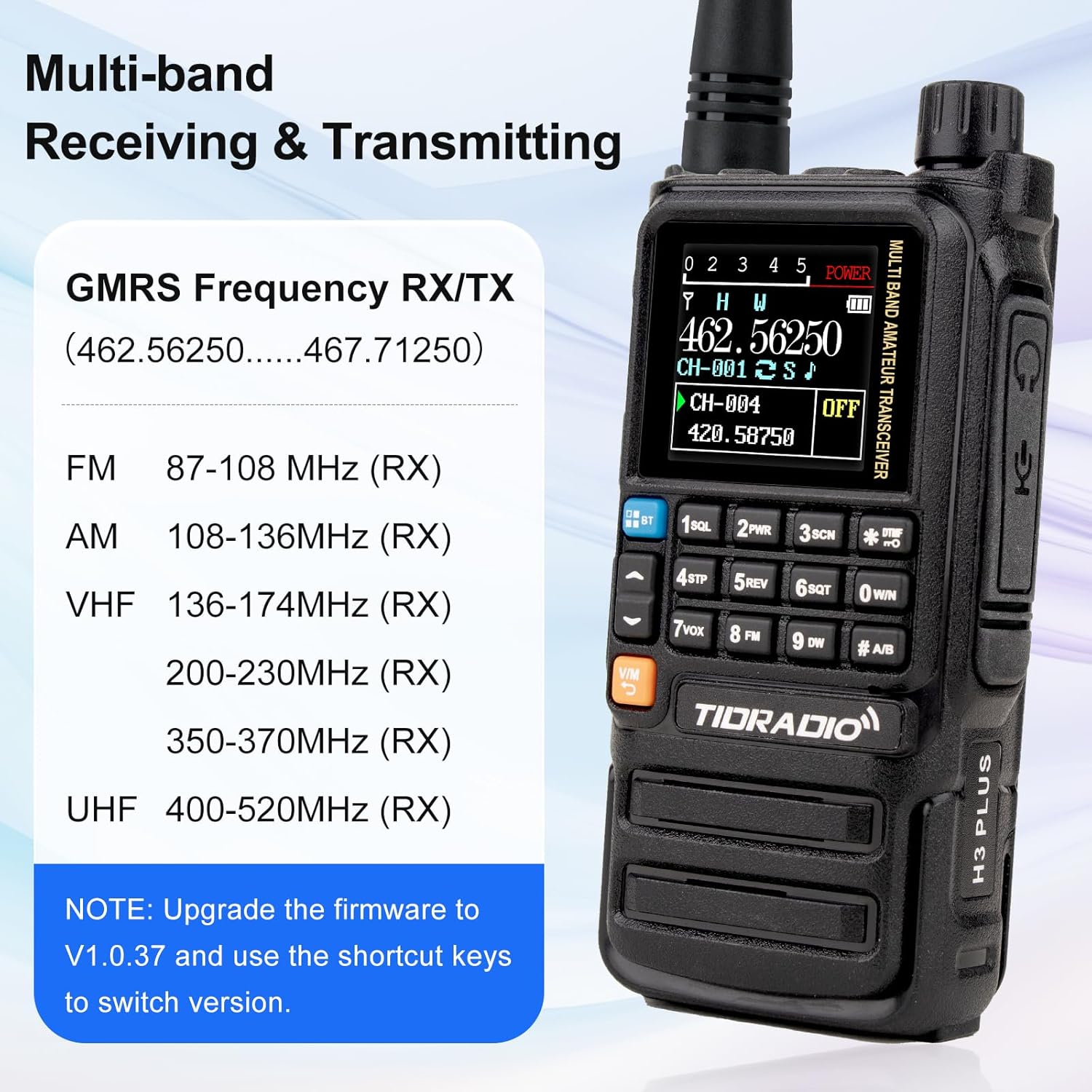
Slika 6.1: Gotovoview of the TD-H3 Plus's multi-band receiving and transmitting frequencies.
6.2 NOAA Meteorološki radio
Stay informed with built-in NOAA Weather Radio, providing real-time weather alerts and broadcasts for your safety.

Figure 6.2: The radio provides access to NOAA Weather Radio for critical weather information.
6.3 VOX funkcija
Enable VOX (Voice Operated Exchange) for hands-free communication. This feature allows transmission when your voice is detected, without needing to press the PTT button.
6.4 DTMF and Keypad Lock
DTMF (Dual-Tone Multi-Frequency) locking ensures secure transmissions. The keypad lock prevents accidental setting changes during use.
6.5 Scanning and Dual-Watch
The radio supports dual-watch and scanning functions, allowing you to monitor two frequencies simultaneously or scan through channels for activity.
6.6 SMS funkcija
Utilize the SMS function for real-time texting, enabling efficient and seamless communication with other compatible devices.

Figure 6.3: The radio's display showing the SMS input and send interface.
6.7 One Touch Frequency Search
The one-touch frequency search feature allows for quick duplication of commonly used frequency settings, streamlining configuration for radio enthusiasts.
6.8 Repeater Support
The TD-H3 Plus supports repeater functionality, extending your communication range.
7. Programming and Firmware Updates
7.1 USB-C Programming
The radio supports programming via its side USB-C port. This allows for direct connection to a computer for channel management and settings adjustments using compatible software.
7.2 Odmaster App Integration
Connect your TD-H3 Plus to the Odmaster app for enhanced functionality, including Bluetooth programming, calling, audio functions, and OD PTT. When paired with the 'Talk' module, it enables global walkie-talkie capabilities.

Figure 7.1: Steps for installing the Odmaster App, pairing the device, choosing a model, and modifying program settings.
7.3 Ažuriranja firmvera
Firmware updates can be performed directly through the Odmaster Web platform. For this process, a CH340 programming cable is required for Windows, and an FTDI programming cable for macOS. Ensure you back up your data before any firmware update.
Video 7.1: USB-C Cable Firmware Upgrade Tutorial.
Video 7.2: Firmware Upgrade via Odmaster Web.
Video 7.3: CH340 Cable Firmware Upgrade Tutorial.
8. Specifikacije
| Feature | Detalj |
|---|---|
| Težina artikla | 14 unce |
| Dimenzije paketa | 9.96 x 7.01 x 2.2 inča |
| Broj modela | TD-H3 Plus GMRS Radio |
| Baterije | 1 nestandardna baterija (uključena) |
| Brand | TIDRADIO |
| Broj kanala | 199 |
| Posebne karakteristike | Odmaster App connectivity, NOAA Weather Radio, Wireless Programming, USB-C Charging, 2500mAh Battery |
| Frekvencijski opseg | GMRS: 462.5500 ~ 467.7250 MHz (Rx & Tx) / AM/FM/UHF & VHF (Scanning & Receiver) |
| Maksimalni domet govora | 5 milja |
| Voltage | 7.4 Volts |
| Nivo vodootpornosti | Nije vodootporan |
9. Otkrivanje problema
9.1 Firmware Unlocking Issues
If you encounter issues with firmware unlocking or switching between GMRS/HAM/Normal versions:
- Ensure the radio firmware is upgraded to V1.0.37 or later.
- Use the designated shortcut key combination to switch between versions.
- If problems persist, contact TIDRADIO support for detailed instructions.
9.2 General Communication Problems
- Nema napajanja: Provjerite nivo napunjenosti baterije i uvjerite se da je ispravno instalirana.
- Ne može se slati/primati: Verify that the antenna is securely attached and that you are on the correct frequency/channel. Check squelch settings.
- Loš kvalitet zvuka: Ensure the earpiece (if used) is properly connected. Check for obstructions around the microphone and speaker.
10. Održavanje
10.1 Čišćenje
Očistite vanjski dio radija mekom krpomamp cloth. Do not use harsh chemicals or abrasive cleaners. Ensure the USB-C port cover is closed when not in use to prevent dust and moisture ingress.
10.2 Otpornost na vodu
The TIDRADIO TD-H3 Plus is Nije vodootporan. Avoid exposing the device to water, rain, or high humidity to prevent damage.
10.3 Njega baterija
Da biste produžili vijek trajanja baterije, izbjegavajte prekomjerno punjenje i potpuno pražnjenje baterije. Radio i bateriju čuvajte na hladnom i suhom mjestu kada ih ne koristite duži period.
11. Garancija i podrška
For specific warranty information, please refer to your purchase documentation or contact the retailer. If you require technical assistance or have questions regarding your TD-H3 Plus radio, please contact TIDRADIO customer support. For firmware-related inquiries, you can reach out to the seller via your order details: Go to "Orders" > "Get Help" > Select the order > Click "Other" > Send to "Seller" > Then send your question.