1. Uvod
This manual provides comprehensive instructions for the proper setup, operation, and maintenance of the Sartorius GL2202i-2S Gold Scale. Adhering to these guidelines will ensure accurate and reliable performance of your precision weighing instrument.
2. Sigurnosne informacije
Pridržavajte se sljedećih sigurnosnih mjera opreza kako biste spriječili ozljede i oštećenje uređaja:
- Operate the scale only in a stable, level environment free from excessive vibrations, drafts, and extreme temperature fluctuations.
- Do not expose the scale to corrosive chemicals or liquids.
- Ensure the power supply matches the specifications indicated on the device.
- Izbjegavajte ispuštanje ili izlaganje vage jakim udarcima.
- Only qualified personnel should perform repairs or internal adjustments.
3. Proizvod je gotovview
The Sartorius GL2202i-2S is a precision gold scale designed for accurate weighing applications. Key components include the weighing pan, digital display, and control panel.
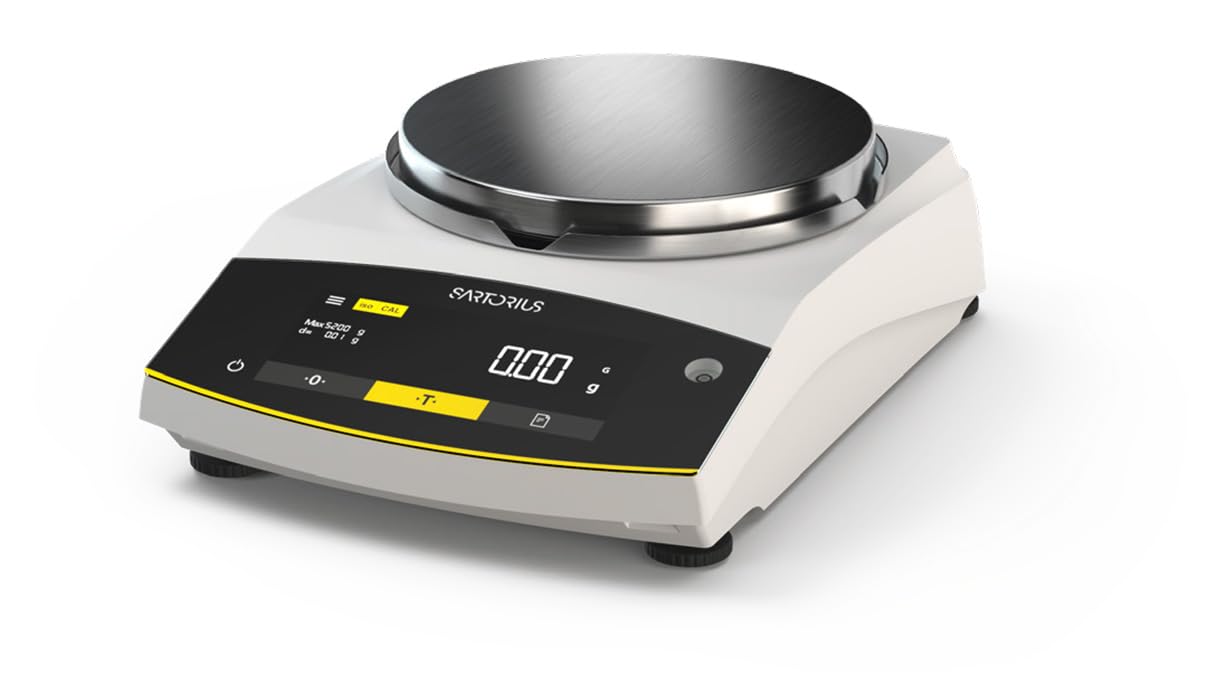
Figure 1: Sartorius GL2202i-2S Gold Scale. This image shows the scale's stainless steel weighing pan, the digital display, and the control buttons for operation.
Glavne komponente:
- Plata za vaganje: Stainless steel platform for placing items to be weighed.
- Digitalni prikaz: Hybrid display (LED and touch technology) showing weight readings and operational status.
- Kontrolna tabla: Buttons for power, tare, calibration, and menu navigation.
- Noge za izravnavanje: Adjustable feet to ensure the scale is perfectly level.
4. Podešavanje
4.1 Raspakivanje
Carefully remove the scale and all accessories from the packaging. Retain the original packaging for future transport or storage.
4.2 Postavljanje
Place the scale on a firm, stable, and level surface. Avoid locations subject to:
- Direct sunlight or heat sources.
- Strong air currents (drafts from doors, windows, or air conditioning).
- Vibrations from machinery or heavy traffic.
- Rapid temperature changes.
4.3 Niveliranje skale
Adjust the leveling feet located at the bottom of the scale until the air bubble in the level indicator (usually located near the display) is centered. This ensures accurate weighing results.
4.4 Priključak za napajanje
Connect the provided power adapter to the scale's power input and then to a suitable electrical outlet. Allow the scale to warm up for at least 30 minutes after initial power-on for optimal stability.
5. Uputstvo za upotrebu
5.1 Uključivanje/isključivanje napajanja
Pritisnite Snaga button (often marked with a circle and a vertical line) to turn the scale on or off. The display will show a self-test sequence before settling at zero.
5.2 Osnovno vaganje
- Ensure the display reads 0.00 g before placing any item on the pan.
- Pažljivo stavite predmet koji treba vagati na sredinu vage.
- Wait for the reading to stabilize. The stable reading will be displayed.
- Izvadite predmet iz tave.
5.3 Funkcija tare
Funkcija tare vam omogućava da vagate predmete u posudi oduzimanjem težine posude.
- Stavite praznu posudu na ploču za vaganje.
- Pritisnite Tare button (often marked with a 'T' or '->0<-'). The display will reset to 0.00 g.
- Dodajte predmet koji treba vagati u posudu. Na ekranu će se prikazati neto težina predmeta.
- Remove both the item and container from the pan.
6. Kalibracija
The Sartorius GL2202i-2S features an automatic, built-in calibration and adjustment function. Regular calibration ensures the highest level of accuracy. Refer to the on-screen prompts or the scale's specific menu for initiating the automatic calibration process. Ensure the scale is stable and free from any load during calibration.
7. Održavanje i čišćenje
7.1 Čišćenje
To maintain the scale's performance and appearance:
- Disconnect the scale from the power supply before cleaning.
- Obrišite vanjske površine mekom krpom, damp krpom i blagim deterdžentom.
- Ne koristite abrazivna sredstva za čišćenje, rastvarače ili jake hemikalije, jer mogu oštetiti završnu obradu ili unutrašnje komponente.
- Ensure no liquids enter the scale's housing or display area.
- The stainless steel weighing pan can be removed and cleaned separately with appropriate cleaning agents.
7.2 Skladištenje
If storing the scale for an extended period, ensure it is clean, dry, and stored in its original packaging or a protective container in a stable environment.
8. Otkrivanje problema
Ovaj odjeljak se bavi uobičajenim problemima na koje možete naići. Za probleme koji nisu ovdje navedeni, obratite se korisničkoj podršci.
| Problem | Mogući uzrok | Rješenje |
|---|---|---|
| Display shows "Err" or unstable readings. | Scale not level, vibrations, drafts, overload, or internal error. | Check leveling, move to a stable location, ensure no load exceeds capacity, restart the scale. |
| Vaga se ne uključuje. | Power cable disconnected, faulty outlet, or power adapter issue. | Verify power cable connection, try a different outlet, check power adapter. |
| Netačna očitavanja. | Needs calibration, environmental factors, or dirty pan. | Perform calibration, ensure stable environment, clean weighing pan. |
9. Specifikacije
- Model: GL2202i-2S
- Brand: Sartorius
- Capacity x Readability: 2200 gx 0.01 g
- Veličina posude: 180 mm (Diameter)
- Težina: Približno 12.00 lb (5.44 kg)
- Vrsta prikaza: Hybrid (LED and Touchscreen)
- Posebna karakteristika: Automatic, built-in calibration and adjustment function
- Boja: Bijelo
10. Garancija i podrška
For warranty information, technical support, or service inquiries, please refer to the documentation provided with your purchase or contact Sartorius customer service directly. Keep your purchase receipt and model number readily available when contacting support.


