1. Uvod
This manual provides detailed instructions for the setup, operation, and maintenance of your Bmax B6 Power Mini PC. This compact desktop computer is designed for various applications, from office tasks to multimedia consumption, offering a balance of performance and space efficiency.

Image 1.1: The Bmax B6 Power Mini PC, showcasing svojim kompaktnim dizajnom i prednjim priključcima.
2. Šta se nalazi u kutiji
Molimo Vas da provjerite sadržaj paketa kako biste bili sigurni da su svi artikli prisutni:
- 1 x Bmax B6 Power Mini PC (16GB+1TB configuration)
- 1 x HDMI kabl
- 1 x Uputstvo za upotrebu
- 1 x američki adapter za napajanje
- 1 x VESA nosač sa vijcima
3. Proizvod je gotovview
The Bmax B6 Power Mini PC is equipped with advanced components for efficient performance.

Slika 3.1: Gotovoview of key features including processor, memory, storage, and connectivity.
3.1 Ključne karakteristike
- procesor: Intel Core i7-1060NG7, 4 Cores/8 Threads, up to 3.8GHz.
- Memorija: 16GB LPDDR4 RAM memorije.
- Skladištenje: 1TB NVMe SSD, with support for dual NVMe SSDs and expandable up to 2TB via 2.5" HDD (SATA cable included).
- Grafika: Intel Iris Xe Graphics, supporting 4K@60Hz output.
- Izlaz ekrana: Supports three simultaneous displays via 2x HDMI 2.0 and 1x Full-Featured Type-C port.
- Bežična povezanost: Wi-Fi 6 (2.4G/5G 802.11a/b/g/n/ac) and Bluetooth 5.2.
- Žičano povezivanje: 1x Gigabit Ethernet (RJ45).
- luke: 3x USB 3.0, 1x Full-Featured Type-C, 2x HDMI 2.0, 1x Earphone/Microphone Jack, 1x DC Power Input.
- Dodatne karakteristike: VESA mount compatibility, Wake On LAN, PXE Boot, RTC Wake, Auto Power On, One-key Smart Recovery.

Image 3.2: Detailed diagram of the front and rear ports and their functions.
4. Vodič za postavljanje
4.1 Povezivanje perifernih uređaja
- Poveži ekran: Use the provided HDMI cable to connect your monitor or TV to one of the HDMI ports on the Mini PC. Alternatively, use a compatible USB-C to display cable for the Type-C port.
- Povežite tastaturu i miš: Plug your USB keyboard and mouse into the available USB 3.0 ports. For wireless devices, ensure Bluetooth is enabled and pair them as per their instructions.
- Poveži mrežu (opciono): For a wired internet connection, connect an Ethernet cable from your router or modem to the RJ45 port on the Mini PC.
- Priključite napajanje: Plug the US Power Adapter into the DC power input port on the Mini PC, then plug the adapter into a power outlet.
4.2 Početno uključivanje
- Provjerite da li su svi periferni uređaji povezani.
- Pritisnite dugme za napajanje koje se nalazi na prednjoj strani Mini PC-a.
- The system will boot up. Follow the on-screen instructions to complete the Windows setup process. It is recommended to keep the Ethernet cable unplugged during the first boot for faster setup if prompted.
5. Uputstvo za upotrebu
5.1 Osnovni rad
- Uključivanje/isključivanje: Press the power button to turn on the PC. To turn off, use the Windows Shut Down option or press and hold the power button for 5 seconds.
- Ponovno pokretanje: Use the Windows Restart option.
- Režim spavanja: Use the Windows Sleep option or briefly press the power button.
5.2 Konfiguracija ekrana
The Bmax B6 Power supports up to three 4K@60Hz displays simultaneously.
- Connect your displays to the available HDMI 2.0 ports and the Full-Featured Type-C port.
- In Windows, right-click on the desktop and select "Display settings" to configure multiple displays (extend, duplicate, or show only on one).

Image 5.1: Illustration of the Mini PC connected to multiple displays, demonstrating its multi-tasking capabilities.
5.3 Mrežna povezivost
- Wi-Fi: Da biste se povezali na bežičnu mrežu, kliknite na ikonu Wi-Fi u programskoj traci, odaberite svoju mrežu i unesite lozinku.
- Ethernet: If an Ethernet cable is connected, the PC will automatically establish a wired network connection.
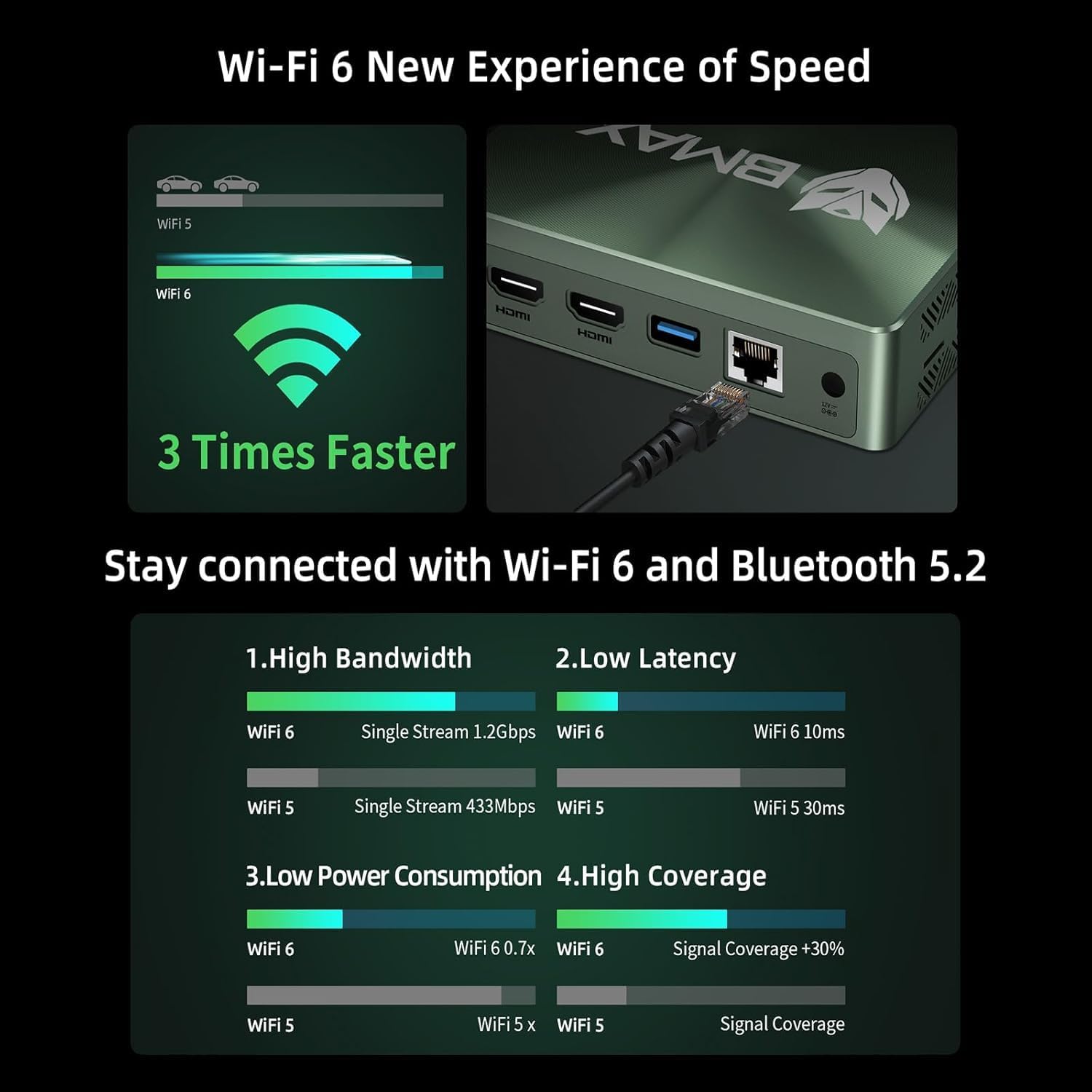
Image 5.2: Visual representation of Wi-Fi 6 and Bluetooth 5.2 capabilities, highlighting speed and connectivity benefits.
6. Održavanje
6.1 Čišćenje
- Ensure the Mini PC is powered off and unplugged before cleaning.
- Koristite meku, suhu krpu za brisanje vanjske strane.
- For dust accumulation in vents, use compressed air. Do not insert objects into the vents.
6.2 Proširenje skladišnog prostora
The Bmax B6 Power supports additional storage. You can install a second M.2 NVMe SSD or a 2.5-inch HDD/SSD.
- Refer to the detailed instructions in the included user manual for safe installation of additional storage devices.
- Ensure the device is powered off and unplugged before opening the chassis.

Image 6.1: Diagram illustrating the M.2 NVMe SSD slot and the option for expanded storage.
7. Otkrivanje problema
7.1 Nema napajanja
- Provjerite je li adapter za napajanje sigurno priključen i na Mini PC i na utičnicu.
- Uvjerite se da je utičnica funkcionalna.
- Pokušajte s drugom utičnicom.
7.2 Nema izlaza za prikaz
- Verify that the HDMI or USB-C cable is securely connected to both the Mini PC and the monitor.
- Provjerite je li monitor uključen i postavljen na ispravan ulazni izvor.
- Pokušajte s drugim kabelom za prikaz ili monitorom ako je dostupan.
7.3 System Recovery (One-key Smart Recovery)
If your Windows operating system encounters issues, the Bmax B6 Power features a "Smart Recovery" environment to restore factory settings.
- Step 1: Power On Mini PC.
- Step 2: Enter Recovery Mode. As soon as the screen lights up, immediately and repeatedly press the F9 key until the System Recovery menu appears.
- Step 3: Start the Recovery. Imate dvije opcije:
- Using Keyboard: Press the 'Y' key to begin the Factory Reset.
- Using Mouse: Click the [Restore System] button.
- Step 4: Set Up Windows Once Complete. You will be greeted by the initial Windows setup screen. Simply follow the on-screen instructions to set up your fresh system.

Image 7.1: Screenshot of the Bmax Smart Recovery environment, showing options for Factory Reset and Exit.
8. Specifikacije
| Feature | Detalj |
|---|---|
| Brand | Bmax |
| Broj modela | B6 Snaga |
| Procesor | Intel Core i7-1060NG7 (4C/8T, up to 3.8 GHz) |
| RAM | 16 GB LPDDR4 |
| Skladištenje | 1 TB NVMe SSD (expandable up to 2 TB via 2.5" HDD/SSD) |
| Grafika | Intel Iris Xe grafika (integrirana) |
| Maksimalna rezolucija ekrana | 3840 x 2160 piksela (4K) |
| Display Output | 2x HDMI 2.0, 1x Full-Featured Type-C (supports triple 4K@60Hz displays) |
| Bežično povezivanje | Wi-Fi 6 (802.11a/b/g/n/ac), Bluetooth 5.2 |
| Žičano povezivanje | 1x Gigabit Ethernet (RJ45) |
| USB portovi | 3x USB 3.0, 1x Full-Featured Type-C |
| Audio | 1x Earphone/Microphone Jack |
| Operativni sistem | OS (Typically Windows, specific version may vary) |
| Težina artikla | 1.61 funte |
| Boja | Crna |
| Posebne karakteristike | VESA Mount, Wake On LAN, PXE Boot, RTC Wake, Auto Power On, Smart Recovery |
9. Garancija i podrška
Bmax provides comprehensive support for your Mini PC.
- garancija: Your Bmax Mini PC comes with a 12-month warranty.
- Povratak: Dostupna je politika povrata u roku od 30 dana.
- Služba za korisnike: 7x24-hour customer service support is provided.
- tehnička podrška: Doživotna tehnička podrška je dostupna.
9.1 Kako kontaktirati podršku
For inquiries, system updates, or troubleshooting assistance, please contact customer service through your Amazon account:
- Log in to Amazon.
- Go to "Your Account".
- Navigate to "Your Orders".
- Select the Bmax B6 Power Mini PC order and click "Ask Product Question".

Image 9.1: Information on contacting Bmax after-sales support via Amazon.


