Važne informacije o sigurnosti
Molimo vas da pažljivo pročitate sva sigurnosna uputstva prije upotrebe kamere. Sačuvajte ovaj priručnik za buduću upotrebu.
- Ne izlažite fotoaparat vodi ili vlazi.
- Izbjegavajte direktnu sunčevu svjetlost ili visoke temperature.
- Koristite samo propisane baterije i punjače.
- Ne pokušavajte rastavljati ili modificirati kameru.
- Čuvati van domašaja djece.
Sadržaj paketa
Provjerite da li su sve stavke prisutne u paketu:
- Kućište fotoaparata Panasonic LUMIX G100
- 12-32mm Kit Lens
- Baterija
- AC adapter
- USB priključni kabel
- Naramenica
- Poklopac objektiva
- Body Cap
Camera Overview
Familiarize yourself with the camera's physical components.
Front View

Prednja strana view shows the lens, lens release button, and the LUMIX branding.
Pozadi View

Pozadi view highlights the vari-angle LCD touchscreen, electronic viewfinder (EVF), and various control buttons.
Top View

Vrh view displays the mode dial, shutter button, video record button, and hot shoe for external accessories.
Product Overview Video
Ovaj video pruža brz pregledview of the Panasonic LUMIX G100 camera and its key features.
Setup
Pričvršćivanje sočiva
- Skinite poklopac tijela s fotoaparata i stražnji poklopac objektiva s objektiva.
- Poravnajte bijelu indeksnu oznaku na objektivu s bijelom indeksnom oznakom na kućištu fotoaparata.
- Rotirajte sočivo u smjeru kazaljke na satu dok ne klikne na svoje mjesto.
Inserting Battery and SD Card
- Open the battery/SD card compartment cover on the bottom of the camera.
- Insert the battery with the correct orientation until it locks.
- Insert an SD, SDHC, or SDXC memory card (UHS-I U3 V30 recommended) into the slot until it clicks.
- Čvrsto zatvorite poklopac odjeljka.
Punjenje baterije
- Uvjerite se da je kamera isključena.
- Connect the USB cable to the camera's USB-C port and the AC adapter.
- Uključite AC adapter u utičnicu. Indikator punjenja će zasvijetliti.
- Punjenje je završeno kada se indikator ugasi.
Upravljanje kamerom
Osnovni načini fotografiranja
Okrenite birač načina rada da biste odabrali željeni način snimanja:
- iA (Inteligentni automatski režim): Kamera automatski optimizuje postavke za scenu.
- P (Program AE): Kamera podešava otvor blende i brzinu zatvarača, ali možete prilagoditi i druge postavke.
- A (AE s prioritetom otvora blende): Vi podešavate otvor blende, kamera podešava brzinu zatvarača. Idealno za kontrolu dubine polja.
- S (Prioritet zatvarača AE): Vi podešavate brzinu zatvarača, kamera podešava otvor blende. Idealno za kontrolu zamućenja pokreta.
- M (Ručna ekspozicija): Vi kontrolišete i otvor blende i brzinu zatvarača.
Video Recording
The LUMIX G100 supports high-resolution video recording:
- 4K video: Record in 4K 24p/30p for detailed footage.
- FHD Video: Record in Full HD (1080p) at 60p for smoother motion.
- V-Log L Recording: For advanced videographers, V-Log L provides a flat color profile for greater flexibility in post-production color grading.
Audio Recording
The camera features OZO Audio by Nokia with a high-performance built-in microphone system:
- Three internal microphones (Surround, Front, Back) for spatial audio.
- Tracking function automatically adjusts microphone direction for clear audio.
Stabilizacija slike
The 5-Axis Hybrid I.S. (Image Stabilizer) helps to reduce camera shake for both photos and videos, especially useful when shooting handheld.
Povezivanje
Kamera nudi različite mogućnosti povezivanja:
- Bluetooth i Wi-Fi: Seamlessly transfer images and videos to a smartphone or tablet using the LUMIX Sync app.
- USB-C: Za punjenje i prijenos podataka.
- HDMI (Type D Micro HDMI): For video output to external monitors or TVs.
Webcam Funkcionalnost
The LUMIX G100 can be used as a high-quality webkamera za prijenos uživo ili video pozive.
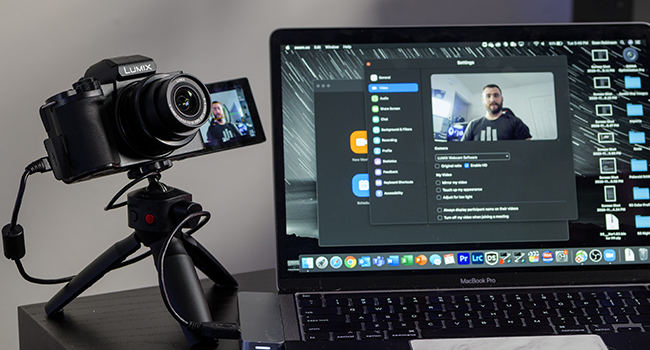
Connect the camera to your computer via USB and select it as your webcam source in your video conferencing software.
Održavanje
- Čišćenje sočiva: Use a soft, lint-free cloth and lens cleaning solution. Avoid touching the lens surface with your fingers.
- Čišćenje kućišta fotoaparata: Wipe with a dry, soft cloth. For stubborn dirt, use a slightly damp krpom, a zatim dobro osušite.
- Skladištenje: Čuvajte kameru na hladnom i suhom mjestu, dalje od direktne sunčeve svjetlosti i ekstremnih temperatura. Izvadite bateriju ako je skladištite duži period.
- Ažuriranja firmvera: Povremeno provjeravajte podršku za Panasonic website for firmware updates to ensure optimal performance and new features.
Rješavanje problema
| Problem | Rješenje |
|---|---|
| Kamera se ne uključuje. | Ensure the battery is charged and correctly inserted. Try charging the battery. |
| Slike su mutne. | Check focus settings. Ensure lens is clean. Use a faster shutter speed or enable image stabilization. |
| Cannot record video in 4K. | Ensure you are using a compatible SD card (UHS-I Speed Class 3 / V30 or higher). Check available storage space. |
| Nije snimljen audio. | Check audio recording settings. Ensure microphone is not obstructed. |
| Wi-Fi/Bluetooth veza nije uspjela. | Restart both the camera and the connected device. Ensure the LUMIX Sync app is updated. |
Specifikacije
| Feature | Detalj |
|---|---|
| Naziv modela | DC-G100 |
| Tip senzora | CMOS |
| Rezolucija foto senzora | 20.3 MP |
| Kompatibilni nosači | Micro Four Thirds |
| Lens Type | 12-32mm Wide Angle Lens (Kit) |
| Stabilizacija slike | 5-Axis Hybrid I.S. (Digital) |
| Video Rezolucija | 2160p (4K) |
| Veličina ekrana | 3 inča |
| Display Type | Articulating LCD Touch Screen |
| Viewfinder | Electronic (OLED EVF) |
| Povezivanje | Bluetooth, USB-C, Wi-Fi, HDMI |
| Težina artikla | 14.88 unce |
| Podržano File Format | JPEG |
| Vrsta Flash memorije | SD, SDHC, or SDXC (UHS-I U3 V30) |
Garancija i podrška
This Panasonic LUMIX G100 camera comes with a 1-godišnja garancija proizvođača.
For technical support, service, or warranty claims, please visit the official Panasonic support webstranice ili kontaktirajte njihovu korisničku službu.
Online podrška: https://www.panasonic.com/us/support.html