Uvod
This manual provides detailed instructions for setting up and using your OMOTON Bluetooth Keyboard and Mouse Combo. Designed for seamless compatibility with macOS 11.3 or above, this combo enhances your productivity across various Mac devices, including MacBook, MacBook Air, MacBook Pro, iMac, iMac Pro, Mac Pro, and Mac mini.

Image: The OMOTON Bluetooth Keyboard and Mouse Combo, featuring a full-size keyboard with numeric keypad and a compact, ergonomic mouse.
Sadržaj paketa
- OMOTON Bluetooth Keyboard
- OMOTON Bluetooth Mouse
- Uputstvo za upotrebu
Setup
1. Instalacija baterije
The keyboard requires two AAA batteries, and the mouse requires one AA battery (batteries are not included).
- Pronađite odjeljak za baterije na donjoj strani tastature i miša.
- Otvorite poklopac odeljka za baterije.
- Umetnite baterije, vodeći računa o ispravnom polaritetu (+/-).
- Zatvorite poklopac odeljka za baterije.
2. Upute za uparivanje putem Bluetootha
Follow these steps to pair your keyboard and mouse with your Mac device.

Image: Visual guide for Bluetooth pairing, showing battery insertion, power switch, Mac Bluetooth settings, and pairing button.
- Uparivanje tastature:
- Insert two AAA batteries into the keyboard and slide the power switch to the ON position.
- Press and hold the 'Fn' + 'BT1' keys for 3-5 seconds until the LED indicator flashes blue. This activates pairing mode.
- Na vašem Mac-u, idi System Settings > Bluetooth i uvjerite se da je Bluetooth uključen.
- Select "OMOTON Keyboard" from the list of available devices to complete the pairing. The blue indicator will turn off upon successful connection.
- Uparivanje miša:
- Insert one AA battery into the mouse and slide the power switch to the ON position.
- Press the 'CONNECT' button on the underside of the mouse. The LED indicator will flash.
- Na vašem Mac-u, idi System Settings > Bluetooth.
- Select "OMOTON Mouse" from the list of available devices to complete the pairing.
Savjet:
The keyboard supports three independent Bluetooth channels (BT1, BT2, BT3). To pair with additional devices, press and hold 'Fn' + 'BT2' or 'Fn' + 'BT3' to enter pairing mode for the respective channel, then repeat the pairing steps.

Image: Detailed instructions for keyboard pairing, highlighting battery insertion, power switch, and Bluetooth channel selection.
Uputstvo za upotrebu
Karakteristike tastature
- Izgled pune veličine: Uključuje numeričku tastaturu za efikasan unos podataka.
- macOS Shortcut Keys: A dedicated row of function keys provides quick access to macOS controls such as brightness, volume, media playback, and Mission Control.
- Scissor-Switch Mechanism: Provides a responsive and quiet typing experience.
- Ergonomski dizajn: The keyboard features a slight tilt for comfortable typing.

Image: Diagram illustrating the multimedia function keys on the keyboard and their corresponding actions for Mac.
Multimedia Key Functions:
- Escape
- Bright Down (F1)
- Bright Up (F2)
- Open Mission Control (F3)
- Open Launchpad (F4)
- Previous Track (F7)
- Play/Pause (F8)
- Next Track (F9)
- Mute (F10)
- Volume Down (F11)
- Volume Up (F12)
- Izbaci

Slika: Pogled odozgo view of the keyboard, highlighting the multimedia keys and their F-key assignments, along with Bluetooth channel indicators.
Karakteristike miša
- Podesivi DPI: Cycle through 800, 1200, and 1600 DPI settings to adjust cursor sensitivity.
- Tihi klikovi: Designed for quiet operation, minimizing click noise.
- Ergonomski dizajn: Contoured shape for comfortable use.
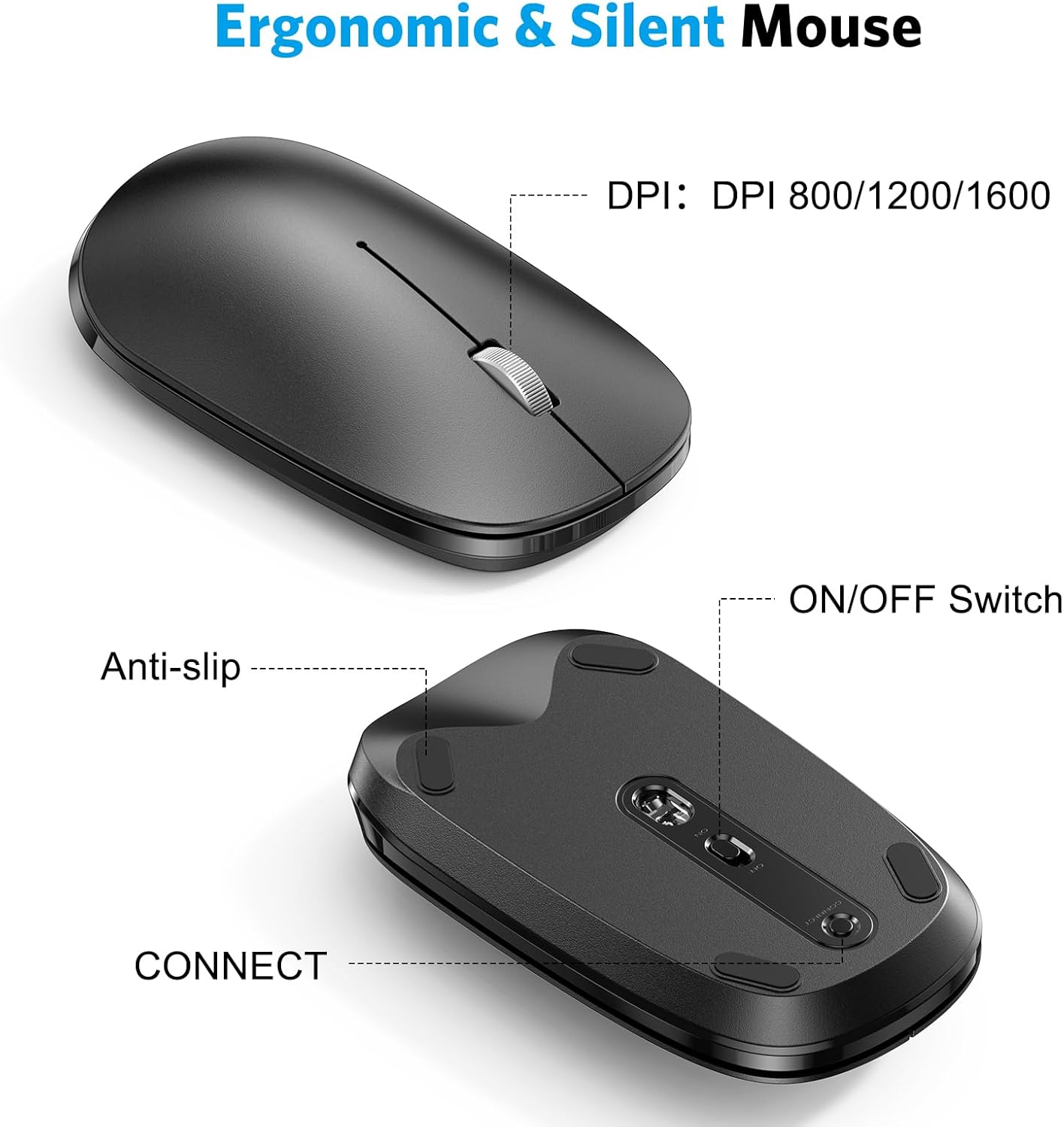
Slika: Krupni plan views of the mouse, indicating the DPI switch, ON/OFF switch, and CONNECT button, along with anti-slip pads.

Image: Diagram illustrating the three adjustable DPI levels (800, 1200, 1600) for the mouse, controlled by a button near the scroll wheel.
Režim uštede energije
Both the keyboard and mouse are equipped with an automatic power-saving mode. After a period of inactivity, they will enter sleep mode to conserve battery life. To reactivate, simply press any key on the keyboard or move/click the mouse.
Održavanje
Čišćenje
- Use a soft, dry cloth to wipe the surfaces of the keyboard and mouse.
- Za tvrdokornu prljavštinu, lagano dampOperite krpu vodom ili blagim, neabrazivnim sredstvom za čišćenje. Izbjegavajte prekomjernu vlagu.
- Ne koristite jake hemikalije, rastvarače ili abrazivna sredstva za čišćenje.
Skladištenje
- Uređaje čuvajte na hladnom i suhom mjestu, dalje od direktne sunčeve svjetlosti i ekstremnih temperatura.
- Ako skladištite duže vrijeme, izvadite baterije kako biste spriječili curenje.
Rješavanje problema
Problemi sa povezivanjem
- Ensure Batteries are Fresh: Low batteries can cause intermittent connections or prevent pairing. Replace batteries if necessary.
- Uključeno: Verify that both the keyboard and mouse are switched ON.
- Bluetooth omogućen: Confirm that Bluetooth is enabled on your Mac device.
- Popravka uparivanja uređaja: If connection is lost, try unpairing the devices from your Mac's Bluetooth settings and then re-pairing them following the setup instructions.
- smetnje: Move the devices closer to your Mac and away from other wireless devices that might cause interference.
Keys Not Responding / Mouse Tracking Issues
- Provjerite baterije: Uvjerite se da baterije nisu istrošene.
- Reconnection Delay: After entering power-saving mode, there might be a brief delay (a few seconds) for the devices to reconnect when reactivated.
- Očistite senzore: Kod miša, provjerite da li je optički senzor na donjoj strani čist i bez prepreka.
- Površina: Osigurajte da se miš koristi na odgovarajućoj, nereflektirajućoj površini.
Specifikacije
| Brand | OMOTON |
| Model | B0CQ3RQJ8B |
| Tehnologija povezivanja | Bluetooth |
| Kompatibilni uređaji | MacBook Pro/Air, iMac, iMac Pro, Mac Mini, Mac Pro (macOS 11.3 or Above) |
| Baterije za tastaturu | 2 x AAA baterije (nisu uključene) |
| Baterije za miševe | 1 x AA baterija (nije uključena) |
| Nivoi DPI-ja miša | 800, 1200, 1600 |
| Dimenzije tastature | Pribl. 17.1 x 4.76 x 0.86 inča (434 x 121 x 21.9 mm) |
| Dimenzije miša | Pribl. 4.3 x 2.5 x 0.9 inča (110 x 63 x 23 mm) |
| Težina artikla | 1.61 funti (ukupno) |

Image: Diagram showing the physical dimensions of both the OMOTON keyboard and mouse.
Garancija i podrška
OMOTON products are designed for reliability and performance. For warranty information or technical support, please refer to the contact details provided with your product packaging or visit the official OMOTON website.
If you encounter any issues not covered in this manual, please contact OMOTON customer service for assistance.


