Uvod
This user manual provides comprehensive instructions for the installation, operation, and maintenance of your Kolink Unity Arena Mid-Tower PC Case. Please read this manual carefully before beginning assembly to ensure proper setup and to maximize the performance and longevity of your system. Keep this manual for future reference.
Product Overview
The Kolink Unity Arena is a mid-tower PC case designed for high-performance gaming systems. It features a borderless glass side panel for an unobstructed view of internal components and comes with four pre-installed Kolink Umbra X ARGB/PWM fans for efficient cooling and customizable lighting. The spacious interior supports E-ATX motherboards and large graphics cards up to 420mm, including NVIDIA RTX 40 series. It also accommodates up to three radiators for advanced liquid cooling solutions and includes a dedicated half PSU shroud for clean cable management.

slika: Prednje-lijevo view of the Kolink Unity Arena PC case, showcasing the borderless glass side panel and three pre-installed RGB fans on the front.
- Mid-Tower Design: Optimized for a balance of size and component compatibility.
- Borderless Glass Panels: Provides an uninterrupted view of your internal hardware.
- Opsežna hardverska podrška: Compatible with E-ATX motherboards and GPUs up to 420mm, including NVIDIA RTX 40 series.
- Napredno hlađenje: Supports up to three radiators and includes four pre-installed Kolink Umbra X ARGB/PWM fans.
- Dedicated PSU Shroud: A half power supply shroud helps maintain a clean and organized interior.
Specifikacije
| Brand | Kolink |
| Naziv modela | Unity Arena |
| Broj modela | UNITYARENABLK |
| Boja | Crna |
| Tip slučaja | Mid Tower |
| Materijal | legirani čelik |
| Kompatibilnost matične ploče | Extended ATX |
| Posebne karakteristike | RGB Lighting, Pre-installed Fans |
| Kompatibilni uređaji | High-performance gaming components |
| Preporučena upotreba | Gaming |
| Vrsta montaže napajanja | Bottom Mount |
| Metoda hlađenja | Vazduh |
| Veličina ventilatora | 120 milimetara |
Postavljanje i instalacija
Follow these steps to properly set up and install your components into the Kolink Unity Arena PC case.
1. Raspakivanje i priprema
- Pažljivo izvadite kućište računara iz ambalaže.
- Postavite kućište na stabilnu, ravnu površinu.
- Identify the accessory box, which contains screws, zip ties, and other small parts.
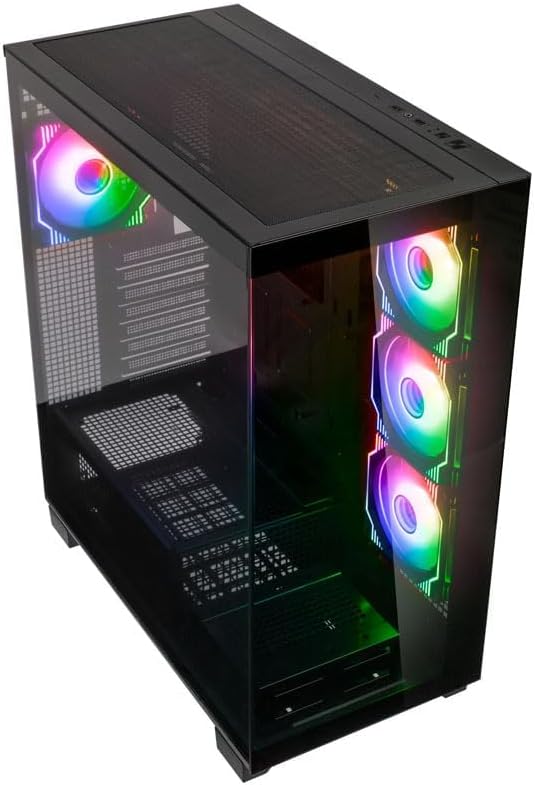
slika: Angled top-front view of the Kolink Unity Arena PC case, highlighting the top ventilation and the illuminated RGB fans visible through the front glass panel.
2. Uklanjanje panela
- Glass Side Panel: The borderless glass side panel is typically secured with thumbscrews at the rear. Unscrew these and carefully slide or lift the panel off. Place it on a soft, non-abrasive surface to prevent scratches.
- Solid Side Panel: The solid right-side panel (behind the motherboard tray) is also usually secured with thumbscrews. Remove these to access the cable management area.
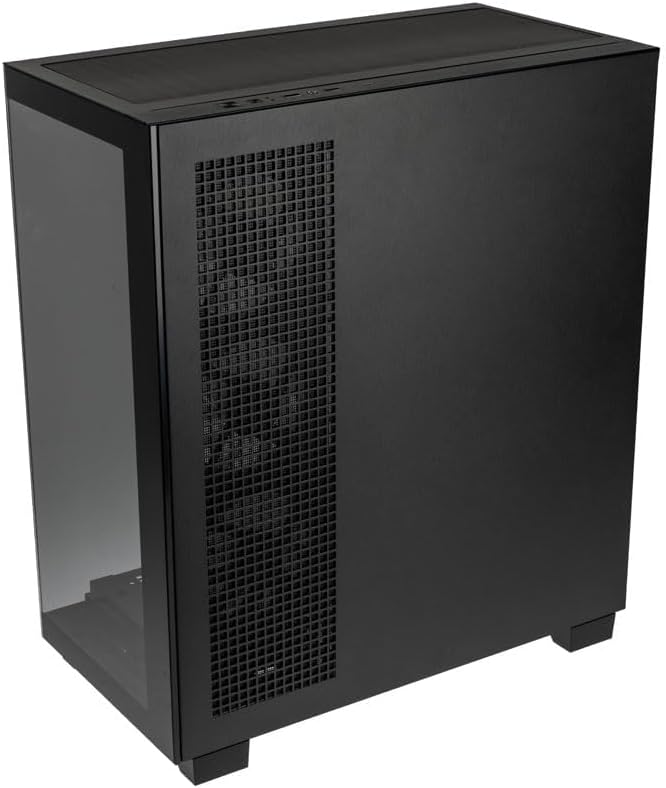
slika: Pozadi desno view of the Kolink Unity Arena PC case, showing the solid right side panel and the rear exhaust fan area.
3. Instalacija matične ploče
- Install the I/O shield (if not pre-attached to your motherboard).
- Align your E-ATX or smaller motherboard with the standoffs inside the case.
- Pričvrstite matičnu ploču odgovarajućim vijcima iz kompleta dodatne opreme.

slika: Enterijer view of the Kolink Unity Arena PC case from the front, displaying the motherboard tray, the three front-mounted fans, and the PSU shroud at the bottom.
4. Instalacija grafičke kartice (GPU)
- Uklonite potrebne poklopce PCIe utora na stražnjoj strani kućišta.
- Umetnite grafičku karticu u primarni PCIe slot na matičnoj ploči.
- Pričvrstite grafičku karticu vijcima. Kućište podržava grafičke kartice dužine do 420 mm.
5. Storage Device Installation (HDDs/SSDs)
Refer to the case's internal layout for specific drive bay locations and mounting mechanisms. Typically, 2.5" SSDs mount on the back of the motherboard tray, and 3.5" HDDs are installed in a drive cage near the PSU shroud.
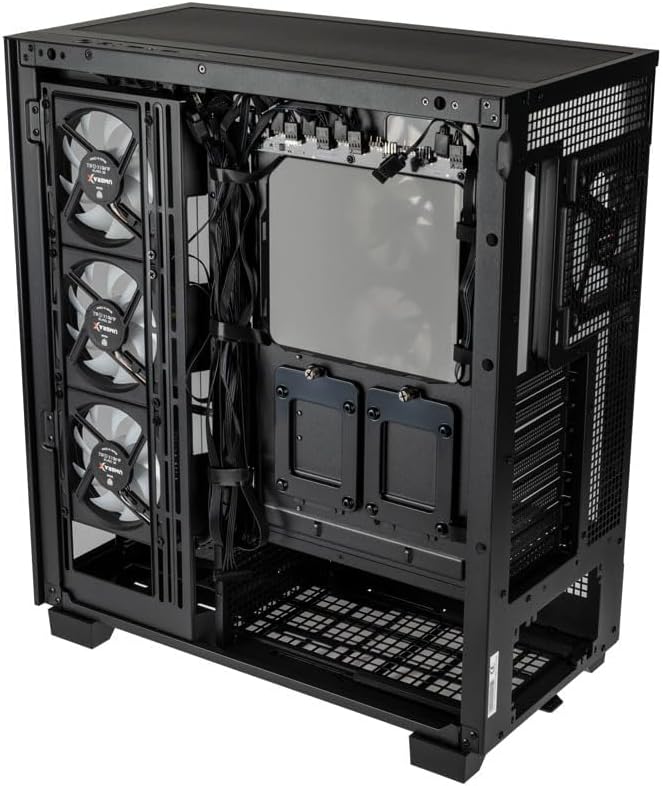
slika: Zadnji enterijer view of the Kolink Unity Arena PC case, focusing on the cable management area behind the motherboard tray and drive mounts.
6. Instalacija jedinice za napajanje (PSU)
- Mount your ATX power supply into the dedicated half PSU shroud at the bottom rear of the case.
- Secure it with screws from the rear of the case.
7. Ugradnja ventilatora i radijatora
- The case comes with four pre-installed Kolink Umbra X ARGB/PWM fans.
- Additional fans or radiators can be installed at the top, front, or rear depending on your cooling needs. The case supports up to three radiators.

slika: Close-up of the three pre-installed Kolink Umbra X fans mounted at the front of the Kolink Unity Arena PC case, highlighting their design.
8. Povezivanje prednjeg I/O porta
Connect the front panel cables (USB, audio, power switch, reset switch, LED indicators) to the corresponding headers on your motherboard. Refer to your motherboard manual for exact header locations.

slika: Close-up of the top I/O panel of the Kolink Unity Arena PC case, featuring USB ports, audio jacks, and power/reset buttons.
9. Upravljanje kablovima
Iskoristite izreze za usmjeravanje kablova i tačke za vezivanje iza ležišta matične ploče da biste organizovali kablove. Ovo poboljšava protok vazduha i estetiku.
Uputstvo za upotrebu
Uključivanje
Once all components are installed and connected, ensure the power supply switch is in the 'ON' position. Press the power button on the front I/O panel to start your system.
RGB kontrola osvetljenja
The pre-installed Kolink Umbra X fans feature ARGB lighting. The case includes a built-in controller with a SATA power input. Connect this controller to your power supply. If your motherboard does not support ARGB control, you can typically manage the lighting effects using the reset button on the front I/O panel, which often doubles as an RGB mode switch when connected to the case's controller.
Održavanje
Redovno održavanje pomaže u osiguravanju optimalnih performansi i produžava vijek trajanja komponenti vašeg računara.
- Filteri za prašinu: The Kolink Unity Arena case is equipped with dust filters. Periodically remove and clean these filters (e.g., top, front, bottom) to prevent dust buildup inside the case. Use compressed air or wash them gently with water and allow them to dry completely before reinstallation.
- Čišćenje unutrašnjosti: With the system powered off and unplugged, carefully open the side panels and use compressed air to remove dust from internal components, especially heatsinks and fan blades.
- Čišćenje ventilatora: Gently clean the blades of the pre-installed fans with a soft brush or compressed air to maintain efficient airflow.
Rješavanje problema
Ako naiđete na probleme tokom ili nakon montaže, razmotrite sljedeće uobičajene korake za rješavanje problema:
- Sistem se ne uključuje:
- Provjerite je li kabel za napajanje sigurno spojen i na PSU i na zidnu utičnicu.
- Provjerite je li prekidač za napajanje u položaju 'UKLJUČENO'.
- Check all power connections to the motherboard (24-pin ATX, 8-pin CPU) and GPU.
- Confirm the front panel power switch cable is correctly connected to the motherboard header.
- Ventilatori se ne okreću / RGB ne radi:
- Provjerite priključke napajanja ventilatora na matičnu ploču ili kontroleru ventilatora.
- Ensure ARGB cables are properly connected to the motherboard's ARGB header or the case's integrated controller.
- If using the case's controller, verify it is receiving SATA power.
- Nema izlaza za prikaz:
- Ensure your monitor cable is connected to the graphics card, not the motherboard's integrated graphics port (unless you are using integrated graphics).
- Ponovo umetnite grafičku karticu u njen PCIe slot.
- Check GPU power connections.
Garancija i podrška
For warranty information, please refer to the documentation provided with your purchase or contact your retailer. Kolink's official website may also provide details regarding product support and warranty terms.
- Dostupnost rezervnih dijelova: Informacije nisu dostupne.
- Ažuriranja softvera zagarantovana do: Informacije nisu dostupne.
For technical assistance or further inquiries, please visit the official Kolink support webstranice ili kontaktirajte njihov odjel za korisničku podršku.


