1. Uvod
This manual provides detailed instructions for the installation, configuration, and operation of your Rebel KOM1031 Dual-Band Wireless Network Repeater. This device is designed to extend the coverage of your existing Wi-Fi network, providing a stronger and more reliable signal in areas with weak or no coverage. It supports both 2.4 GHz and 5 GHz wireless bands, offering flexible connectivity options and high data transfer rates.
2. Sadržaj paketa
Molimo Vas da provjerite da li se u Vašem paketu nalaze svi artikli:
- Rebel KOM1031 Wireless Network Repeater
- Korisnički priručnik (ovaj dokument)
- Ethernet Cable (may be included, check packaging)

Slika 2.1: The Rebel KOM1031 Repeater packaging, showing the device and its key features.
3. Proizvod je gotovview
Familiarize yourself with the physical components and indicators of the Rebel KOM1031 Repeater.
3.1. Izgled uređaja

Slika 3.1: Front view of the Rebel KOM1031 Repeater, highlighting the LED indicators and Ethernet ports.

Slika 3.2: Side view of the Rebel KOM1031 Repeater, showing the four external antennas in an extended position.

Slika 3.3: Dno view of the Rebel KOM1031 Repeater, illustrating the integrated power plug and two RJ45 Ethernet ports.
3.2. LED indikatori
| Indikator | Status | Opis |
|---|---|---|
| SYS/POWER | Solid On | Uređaj je uključen i radi normalno. |
| 2.4G | Solid On | 2.4 GHz Wi-Fi band is active. |
| 5.8G | Solid On | 5 GHz Wi-Fi band is active. |
| LAN3 / LAN4 | Solid On/Flashing | Indicates an active Ethernet connection and data transfer on the respective LAN port. |
4. Vodič za postavljanje
Follow these steps to set up your Rebel KOM1031 Repeater.
4.1. Initial Placement and Power On
- Odaberite lokaciju: Plug the repeater into an electrical outlet in an area between your main router and the location where you need improved Wi-Fi coverage. Ensure it is within the range of your existing Wi-Fi signal.
- Uključeno: Plug the device directly into a standard wall socket. The SYS/POWER LED should illuminate. Wait approximately 30-60 seconds for the device to boot up.
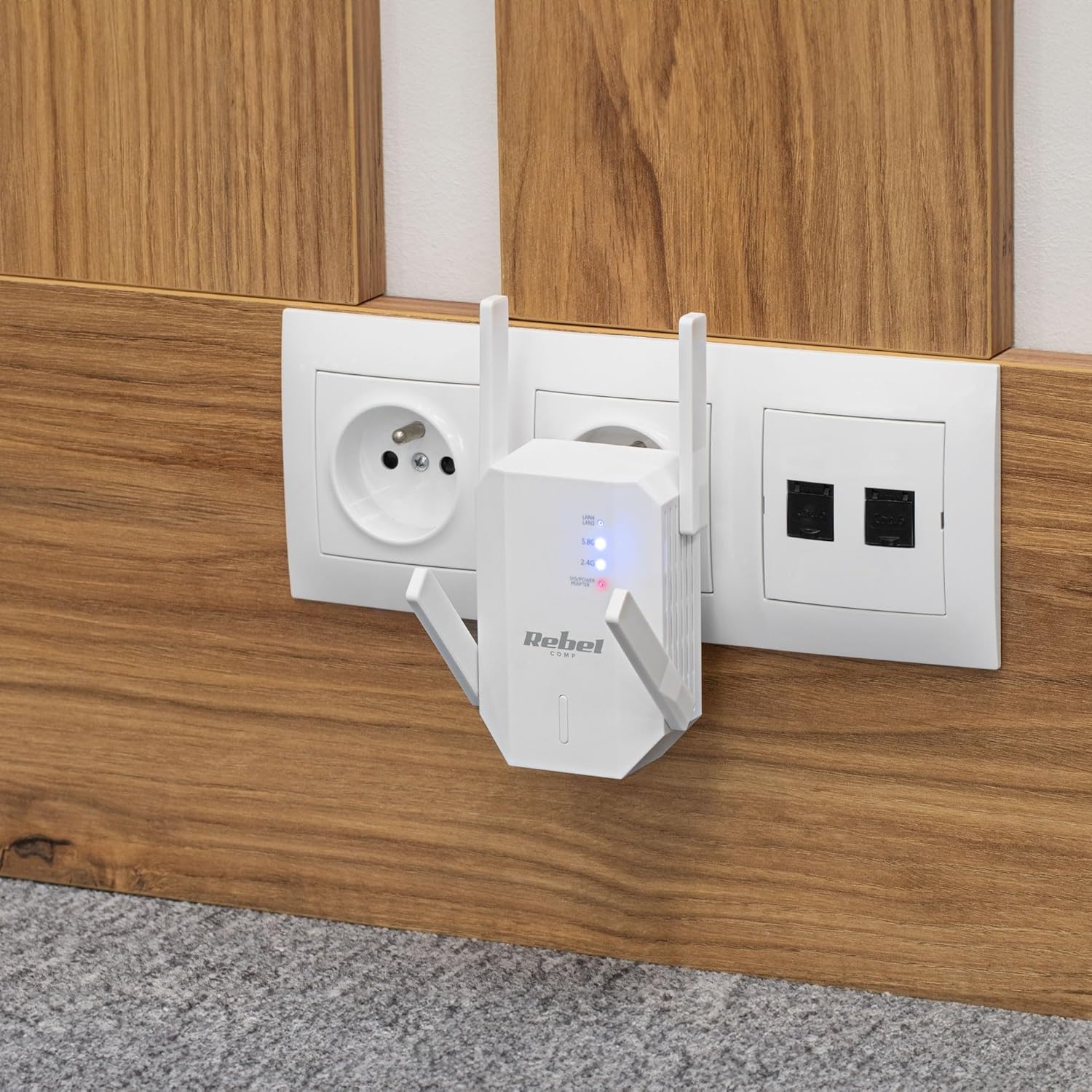
Slika 4.1: The Rebel KOM1031 Repeater plugged into a wall outlet, ready for configuration.
4.2. Connecting to the Repeater
- Bežično povezivanje: On your computer or mobile device, search for available Wi-Fi networks. Connect to the network named "Rebel_XXXX" or similar (check the label on the device for the default SSID). No password is required for the initial connection.
- Pristup Web Interfejs: Otvori a web browser (e.g., Chrome, Firefox, Edge) and enter the default IP address or domain name (usually 192.168.10.1 or rebelrepeater.net) u adresnu traku. Pritisnite Enter.
- Prijava: When prompted, enter the default username and password (usually admin za oboje).
4.3. Configuration Wizard (Repeater Mode)
Most users will configure the device in Repeater Mode to extend an existing Wi-Fi network.
- Odaberite način rada repetitora: Na web interface, select "Repeater Mode" or "Wi-Fi Repeater" from the available options.
- Skeniranje mreža: The device will scan for available Wi-Fi networks. Select your main Wi-Fi network (SSID) from the list.
- Unesite lozinku: Enter the Wi-Fi password (security key) of your main router.
- Configure Repeater SSID (Optional): You can choose to keep the same SSID as your main network or create a new one (e.g., "MyHome_EXT"). It is recommended to use a different SSID to easily distinguish between networks.
- Primijeni postavke: Click "Apply" or "Save" to confirm your settings. The repeater will restart. This process may take a few minutes.
- Ponovo poveži: After the repeater restarts, disconnect from the repeater's default Wi-Fi network and connect to your newly configured extended network (e.g., "MyHome_EXT") using the password you entered.
Your Rebel KOM1031 Repeater should now be extending your Wi-Fi network. Check the signal strength in previously weak areas.
5. Načini rada
The Rebel KOM1031 supports multiple operating modes to suit various networking needs.
5.1. Režim repetitora (zadano)
In Repeater Mode, the device extends the coverage of an existing wireless network. It receives the wireless signal from your main router and re-transmits it, effectively expanding the Wi-Fi range. This is the most common mode for eliminating Wi-Fi dead zones.
5.2. Način rada pristupne tačke (AP)
In AP Mode, the device connects to a wired network (via an Ethernet cable) and broadcasts a new wireless network. This is useful for adding Wi-Fi capability to a wired-only network or creating a new Wi-Fi hotspot from a wired internet connection.
- Povežite Ethernet: Connect an Ethernet cable from your router or modem to one of the RJ45 ports on the KOM1031.
- Pristup Web Interfejs: Follow steps 4.2 to access the web interfejs.
- Odaberite AP način rada: Choose "AP Mode" or "Access Point" from the configuration options.
- Konfigurirajte Wi-Fi postavke: Set a new SSID (network name) and a strong password for your new wireless network.
- Primijeni postavke: Save the configuration. The device will restart and operate as an Access Point.
6. Održavanje
Pravilno održavanje osigurava dugotrajnost i optimalne performanse vašeg uređaja.
- čišćenje: Za čišćenje uređaja koristite meku, suhu krpu. Ne koristite tekuća sredstva za čišćenje ili aerosole.
- ventilacija: Ensure the device is placed in a well-ventilated area. Do not block the ventilation slots.
- Ažuriranja firmvera: Povremeno provjeravajte proizvođačeve website for firmware updates. Updating firmware can improve performance and security.
- Resetiranje: If the device malfunctions or you forget the login credentials, you can perform a factory reset. Locate the reset button (usually a small pinhole) and press it with a paperclip for 5-10 seconds while the device is powered on. The device will revert to factory default settings.
7. Otkrivanje problema
Ako naiđete na probleme, pogledajte sljedeće uobičajene probleme i rješenja.
7.1. Nema pristupa internetu nakon postavljanja
- Check Main Router: Provjerite da li vaš glavni ruter ima aktivnu internetsku vezu.
- Potvrdite lozinku: Double-check that you entered the correct Wi-Fi password for your main router during setup.
- Relocate Repeater: The repeater might be too far from your main router. Move it closer to ensure it receives a strong signal.
- Ponovo pokrenite uređaje: Restart your main router, the repeater, and your client devices.
7.2. Nemoguć pristup Web Stranica upravljanja
- Provjerite vezu: Ensure your device is connected to the repeater's Wi-Fi network (either the default "Rebel_XXXX" or your configured extended network).
- Potvrdite IP adresu: Confirm you are using the correct IP address (e.g., 192.168.10.1) or domain name (rebelrepeater.net).
- Obriši keš memoriju preglednika: Pokušajte očistiti svoje web keš memorije preglednika ili korištenje drugog preglednika.
- Vraćanje na tvorničke postavke: If all else fails, perform a factory reset (see Section 6. Maintenance) and try setting up again.
7.3. Weak Signal or Slow Speed
- Optimalni plasman: Ensure the repeater is placed optimally, roughly halfway between your router and the dead zone. Avoid physical obstructions like thick walls or metal objects.
- smetnje: Other electronic devices (microwaves, cordless phones) can cause interference. Try moving the repeater away from such devices.
- Podešavanje antene: Adjust the external antennas for better signal reception and transmission.
8. Tehničke specifikacije
| Feature | Detalj |
|---|---|
| Model | KOM1031 |
| Brand | Buntovnik |
| Čipset | MTK7612 |
| Wireless Standards | IEEE 802.11 a/b/g/n/ac |
| Frekvencijski opsezi | 2.4 GHz / 5 GHz (Dual-Band) |
| Brzina prijenosa podataka | Up to 300 Mbps (2.4 GHz), Up to 867 Mbps (5 GHz) |
| Antene | 4 External (2 dBi each) |
| Sigurnosni protokoli | WEP, WPA/WPA2, WPS (64/128 bit) |
| Ethernet portovi | 2x RJ45 (10/100 Mbps) |
| bežični domet | Up to 100 meters (environment dependent) |
| Napajanje | 110-240 V; 50/60 Hz; 2 A |
| Dimenzije | 87 x 63 x 55 mm |
| Težina | 76 g |
| Istovremeni korisnici | Podržava do 10 korisnika istovremeno |
9. Sigurnosne informacije
Molimo vas da pročitate i slijedite ove sigurnosne upute kako biste spriječili oštećenje uređaja ili ozljede.
- Ne izlažite uređaj vodi, vlazi ili ekstremnim temperaturama.
- Ne pokušavajte sami rastavljati ili popravljati uređaj. Za sve servisne radove obratite se kvalifikovanom osoblju.
- Ensure the power outlet used is easily accessible and provides the correct voltage (110-240V).
- Izbjegavajte postavljanje uređaja u blizini izvora topline ili na direktnom suncu.
- Držite uređaj podalje od djece i kućnih ljubimaca.
10. Garancija i podrška
For warranty information, technical support, or further assistance, please refer to the official Rebel website or contact your retailer. Please have your product model number (KOM1031) and purchase details ready when seeking support.


