1. Uvod
Thank you for choosing the ATUMTEK Wireless Bluetooth Camera Remote Shutter. This device allows you to remotely control your smartphone's camera for taking photos and videos, providing convenience for selfies, group shots, and stable long-exposure photography. This manual provides detailed instructions for setup, operation, and maintenance.

Image: Two ATUMTEK wireless Bluetooth camera remote shutters in white, with wrist straps.
Ključne karakteristike:
- Napredna Bluetooth 5.2 tehnologija: Ensures a stable and fast connection up to 10 meters (33 feet).
- Proširena kompatibilnost: Works with most iOS (iPhone) and Android smartphones.
- Long-Life Button Battery: Powered by a CR2032 battery (210mAh), capable of capturing over 20,000 photos.
- Kompaktan i prenosiv dizajn: Small dimensions (48.5mm x 33.7mm x 12.5mm) and lightweight (14g) for easy carrying.
- Detachable Wrist Strap: Provides added security and prevents loss.
2. Podešavanje
2.1 Raspakivanje
Prilikom otvaranja pakovanja, provjerite da li su sve komponente prisutne:
- ATUMTEK Wireless Bluetooth Camera Remote Shutter (2 units)
- Wrist Straps (2 units)
- Uputstvo za upotrebu

Image: The ATUMTEK product box and its contents: two white remote shutters, two wrist straps, and a user manual.
Video: Raspakivanje i gotovoview of the ATUMTEK Bluetooth Camera Remote Shutter, demonstrating its features and compact design.
2.2 Instalacija baterije
The remote shutter comes with a pre-installed CR2032 button battery. If replacement is needed, follow these steps:
- Pronađite odeljak za baterije na poleđini daljinskog upravljača.
- Use a small tool or coin to gently open the compartment.
- Umetnite novu CR2032 bateriju tako da pozitivna (+) strana bude okrenuta prema gore.
- Čvrsto zatvorite odeljak za baterije.

Image: Close-up of a CR2032 lithium battery, which powers the remote shutter.
3. Uputstvo za upotrebu
3.1 Uključivanje/isključivanje napajanja
- Za okretanje ON: Slide the power switch on the side of the remote to the 'ON' position. The blue LED indicator will flash.
- Za okretanje OFF: Slide the power switch to the 'OFF' position.
3.2 Bluetooth uparivanje
Follow these steps to pair your ATUMTEK remote shutter with your smartphone:
- Ensure the remote shutter is turned ON. The blue LED will rapidly flash for 7 seconds, then enter a slow flash state, indicating it's in pairing mode.
- Na svom pametnom telefonu idite na Postavke i omogućiti Bluetooth.
- Look for "ATUMTEK" in the list of available devices.
- Tap on "ATUMTEK" to connect. If prompted, select "Pair".
- Once successfully paired, the blue LED on the remote will turn off.
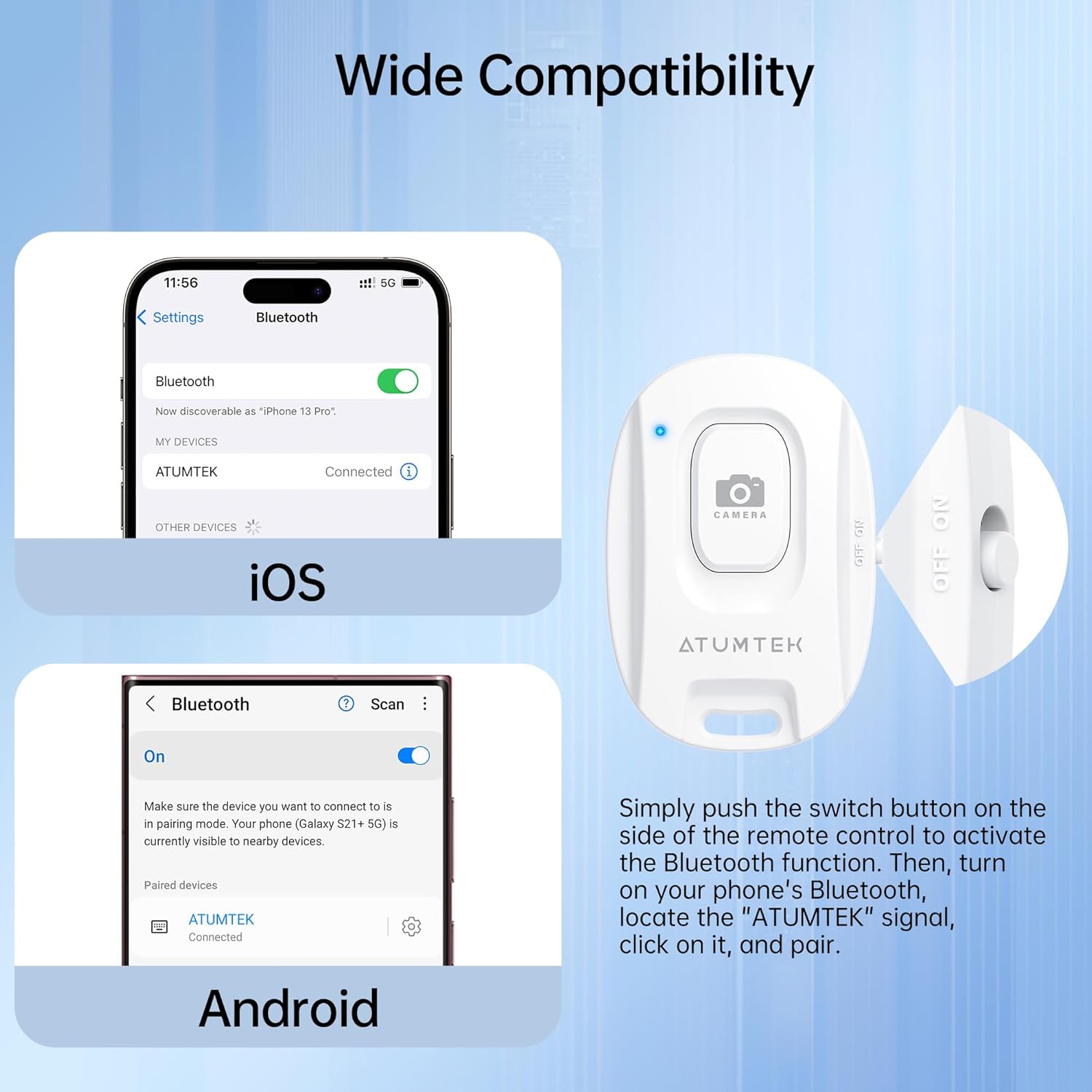
Image: Bluetooth pairing instructions for iOS and Android devices.
Video: Detailed instructions on how to pair the ATUMTEK remote shutter with iOS and Android devices, and how to use its functions for photos and videos.
3.3 Snimanje fotografija i videa
- Otvorite aplikaciju kamere na svom pametnom telefonu.
- Ensure the camera app is in the desired mode (Photo or Video).
- Pritisnite CAMERA button on the remote shutter once to take a photo or start/stop video recording.
3.4 Status LED indikatora
- Rapid Flashing (7 seconds after power on): Initial pairing mode.
- Sporo treperi: Standby state, ready for pairing.
- Off (after pairing): Successfully connected to a device.
- Off (after 5 minutes of no operation): Enters sleep mode to conserve battery.
- Brief Light-up (when pressing button in sleep mode): Remote is waking up and re-entering pairing mode.
- Niska baterija: The LED will turn off, and the connection may be lost. Replace the battery.
4. Održavanje
4.1 Zamjena baterije
The remote uses a CR2032 button battery. When the battery is low or depleted, replace it as described in Section 2.2. A fresh battery can last for over 20,000 photos.
4.2 Čišćenje
To clean the remote shutter, use a soft, dry cloth. Avoid using harsh chemicals or abrasive materials, as these may damage the device.
5. Otkrivanje problema
5.1 Remote Not Pairing
- Provjerite snagu: Ensure the remote is turned ON.
- Check Bluetooth on Phone: Provjerite je li Bluetooth omogućen na vašem pametnom telefonu.
- Nivo baterije: A low battery can prevent successful pairing. Replace the CR2032 battery if necessary.
- Udaljenost: Ensure the remote is within 10 meters (33 feet) of your smartphone.
- smetnje: Move away from other Bluetooth devices or strong electromagnetic fields.
5.2 Remote Not Taking Photos/Videos
- Camera App Open: The remote only functions when your smartphone's camera application is open and active.
- Android Specific Setting: For some Android devices (e.g., Samsung Galaxy S25 Ultra), you may need to adjust a camera setting. Go to Camera app > Quick controls icon (four small dots) > Settings icon > Shooting methods > Press Volume buttons to > Choose "Take pictures or record video".
- Nivo baterije: Provjerite da baterija nije prazna.
6. Specifikacije
| Broj modela | ATYK179 |
| Dimenzije proizvoda | 48.5 mm x 33.7 mm x 12.5 mm (1.89 x 1.18 x 0.39 inča) |
| Težina artikla | 1.41 unci (otprilike 40 g) |
| Bluetooth verzija | 5.2 |
| bežični domet | Do 10 metara (33 stope) |
| Vrsta baterije | CR2032 Lithium Button Battery (included) |
| Kapacitet baterije | 210mAh |
| Trajanje baterije | Over 20,000 photos |
| Kompatibilni uređaji | Most iOS (iPhone, iPad) and Android smartphones/tablets |
7. Garancija i podrška
7.1 Informacije o garanciji
ATUMTEK offers a warranty for all its branded products when purchased through authorized channels. Please retain your proof of purchase for warranty claims.
7.2 Korisnička podrška
For further assistance, troubleshooting, or to provide feedback, please visit the official ATUMTEK store or contact customer service through the platform where you purchased the product.
Official ATUMTEK Store: ATUMTEK Store on Amazon


