Uvod
Welcome to the iRobot Roomba i1 (1152) Robot Vacuum user manual. This guide provides essential information for setting up, operating, maintaining, and troubleshooting your robot vacuum. The Roomba i1 is designed to efficiently clean hard floors and carpets, utilizing Wi-Fi connected mapping technology to navigate your home.
Važne informacije o sigurnosti
Before using your Roomba i1 robot vacuum, please read all safety instructions carefully. Failure to follow these instructions may result in electric shock, fire, or serious injury.
- Ovaj uređaj mogu koristiti djeca starija od 8 godina i osobe sa smanjenim fizičkim, senzornim ili mentalnim sposobnostima ili nedostatkom iskustva i znanja ako su pod nadzorom ili upute o korištenju uređaja na siguran način i razumiju opasnosti koje su uključene. .
- Children should not play with the appliance. Cleaning and user maintenance shall not be made by children without supervision.
- Koristite samo onako kako je opisano u ovom priručniku.
- Nemojte koristiti na otvorenom ili na mokrim površinama.
- Ne dozvoliti da se koristi kao igračka. Posebna pažnja je neophodna kada se koristi od strane dece ili u blizini.
- Ne koristite uređaj s oštećenim kablom ili utikačem. Ako uređaj ne radi kako bi trebao, ako je pao, oštećen, ostavljen na otvorenom ili je pao u vodu, vratite ga u servisni centar.
- Nemojte vući niti nositi za kabl, koristiti kabl kao ručku, zatvarati vrata na kablu ili vući kabl oko oštrih ivica ili uglova. Ne prebacujete uređaj preko kabla. Držite kabl dalje od zagrejanih površina.
- Ne isključujte utikač povlačenjem za kabl. Za isključivanje, uhvatite utikač, a ne kabl.
- Nemojte rukovati utikačem ili uređajem mokrim rukama.
- Ne stavljajte nikakve predmete u otvore. Ne koristite sa blokiranim otvorom; čistite od prašine, dlačica, dlačica i svega što može smanjiti protok zraka.
- Držite kosu, široku odjeću, prste i sve dijelove tijela dalje od otvora i pokretnih dijelova.
- Ne uzimajte ništa što gori ili dimi, kao što su cigarete, šibice ili vrući pepeo.
- Nemojte koristiti za usisavanje zapaljivih ili zapaljivih tečnosti, kao što je benzin, niti koristiti u područjima gdje bi mogle biti prisutne.
- Nemojte koristiti bez vrećice za prašinu i/ili filtera na mjestu.
- Spriječite nenamjerno pokretanje. Uvjerite se da je prekidač u isključenom položaju prije povezivanja na bateriju, podizanja ili nošenja uređaja.
- Punite samo punjačem koji je odredio proizvođač. Punjač koji je prikladan za jednu vrstu baterije može stvoriti opasnost od požara kada se koristi s drugim paketom baterija.
- Koristite uređaje samo sa posebno određenim baterijama. Upotreba drugih baterija može stvoriti opasnost od ozljeda i požara.
- Kada se baterija ne koristi, držite je dalje od drugih metalnih predmeta, kao što su spajalice, novčići, ključevi, ekseri, zavrtnji ili drugi mali metalni predmeti, koji mogu uspostaviti vezu s jednog terminala na drugi. Kratak spoj polova baterije može uzrokovati opekotine ili požar.
- U lošim uslovima, tečnost može da izađe iz baterije; izbegavajte kontakt. Ako slučajno dođe do kontakta, isperite vodom. Ako tečnost dođe u kontakt sa očima, dodatno potražite medicinsku pomoć. Tečnost izbačena iz baterije može izazvati iritaciju ili opekotine.
- Nemojte koristiti bateriju ili uređaj koji je oštećen ili modificiran. Oštećene ili modificirane baterije mogu pokazati nepredvidivo ponašanje koje rezultira požarom, eksplozijom ili rizikom od ozljeda.
- Ne izlažite bateriju ili uređaj vatri ili previsokoj temperaturi. Izlaganje vatri ili temperaturi iznad 130°C (265°F) može uzrokovati eksploziju.
- Slijedite sva uputstva za punjenje i ne punite bateriju ili uređaj izvan temperaturnog raspona navedenog u uputama. Nepravilno punjenje ili na temperaturama izvan navedenog raspona može oštetiti bateriju i povećati rizik od požara.
- Neka servis obavlja kvalifikovana osoba za popravku koristeći samo identične zamjenske dijelove. To će osigurati očuvanje sigurnosti proizvoda.
- Nemojte modificirati niti pokušavati popravljati uređaj ili bateriju (ako je primjenjivo) osim kako je navedeno u uputama za upotrebu i njegu.
Sadržaj paketa
Verify that all original components are included in your package:
- iRobot Roomba i1 robotski usisivač
- Stanica za punjenje kućne baze
- Line Cord
- 1 litijum-jonska baterija (unapred instalirana)
- Bočna četka
- Filter (Cloth Type)
- Dual Multi-Surface Rubber Brushes
Setup
Follow these steps to set up your Roomba i1 robot vacuum for first use:
- Odaberite lokaciju za kućnu bazu: Place the Home Base charging station against a wall in an open, uncluttered area. Ensure there is at least 1.5 feet (0.5 meters) of clear space on each side of the Home Base and 4 feet (1.2 meters) in front of it.
- Povežite kabl za napajanje: Plug the line cord into the Home Base and then into a wall outlet. Ensure the Home Base is powered on.
- Napunite robota: Place your Roomba i1 onto the Home Base. The robot will emit a tone to confirm it is properly docked and charging. Allow the robot to charge for at least 3 hours before its first cleaning mission. The light ring around the CLEAN button will pulse white while charging and turn solid white when fully charged.
- Preuzmite iRobot Home aplikaciju: For full functionality, download the iRobot Home App on your smartphone or tablet. The app will guide you through connecting your robot to your Wi-Fi network and setting up cleaning schedules.
- Povežite se na Wi-Fi: Follow the in-app instructions to connect your Roomba i1 to your home Wi-Fi network. This enables smart features like mapping, scheduling, and integration with voice assistants.

Operating Your Roomba i1
Your Roomba i1 is designed for intelligent and efficient cleaning. Here's how to operate it:
Početak posla čišćenja
- Using the CLEAN Button: Press the large CLEAN button on top of the robot once to wake it up, then press it again to start a cleaning cycle.
- Korištenje aplikacije iRobot Home: Open the app and tap the "CLEAN" button to start a cleaning job from anywhere. You can also schedule cleaning times and customize cleaning preferences through the app.
- upravljanje glasom: The Roomba i1 is compatible with Google Home. Once connected via the iRobot Home App, you can use voice commands like "Hey Google, ask Roomba to start cleaning."
Karakteristike čišćenja
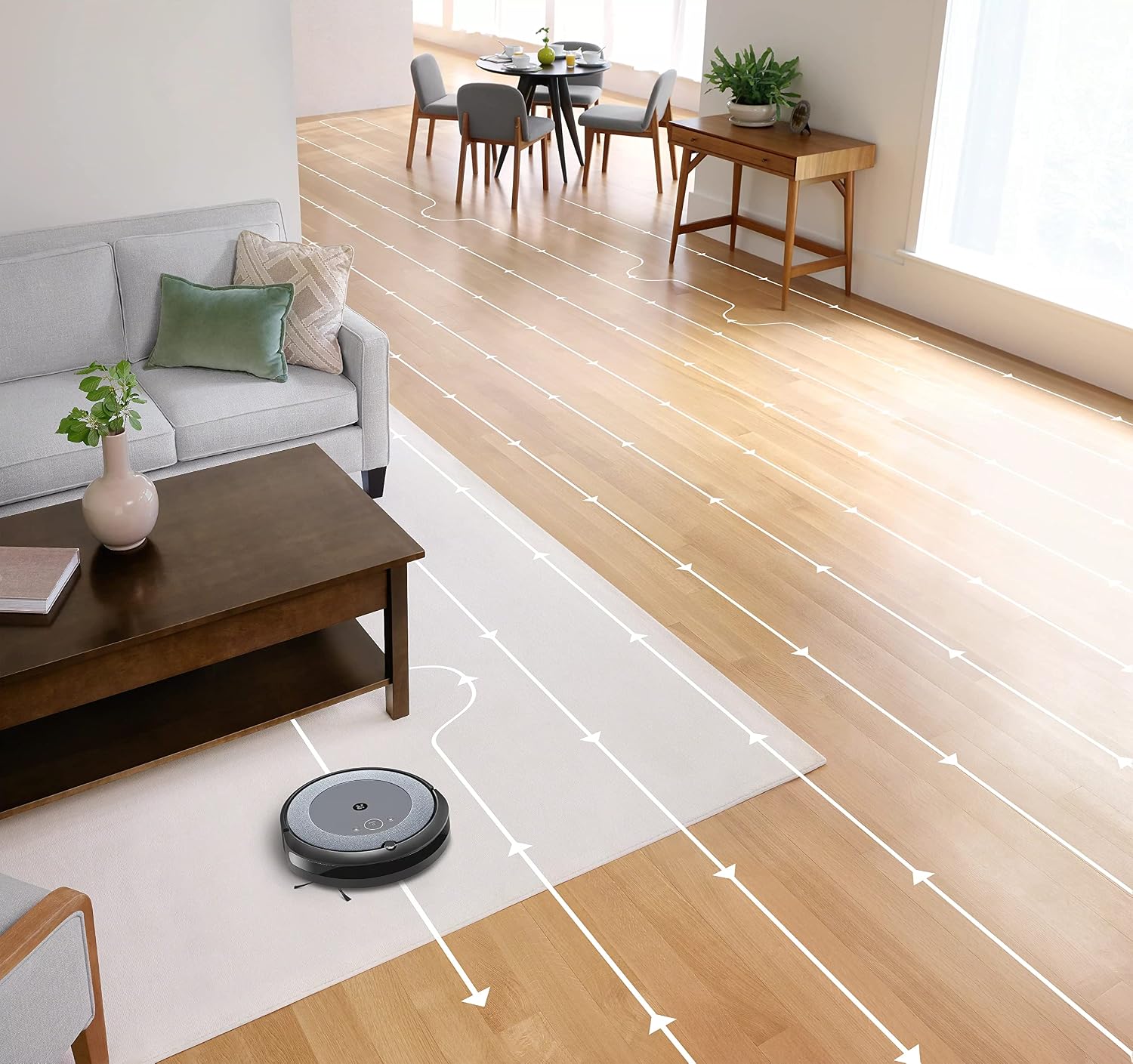
- Inteligentna navigacija: The robot cleans in neat, efficient rows, adapting to different floor types including carpets and hard floors.
- Dual Multi-Surface Rubber Brushes: These brushes are designed to prevent tangles with pet hair and effectively pick up dirt and debris from various surfaces.
- Dirt Detect™ Technology: The robot uses acoustic and optical sensors to find dirtier areas and spends more time cleaning them.
- Automatic Dirt Disposal (with compatible Clean Base): If you have a compatible Clean Base (sold separately), the robot will automatically empty its dustbin into an enclosed bag, allowing for weeks of hands-free cleaning.


Održavanje
Regular maintenance ensures your Roomba i1 operates at peak performance. Always turn off the robot and disconnect it from the Home Base before performing any maintenance.
Pražnjenje kante za prašinu
- Pritisnite dugme za otpuštanje kante i izvucite kantu.
- Otvorite vrata kante za smeće i ispraznite otpad u kantu za smeće.
- Tap the bin against the trash can to dislodge any trapped debris.
Cleaning the Filter (Cloth Type)
- Uklonite filter iz kante za prašinu.
- Tap the filter against a trash can to remove debris. Do not wash the filter.
- Replace the filter every 2 months, or more frequently if you have pets.
Čišćenje četkica
- Pinch the yellow brush release tabs to lift the brush frame.
- Remove the brushes and remove any hair or debris wrapped around them or trapped beneath the yellow caps.
- Vratite četkice na mjesto, pazeći da kliknu.
Čišćenje bočne četke
- Use a coin or small screwdriver to remove the screw holding the side brush.
- Remove the side brush and clean any hair or debris from the brush and its post.
- Vratite bočnu četku i zategnite vijak.
Čišćenje senzora i kontakata za punjenje
- Wipe the charging contacts on the robot and Home Base with a clean, dry cloth.
- Wipe the cliff sensors (located on the bottom of the robot) and the front bumper sensor window with a clean, dry cloth.
Rješavanje problema
If your Roomba i1 encounters an issue, the robot will play an audible alert and the light ring around the CLEAN button will flash. Consult the iRobot Home App for specific error messages and solutions.
Uobičajeni problemi i rješenja:
- Robot se ne puni: Ensure the Home Base is plugged in and the robot is properly docked. Clean the charging contacts on both the robot and Home Base.
- Robot stuck or trapped: Clear obstacles from the robot's path. If it frequently gets stuck in the same area, consider using Virtual Wall Barriers (sold separately) or adjusting furniture.
- Loše performanse čišćenja: Empty the dust bin, clean or replace the filter, and clean the main brushes and side brush. Ensure the robot's sensors are clean.
- Robot se ne povezuje na Wi-Fi: Ensure your Wi-Fi router is on and within range. Restart your router and the robot. Follow the Wi-Fi setup instructions in the iRobot Home App again.
- Robot ispušta neobične zvukove: Check the brushes and wheels for any trapped debris or hair. Clean them thoroughly.
For more detailed troubleshooting, refer to the iRobot Home App or the iRobot support website.
Specifikacije
| Brand | iRobot |
| Naziv modela | Roomba i1 (1152) |
| Posebna karakteristika | Smart, Wi-Fi Connected Mapping |
| Boja | Crna/Siva |
| Uključene komponente | Robot Vacuum, Home Base, Line Cord, Battery, Side Brush, Filter, Dual Multi-Surface Rubber Brushes |
| Filter Type | Cloth |
| Izvor napajanja | Battery Powered |
| Baterije | 1 litijum-jonska baterija (uključena) |
| Kontrolni metod | App |
| Kompatibilni uređaji | Google Home |
| Form Factor | Robotski |
| Dimenzije proizvoda | 13.5 x 3.6 x 13.4 inča |
| Težina artikla | 13.2 funte |
| Surface Recommendation | Tepisi, tvrdi podovi |
| UPC | 657768820809 |
| ASIN | B0CPQ3RVDK |
Garancija i podrška
This product is sold as a renewed item. Please refer to the specific warranty terms provided by the seller or Amazon Renewed at the time of purchase. For technical support, troubleshooting assistance, or to purchase replacement parts, please visit the official iRobot support website or contact iRobot customer service. You can also find helpful resources within the iRobot Home App.
Online podrška: www.irobot.com/support