1. Uvod
This user manual provides comprehensive instructions for the setup, operation, and maintenance of your IPEVO VC-Z4K UHD 4K PTZ Camera. The VC-Z4K is designed to enhance educational and worship spaces with its 4K UHD resolution and 8.29-MP Sony CMOS sensor. It features advanced pan-tilt-zoom capabilities, AI auto-tracking, and a powerful 12X Optical + 15X Digital Zoom, making it ideal for capturing detailed and engaging remote sessions. Its AI functionality helps minimize the need for additional personnel, and its easy setup allows seamless integration with popular platforms like YouTube, OBS, and Zoom.
2. Sigurnosne informacije
Please read and understand all safety instructions before using the IPEVO VC-Z4K camera to prevent injury or damage to the device. Keep this manual for future reference.
- Izvor napajanja: Use only the provided power adapter. Ensure the power outlet meets the camera's voltage zahtjeve.
- ventilacija: Do not block ventilation openings. Ensure adequate airflow around the camera to prevent overheating.
- Okruženje: Avoid exposing the camera to water, moisture, extreme temperatures, or direct sunlight. Operate in a clean, dry environment.
- Rukovanje: Pažljivo rukujte kamerom. Ne ispuštajte je niti je izlažite jakim vibracijama.
- čišćenje: Isključite napajanje prije čišćenja. Koristite meku, suhu krpu. Ne koristite tekuća ili aerosolna sredstva za čišćenje.
- servisiranje: Ne pokušavajte sami rastavljati ili popravljati kameru. Sve servisne radove prepustite kvalifikovanom osoblju.
3. Sadržaj paketa
Provjerite da li se u vašem paketu nalaze sve dolje navedene stavke:
- IPEVO VC-Z4K Camera
- Power adapter (8.2 ft / 2.5 m)
- USB 3.0 cable (4.9 ft / 1.5 m)
- RS232 cable (6.5 ft / 2 m)
- Daljinski upravljač (baterija nije uključena)
- Uputstvo za upotrebu (ovaj dokument)
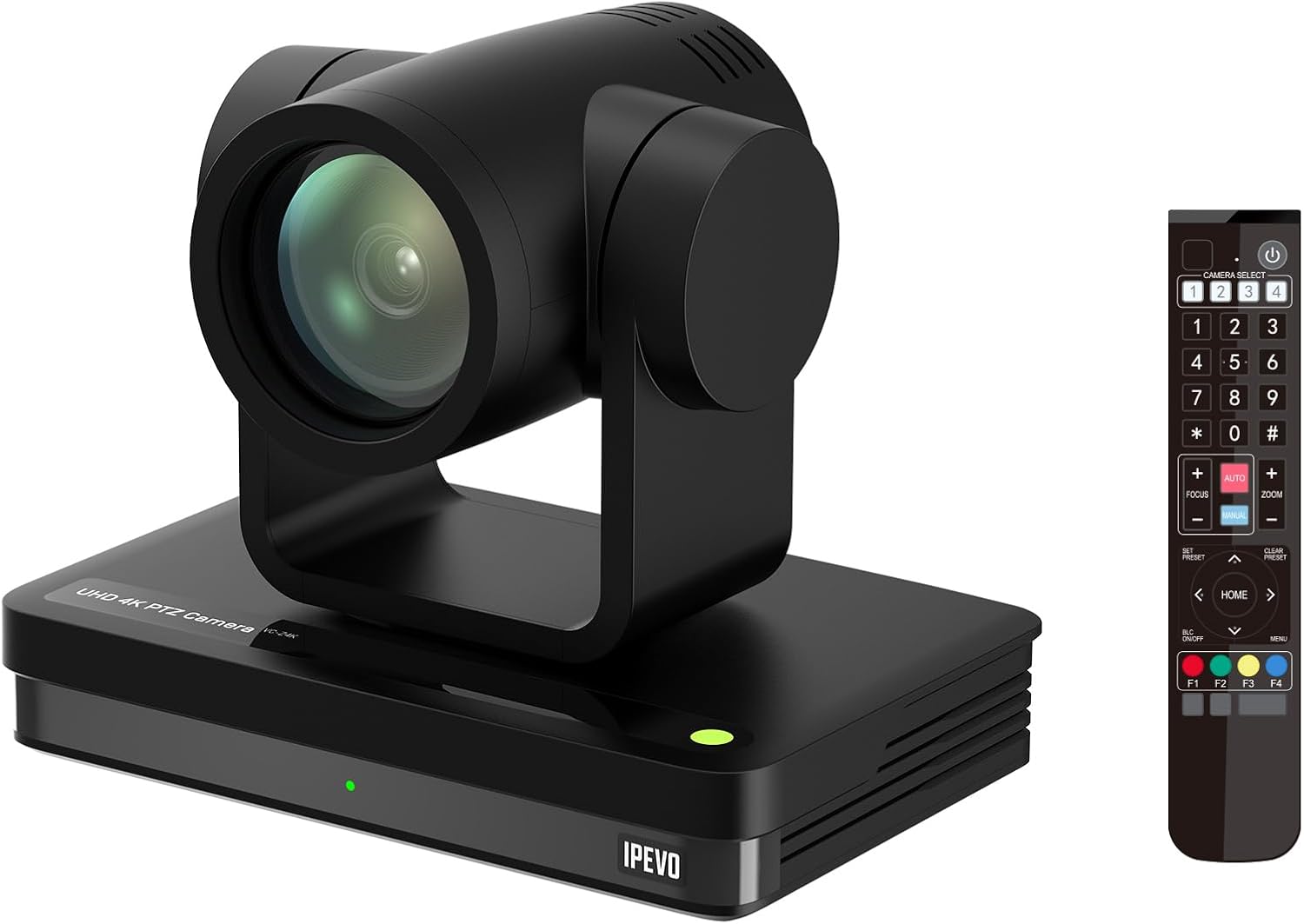
Image: The IPEVO VC-Z4K camera unit shown alongside its remote control, illustrating the main components included in the package.
4. Proizvod je gotovview
4.1 Ključne karakteristike
- 4K Ultra HD rezolucija: Equipped with a 1/2.8" HD CMOS sensor for stunning 4K video output.
- 12X optički zum: Provides clear, detailed close-ups without loss of quality.
- Automatsko praćenje umjetnom inteligencijom: Automatically follows speakers or presenters, ensuring they remain in frame.
- Fleksibilno povezivanje: Features HDMI, USB-C, LAN (PoE), and SDI outputs for versatile integration.
- Wide Pan and Tilt Range: Offers 340° pan and 120° tilt for comprehensive room coverage.
- Napredno smanjenje buke: 2D/3D noise reduction ensures clear video in various lighting conditions.
4.2 Camera Components and Ports

Slika: Stražnja strana view of the IPEVO VC-Z4K camera showing its various connectivity ports including USB 3.0, HDMI, SDI, LAN (PoE), and power input.
The VC-Z4K camera features a range of ports for diverse connectivity options:
- HDMI izlaz: For high-definition video output to displays or capture devices.
- USB-C priključak: For direct connection to computers for video and control.
- LAN (PoE) Port: For network connectivity and Power over Ethernet, simplifying installation.
- SDI izlaz: Za profesionalne video radne procese koji zahtijevaju duže kablove.
- RS232 port: For serial control via external control systems.
- Ulazna snaga: Za spajanje priloženog adaptera za napajanje.
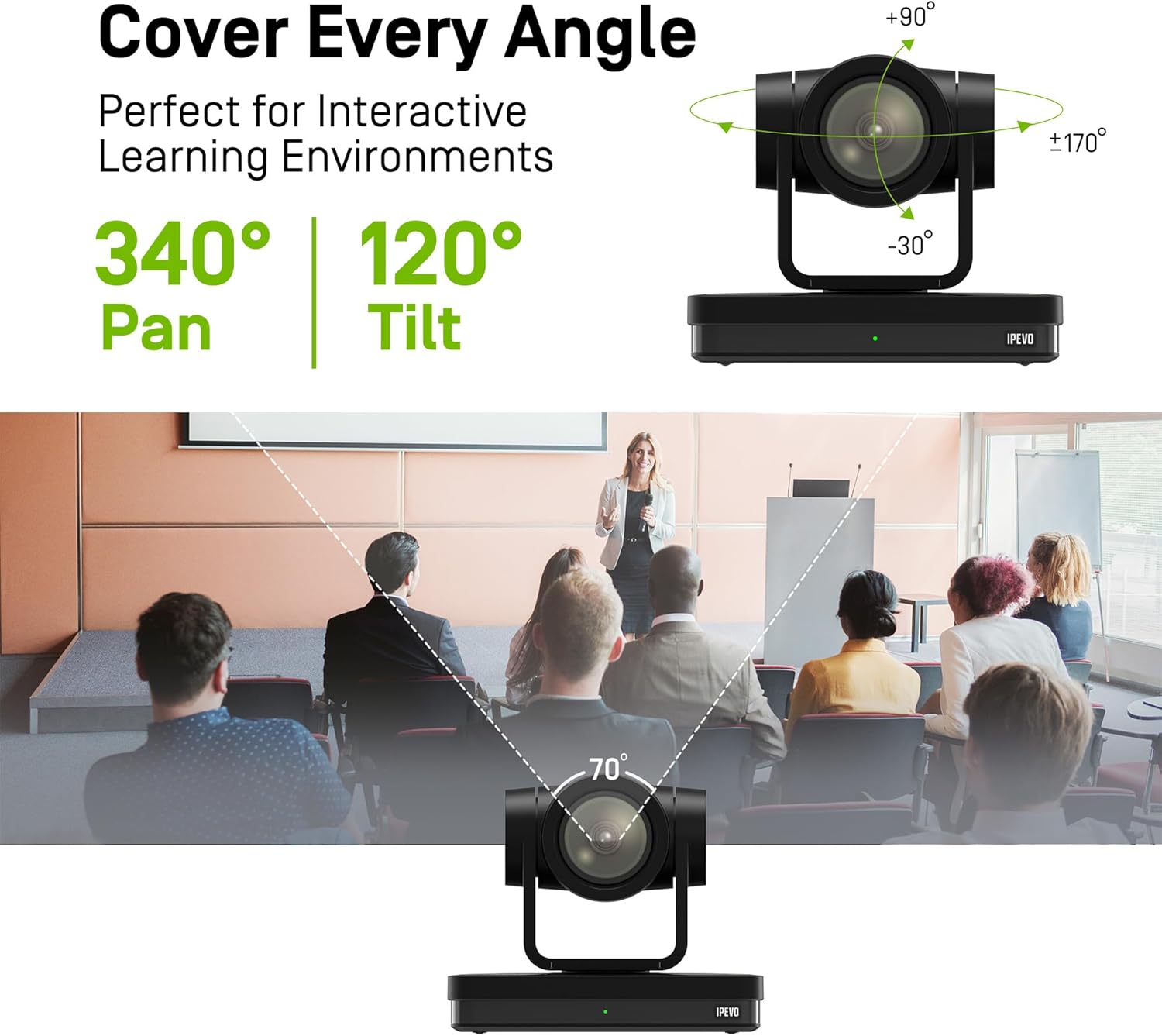
Image: Diagram illustrating the IPEVO VC-Z4K camera's pan (340°) and tilt (120°) ranges, highlighting its ability to cover a wide area.
The camera's motorized head allows for precise pan and tilt movements, enabling comprehensive coverage of your space. The pan range is 340 degrees, and the tilt range is 120 degrees (-30° to +90°).
5. Podešavanje
Follow these steps for the initial setup of your IPEVO VC-Z4K camera:
- plasman: Choose a stable surface or mount the camera securely in your desired location. Ensure it has a clear line of sight to the area you wish to capture.
- Priključak za napajanje:
- Korištenje adaptera za napajanje: Connect the provided power adapter to the camera's power input port and then plug it into a wall outlet.
- Korištenje PoE (napajanje preko Etherneta): If your network switch supports PoE, connect an Ethernet cable from the PoE-enabled switch to the camera's LAN (PoE) port. This will provide both power and network connectivity.
- Video Output Connection (Choose one or more):
- HDMI: Connect an HDMI cable from the camera's HDMI output to a display, projector, or video capture card.
- USB-C: Connect the USB 3.0 cable from the camera's USB-C port to a USB 3.0 port on your computer. This enables the camera as a webkamera za aplikacije za video konferencije.
- LAN: Connect an Ethernet cable from the camera's LAN port to your network router or switch for IP streaming and control.
- SDI: Connect an SDI cable from the camera's SDI output to a professional video switcher or recorder.
- Podešavanje daljinskog upravljača: Insert two AAA batteries (not included) into the remote control. The remote control is essential for initial configuration and operation.
- Uključeno: Once all connections are secure, power on the camera. The indicator light will illuminate.
6. Uputstvo za upotrebu
6.1 Basic Camera Control (via Remote Control)
- Pan/Tilt: Use the directional arrows on the remote control to move the camera horizontally (pan) and vertically (tilt).
- zumiranje: Use the 'ZOOM +' and 'ZOOM -' buttons to adjust the optical zoom.
- Fokus: Press 'AUTO FOCUS' for automatic focus. Use 'FOCUS +' and 'FOCUS -' for manual adjustment if needed.
- Unaprijed postavljene postavke: The camera supports up to 255 presets. You can save and recall up to 10 presets directly from the remote control using the number buttons (0-9). To save a preset, position the camera, then press 'PRESET' followed by a number (e.g., '1'). To recall, press the number button.

Image: The IPEVO VC-Z4K camera demonstrating its 12X optical zoom capability, highlighting its 8.29-MP Sony CMOS sensor for high-quality video.
6.2 AI automatsko praćenje
The VC-Z4K features advanced AI auto-tracking to keep a presenter or subject automatically in frame.
- Enabling Tracking: Refer to the remote control or camera's web interface for specific buttons or settings to activate AI tracking.
- Praćenje zone: Configure specific zones within the camera's view where tracking should occur.
- Praćenje izlagača: The camera can identify and follow a designated presenter as they move within the defined area.

Image: A visual representation of the IPEVO VC-Z4K's AI auto-tracking and auto-focus features, showing how it maintains focus on a moving subject in a classroom setting.
6.3 Integration with Platforms
The VC-Z4K seamlessly integrates with various video conferencing and streaming platforms:
- USB veza: When connected via USB-C, the camera will be recognized as a standard webcam by applications like Zoom, OBS Studio, Microsoft Teams, Google Meet, GoTo Meeting, and Skype. Select "IPEVO VC-Z4K" as your video input device within the application settings.
- LAN/IP Streaming: For advanced streaming setups, use the LAN connection to stream video via RTSP/RTMP protocols to platforms like YouTube Live or OBS Studio. Refer to the camera's web interface for IP configuration and streaming settings.
7. Održavanje
Proper maintenance ensures the longevity and optimal performance of your IPEVO VC-Z4K camera.
- Čišćenje sočiva: Koristite meku krpu koja ne ostavlja dlačice, posebno dizajniranu za optička sočiva. Nježno obrišite sočivo kako biste uklonili prašinu ili mrlje. Izbjegavajte upotrebu abrazivnih materijala ili jakih hemikalija.
- Čišćenje tijela: Obrišite kućište fotoaparata mekom, suhom krpom. Za tvrdokornu prljavštinu, laganoampen the cloth with water, then wipe dry immediately. Do not allow liquids to enter the camera.
- Skladištenje: Kada se kamera ne koristi duži period, čuvajte je na hladnom i suhom mjestu, dalje od direktne sunčeve svjetlosti i ekstremnih temperatura.
- Ažuriranja firmvera: Periodically check the IPEVO official website for firmware updates. Keeping your camera's firmware up-to-date can improve performance and add new features.
8. Otkrivanje problema
If you encounter issues with your IPEVO VC-Z4K camera, refer to the following common problems and solutions:
| Problem | Mogući uzrok | Rješenje |
|---|---|---|
| Nema napajanja/Kamera se ne uključuje | Power adapter not connected or faulty; no PoE connection. | Ensure power adapter is securely connected and plugged into a working outlet. If using PoE, verify the network switch is PoE-enabled and the Ethernet cable is functional. |
| Nema video izlaza | Incorrect cable connection; wrong input selected on display; software issue. | Check HDMI, USB-C, LAN, or SDI cable connections. Ensure the display is set to the correct input source. Restart the computer/application if connected via USB. |
| Daljinski upravljač ne radi | Baterije su prazne ili su nepravilno umetnute; IR senzor je blokiran. | Replace batteries (AAA). Ensure batteries are inserted with correct polarity. Point the remote directly at the camera's IR receiver. |
| AI tracking not functioning | Tracking feature not enabled; subject out of tracking range; poor lighting. | Activate AI tracking via remote or web interface. Ensure the subject is within the optimal tracking area. Improve lighting conditions if too dark. |
| Poor video quality (blurry, noisy) | Lens is dirty; focus issue; low light conditions; network bandwidth. | Clean the lens. Adjust focus manually or use auto-focus. Ensure adequate lighting. For IP streaming, check network bandwidth and camera's streaming settings. |
9. Specifikacije
Detailed technical specifications for the IPEVO VC-Z4K UHD 4K PTZ Camera:
| Dimenzije proizvoda | 7.1 x 5.9 x 4.5 inča |
| Težina artikla | 2.64 funte |
| Broj modela stavke | CDCU-06IP |
| Tehnologija foto senzora | CMOS (1/2.8" HD CMOS Sensor) |
| Rezolucija video snimanja | 4K UHD |
| Optički zum | 12X |
| Digitalni zum | 15X |
| Maksimalni otvor blende | 2.8 milimetara |
| Tehnologija povezivanja | USB, HDMI, LAN (PoE), SDI, RS232 |
| Posebne karakteristike | AI Tracking and Auto Focus, Low Noise and High SNR, Multiple Presets (up to 255) |
| Boja | Crna |
| Proizvođač | IPEVO |
10. Garancija i podrška
IPEVO products are designed for reliability and performance. For warranty information, technical support, or service inquiries, please visit the official IPEVO webweb-mjesto ili direktno kontaktirajte njihovu korisničku podršku. Sačuvajte račun kao dokaz o kupovini za reklamacije u slučaju garancije.
Za dalju pomoć posjetite: www.ipevo.com


