1. Uvod
Hvala na kupoviniasing the Sharp Plasmacluster Humidifying Air Purifier, Model KC-35T7. This manual provides essential information for the safe and efficient operation, maintenance, and troubleshooting of your new appliance. Please read this manual thoroughly before use and keep it for future reference.
This advanced air purifier is designed to improve your indoor air quality by reducing harmful gases such as formaldehyde and other Volatile Organic Compounds (VOCs). It features a powerful purification function, integrated humidification, and a convenient display for humidity and temperature.
2. Sigurnosne informacije
To ensure safe operation and prevent damage to the product or injury to yourself and others, please observe the following safety precautions:
- Always use the appliance with the correct voltage kako je navedeno na naljepnici s karakteristikama.
- Ne blokirajte otvore za usis ili izlaz zraka.
- Do not insert fingers or objects into any openings.
- Unplug the appliance before cleaning, performing maintenance, or when not in use for extended periods.
- Do not operate the appliance near flammable gases or combustible materials.
- Keep the appliance away from water and moisture. Do not immerse the unit in water.
- Ensure the water tank is properly installed before operating the humidification function. Use only clean tap water in the water tank.
- Ovaj uređaj nije namijenjen za upotrebu od strane osoba (uključujući djecu) sa smanjenim fizičkim, senzornim ili mentalnim sposobnostima, ili nedostatkom iskustva i znanja, osim ako im je dat nadzor ili upute o korištenju uređaja od strane osobe odgovorne za njihovu sigurnost.
3. Identifikacija dijelova
Familiarize yourself with the main components of your Sharp Plasmacluster Humidifying Air Purifier:

Slika 3.1: Prednja strana View of the Air Purifier. This image displays the main body of the Sharp KC-35T7 air purifier, highlighting the control panel at the top, the air intake grille, and the Plasmacluster logo. The unit is white with black accents on the sides.
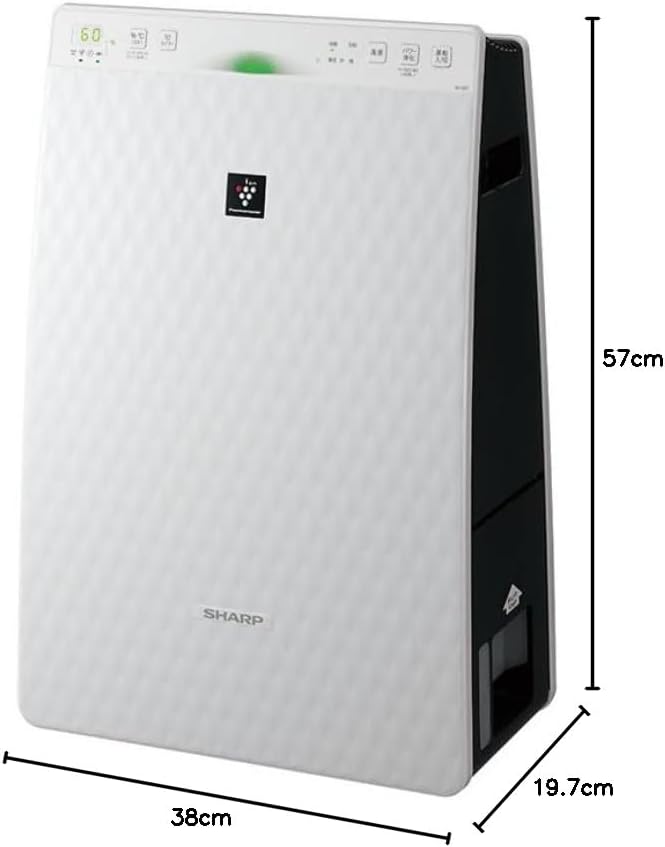
Figure 3.2: Air Purifier with Dimensions. Ova slika pruža perspektivu view of the Sharp KC-35T7, illustrating its approximate dimensions: 38 cm (width), 19.7 cm (depth), and 57 cm (height). These measurements are crucial for proper placement and space planning.
Ključne komponente:
- Kontrolna tabla: Located on the top, with buttons for power, mode selection, fan speed, and display.
- Usis zraka: Located on the front and sides, where air is drawn into the unit.
- Izlaz zraka: Nalazi se na vrhu, gdje se ispušta pročišćeni i ovlaženi zrak.
- Spremnik za vodu: Uklonjivi rezervoar za ovlaživanje, obično smješten sa strane ili pozadi.
- Filteri: Internal filters (e.g., HEPA, deodorizing) for air purification.
4. Podešavanje
Follow these steps for the initial setup of your air purifier:
- Raspakivanje: Carefully remove the air purifier from its packaging. Retain the packaging materials for future transport or storage.
- Instalacija filtera: Open the rear panel of the unit. Remove all protective plastic bags from the filters (e.g., HEPA filter, deodorizing filter) and install them according to the markings inside the unit. Ensure they are securely in place. Close the rear panel.
- Fill Water Tank (for Humidification): Remove the water tank from the unit. Open the water tank cap and fill it with clean tap water up to the maximum fill line. Close the cap securely and reinsert the water tank into the unit until it clicks into place.
- plasman: Place the air purifier on a flat, stable surface, ensuring there is adequate space (at least 20 cm) around the air intake and outlet for optimal airflow. Avoid placing it directly against a wall or near heat sources.
- Priključak za napajanje: Uključite kabl za napajanje u odgovarajuću električnu utičnicu.
5. Uputstvo za upotrebu
Learn how to operate your Sharp Plasmacluster Humidifying Air Purifier:
Uključivanje/isključivanje:
- Pritisnite Snaga dugme na kontrolnoj ploči da biste uključili ili isključili uređaj.
Odabir načina rada:
Uređaj obično nudi nekoliko načina rada:
- Automatski režim: The unit automatically adjusts fan speed and humidification based on detected air quality and humidity levels.
- Način pročišćavanja zraka: Operates solely as an air purifier.
- Humidification Mode: Operates with humidification function active.
- Plasmacluster Spot Mode: Concentrates Plasmacluster ions for targeted deodorization or purification.
Pritisnite Mode button repeatedly to cycle through available modes.
Podešavanje brzine ventilatora:
Adjust the fan speed to your preference:
- Pritisnite Brzina ventilatora button to select between Low, Medium, High, or Silent settings.
Humidity/Temperature Display:
The display shows current room humidity and temperature. This information helps you monitor your indoor environment and adjust settings as needed.
6. Održavanje
Regular maintenance ensures optimal performance and extends the lifespan of your air purifier. Always unplug the unit before cleaning.
Filter Cleaning and Replacement:
- Predfilter: Clean the pre-filter (mesh filter) regularly, approximately once a month, or more often if used in a dusty environment. Use a vacuum cleaner to remove dust or wash it with water and mild detergent. Ensure it is completely dry before reinstallation.
- HEPA filter: The HEPA filter cannot be washed. Replace it approximately every 2-5 years, depending on usage and air quality. Refer to the indicator light on the control panel for replacement timing.
- Dezodorirajući filter: The deodorizing filter also cannot be washed. Replace it at the same interval as the HEPA filter.
Water Tank and Humidifying Filter Cleaning:
- Spremnik za vodu: Clean the water tank weekly to prevent mold and bacteria growth. Rinse with clean water and use a soft brush or cloth to remove any residue.
- Humidifying Filter/Tray: Clean the humidifying filter and tray monthly. Remove any mineral deposits or slime using a soft brush and a mild descaling solution (e.g., citric acid solution) if necessary. Rinse thoroughly with clean water and ensure all parts are dry before reassembly.
Eksterijerno čišćenje:
- Wipe the exterior of the unit with a soft, dry cloth. For stubborn stains, use a damp cloth with a mild detergent, then wipe dry. Do not use abrasive cleaners or solvents.
7. Otkrivanje problema
Ako imate problema s pročišćivačem zraka, pogledajte sljedeće uobičajene probleme i rješenja:
| Problem | Mogući uzrok | Rješenje |
|---|---|---|
| Jedinica se ne uključuje. | Kabl za napajanje nije sigurno priključen. Nema napajanja iz utičnice. | Provjerite priključak kabla za napajanje. Testirajte utičnicu s drugim uređajem. |
| Nema vlaženja. | Water tank empty. Water tank not properly installed. Humidifying filter dirty. | Refill water tank. Reinstall water tank correctly. Clean humidifying filter. |
| Neobična buka. | Filters not properly installed. Foreign object in unit. | Check filter installation. Unplug and inspect for foreign objects. |
| Loše prečišćavanje zraka. | Filters are dirty or clogged. Unit placed in an obstructed area. | Clean or replace filters. Ensure proper clearance around the unit. |
| Odor coming from unit. | Deodorizing filter saturated. Water tank/humidifying filter dirty. | Replace deodorizing filter. Clean water tank and humidifying filter. |
Ako problem i dalje postoji nakon isprobavanja ovih rješenja, obratite se korisničkoj podršci.
8. Specifikacije
Detailed technical specifications for the Sharp Plasmacluster Humidifying Air Purifier KC-35T7:
| Feature | Specifikacija |
|---|---|
| Brand | Sharp |
| Broj modela | KC-35T7 |
| Boja | Bijelo |
| Dimenzije proizvoda (D x Š x V) | 19.7 cm x 38 cm x 57 cm |
| Dimenzije pakovanja (D x Š x V) | 63 cm x 43 cm x 26 cm |
| Težina paketa | 7.88 kg |
| Ostale funkcije | Humidification function, Plasmacluster technology, Humidity/Temperature display |
| Baterije su potrebne | br |
9. Garancija i podrška
Your Sharp Plasmacluster Humidifying Air Purifier is covered by a manufacturer's warranty. Please refer to the warranty card included in your product packaging for specific terms and conditions, including the warranty period and coverage details.
For technical assistance, service, or to inquire about replacement parts and filters, please contact Sharp customer support. Contact information can typically be found on the manufacturer's official webweb stranici ili na vašem računu za kupovinu.
When contacting support, please have your product model number (KC-35T7) and serial number (if applicable) ready.


