Uvod
The Minolta MND65 Digital Camera is designed for capturing high-quality photos and videos in a compact, portable form. This manual provides essential information for setting up, operating, maintaining, and troubleshooting your camera. Please read this manual thoroughly before using your camera to ensure optimal performance and longevity.
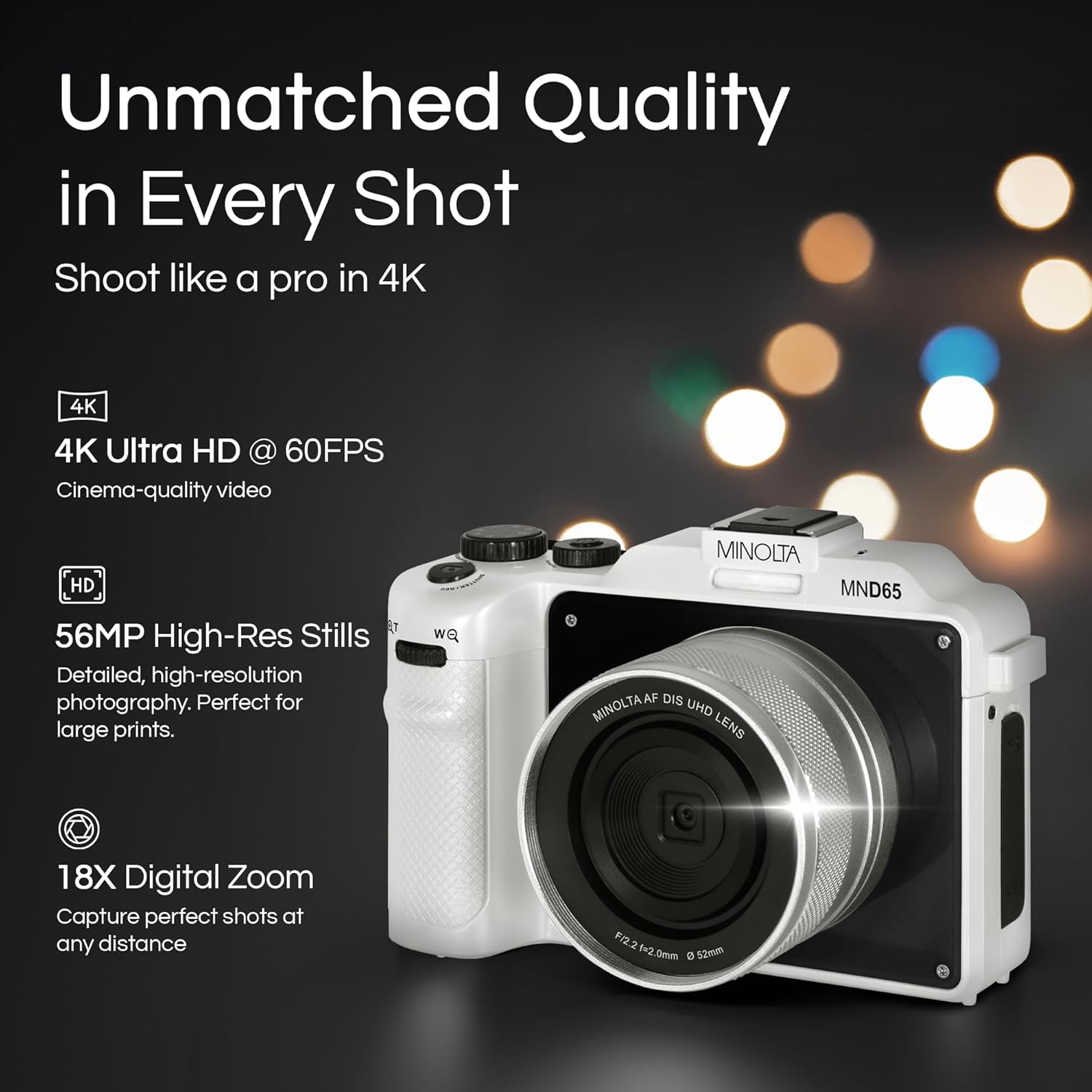
Slika 1: Prednja strana view of the Minolta MND65 Digital Camera.
Šta je u kutiji
Provjerite da li su sve stavke prisutne u paketu:
- Minolta MND65 digitalni fotoaparat
- Zaštitna torbica
- USB kabel
- Litijum-jonska baterija
- Remen za zapešće
- Memory Card (16GB)
- AC adapter
- Lens Cap & Keeper
- Screwdriver + Screws (for faceplates)
- 2 Replaceable Faceplates (Black and Teal)
Vodič za postavljanje
1. Instalacija baterije
- Pronađite poklopac pretinca za bateriju na dnu kamere.
- Pomaknite zasun poklopca da biste otvorili pretinac.
- Insert the Lithium-Ion battery according to the polarity indicators (+/-).
- Čvrsto zatvorite poklopac pretinca za baterije dok ne klikne na svoje mjesto.
2. Instalacija memorijske kartice
- Open the memory card slot cover, usually located near the battery compartment or on the side.
- Insert the provided SD memory card with the metal contacts facing the front of the camera until it clicks.
- Zatvorite poklopac slota za memorijsku karticu.
- Napomena: Ensure the camera is powered off before inserting or removing the memory card.
3. Punjenje baterije
- Spojite USB kabel na USB priključak kamere.
- Connect the other end of the USB cable to the AC adaptor.
- Uključite AC adapter u utičnicu.
- Indikatorska lampica punjenja će se upaliti. Isključit će se ili promijeniti boju kada je punjenje završeno.
- Potpuno punjenje obično traje otprilike 2-3 sata.
4. Pričvršćivanje remena za zapešće
Thread the wrist strap through the strap lug on the side of the camera and secure it to prevent accidental drops.
5. Customizing Faceplates
Your camera comes with replaceable faceplates (Black and Teal) and a screwdriver kit for customization.
- Using the provided screwdriver, carefully remove the small screws securing the current faceplate.
- Gently detach the faceplate.
- Align the desired new faceplate and secure it with the screws. Do not overtighten.

Figure 2: Customizing your camera with replaceable faceplates.
Upravljanje kamerom
Kontrole kamere iznadview

Slika 3: Pozadi view of the camera showing LCD and control buttons.
- Dugme za napajanje: Uključuje/isključuje kameru.
- Dugme okidača: Pritisnite do pola za fokusiranje, do kraja za snimanje fotografije ili pokretanje/zaustavljanje snimanja videa.
- Birač/dugme za izbor načina rada: Selects shooting modes (e.g., Photo, Video, Playback).
- Dugme menija: Pristupa postavkama i opcijama kamere.
- Navigacijski gumbi (gore/dolje/lijevo/desno): Navigacija kroz menije i podešavanje postavki.
- OK/Set Button: Potvrđuje odabire.
- Ručica za zumiranje: Controls the 18X digital zoom.
- LCD ekran: 3.0" IPS display for framing shots, reviewslikanje i kretanje kroz menije.
Snimanje fotografija
- Turn on the camera using the Power button.
- Select Photo mode using the Mode button/dial.
- Kadrirajte snimak pomoću LCD ekrana od 3.0 inča.
- Press the Shutter button halfway to activate autofocus. The focus indicator will confirm focus.
- Press the Shutter button fully to capture the 56MP image.
- Images are saved in JPEG or RAW format, as selected in the settings.
Snimanje video zapisa
- Uključite kameru.
- Odaberite Video način rada.
- Kadrirajte svoju scenu.
- Press the Shutter button fully to start recording 4K 60FPS video. A recording indicator will appear on the screen.
- Press the Shutter button fully again to stop recording.
Using the Selfie Lens
The Minolta MND65 features a dedicated front-facing selfie lens for easy self-portraits and vlogging.
- Activate the selfie lens mode (refer to your camera's on-screen menu for specific activation steps, usually a dedicated button or menu option).
- The camera will switch to the front-facing lens, and the LCD screen will display your reflection.
- Frame your selfie or video.
- Press the Shutter button to capture.

Figure 4: The dedicated selfie lens for convenient self-portraits.
Wi-Fi Connectivity and File Transfer
The built-in Wi-Fi allows for wireless transfer of photos and videos to your smartphone or tablet.
- Download the official Minolta camera app to your mobile device (available on iOS and Android app stores).
- On the camera, navigate to the Wi-Fi settings in the menu and enable Wi-Fi.
- Na svom mobilnom uređaju se povežite na Wi-Fi mrežu kamere (SSID i lozinka će biti prikazani na ekranu kamere).
- Open the Minolta app. You can now browse, transfer, and share your media wirelessly.
Održavanje
Čišćenje kamere
- Za čišćenje kućišta fotoaparata koristite meku krpu koja ne ostavlja dlačice. Za tvrdokornu prljavštinu, laganoampi krpu vodom.
- For the lens, use a lens brush to remove dust, then a lens cleaning cloth with a specialized lens cleaning solution if necessary. Avoid touching the lens surface with your fingers.
- Clean the LCD screen with a soft, dry microfiber cloth.
- Do not use organic solvents or strong chemical cleaners.
Battery Care
- Čuvajte bateriju na hladnom i suvom mestu kada nije u upotrebi.
- Izbjegavajte često potpuno pražnjenje baterije kako biste produžili njen vijek trajanja.
- Ako skladištite bateriju duži period, napunite je do oko 50% kapaciteta.
Skladištenje
- When not in use, store the camera in its protective pouch to shield it from dust and scratches.
- Avoid storing the camera in areas with extreme temperatures, high humidity, or direct sunlight.
- Uklonite bateriju ako se fotoaparat neće koristiti duži period.
Rješavanje problema
| Problem | Mogući uzrok | Rješenje |
|---|---|---|
| Kamera se ne uključuje. | Baterija je prazna ili nepravilno umetnuta. | Potpuno napunite bateriju. Ponovo pravilno umetnite bateriju. |
| Ne mogu snimati fotografije/video zapise. | Memorijska kartica je puna, zaključana ili nije umetnuta. | Izbrišite nepotrebno files, unlock the memory card, or insert it correctly. |
| Slike su mutne. | Podrhtavanje fotoaparata, nepravilan fokus ili prljav objektiv. | Hold the camera steady. Ensure autofocus locks before shooting. Clean the lens. |
| Wi-Fi veza ne uspijeva. | Netačna lozinka, Wi-Fi kamere nije omogućen ili problem s aplikacijom. | Verify Wi-Fi password. Ensure camera Wi-Fi is active. Restart camera and mobile app. |
| Green screen appears on LCD. | Software/hardware malfunction. | Power cycle the camera. If the issue persists, contact customer support. |
| Poor image/video quality (not 56MP/4K). | Incorrect resolution settings. | Check camera settings to ensure 56MP for photos and 4K for video are selected. |
If you encounter issues not listed here or if the suggested solutions do not resolve the problem, please contact Minolta Customer Support.
Specifikacije
| Naziv modela | MND65-WK |
| Rezolucija foto senzora | 56 MP |
| Video Rezolucija | 4K (2160p) at 60 FPS |
| Digitalni zum | 18x |
| Veličina ekrana | 3 Inches (IPS LCD) |
| Povezivanje | Wi-Fi |
| Podržano File Formati | JPEG, RAW (Images); MP4 (Video) |
| Stabilizacija slike | Digital |
| Tehnologija foto senzora | CMOS |
| Vrsta baterije | Lithium Ion |
| Minimalna žižna daljina | 18 milimetara |
| Maksimalni otvor blende | 2.8 milimetara |
| Režimi blica | Auto Flash |
| Mediji za pohranu | SD Card (Class 10, U1 recommended) |
Informacije o garanciji
The Minolta MND65 Digital Camera comes with a Limited 1 Year Manufacturer Warranty. This warranty covers defects in materials and workmanship under normal use. It does not cover damage caused by misuse, accident, unauthorized modification, or external causes such as drops or liquid damage.
Please retain your proof of purchase for warranty claims. For detailed terms and conditions, refer to the warranty card included in your product packaging or visit the official Minolta website.
Korisnička podrška
For technical assistance, warranty service, or general inquiries regarding your Minolta MND65 Digital Camera, please contact Minolta Customer Support.
- Webstranica: Visit the official Minolta webstranica za često postavljana pitanja, ažuriranja softvera i resurse podrške.
- Email: Pogledajte pakovanje proizvoda ili službene webstranica za adrese e-pošte korisničke službe.
- Telefon: Pogledajte pakovanje proizvoda ili službene webstranica za brojeve telefona korisničke službe.
When contacting support, please have your camera model number (MND65-WK) and proof of purchase available.


