1. Uvod
Welcome to the user manual for your MAXCOM FW67 Titan Pro Smartwatch. This device is designed to enhance your daily life by providing convenient access to notifications, health monitoring, and fitness tracking features directly from your wrist. Please read this manual carefully to ensure proper use and to fully understand the capabilities of your new smartwatch.
2. Sigurnosne informacije
- Do not attempt to disassemble, repair, or modify the device. This may void the warranty and cause damage.
- Držite uređaj dalje od ekstremnih temperatura, direktne sunčeve svjetlosti i otvorenog plamena.
- Izbjegavajte izlaganje uređaja jakim udarcima ili vibracijama.
- This device is water-resistant (IP69K rating), suitable for splashes and swimming. However, avoid hot water, steam, or prolonged submersion in deep water.
- Consult a medical professional before starting any new exercise regimen or if you have any health concerns. The health data provided by the smartwatch is for reference only and should not be used for medical diagnosis or treatment.
- Koristite samo priloženi kabel za punjenje i kompatibilni adapter za napajanje.
3. Sadržaj paketa
Molimo Vas da provjerite paket za sljedeće stavke:
- MAXCOM FW67 Titan Pro Smartwatch (Orange)
- Kabel za punjenje
- Uputstvo za upotrebu
4. Device Overview
Upoznajte se s glavnim komponentama vašeg pametnog sata.

Slika 4.1: Front view of the MAXCOM FW67 Titan Pro Smartwatch, displaying the main watch face with time, date, weather, battery level, and activity metrics like calories burned and step count.

Slika 4.2: Side view of the smartwatch, highlighting the 'POWER' button at the top and the 'BACK' button below it, both located on the right side of the watch casing.
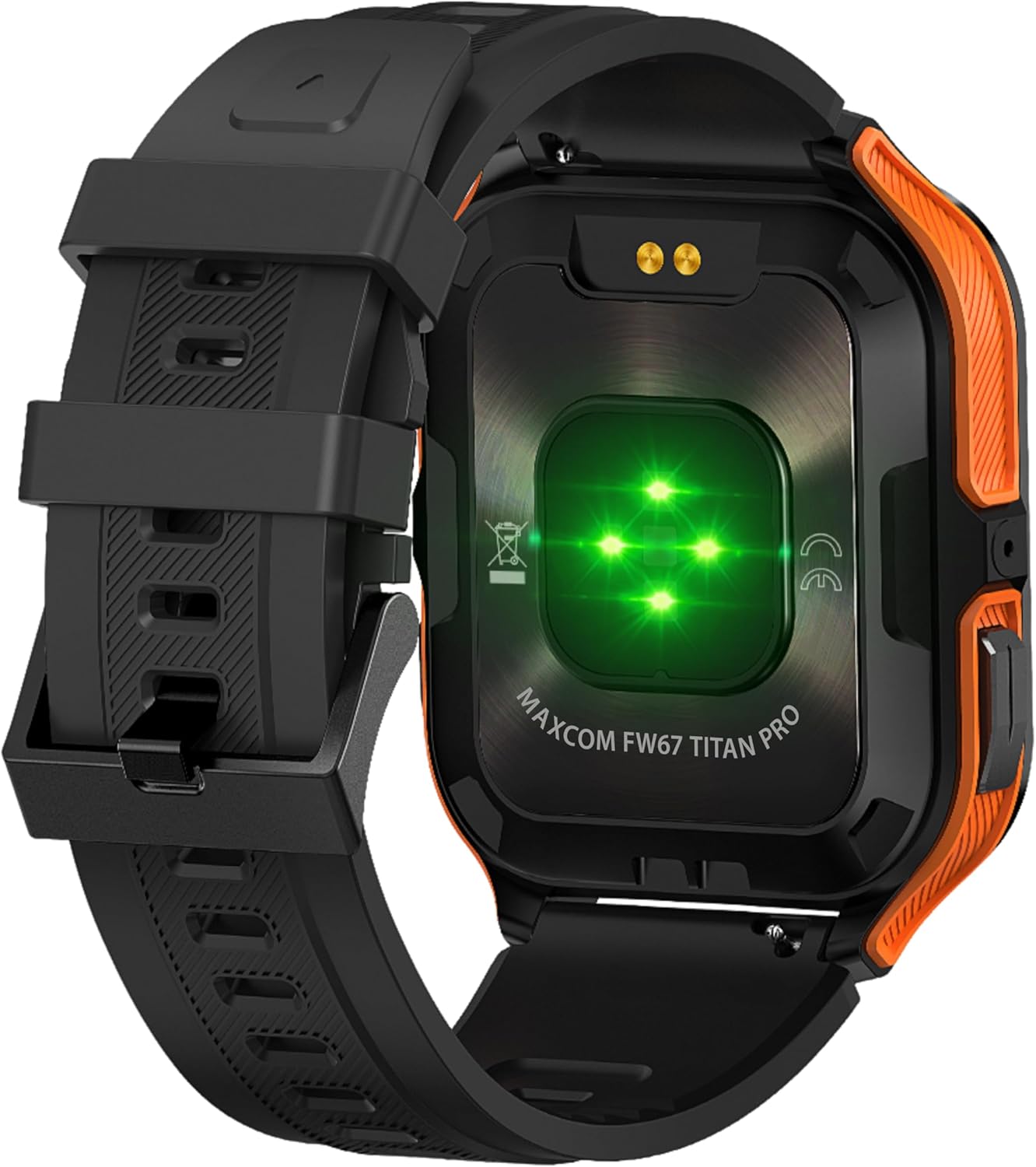
Slika 4.3: Pozadi view of the smartwatch, showing the optical heart rate sensors (glowing green) and the magnetic charging pins. The model name 'MAXCOM FW67 TITAN PRO' is also visible.
5. Podešavanje
5.1. Početno punjenje
Prije prve upotrebe, potpuno napunite svoj pametni sat.
- Connect the charging cable to the magnetic charging pins on the back of the smartwatch. Ensure the pins align correctly.
- Plug the USB end of the charging cable into a compatible USB power adapter (e.g., 5V/1A) or a computer's USB port.
- The watch display will indicate charging status. A full charge typically takes approximately 2-3 hours.
5.2. Instalacija i uparivanje aplikacije
To unlock the full potential of your smartwatch, you need to pair it with your smartphone via the dedicated companion application.
- Preuzmite aplikaciju: Traži the official MAXCOM smartwatch application (e.g., 'GloryFit' or similar, refer to packaging for exact app name) on the Google Play Store (for Android) or Apple App Store (for iOS). Install the app on your smartphone.
- Omogući Bluetooth: Provjerite je li Bluetooth omogućen na vašem pametnom telefonu.
- Otvorite aplikaciju: Launch the installed app and follow the on-screen instructions to create an account or log in.
- Dodaj uređaj: Within the app, navigate to the 'Device' or 'Add Device' section. The app will search for available smartwatches.
- Select Your Smartwatch: Select 'FW67 Titan Pro' from the list of discovered devices.
- Potvrdite uparivanje: Zahtjev za uparivanje može se pojaviti i na vašem telefonu i na pametnom satu. Potvrdite uparivanje na oba uređaja.
- Kompletno podešavanje: Follow any remaining prompts in the app to set up your profile, permissions, and preferences.
6. Upravljanje pametnim satom
6.1. Osnovna navigacija
- Dugme za napajanje: Press and hold to power on/off. Short press to wake the screen or return to the main watch face.
- Dugme za povratak: Short press to go back to the previous screen or exit a function.
- Geste na ekranu osjetljivom na dodir:
- Prevucite prema gore: Pristup brzim postavkama/kontrolnom centru.
- Prevucite prema dolje: View obavještenja.
- Prevucite lijevo/desno: Navigate through widgets (e.g., activity, heart rate, weather).
- Dodirnite: Odaberite stavku ili uđite u meni.
6.2. Ključne karakteristike

Slika 6.1: The smartwatch display showcasing various health metrics including steps taken, calories burned, heart rate, blood oxygen saturation (SpO2), and blood pressure, along with battery status.
- Praćenje srčanog ritma: The watch continuously monitors your heart rate. Access this feature from the main menu or by swiping to the heart rate widget.
- Praćenje aktivnosti: Tracks steps, distance, and calories burned throughout the day. Set daily goals in the companion app.
- Praćenje spavanja: Automatski prati vaše obrasce spavanja, uključujući duboki san, lagani san i vrijeme buđenja. View detaljna analiza u aplikaciji.
- Sportski modovi: Select from various sports modes (e.g., running, walking, cycling) to track specific workout data. Start a workout from the 'Sport' menu.
- Obavještenja: Receive call, message, and app notifications directly on your wrist. Ensure notification permissions are granted in the companion app.
- Blood Oxygen (SpO2) & Blood Pressure: The watch can measure SpO2 and blood pressure. These measurements are for reference only and not for medical use.
- Vrijeme: View current weather conditions after syncing with the app and granting location permissions.
- Kontrola muzike: Kontrolirajte reprodukciju muzike na svom pametnom telefonu direktno sa sata.
7. Održavanje
- čišćenje: Regularly clean your smartwatch and strap with a soft, dry, lint-free cloth. If necessary, use a slightly damp krpu blagim sapunom, zatim isperite i temeljito osušite.
- Izbjegavajte hemikalije: Ne koristite jake hemikalije, rastvarače za čišćenje ili jake deterdžente, jer oni mogu oštetiti završnu obradu i zaptivke sata.
- Port za punjenje: Keep the charging pins clean and dry to ensure proper charging.
- Skladištenje: Kada se pametni sat ne koristi duži period, čuvajte ga na hladnom i suhom mjestu.
- Otpornost na vodu: While the watch is IP69K water-resistant, it is not recommended for diving or high-pressure water activities. Always dry the watch thoroughly after exposure to water.
8. Otkrivanje problema
Ako imate problema sa svojim pametnim satom, pogledajte sljedeće uobičajene probleme i rješenja:
| Problem | Rješenje |
|---|---|
| Pametni sat se ne uključuje | Provjerite je li sat potpuno napunjen. Spojite ga na punjač na najmanje 30 minuta. |
| Nije moguće upariti uređaj sa pametnim telefonom | 1. Ensure Bluetooth is enabled on your phone. 2. Make sure the smartwatch is within range. 3. Restart both the smartwatch and your phone. 4. Clear Bluetooth cache on your phone. 5. Try pairing through the app, not directly via phone's Bluetooth settings. |
| Obavještenja se ne primaju | 1. Check if the smartwatch is connected to the app. 2. Ensure notification permissions are granted for the app on your phone. 3. Verify that app notifications are enabled within the smartwatch app settings. 4. Disable 'Do Not Disturb' mode on both the watch and phone. |
| Netačni zdravstveni podaci | 1. Ensure the watch is worn snugly on your wrist, not too loose or too tight. 2. Clean the sensors on the back of the watch. 3. Avoid excessive movement during measurements. 4. Remember that data is for reference and not medical diagnosis. |
| Kratko trajanje baterije | 1. Reduce screen brightness. 2. Limit continuous heart rate monitoring if not needed. 3. Turn off unnecessary notifications. 4. Ensure the watch is fully charged each time. |
9. Specifikacije
Key technical specifications for the MAXCOM FW67 Titan Pro Smartwatch:
| Feature | Specifikacija |
|---|---|
| Brand | MAXCOM |
| Model | FW67 Titan Pro |
| Boja | Narandžasta |
| Operativni sistem | Proprietary OS (compatible with Android/iOS) |
| Veličina ekrana | 1.85 inča |
| Povezivanje | Bluetooth |
| Posebne karakteristike | Heart Rate Monitor, Notifications, SpO2, Blood Pressure, Activity Tracking |
| Kompatibilni uređaji | Smartphone |
| Sastav baterije | Litijum-jonski |
| Kapacitet baterije | 380 mAh |
| GPS | GPS putem pametnog telefona |
| Oblik | Pravougaona |
10. Garancija i podrška
Your MAXCOM FW67 Titan Pro Smartwatch comes with a standard manufacturer's warranty. Please refer to the warranty card included in your package for specific terms and conditions, including warranty duration and coverage details. For technical support, troubleshooting assistance beyond this manual, or warranty claims, please contact MAXCOM customer service through their official webweb-mjesto ili kontakt informacije navedene u dokumentaciji vašeg proizvoda.


