1. Proizvod je gotovview
The Speedlink LIBERA is a versatile rechargeable wireless mouse designed for comfort and efficiency. It offers dual connectivity options, allowing you to connect via Bluetooth or a 2.4 GHz USB-A nano receiver. Key features include silent main buttons, a thumb scroll wheel for horizontal scrolling, and adjustable DPI settings for precise control.

Image: The Speedlink LIBERA mouse shown with its accompanying USB receiver, highlighting its sleek design and connectivity components.
2. Šta se nalazi u kutiji
Prilikom otvaranja paketa, molimo Vas da se uvjerite da su prisutni svi sljedeći elementi:
- Speedlink LIBERA Mouse
- USB prijemnik
- Kabel za punjenje od USB-C do USB-A
- Korisnički priručnik (ovaj dokument)
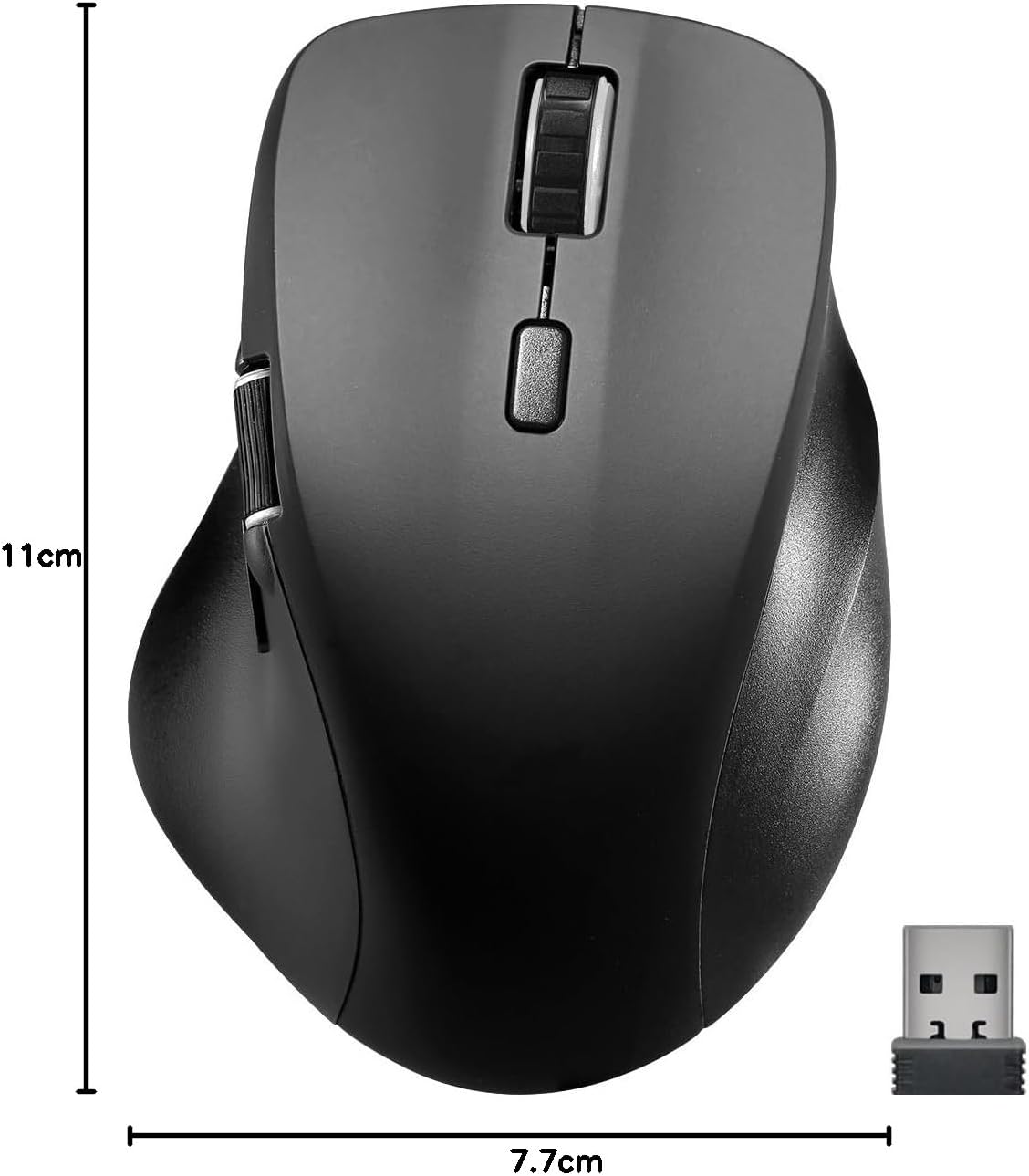
Image: The retail packaging for the Speedlink LIBERA mouse, indicating the contents and key features.
3. Podešavanje
3.1. Punjenje miša
Before first use, it is recommended to fully charge the mouse. The mouse can be charged while in use.
- Locate the USB-C port on the front of the mouse.
- Connect the included USB-C to USB-A charging cable to the mouse.
- Plug the USB-A end of the cable into a powered USB port (e.g., computer, USB wall adapter).
- Indikatorska lampica punjenja će se upaliti. Isključit će se ili promijeniti boju kada se uređaj potpuno napuni.

Image: The USB-C to USB-A charging cable included with the mouse, used for recharging the internal battery.
3.2. Povezivanje miša
The Speedlink LIBERA mouse offers two connection methods: 2.4 GHz USB receiver and Bluetooth.
3.2.1. 2.4 GHz USB Connection
- Locate the USB-A nano receiver, typically stored in a compartment on the underside of the mouse.
- Uključite USB prijemnik u dostupan USB-A priključak na računaru.
- Uključite miš pomoću prekidača za uključivanje/isključivanje koji se nalazi na donjoj strani.
- Miš bi se trebao automatski povezati s vašim računarom.
3.2.2. Bluetooth veza
The mouse supports up to two Bluetooth profiles.
- Uvjerite se da je miš uključen.
- Press the Bluetooth pairing button (refer to the diagram in Section 4.1 for location) to enter pairing mode. The indicator light will flash.
- Na računaru idite na postavke Bluetootha.
- Traži new devices and select "Speedlink LIBERA" from the list.
- Pratite sve upite na ekranu da dovršite proces uparivanja.
- To switch between Bluetooth profiles or to the 2.4 GHz connection, press the mode switch button on the underside of the mouse.

Image: The Speedlink LIBERA mouse positioned next to its compact USB receiver, illustrating the 2.4 GHz wireless connection method.
4. Uputstvo za upotrebu
4.1. Funkcije gumba
The Speedlink LIBERA mouse features multiple buttons for enhanced control:
- Lijevi klik na dugme: Standard primary click function. (Silent)
- Desni klik: Standard secondary click function. (Silent)
- Točak za pomicanje: Vertical scrolling. Can also be pressed for middle-click functionality.
- Dugme za promjenu DPI-ja: Cycles through DPI settings (1000/1600/2400/3200 DPI).
- Thumb Scroll Wheel: Located on the side, allows for horizontal scrolling of documents and web stranice.
- Dugmad za naprijed/nazad: Located near the thumb scroll wheel, typically used for navigation in web pretraživači ili file istraživači.

Image: A hand demonstrating the ergonomic grip and use of the Speedlink LIBERA mouse, highlighting the placement of the thumb scroll wheel and side buttons.
4.2. DPI podešavanje
The mouse's optical sensor resolution can be adjusted to suit your preference and task. Press the DPI switch button (located behind the main scroll wheel) to cycle through the available DPI settings: 1000, 1600, 2400, and 3200 DPI. Each press will change the sensitivity, allowing for faster or slower cursor movement.
4.3. Upravljanje napajanjem
The mouse features an On/Off switch on its underside to conserve battery life when not in use. It also incorporates a smart power-saving mode that activates after a period of inactivity, further extending battery life. To wake the mouse, simply move it or click any button.
5. Održavanje
To ensure the longevity and optimal performance of your Speedlink LIBERA mouse, follow these simple maintenance guidelines:
- čišćenje: Za brisanje površine miša koristite meku, suhu krpu koja ne ostavlja dlačice. Za tvrdokornu prljavštinu, lagano obrišiteampNapržite krpu vodom. Izbjegavajte upotrebu jakih hemikalija, rastvarača ili abrazivnih sredstava za čišćenje.
- Održavanje senzora: Keep the optical sensor on the underside of the mouse clean and free from dust or debris. A small brush or compressed air can be used carefully.
- Održavanje baterije: While the mouse has a rechargeable battery, avoid completely draining it frequently. Recharge it when the low battery indicator appears. Store the mouse in a cool, dry place if not used for extended periods.
- Skladištenje: When transporting or storing the mouse, ensure it is protected from impacts and extreme temperatures.
6. Otkrivanje problema
If you encounter issues with your Speedlink LIBERA mouse, please refer to the following common problems and solutions:
| Problem | Mogući uzrok | Rješenje |
|---|---|---|
| Miš ne reaguje | Mouse is off, low battery, connection issue. | Ensure mouse is on. Charge the mouse. Re-establish 2.4 GHz or Bluetooth connection. Try a different USB port. |
| Kretanje kursora je nepravilno ili sporo | Prljav optički senzor, neodgovarajuća površina, niska DPI postavka. | Clean the optical sensor. Use on a clean, non-reflective mouse pad. Increase DPI setting. |
| Bluetooth veza nije uspjela | Mouse not in pairing mode, interference, incorrect pairing steps. | Ensure mouse is in Bluetooth pairing mode. Turn off other Bluetooth devices. Remove previous pairings from computer and re-pair. |
| Problem punjenja | Faulty cable, power source issue. | Try a different USB port or power adapter. Ensure the charging cable is securely connected. |
| Buttons not clicking or unresponsive | Software issue, physical obstruction. | Restart your computer. Ensure no debris is lodged under the buttons. |
7. Tehničke specifikacije
| Feature | Specifikacija |
|---|---|
| Broj modela | SL-630021-RRBK |
| Povezivanje | Bluetooth, 2.4 GHz Radio Frequency (USB Receiver) |
| Tehnologija detekcije pokreta | Optički |
| DPI rezolucija | 1000 / 1600 / 2400 / 3200 dpi (adjustable) |
| Dugmad | 5 buttons + DPI switch + dual scroll wheels (vertical and horizontal) |
| Vrsta baterije | 500mAh Lithium-Ion (rechargeable) |
| Port za punjenje | USB-C |
| Dimenzije (D x Š x V) | 110 x 77 x 45 mm |
| Težina | 93 g |
| Kompatibilnost operativnog sistema | Windows 7, Windows 8, Windows 8.1, Windows 10, Windows 11 |
8. Informacije o garanciji i podršci
Speedlink products are manufactured with care and undergo strict quality controls. This product is covered by a manufacturer's warranty. For detailed warranty terms and conditions, please refer to the warranty card included with your purchase or visit the official Speedlink website.
For technical support, troubleshooting assistance beyond this manual, or warranty claims, please contact Speedlink customer service through their official website or the contact information provided in your product packaging. Please have your product model number (SL-630021-RRBK) and proof of purchase ready when contacting support.


