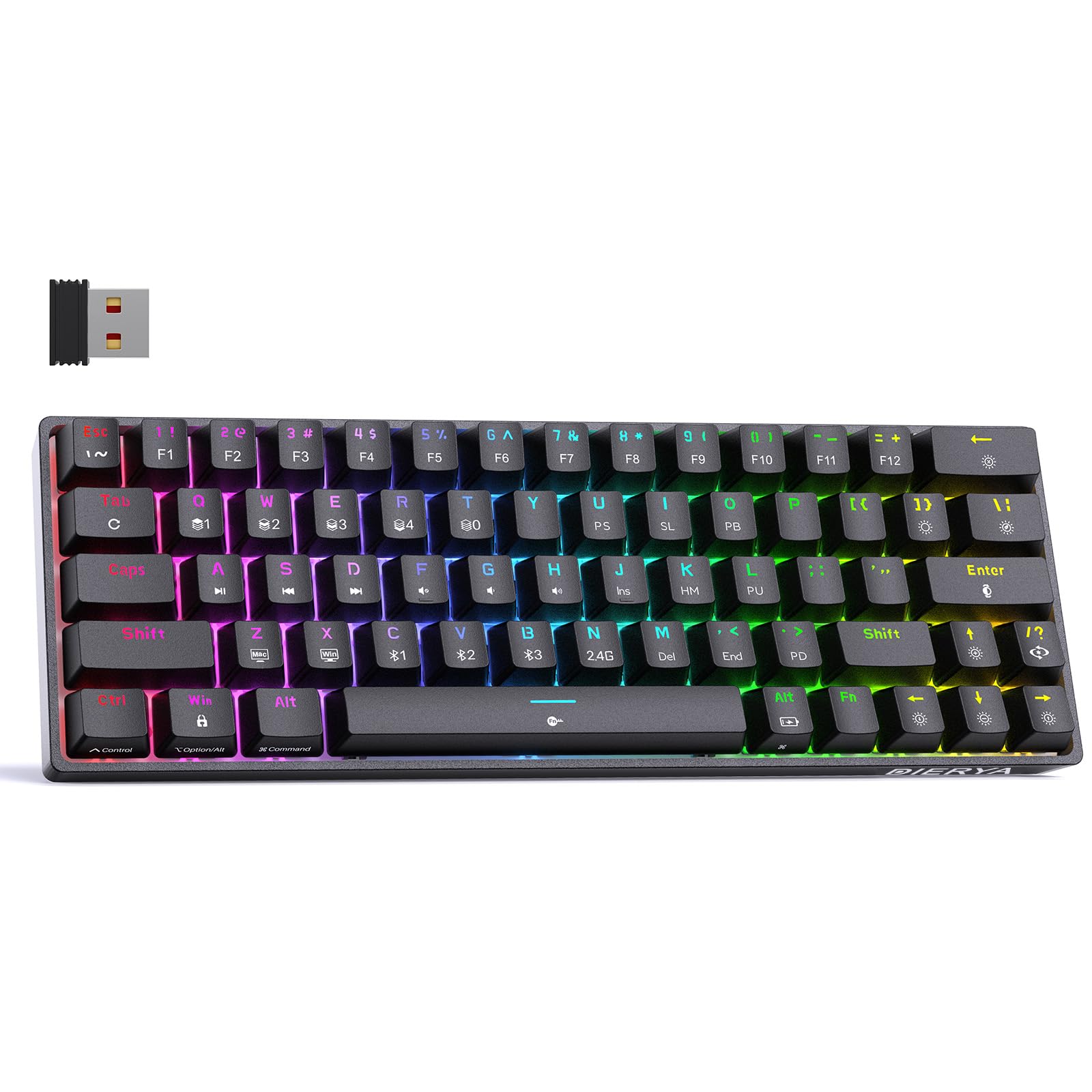
Thank you for choosing the DIERYA DK63 60% Wireless Mechanical Gaming Keyboard. This compact 63-key keyboard offers versatile connectivity options, vibrant RGB backlighting, and durable mechanical switches for an enhanced typing and gaming experience. This manual provides detailed instructions to help you set up, operate, and maintain your keyboard.
Sadržaj paketa
DIERYA DK63 Wireless Mechanical Keyboard (1)
2.4G Receiver (hidden in the fuselage) (1)
Izvlakač za ključeve (1)
USB kabel (1)
Korisnički priručnik (1)
Product Overview
The DIERYA DK63 is a compact 60% mechanical keyboard designed for efficiency and performance. It features 63 keys, including directional keys, and utilizes an "FN" key for full functionality, maximizing desktop space. The keyboard is equipped with Blue Switches, providing tactile feedback and a distinct click sound, ideal for typists. It supports three connection modes: 2.4G wireless, Bluetooth 5.0, and wired USB-C, allowing seamless switching between various devices. A high-capacity 3000mAh battery ensures extended usage, and the rich RGB dynamic lighting system offers 18 modes and 16.8 million customizable colors.
Image: The DIERYA DK63 keyboard showcasinzahvaljujući kompaktnom 60% rasporedu i živopisnom RGB pozadinskom osvjetljenju.
Uputstva za postavljanje
1. Žična veza
Connect the provided USB-C cable to the keyboard's USB-C port and the other end to your computer's USB port. The keyboard will automatically connect and begin charging.
Image: Close-up of the keyboard's USB-C port and the included Type-C data cable for wired connection and charging.
2. 2.4G bežična veza
Locate the 2.4G USB receiver, typically stored in a compartment on the underside of the keyboard.
Priključite 2.4G prijemnik u dostupan USB port na računaru.
Flip the connection switch on the keyboard to the "2.4G" position.
Pritisnite FN + N. The 2.4G indicator light will illuminate, indicating a successful connection.
Image: The underside of the keyboard showing the 2.4G dongle storage area and the connection mode switch.
Video: DIERYA DK63 Operation Guide, demonstrating 2.4G and Bluetooth connection steps, FN key usage, and RGB lighting adjustments.
3. Bluetooth veza
Flip the connection switch on the keyboard to the "Bluetooth" position.
Na svom uređaju (računaru, tabletu, pametnom telefonu) omogućite Bluetooth i potražite dostupne uređaje.
The keyboard will appear as "DIERYA DK63-1", "DIERYA DK63-2", or "DIERYA DK63-3". Select one to pair.
To switch between Bluetooth channels (BT1, BT2, BT3), press FN + C, FN + V, ili FN + B respektivno.
Uputstvo za upotrebu
FN Key Usage
The FN key is essential for accessing secondary functions on the compact DK63 keyboard. Hold down the FN key and press the desired key to activate its secondary function.
Image: The keyboard displaying various RGB lighting effects and key combinations for adjusting them.
Video: DIERYA DK63 Operation Guide, demonstrating 2.4G and Bluetooth connection steps, FN key usage, and RGB lighting adjustments.
Održavanje
To ensure the longevity and optimal performance of your DIERYA DK63 keyboard, follow these maintenance guidelines:
čišćenje: Koristite meku krpu koja ne ostavlja dlačiceampened with water or a mild cleaning solution to wipe the keycaps and keyboard surface. Avoid excessive moisture. For deeper cleaning, use the provided keycap puller to remove keycaps and clean underneath with compressed air.
Skladištenje: Tastaturu čuvajte na hladnom i suhom mjestu, dalje od direktne sunčeve svjetlosti i ekstremnih temperatura.
Održavanje baterije: To prolong battery life, avoid fully discharging the keyboard frequently. Charge it when the battery reminder indicates low power.
Image: The DIERYA DK63 keyboard with a keycap puller, illustrating how to remove keycaps for cleaning or switch replacement.
Rješavanje problema
Issue
Moguće rješenje
Keyboard not connecting via 2.4G.
Ensure the 2.4G receiver is securely plugged into a USB port and the keyboard switch is set to "2.4G". Press FN + N to re-establish connection.
Problemi sa Bluetooth vezom.
Ensure the keyboard switch is set to "Bluetooth". On your device, forget the keyboard and attempt to re-pair. Try switching Bluetooth channels using FN + C/V/B. Ensure the keyboard is charged.
RGB lights not working or stuck.
Pritisnite FN + Backspace to toggle lights. Try switching lighting modes with FN + /?. If issues persist, perform a factory reset by holding FN + Tab.
Tipke ne reagiraju.
Check if the keyboard is locked (FN + razmaknica). Ensure the correct system layout (Windows/Mac) is selected (FN + Z/X). Recharge the battery if in wireless mode. Try a wired connection.
Specifikacije
Broj modela: T63
Izgled: 60% (63-keys)
Tip prekidača: Blue Switch (Tactile & Clicky)
Povezivanje: 2.4GHZ Wireless, Bluetooth 5.0, USB-C Wired
Kapacitet baterije: 3000mAh
RGB pozadinsko osvjetljenje: 18 modes, 16.8 million colors
Kompatibilnost: Windows 11/10/8/7/XP, Mac OS, Vista, Linux
Dimenzije proizvoda: 11.53 cm D x 3.98 cm Š x 1.65 cm V
Težina artikla: 1.41 funte
Image: Visual representation of the DIERYA DK63's ultra-compact 63-key layout and dimensions.
Video: DIERYA DK63 Switch Sound Comparison, demonstrating the sound profiles of Red (linear) and Blue (clicky) switches.
Garancija i podrška
DIERYA is committed to your satisfaction. If you encounter any issues with your DK63 keyboard, please do not hesitate to contact us. Our customer support team is available to assist you with troubleshooting, warranty claims, and any product-related inquiries.
Za podršku, posjetite DIERYA trgovina na Amazonu ili pogledajte kontakt informacije koje ste dobili uz kupovinu.
DIERYA DK63 bežična mehanička gejmerska tastatura - uputstvo za upotrebu Sveobuhvatno korisničko uputstvo za DIERYA DK63 bežičnu mehaničku igraću tastaturu. Ovo uputstvo obuhvata specifikacije proizvoda, Bluetooth i 2.4G bežičnu povezivost,file upravljanje, multimedijske kontrole, prilagođavanje RGB osvjetljenja i rad prekidača.
Dierya DK61se mehanička tastatura - Funkcije i karakteristike Sveobuhvatno korisničko uputstvo za mehaničku tastaturu Dierya DK61se, koje detaljno opisuje sve funkcije FN tipke, multimedijalne kontrole, svjetlosne efekte i informacije o podršci.
DIERYA DK63 Mehanička tastatura - Korisnički priručnik Sveobuhvatan vodič za mehaničku tastaturu DIERYA DK63, koji pokriva načine povezivanja, RGB osvjetljenje, multimedijalne tipke, funkcije prečica i način rada za igranje. Saznajte kako prilagoditi svoje iskustvo korištenja tastature.
Vodič za funkcije mehaničke tastature DIERYA DK 61SE Istražite punu funkcionalnost vaše mehaničke tastature DIERYA DK 61SE uz ovaj sveobuhvatni priručnik. Saznajte više o svim kombinacijama FN tipki za multimediju, kontrole sistema, podešavanja osvjetljenja i posebne funkcije. Uključuje specifikacije proizvoda i kontakt za podršku.