1. Uvod
This manual provides detailed instructions for the installation, operation, and maintenance of your Jennov JS7015 5MP Dual-Band Wi-Fi Outdoor Security Camera. Please read this manual thoroughly before using the product to ensure correct usage and optimal performance.

Figure 1: Jennov JS7015 Outdoor Security Camera
The Jennov JS7015 is a 5-megapixel outdoor security camera featuring dual-band Wi-Fi connectivity (2.4GHz and 5GHz). It offers 360-degree viewing capabilities, PIR human detection, auto-tracking, 24/7 recording, and two-way audio for comprehensive outdoor surveillance.
2. Sadržaj paketa
Molimo Vas da provjerite sadržaj paketa prilikom prijema. Ako bilo koji artikl nedostaje ili je oštećen, obratite se korisničkoj podršci.
- Jennov JS7015 5MP Dual-Band Wi-Fi Outdoor Security Camera
- Adapter za napajanje
- Montažni vijci i ankeri
- Korisnički priručnik (ovaj dokument)
3. Proizvod je gotovview
Upoznajte se sa komponentama kamere.

Figure 2: Camera Pan and Tilt Mechanism
The camera features a motorized pan and tilt mechanism, allowing for a 355° horizontal rotation (pan) and a 60° vertical rotation (tilt). This enables comprehensive coverage of the surveillance area. The camera body houses the lens, infrared LEDs, white light LEDs, microphone, and speaker. Two external antennas provide enhanced Wi-Fi signal reception.
- Objektiv kamere: Snima video footage.
- Infracrvene LED diode: Provide illumination for black and white night vision.
- White Light LEDs: Provide illumination for color night vision and act as a spotlight.
- mikrofon: Snima zvuk za dvosmjernu komunikaciju i snimanje.
- govornik: Izlazi zvuk za dvosmjernu komunikaciju i alarme.
- Antene: Za Wi-Fi povezivanje.
- Napajanje: Povezuje se na strujni adapter.
- Dugme za resetiranje: Used to reset the camera to factory settings (usually located near the SD card slot or under a cover).
- Utor za SD karticu: For local video storage (supports up to 128GB, not included).
4. Vodič za postavljanje
4.1 Fizička instalacija
The camera is designed for outdoor use and is IP66 waterproof. Choose a suitable location for mounting, ensuring a clear view of the area you wish to monitor and proximity to a power source.
- Označite pozicije za bušenje: Koristite šablon za montažu (ako je priložen) ili bazu kamere da označite rupe za vijke na zidu.
- Izbušite rupe: Drill holes at the marked positions. Insert wall anchors if mounting on masonry.
- Sigurna kamera: Attach the camera base to the wall using the provided screws.
- Podesite ugao: Loosen the adjustment screws (if any) to position the camera for optimal coverage before tightening.

Slika 3: Vodootporni dizajn IP66
The camera is built with waterproof materials and has an IP66 rating, making it suitable for outdoor installation and resistant to dust and water jets.
4.2 Priključak za napajanje
Spojite priloženi adapter za napajanje na priključak za napajanje kamere, a zatim ga uključite u utičnicu. Kamera će se uključiti i pokrenuti sekvencu pokretanja.
4.3 Preuzimanje aplikacije i registracija računa
The Jennov JS7015 camera uses the EseeCloud application for remote access and control.
- Preuzmi aplikaciju: Traži "EseeCloud" in your smartphone's app store (Google Play Store for Android or Apple App Store for iOS) and download the application.
- Registrirajte račun: Open the EseeCloud app and follow the on-screen instructions to register a new account using your email address or phone number.
4.4 Dodavanje kamere u aplikaciju
Provjerite je li vaš pametni telefon povezan na istu Wi-Fi mrežu (2.4 GHz ili 5 GHz) na koju namjeravate povezati kameru.
- Otvori aplikaciju: Launch the EseeCloud app and log in.
- Dodaj uređaj: Tap the "+" icon or "Add Device" option.
- Odaberite vrstu uređaja: Choose "Wi-Fi Camera" or similar option.
- Skenirajte QR kod: The app may prompt you to scan a QR code located on the camera or its packaging.
- Wi-Fi konfiguracija: Follow the app's instructions to enter your Wi-Fi network name (SSID) and password. The camera supports both 2.4GHz and 5GHz Wi-Fi bands.
- Povežite se: The camera will attempt to connect to your Wi-Fi network. Once connected, it will appear in your device list within the app.
- Postavite lozinku: Create a strong password for your camera for security purposes.
5. Uputstvo za upotrebu
5.1 Uživo View i kontrola panoramiranja/nagiba
From the EseeCloud app, select your camera to access the live view.
- Prijenos uživo: View real-time video from your camera.
- Pan/Tilt: Use the directional controls within the app to remotely adjust the camera's horizontal (pan) and vertical (tilt) angles.
5.2 Automatsko praćenje
Kamera može automatski pratiti pokretne objekte unutar svog polja view.

Figure 4: Auto Tracking in Action
Enable the auto-tracking feature in the app settings. The camera will then detect and follow moving targets until they leave the camera's view.
5.3 Detekcija pokreta i alarmi
The camera features advanced PIR (Passive Infrared) human detection to minimize false alarms.

Figure 5: PIR Human Detection and Alarm Options
When a human thermal profile is detected, the camera can trigger various alarms.
- PIR detekcija: Activates recording and sends notifications when a human is detected.
- Zvučni alarm: Configure the camera to emit a siren sound upon detection.
- Alarm reflektora: The integrated spotlight can be activated to deter intruders.
- Obavještenja: Receive instant alerts on your smartphone via the EseeCloud app.
5.4 Dvosmjerni audio
Communicate directly with individuals near the camera using the built-in microphone and speaker.

Slika 6: Dvosmjerna audio komunikacija
Tap the microphone icon in the app to speak, and listen through the camera's speaker. This feature is useful for interacting with visitors or deterring unwanted guests.
5.5 Snimanje i pohranjivanje
The camera supports continuous 24/7 recording and offers flexible storage options.
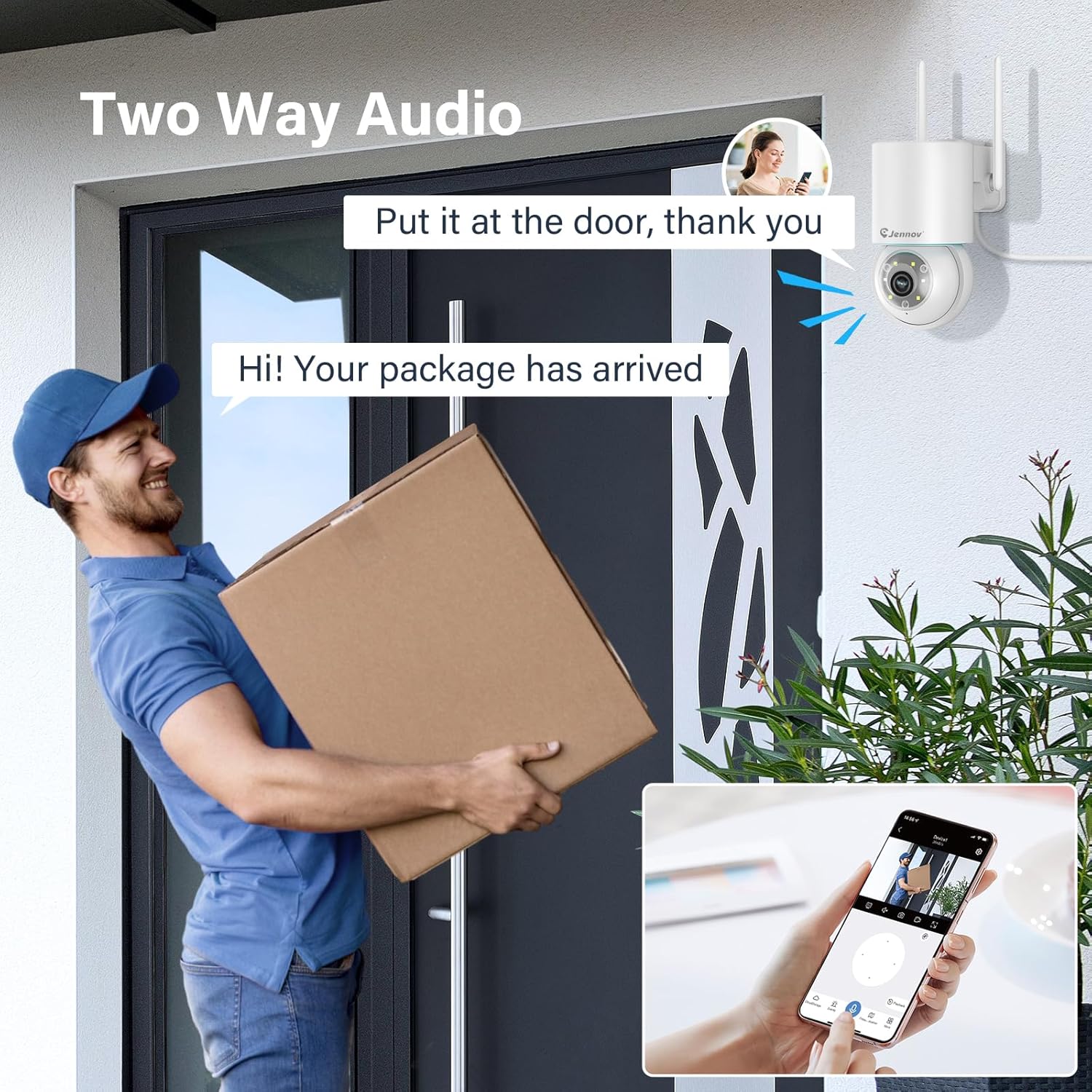
Figure 7: 24/7 Recording and Storage Options
Pristup snimljen footage via the app's playback function.
- 24/7 snimanje: The camera can continuously record footage, ensuring no vital moments are missed.
- Lokalna pohrana: Umetnite microSD karticu (do 128 GB, nije uključena) u utor za SD karticu kamere za lokalnu pohranu.
- Cloud Storage: Optional cloud storage service is available, often with a free trial period (e.g., 7 days). This provides off-site backup of your recordings.
5.6 Režimi noćnog vida
The camera offers three night vision modes for clear visibility in low-light conditions.

Figure 8: 5MP Color Night Vision
The camera provides clear night vision up to 65 feet (20 meters) with 5MP resolution.
- Način rada u punoj boji: Utilizes white LEDs to provide full-color video at night.
- Black and White Mode: Uses infrared LEDs for traditional black and white night vision.
- Smart Režim: Automatically switches between black and white and full color based on detected motion or light conditions.
You can switch between these modes within the EseeCloud mobile application.
5.7 Customized Detection Area
Definišite specifična područja unutar kamere view where motion detection should be active.

Figure 9: Customized Detection Area Settings
This feature helps reduce unwanted alerts by focusing detection on critical zones. The app typically offers "Area mode" and "Cordon mode" for defining these zones.
6. Održavanje
- čišćenje: Redovno čistite objektiv kamere mekom, suhom krpom kako biste osigurali jasnu sliku. Ne koristite jake hemikalije.
- Ažuriranja firmvera: Check the EseeCloud app periodically for available firmware updates. Keeping your camera's firmware updated ensures optimal performance and security.
- Upravljanje SD karticama: If using local storage, periodically check the SD card's status in the app. Format the card as needed to maintain recording efficiency.
- Napajanje: Provjerite da li su adapter za napajanje i kabel neoštećeni i pravilno spojeni.
7. Otkrivanje problema
- Kamera van mreže:
- Provjerite jačinu Wi-Fi signala.
- Uvjerite se da je kamera uključena.
- Ponovo pokrenite kameru i Wi-Fi ruter.
- If using 5GHz Wi-Fi, ensure your router supports it and the camera is connected to the correct band.
- Try re-adding the camera to the EseeCloud app.
- Loš kvalitet slike:
- Očistite sočivo kamere.
- Ensure sufficient lighting, especially at night.
- Provjerite brzinu vaše internet veze.
- Detekcija pokreta ne radi:
- Verify motion detection settings in the app are enabled.
- Podesite osjetljivost detekcije.
- Provjerite da nema prepreka koje blokiraju kameru view.
- Check if detection areas are correctly configured.
- Dvosmjerni audio problemi:
- Ensure microphone and speaker permissions are granted to the EseeCloud app on your smartphone.
- Check volume settings on both the app and your phone.
- Ensure there are no physical obstructions blocking the camera's microphone or speaker.
- Cannot Access SD Card Recordings:
- Provjerite je li SD kartica pravilno umetnuta.
- Check if the SD card is formatted correctly (usually FAT32).
- Verify that continuous recording or event recording to SD card is enabled in the app.
- The SD card might be full; consider formatting it or replacing it.
8. Specifikacije
| Feature | Specifikacija |
|---|---|
| Broj modela | JS7015 |
| Brand | Jennov |
| Rezolucija | 5 Megapixel (1920p video recording) |
| Kut pomicanja / nagiba | Pan 355°, Tilt 60° |
| Night Vision | Color Night Vision, Black & White Night Vision, Smart Mode (up to 65ft/20m) |
| Wi-Fi povezivanje | Dvofrekventni (2.4 GHz / 5 GHz) |
| Audio | Dvosmjerni audio (ugrađeni mikrofon i zvučnik) |
| Detekcija pokreta | PIR Human Detection, Auto Tracking |
| Opcije skladištenja | MicroSD kartica (do 128 GB), pohrana u oblaku |
| Waterproof Rating | IP66 |
| Power Input | 5 Volts |
| Potrošnja energije | 24 Watts |
| Dimenzije (D x Š x V) | 12 x 8 x 16 cm |
| Materijal | Plastika |
| Vrsta montaže | Zidni nosač |
| Kompatibilni uređaji | Pametni telefon, tablet, računar |
| Kontrolirajte aplikaciju | EseeCloud |
9. Garancija i podrška
For warranty information and technical support, please refer to the warranty card included with your product or visit the official Jennov website.
- Služba za korisnike: Contact Jennov customer support for assistance with product issues, technical questions, or warranty claims.
- Online resursi: Check the Jennov webstranica za često postavljana pitanja, ažurirane priručnike i preuzimanje softvera.


