Uvod
This manual provides comprehensive instructions for the Hodozzy 9-inch Android Car Stereo, Model 4G+64G. It is specifically designed for Mercedes-Benz C-Class W204 and S204 vehicles manufactured between 2007 and 2010. This guide covers product features, installation procedures, operational instructions, maintenance tips, and troubleshooting information to ensure optimal performance and user experience.
Kompatibilna vozila: Mercedes-Benz C-Class W204 S204 (2007-2010)
Sadržaj paketa
Provjerite da li se u vašem paketu nalaze sve dolje navedene stavke. Ako neke stavke nedostaju ili su oštećene, obratite se korisničkoj podršci.
- Car Radio Player (9-inch Android Unit) x 1
- Dashboard Kit x 1
- Kabel za napajanje x 1
- GPS Antenna x 1
- Rear Camera Input Cable x 1
- RCA kabl x 1
- USB kabl x 2
- Montažni nosač x 2
- Vijci x 4
- Alat za instalaciju x 1
- Canbus x 1
- Korisnički priručnik x 1
- Zadnja kamera x 1
- Mikrofon x 1
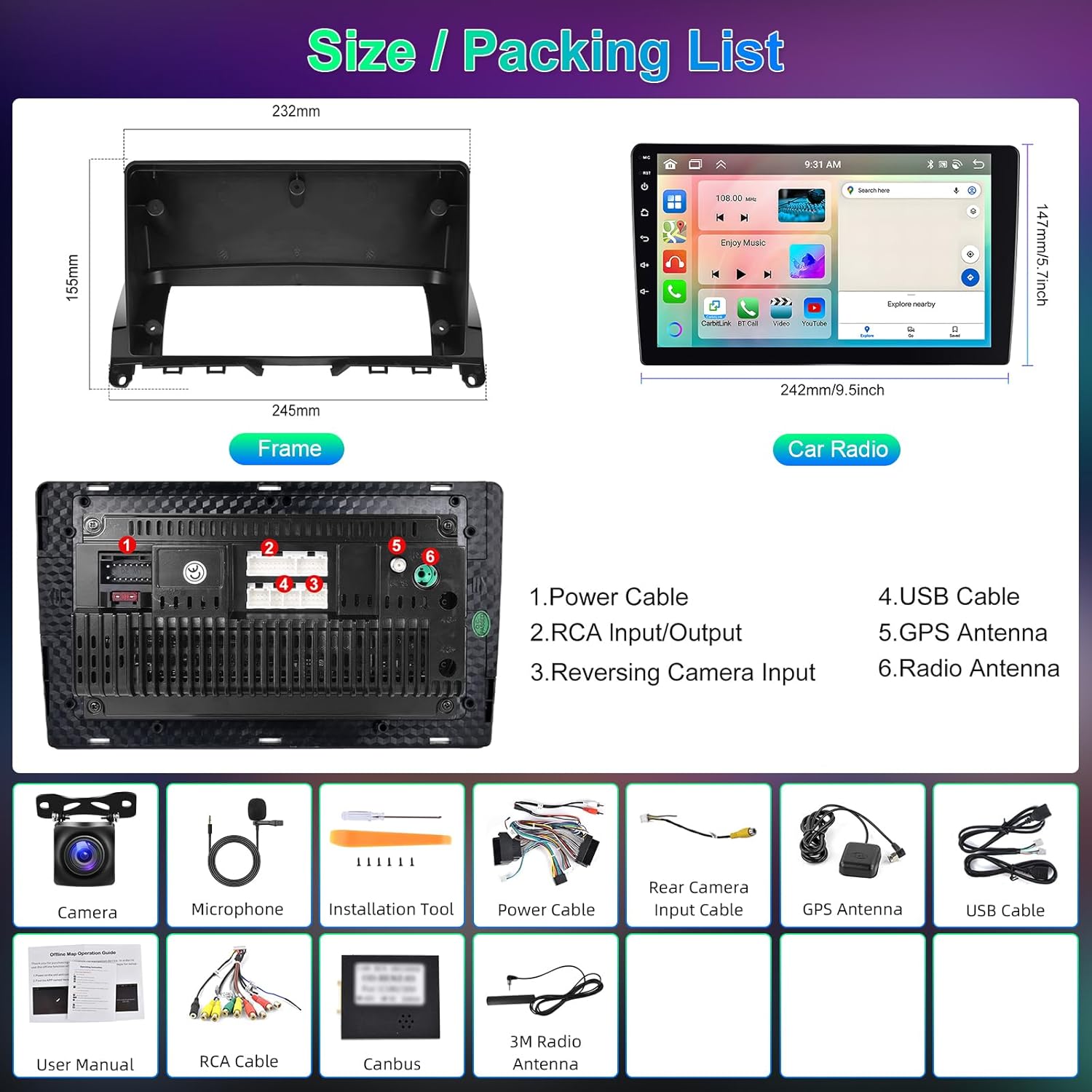
slika: Gotovoview of the car radio unit dimensions and a visual representation of all included accessories in the package.
Specifikacije
| Feature | Detalj |
|---|---|
| Sistem | Android 13 |
| Čipset | 8257 (8-Core CPU) |
| Memorija | 4GB RAM + 64GB ROM |
| Veličina ekrana | 9-inčni ekran osjetljiv na dodir |
| Rezolucija ekrana | 1280*720 |
| Radio Chip | 8035 (FM/RDS) |
| Izlazna snaga | 4*45W (Amplifier Chip: YD7388) |
| Bluetooth verzija | 5.0 (A2DP, Hands-free, Phonebook Sync) |
| DSP | 36-pojasni ekvilajzer |
| Radna temperatura | -20℃ do 75℃ |
| Kontrola na volanu | Podržano |
| Video izlaz | Podržano |
| Obrnuti ulaz | AHD/CVBS |
| Eksterni mikrofon | Podržano |
| Split Screen | Podržano |
| Navigacija | Built-in Offline Maps (requires internet for data download) |
| Povezivanje | WiFi, Dual USB Interface |
| Audio formati | APE/FLAC/WAV/MP3/WMA, etc. |
| Video Formati | MKV/RMVB/AVI/MP4/MDV, etc. |
| Formati slika | PNG/JPEG/JPG/GIF/WBMP/BNP, etc. |
| Factory Keyword | 1234 |
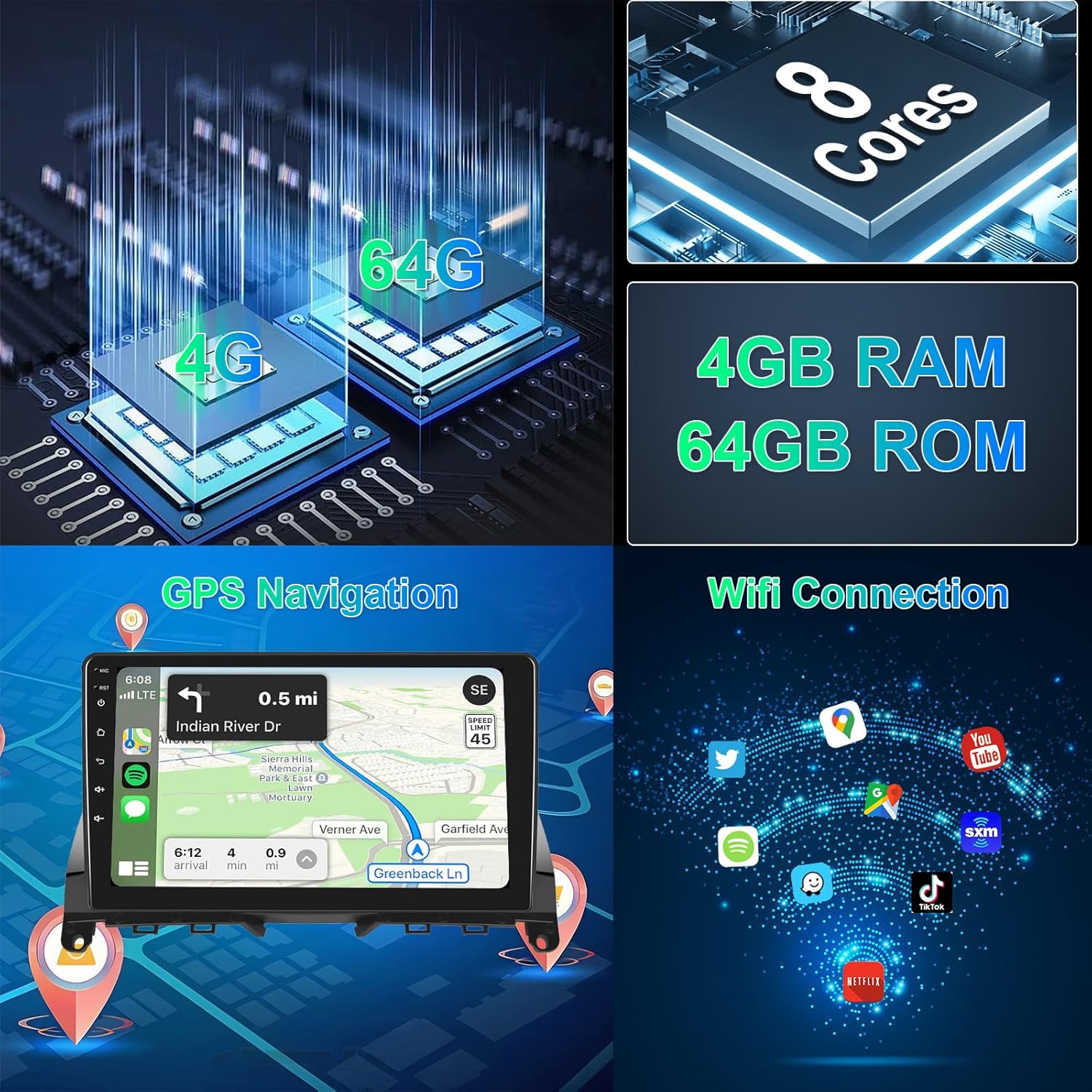
slika: Visual representation of the system's core specifications including CPU, memory, GPS navigation, and WiFi connectivity.
Postavljanje i instalacija
Professional installation is recommended for this car stereo system. Ensure the vehicle's power is disconnected before beginning installation.
- Priprema: Carefully remove the original car radio unit from your Mercedes-Benz C-Class W204/S204 (2007-2010). Refer to your vehicle's service manual for specific removal instructions.
- Priključak kabelskog svežnja: Connect the provided power cable and Canbus to the vehicle's original wiring harness. Ensure all connections are secure.
- Periferne veze:
- Spojite GPS antenu i postavite je za optimalni prijem signala (npr. na instrumentnu ploču).
- Spojite eksterni mikrofon za hands-free pozive.
- If installing the rear camera, connect the rear camera input cable and route the camera cable to the rear of the vehicle.
- Connect any additional USB devices or RCA cables as needed.
- Montaža: Use the provided mounting brackets and screws to secure the new Hodozzy car stereo unit into the dashboard. Ensure it fits snugly within the dashboard kit.
- Uključite i testirajte: Reconnect the vehicle's power. Turn on the car stereo and perform initial tests to ensure all functions (radio, GPS, Bluetooth, touchscreen, steering wheel controls) are operational.

slika: Detaljno view of the wiring harness connections and an illustration of the steering wheel control interface.
Uputstvo za upotrebu
Basic Operation
- Uključivanje/isključivanje: Pritisnite i držite dugme za napajanje (obično se nalazi na prednjoj ploči) da biste uključili ili isključili uređaj.
- Kontrola jačine zvuka: Adjust volume using the physical knobs or touchscreen controls.
- Početni ekran: Tap the Home icon to return to the main application interface.
- Prebacivanje aplikacija: Long press on an app icon to switch applications or customize your home screen layout.
CarPlay & Android Auto (Wireless/Wired)
The unit supports both wireless and wired CarPlay and Android Auto via Zlink. Mirror Link (Airplay) is also supported for Android (wireless/wired) and iOS (wireless).
- Bežična veza:
- Omogućite Bluetooth i Wi-Fi na svom pametnom telefonu.
- On the car stereo, open the Zlink application.
- Pair your phone via Bluetooth with the car stereo.
- Pratite upute na ekranu da biste aktivirali CarPlay ili Android Auto.
- Žična veza:
- Connect your smartphone to the car stereo using a USB cable.
- Sistem bi trebao automatski detektovati i pokrenuti CarPlay ili Android Auto.

slika: Visual guide to connecting and using Apple CarPlay, Android Auto, and Mirror Link functionalities.
GPS navigacija
The unit comes with built-in offline maps. For online maps and updates, connect to Wi-Fi or a mobile hotspot.
- Open the Navigation app from the home screen.
- Unesite svoje odredište.
- The system will provide turn-by-turn directions.
- To download offline map data, ensure an internet connection is active and follow the prompts within the navigation application.
Bluetooth funkcije
Povežite svoj telefon putem Bluetootha za hands-free pozive i streaming muzike.
- Idite na Bluetooth postavke na auto stereo uređaju.
- Omogućite Bluetooth na svom pametnom telefonu i potražite dostupne uređaje.
- Select the car stereo's Bluetooth name (e.g., "Hodozzy Car Stereo") and pair.
- Once connected, you can make/receive calls and play music from your phone.

slika: Demonstrates Bluetooth connectivity for calls and music, the 36-band DSP interface, and FM radio with RDS functionality.
Radio (FM/RDS)
- Open the Radio application.
- Koristite funkciju skeniranja da biste pronašli dostupne stanice ili ručno podesili frekvenciju.
- RDS (Radio Data System) will display station information where available.
DSP (Digital Sound Processor)
Adjust audio settings for an optimized listening experience.
- Access the DSP settings from the main menu.
- Utilize the 36-band equalizer to fine-tune audio frequencies.
- Select from preset sound styles (Rock, Pop, Jazz, Classic) or create custom profiles.
Kontrola na volanu
The unit supports your vehicle's original steering wheel controls. Configuration may be required.
- Go to "Settings" and find "Steering Wheel Control" or "SWC".
- Follow the on-screen instructions to map your steering wheel buttons to the corresponding functions on the car stereo.
Pozadi View Kamera
When the vehicle is shifted into reverse, the display will automatically switch to the rear camera view.
- Ensure the rear camera is correctly installed and connected to the "Reversing Input" port.
- The system supports AHD/CVBS camera types.
Prilagodba

slika: Demonstrates the IPS screen quality, various UI themes, wallpaper options, and the method for switching applications.
- UI Themes: Choose from 59 different user interface desktop themes in the settings.
- Pozadine: Select from 19 wallpaper options to personalize your display.
- App Arrangement: Customize the arrangement of apps on your home screen.
- Podijeljeni ekran: Use the split-screen function to run two applications simultaneously.
Održavanje
- Čišćenje ekrana: Za čišćenje ekrana osjetljivog na dodir koristite meku krpu koja ne ostavlja dlačice. Nemojte koristiti abrazivna sredstva za čišćenje ili rastvarače.
- Ažuriranja softvera: Periodically check for software updates via the system settings (requires internet connection) to ensure optimal performance and access to new features.
- Resetovanje sistema: If the unit experiences issues, a soft reset can often resolve them. Refer to the troubleshooting section for details.
- temperatura: Avoid exposing the unit to extreme temperatures outside the operating range of -20℃ to 75℃.
Rješavanje problema
| Problem | Mogući uzrok | Rješenje |
|---|---|---|
| Jedinica se ne uključuje. | Nepravilno ožičenje, pregorjeli osigurač, problem s napajanjem. | Check power cable connections. Verify vehicle fuse. Consult a professional installer. |
| Nema zvuka. | Volume too low, incorrect audio settings, speaker wiring issue. | Increase volume. Check DSP settings. Verify speaker connections. |
| GPS signal je izgubljen ili netačan. | GPS antena nepravilno postavljena ili isključena, smetnje iz okoline. | Osigurajte da GPS antena ima čist view neba. Provjerite vezu antene. |
| Problemi sa Bluetooth vezom. | Telefon nije vidljiv, nepravilno uparivanje, smetnje. | Ensure phone's Bluetooth is on and discoverable. Re-pair the device. Clear previous pairings. |
| Touchscreen unresponsive or lagging. | Temporary software glitch, excessive background apps. | Restart the unit. Close unnecessary applications. Perform a factory reset if issues persist (note: this will erase data). |
| Zadnja kamera ne prikazuje sliku. | Camera cable disconnected, incorrect camera type setting, faulty camera. | Check camera input cable connection. Verify camera type setting in system. Test with a known working camera if possible. |
If problems persist after attempting these solutions, please contact Hodozzy customer support.
Garancija i podrška
This Hodozzy Autoradio comes with a 2-godišnja garancija proizvođača od datuma kupovine. Ova garancija pokriva nedostatke u materijalu i izradi pri normalnoj upotrebi.
Garancija ne pokriva:
- Damage caused by improper installation, accident, misuse, abuse, or unauthorized modification.
- Normalno habanje.
- Damage during transit.
For warranty claims or technical support, please contact Hodozzy customer service through the retailer where the product was purchased or visit the official Hodozzy webstranica za kontakt informacije.
Molimo sačuvajte dokaz o kupovini radi provjere garancije.


