Uvod
The Optoma ML1080 is an ultra-portable, standard throw RGB laser projector designed for versatile use. It features Time of Flight (ToF) technology for advanced auto-focus and auto keystone correction, ensuring clear images on various surfaces. The RGB Triple Laser delivers 100% REC.709 and 98% DCI-P3 color accuracy for cinematic visuals. Enjoy seamless gaming with an ultra-low 23ms input lag. This projector supports 1080p HD resolution with 4K input, offers multiple connectivity ports, Bluetooth, and a built-in speaker. It can be powered via the included AC cable or a USB-C 60W PD 3.0 portable battery.
Šta je u kutiji
- Adapter za napajanje
- Daljinski upravljač
- Baterija
- Torba za nošenje
- Uputstvo za upotrebu
Karakteristike proizvoda
- Ultra prenosivi dizajn: Compact and lightweight for use on any surface with Time of Flight (ToF) technology for advanced auto-focus.
- RGB Triple Laser: Delivers cinematic color with 100% REC.709 and 98% DCI-P3 (WCG) color accuracy.
- Ultra-nisko ulazno kašnjenje: 23ms at 1080p60 and 23ms at 4K60 with Enhanced Game Mode and Auto Low Latency Mode (ALLM).
- Spremno za streaming: Optional EZC-USB Wireless adapter (not included) allows for streaming apps.
- visoka rezolucija: 1080p resolution with 4K input support.
- Više portova: HDMI 2.1 input, two USB Type-C display inputs, USB-A input.
- Integrirani Media Player: Play content directly from storage devices.
- Ugrađeni zvučnik: Za audio izlaz.
- Raznovrsni načini prikaza: 9 different display modes.
- Bluetooth povezivanje: For input devices and audio devices.
- Casting & Screen Mirroring: Share content from compatible devices.
- File Menadžer: For easy content access.
- Signage Mode: For commercial applications.
- Premium torba za nošenje: Included for portability and protection.
Setup
Početno smještaj
Place the projector on a stable, flat surface. Ensure adequate ventilation around the unit. The compact size allows for flexible placement.

Front view of the Optoma ML1080 projector, highlighting its compact design and lens.
Power Connection
Connect the included power adapter to the "Power In" port on the projector and then to a power outlet. Alternatively, the projector can be powered by a compatible USB-C 60W PD 3.0 portable battery.
Podešavanje slike
The ML1080 features Time of Flight (ToF) technology for advanced auto-focus and auto keystone correction. Upon powering on or moving the projector, it will automatically adjust the image for optimal clarity and geometry. For best results, ensure the projection surface is flat and free of obstructions.

Diagram illustrating the throw distance for the Optoma ML1080 projector to achieve a 100-inch image.
Operating
Uključivanje/isključivanje
Press the power button located on the projector or the remote control to turn the unit on or off.
Odabir izvora
Use the remote control or the projector's control panel to select the desired input source (e.g., HDMI, USB-C, USB-A).
Načini prikaza
The projector offers 9 display modes to optimize image quality for different content types (e.g., movie, game, presentation). Refer to the on-screen menu for selection.
Način igranja
For an enhanced gaming experience, activate the Enhanced Game Mode and Auto Low Latency Mode (ALLM) through the projector settings. This reduces input lag to 23ms at 1080p60 and 4K60.
Official video demonstrating the portability, RGB Triple Laser technology, instant setup with Time-of-Flight, built-in speaker, and multiple input options of the Optoma ML1080 projector.
Povezivanje
Dostupni portovi
- HDMI2.1: Connect to Blu-ray players, gaming consoles, or other HDMI-enabled devices.
- USB Type-C (Image Display): Connect compatible devices for video and audio transmission.
- USB Type-C (Power Input): For powering the projector with a compatible portable battery.
- USB-A: For media playback from USB drives or connecting an optional EZC-USB Wireless adapter for streaming.
- 3.5 mm audio izlaz: Spojite vanjske zvučnike ili slušalice.
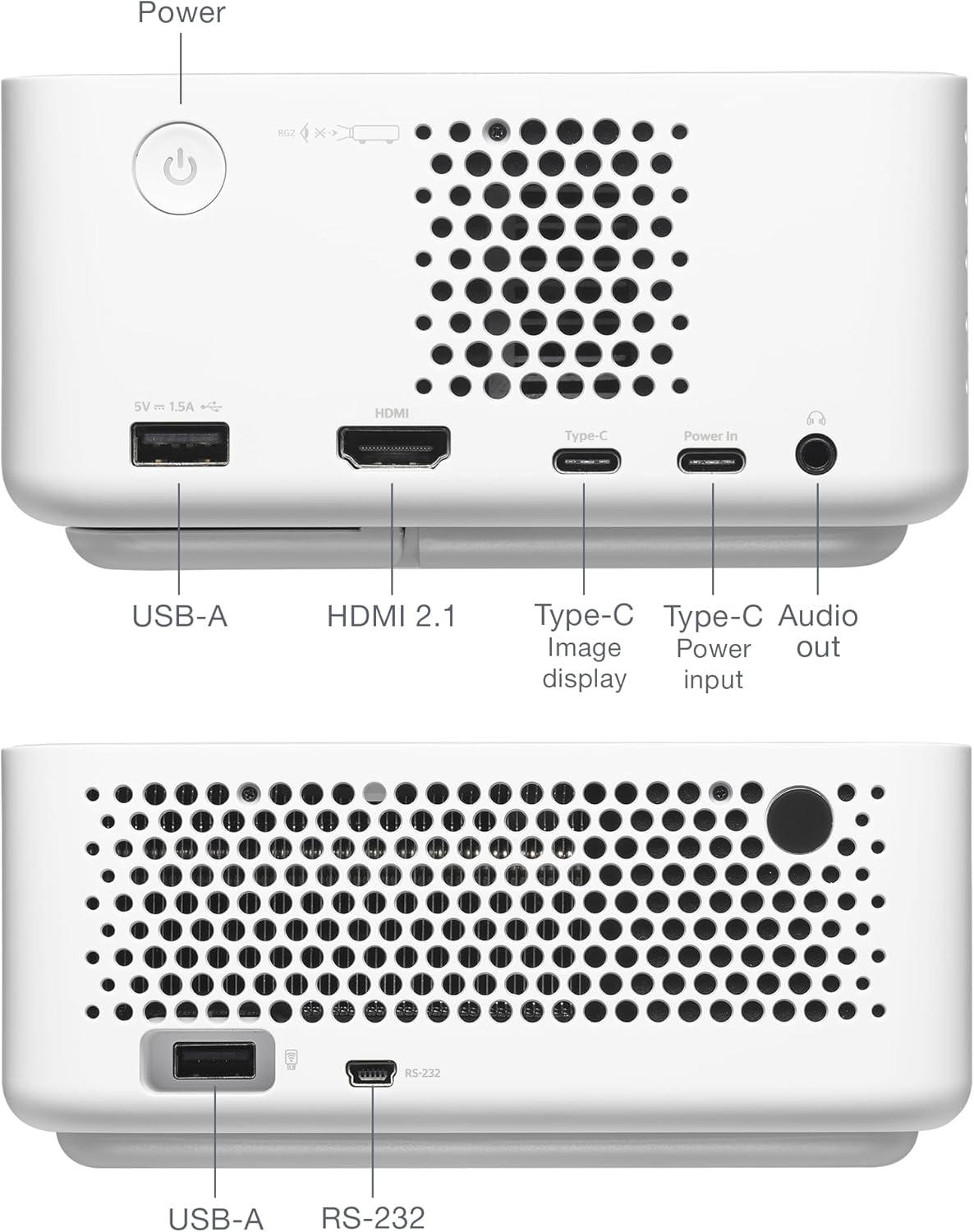
Pozadi view of the Optoma ML1080 projector, showing the various input and output ports including USB-A, HDMI 2.1, USB-C (Image display), USB-C (Power input), and Audio out.
Održavanje
Čišćenje sočiva
Use a soft, lint-free cloth specifically designed for optical lenses. Gently wipe the lens to remove dust or smudges. Avoid abrasive materials or harsh chemicals.
General Cleaning
Obrišite vanjski dio projektora mekom, suhom krpom. Ne koristite tekuća sredstva za čišćenje direktno na uređaju.
Ventilacija
Ensure the projector's ventilation openings are clear and unobstructed to prevent overheating.
Rješavanje problema
Nema prikaza slike
- Provjerite priključke za napajanje i uvjerite se da je projektor uključen.
- Provjerite je li ulazni izvor ispravno odabran.
- Provjerite je li izvorni uređaj uključen i daje li signal.
Mutna slika
- Allow the projector to complete its automatic focus adjustment.
- Ensure the projection surface is flat and free of obstructions.
Nema zvuka
- Provjerite nivo jačine zvuka na projektoru i izvornom uređaju.
- Ako koristite eksterne zvučnike, provjerite da li su pravilno povezani i da li imaju napajanje.
Specifikacije
- Dimenzije proizvoda: 12.5 x 10 x 4.75 inča
- Težina artikla: 2.2 funte
- Broj modela stavke: ML1080
- baterije: Potrebna je 1 litijum-metalna baterija (uključena)
- Proizvođač: Optoma Technology Inc
- Preporučena upotreba: Gaming, Home Cinema, Road Warrior, SMB and Work From Home
- Posebne karakteristike: 100% REC.709 | 98% DCI-P3, Enhanced Game Mode w/ ALLM, RGB Laser Technology, Time-of-Flight (ToF) Technology, Ultra-Portable
- Tehnologija povezivanja: 3.5mm Audio, HDMI, USB
- Rezolucija ekrana: 1920 x 1080

Diagram illustrating the dimensions and connectivity ports of the Optoma ML1080 projector.
Garancija i podrška
For warranty information and technical support, please refer to the official Optoma website or contact Optoma customer service. Keep your purchase receipt for warranty claims. Online resources may include FAQs, driver downloads, and service center locations.


