1. Uvod i krajview
This manual provides instructions for the IINE Mini Storage Case L875, designed to protect and store your Nintendo Switch and OLED Joy-Con controllers. This transparent, portable case features a magnetic closure and a dust-proof design, ensuring your Joy-Cons remain secure and functional during travel or storage.

2. Značajke proizvoda
- Selected Imported PC Material: Crafted from high-transparency PC material to clearly showcase your Switch Joy-Cons.
- Pressure-Resistant Joystick Design: Features a raised joystick design to accommodate joystick caps and prevent damage to the joysticks.
- Perfect Fit for Joy-Con: Conforms precisely to the shape of Joy-Cons, ensuring a secure fit without accidental button presses, battery drain, or scratches.
- Magnetno zatvaranje: Equipped with an automatic magnetic lock for easy and secure opening and closing.
- Dust-Resistant Durability: Made with high-hardness material to withstand pressure and effectively protect against dust.
- Široka primjena: Suitable for various scenarios, offering portability for outings and elegant, dust-free everyday storage.


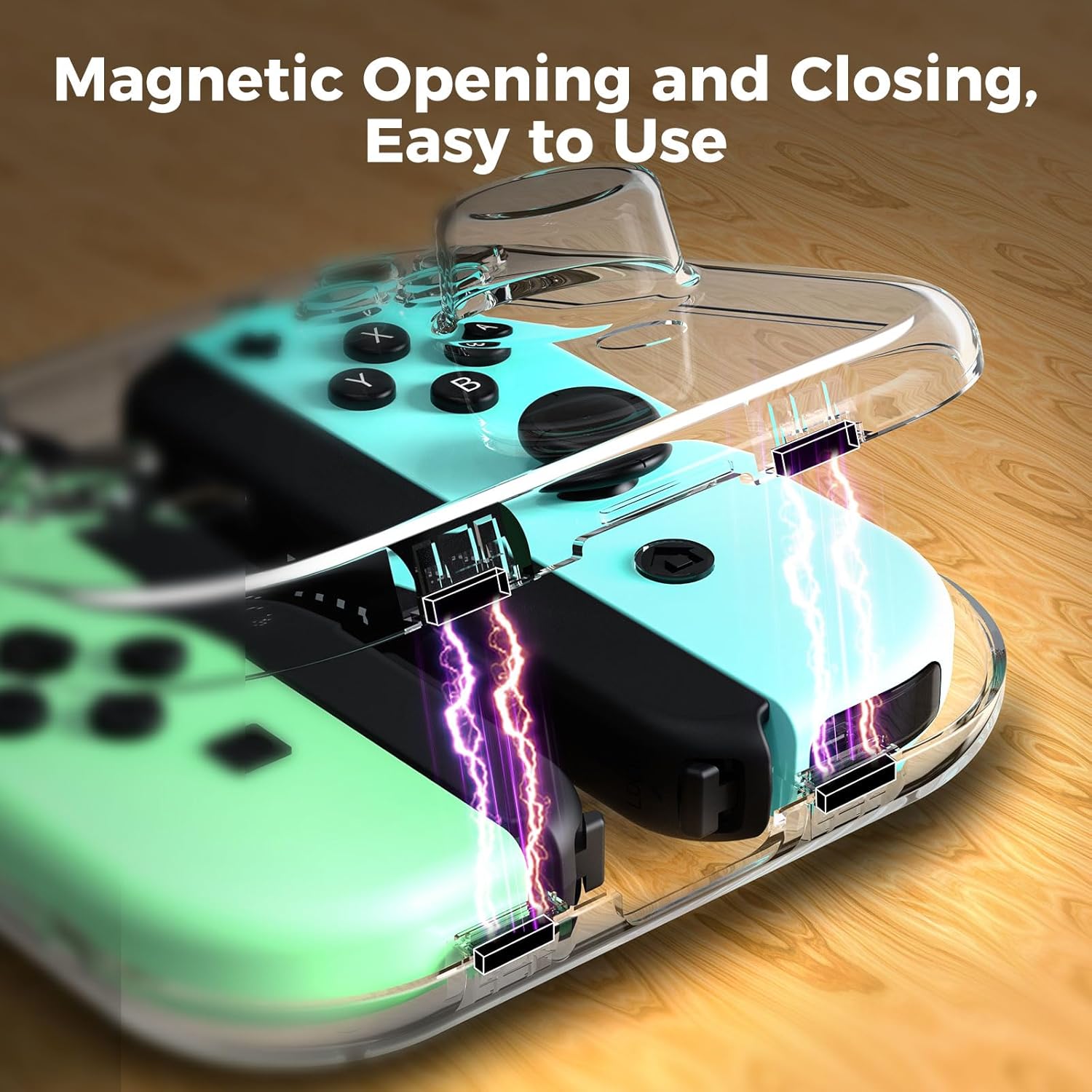
3. Upute za postavljanje
- Otvorite kutiju: Gently separate the two halves of the IINE Mini Storage Case. The magnetic closure will release with minimal effort.
- Prepare Joy-Cons: Ensure your Nintendo Switch Joy-Con controllers are clean and free of any debris. If using wrist straps, ensure they are properly attached to the Joy-Cons.
- Poravnajte i umetnite: Align each Joy-Con controller with its designated molded slot inside the case. The case is designed for a precise fit, so ensure the joysticks and buttons fit into their respective contoured areas.
- Osigurajte slučaj: Carefully place each Joy-Con into its slot. Once both are in place, close the case, allowing the magnetic closure to automatically secure the two halves together.

4. Uputstvo za upotrebu
- Storing Joy-Cons: Place your Joy-Cons inside the case as described in the Setup section and close the magnetic lid. The case will hold them securely, preventing movement and accidental button presses.
- Removing Joy-Cons: To access your controllers, gently open the magnetic lid and lift the Joy-Cons out of their slots.
- prenosivost: The compact and durable design allows for easy transport. You can carry the case in a bag, backpack, or by hand. The secure magnetic closure prevents accidental opening during transit.

5. Održavanje
- čišćenje: To clean the case, use a soft, damp cloth. Avoid using abrasive cleaners, harsh chemicals, or solvents, as these may scratch or damage the transparent PC material.
- Skladištenje: Store the case in a cool, dry place away from direct sunlight and extreme temperatures to maintain its structural integrity and clarity.
- Rukovanje: While the case is designed to be pressure-resistant, avoid dropping the product from a high place or subjecting it to excessive force, as this could cause damage to the case or the Joy-Cons inside.

6. Otkrivanje problema
- Case not closing properly: Ensure both Joy-Con controllers are correctly seated in their respective slots and that no foreign objects are obstructing the magnetic closure mechanism.
- Joy-Cons feel loose inside the case: Verify that the Joy-Cons are standard size and do not have additional skins, covers, or bulky accessories that might alter their dimensions. The case is designed for a precise fit with bare Joy-Cons.
- Accidental button presses or battery drain: The case is designed to prevent this. Double-check that the Joy-Cons are fully inserted and the case is securely closed. If the issue persists, ensure no external pressure is being applied to the case while stored.
- Oštećenje kućišta: If the case is cracked, broken, or shows signs of significant wear, discontinue use to prevent potential damage to your Joy-Con controllers.
7. Specifikacije
| Broj modela | L875 |
| Kompatibilnost | Nintendo Switch Joy-Con, Nintendo Switch OLED Joy-Con |
| Materijal | Imported PC Material (High-Transparency) |
| Closure Type | Magnetic |
| Težina artikla | 2.89 unce |
| Dimenzije paketa | 4.72 x 4.29 x 1.54 inča |
| Vrsta predmeta | Elektronika |
8. Garancija i podrška
For detailed warranty information, product registration, or technical support, please visit the official IINE website or contact their customer service department. Keep your purchase receipt or proof of purchase for any warranty claims or inquiries.


