Uvod
Thank you for choosing the Rohnson Genius 16 Dehumidifier. This appliance is designed to efficiently remove excess moisture from your indoor environment, improve air quality, and create a healthier living space. With its advanced features, including Wi-Fi control, a powerful dehumidification capacity of up to 16 liters per day, and an ultra-quiet operation, the Genius 16 is an ideal solution for rooms up to 100 square meters. Please read this manual thoroughly before operating the unit to ensure safe and optimal performance.
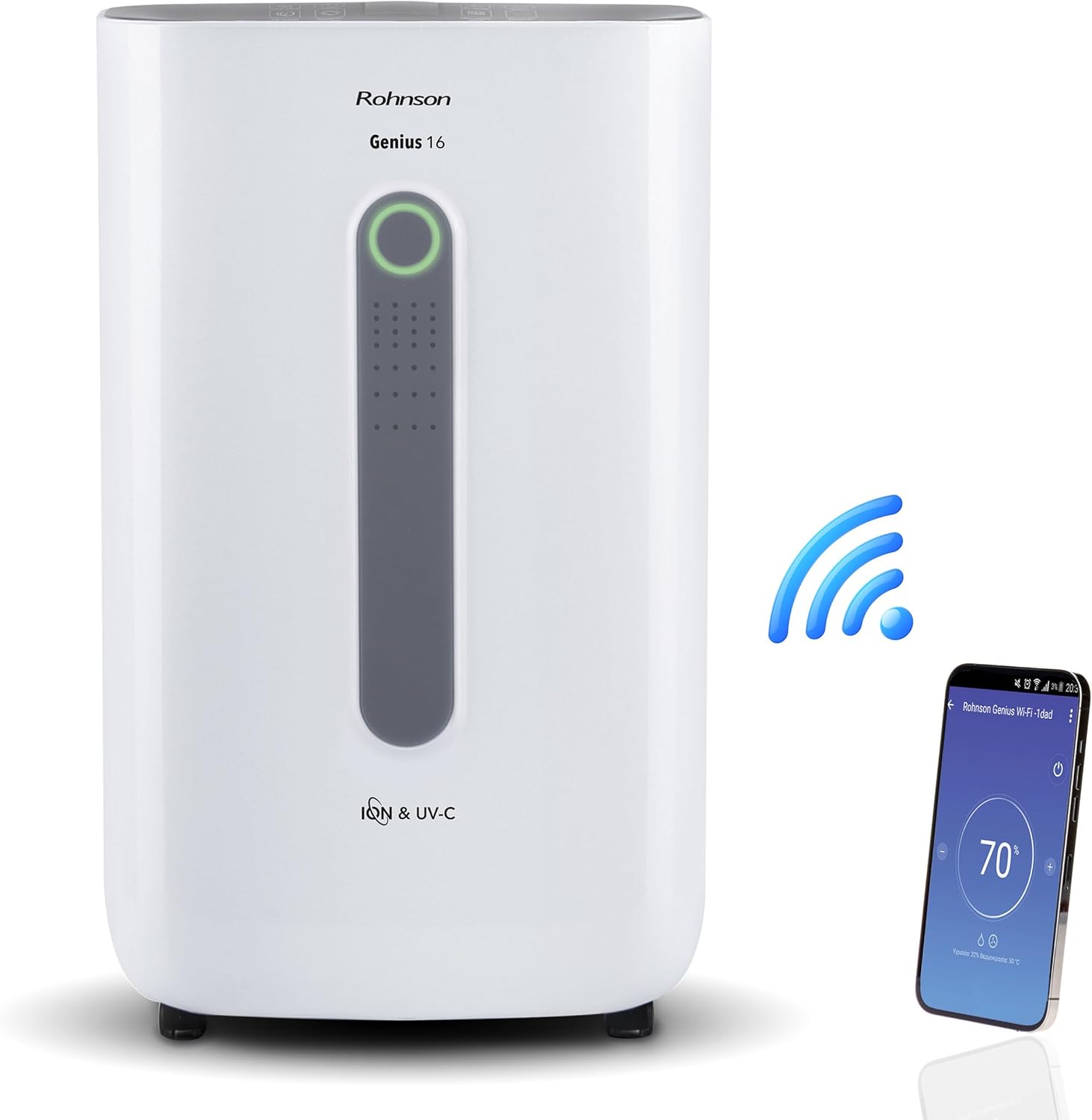
Image: The Rohnson Genius 16 Dehumidifier, a white rectangular unit with a central display, shown alongside a Wi-Fi symbol and a smartphone displaying the control app. This illustrates the unit's smart connectivity.
Sigurnosna uputstva
Uvijek se pridržavajte osnovnih sigurnosnih mjera opreza prilikom korištenja električnih uređaja kako biste smanjili rizik od požara, strujnog udara i ozljeda.
- Uvjerite se da napajanje odgovara voltage navedeno na naljepnici s karakteristikama uređaja.
- Nemojte koristiti uređaj sa oštećenim kablom ili utikačem.
- Držite uređaj dalje od izvora topline i direktne sunčeve svjetlosti.
- Nemojte blokirati ulaze ili izlaze zraka.
- Uvijek isključite jedinicu prije čišćenja ili održavanja.
- Čuvati van domašaja djece.
Product Overview
The Rohnson Genius 16 Dehumidifier is equipped with several features to enhance your indoor air quality and comfort.
- Efikasno odvlaživanje: Removes up to 16 liters of moisture per day, suitable for areas up to 100 m².
- Advanced Air Purification: Features UV-C light and a dual ionizer to eliminate bacteria and odors. An optional HEPA 13 + Activated Carbon filter can remove 99.7% of particles, smoke, chemicals, and allergens.
- Ultra tihi rad: Operates at a low noise level of 36 dB(A) in low fan mode, ideal for bedrooms and living areas.
- Pametna kontrola: Wi-Fi enabled for remote control via the Rohnson App (Android and iOS compatible). Includes a touch control panel, 1-24 hour timer, and automatic restart after power failure.
- Dizajn za uštedu energije: Powerful yet energy-efficient with only 240W power consumption. Features a Turbo-Boost mode for fast clothes drying and automatic shut-off when the water tank is full.
- Digital Humidity Display: A color indicator (Blue, Green, Red) shows current humidity levels for easy monitoring.

Image: The Rohnson Genius 16 Dehumidifier positioned in a living room, illustrating its compact size. Key features are overlaid, including its 16L/day dehumidification capacity, anti-frost system, digital humidity display, smart Wi-Fi control, UV-C light and ionizer, silent 36dB operation, and 6.5L water tank.
Setup
1. Raspakivanje
Pažljivo izvadite odvlaživač zraka iz ambalaže. Pregledajte uređaj na bilo kakve znakove oštećenja. Sačuvajte ambalažu za buduće skladištenje ili transport.
2. Plasman
Place the dehumidifier on a firm, level surface in the area where dehumidification is desired. For optimal performance, ensure there is at least 20 cm (8 inches) of space around all sides of the unit to allow for proper airflow. The unit is effective for rooms up to 100 m². For best air circulation, consider placing it centrally within the room.

Image: A diagram illustrating the optimal placement of the dehumidifier in different household areas such as a laundry room, bedroom, living room, office, and basement, emphasizing central positioning for maximum effectiveness in rooms up to 100 m².
3. Priključak za napajanje
Plug the power cord into a grounded electrical outlet. Ensure the outlet meets the electrical requirements of the unit (230 Volts AC).
4. Filter Installation (Optional HEPA 13 + Activated Carbon Filter)
The Rohnson Genius 16 comes with an optional HEPA 13 + Activated Carbon filter for enhanced air purification.
- Locate the filter compartment, typically at the back or side of the unit.
- Otvorite poklopac filtera.
- Insert the HEPA 13 + Activated Carbon filter, ensuring it is correctly oriented.
- Čvrsto zatvorite poklopac filtera.
5. Opcije za odvod vode
The unit offers two drainage methods:
- Spremnik za vodu: The unit has a 6.5-liter water tank. When the tank is full, the unit will automatically shut off and an indicator will light up. Empty the tank and reinsert it to resume operation.
- Kontinuirana drenaža: For continuous operation without needing to empty the tank, connect a drainage hose (not included) to the continuous drainage port on the unit. Route the hose to a suitable drain or larger container.
Uputstvo za upotrebu
1. Kontrolna tabla
The Rohnson Genius 16 features an intuitive touch control panel and a digital display.
- Dugme za napajanje: Uključuje ili isključuje jedinicu.
- Odabir načina rada: Cycle through different operating modes (e.g., Dehumidification, Turbo-Boost, Night Mode).
- Brzina ventilatora: Adjust fan speed (low, medium, high).
- Postavka vlažnosti: Set your desired humidity level. The unit will operate until this level is reached.
- Dugme za tajmer: Set a timer for automatic shut-off (1-24 hours).
- UV-C/Ionizer Button: Activates or deactivates the UV-C light and dual ionizer.
- Digitalni prikaz: Shows current humidity, temperature, and selected settings.

Image: A visual representation of the digital humidity control feature, showing the dehumidifier and its color-coded humidity indicators. Blue indicates humidity below 55%, Green for 55-70%, and Red for above 70%, providing an easy visual cue for air moisture levels.
2. Wi-Fi App Control
Control your Rohnson Genius 16 from anywhere using the Rohnson App.
- Download the "Rohnson" app from the App Store (iOS) or Google Play Store (Android).
- Registrirajte račun i prijavite se.
- Follow the in-app instructions to add your Rohnson Genius 16 dehumidifier. This typically involves putting the unit into pairing mode and connecting it to your home Wi-Fi network.
- Once connected, you can remotely monitor humidity, adjust settings, set schedules (hourly, daily, weekly), and control all functions of the dehumidifier.

Image: A banner illustrating the smart connectivity of the dehumidifier, showing the unit and a smartphone displaying the Rohnson app. This highlights the ability to control the room climate remotely, schedule operations, and monitor humidity via a smartphone, compatible with both Android and iOS.
3. Specijalni režimi
- Turbo-Boost Mode (Laundry Drying): This mode provides a powerful airflow to quickly dry clothes indoors. Position the unit near the laundry for efficient drying.
- Noćni način rada: Reduces fan speed and dims display lights for quiet operation during sleep.

Image: The Rohnson Genius 16 Dehumidifier positioned in a room with a clothes drying rack, illustrating its effectiveness in drying laundry indoors, especially useful during rainy weather or in apartments without balconies.
Održavanje
Regular maintenance ensures the longevity and efficient operation of your dehumidifier. Always unplug the unit before cleaning.
1. Čišćenje eksterijera
Obrišite spoljašnjost jedinice mekom krpom, damp krpom. Ne koristite jake hemikalije, abrazivna sredstva ili rastvarače, jer mogu oštetiti površinu.
2. Čišćenje/Zamjena filtera
The air filter should be cleaned regularly (e.g., every two weeks or as needed) to maintain optimal performance. If using the optional HEPA 13 + Activated Carbon filter, refer to its specific replacement schedule.
- Isključite i iskopčajte ovlaživač.
- Remove the filter cover and carefully take out the filter(s).
- For washable filters, rinse with lukewarm water and mild detergent. Allow to air dry completely before reinserting.
- For HEPA/Activated Carbon filters, these are typically not washable and should be replaced according to manufacturer recommendations or when visibly dirty.
- Reinsert the clean/new filter(s) and close the cover.
3. Pražnjenje rezervoara za vodu
Kada se rezervoar za vodu napuni, uređaj će prestati s radom.
- Gently pull out the water tank from the unit.
- Pažljivo ispraznite sakupljenu vodu.
- Po potrebi očistite rezervoar blagim sapunom i vodom, a zatim temeljno isperite.
- Reinsert the empty tank firmly into the unit until it clicks into place. The unit will resume operation.
Rješavanje problema
Prije nego što kontaktirate korisničku podršku, pogledajte sljedeće uobičajene probleme i rješenja.
| Problem | Mogući uzrok | Rješenje |
|---|---|---|
| Jedinica se ne uključuje. | Nema napajanja, kabel za napajanje labav, spremnik za vodu pun ili nije pravilno umetnut. | Check power connection. Empty and reinsert water tank securely. |
| Nema sakupljene vode / Nisko odvlaživanje. | Room humidity too low, air filter clogged, temperature too low, unit size too small for room. | Check current humidity setting. Clean or replace air filter. Ensure room temperature is above 5°C (41°F). |
| Jedinica je bučna. | Uređaj nije na ravnoj površini, začepljen ventilator, prljav filter. | Place unit on a flat, stable surface. Check for obstructions in fan area. Clean filter. |
| Problemi s Wi-Fi vezom. | Incorrect Wi-Fi password, unit too far from router, app not updated. | Ensure correct Wi-Fi password. Move unit closer to router. Update Rohnson App. Refer to app's troubleshooting guide. |
Specifikacije
| Feature | Detalj |
|---|---|
| Brand | Rohnson |
| Broj modela | R-9916W |
| Kapacitet odvlaživanja | Do 16 litara/dan |
| Preporučena površina sobe | Do 100 m² |
| Kapacitet rezervoara za vodu | 6.5 litara |
| Nivo buke | 36 dB(A) (low fan mode) |
| Potrošnja energije | 240 W |
| Voltage | 230 volti (AC) |
| Dimenzije proizvoda (D x Š x V) | 28 x 38 x 64 cm |
| Težina artikla | 16 kilograma |
| Posebne karakteristike | Digital Display, Wi-Fi Control, UV-C Light, Dual Ionizer, Optional HEPA 13 Filter, Turbo-Boost Mode, Auto Shut-off, Auto Restart |
| Boja | Bijelo |
Garancija i podrška
For information regarding warranty coverage and customer support, please refer to the warranty card included with your product or visit the official Rohnson webSačuvajte račun kao dokaz o kupovini.
If you encounter issues not covered in this manual, please contact Rohnson customer service for assistance.


