1. Uvod
Thank you for choosing the Maxcom FW58 Vanad Pro Smartwatch. This manual provides essential information for setting up, operating, and maintaining your device. The FW58 Vanad Pro is designed to enhance your daily life by offering comprehensive health monitoring, seamless communication, and robust activity tracking capabilities. Its lightweight design and customizable features make it an ideal companion for both busy individuals and active sports enthusiasts.
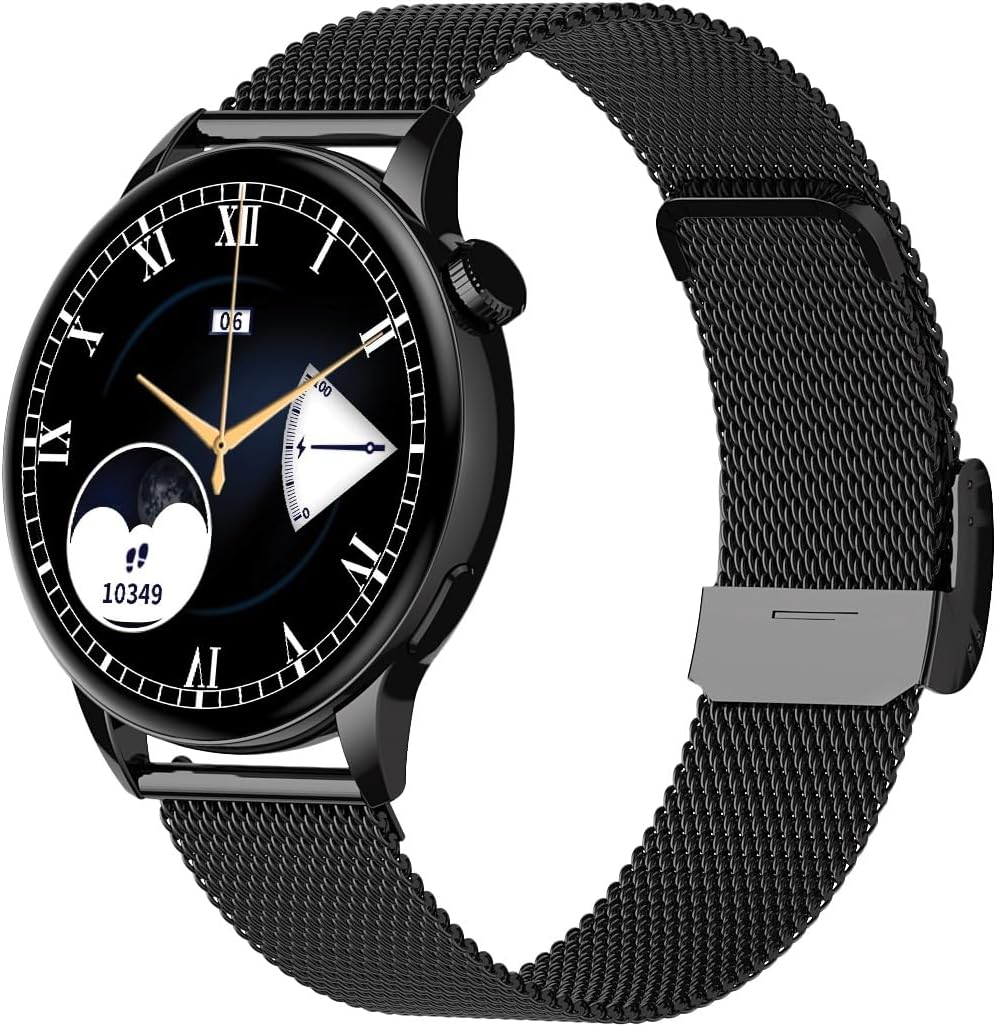
Image 1.1: Maxcom FW58 Vanad Pro Smartwatch, showcasing its elegant design with a black mesh strap and a classic watch face.
2. Podešavanje
2.1. Sadržaj paketa
Prije nego što počnete, molimo vas da se uvjerite da su sve stavke prisutne u vašem paketu:
- Maxcom FW58 Vanad Pro Smartwatch
- Magnetski kabel za punjenje
- Additional Silicone Strap
- Korisnički priručnik (ovaj dokument)
2.2. Punjenje pametnog sata
For optimal performance, fully charge your smartwatch before first use.
- Spojite magnetni kabel za punjenje na kontakte za punjenje na stražnjoj strani pametnog sata. Provjerite jesu li pinovi pravilno poravnati.
- Uključite USB kraj kabla u standardni USB adapter za napajanje (preporučuje se 5V/1A) ili USB port računara.
- Ekran sata će prikazivati status punjenja. Potpuno punjenje obično traje otprilike 2 sata.

Slika 2.1: Pozadi view of the Maxcom FW58 Smartwatch, highlighting the optical sensor for health monitoring and the magnetic charging contacts.
2.3. Uparivanje sa vašim pametnim telefonom
To unlock all features, pair your smartwatch with the dedicated Maxcom smartwatch application on your smartphone.
- Download the official Maxcom smartwatch application from your smartphone's app store (e.g., Google Play Store or Apple App Store). Traži "Maxcom Smartwatch" or refer to the QR code in the quick start guide if provided.
- Provjerite je li Bluetooth omogućen na vašem pametnom telefonu.
- Open the Maxcom app and follow the on-screen instructions to add a new device.
- Select "FW58" from the list of available devices. Confirm the pairing request on both your phone and the smartwatch.
3. Upravljanje pametnim satom
3.1. Osnovna navigacija
The Maxcom FW58 features a responsive touchscreen and a side button/crown for navigation.
- Touchscreen: Prevucite prstom lijevo/desno, gore/dolje za navigaciju kroz menije i funkcije. Dodirnite za odabir.
- Bočno dugme/Kruna: Press to wake the screen, return to the home screen, or access the app menu. Rotate the crown (if applicable) to scroll through lists or adjust settings.

Slika 3.1: Bočni profesionalacfile of the Maxcom FW58 Smartwatch, illustrating the physical crown and button for intuitive control and navigation.
3.2. Komunikacijske karakteristike
- Upućivanje/primanje poziva: Once paired, you can answer incoming calls directly from your smartwatch. You can also initiate calls from your watch's call log or contacts (synced via the app).
- Obavještenja: Receive real-time notifications for SMS messages, app alerts, emails, social media updates, and news directly on your wrist. Manage notification settings through the Maxcom app.
3.3. Praćenje zdravlja
The smartwatch provides various health metrics to help you monitor your well-being.
- Otkucaji srca: Kontinuirano ili po potrebi praćenje otkucaja srca.
- krvni pritisak: Measure your blood pressure (for reference only, not a medical device).
- Kiseonik u krvi (SpO2): Pratite nivo zasićenosti krvi kisikom.
- Praćenje spavanja: Automatically monitors your sleep patterns, including deep sleep, light sleep, and awake times.
3.4. Activity Tracking & Sports Modes
Track your daily activity and specific workouts.
- Dnevna aktivnost: Records steps taken, calories burned, and distance traveled (mileage).
- Sportski modovi: Select from various sports modes such as fitness, hiking, running, badminton, cycling, and football to track specific workout data.
3.5. Kontrola muzike
Control music playback on your connected smartphone directly from your smartwatch. Play, pause, skip tracks, and adjust volume without needing to access your phone.
3.6. Prilagodba
Personalize your smartwatch experience.
- Lica za gledanje: Choose from over 100 pre-installed watch face models or download more via the Maxcom app to match your style or mood.
- Stil menija: Customize the layout and appearance of your smartwatch menu.
- Zamjena remena: Easily change between the included mesh and silicone straps to suit different occasions or activities.

Image 3.2: A digital watch face on the Maxcom FW58 Smartwatch, showing steps and heart rate data.

Image 3.3: The Maxcom FW58 Smartwatch showcasing a dynamic and colorful digital watch face option.
4. Održavanje
4.1. Čišćenje pametnog sata
Regular cleaning helps maintain the device's appearance and functionality.
- Obrišite ekran i kućište mekom krpom koja ne ostavlja dlačice.
- Za tvrdokorne mrlje, lagano dampIsperite krpu vodom. Izbjegavajte upotrebu jakih hemikalija ili abrazivnih materijala.
- Redovno čistite područje senzora na poleđini sata kako biste osigurali tačna očitavanja.
4.2. Održavanje baterije
Da produžite vijek trajanja baterije:
- Izbjegavajte ekstremne temperature.
- Ne ostavljajte sat potpuno ispražnjen duži vremenski period.
- Charge the device using only the provided charging cable.
4.3. Vodootpornost (IP67)
The Maxcom FW58 Vanad Pro Smartwatch is rated IP67, meaning it is protected against dust ingress and can withstand immersion in water up to 1 meter for up to 30 minutes. While it is suitable for daily use and splashes, it is not recommended for swimming, diving, or high-pressure water activities.
5. Otkrivanje problema
Ako imate problema sa svojim pametnim satom, pokušajte sljedeća rješenja:
| Problem | Rješenje |
|---|---|
| Sat se ne uključuje | Ensure the watch is fully charged. Press and hold the side button for 5-10 seconds. |
| Nije moguće upariti uređaj sa pametnim telefonom | Ensure Bluetooth is on. Restart both the watch and phone. Clear app cache/data. Try pairing again. |
| Netačna zdravstvena očitavanja | Ensure the watch is worn snugly on your wrist. Clean the sensor area. Remain still during measurements. |
| Obavještenja nisu primljena | Check app notification permissions on your phone. Ensure the watch is connected via Bluetooth. Verify notification settings within the Maxcom app. |
5.1. Factory Reset
If problems persist, you may need to perform a factory reset. This will erase all data on the smartwatch and restore it to its original settings. Navigate to 'Settings' on your smartwatch, then look for 'System' or 'Reset' options.
6. Specifikacije
| Feature | Detalj |
|---|---|
| Broj modela | FW58 |
| Veličina ekrana | 1.5 inča |
| Trajanje baterije | 6-10 days (intensive use) |
| Težina | 46g |
| Dimenzije kućišta | 44 x 38 x 10 mm |
| Veličina trake | 255 x 20 mm |
| Otpornost na vodu | IP67 (do 1 metar za 30 minuta) |
| Povezivanje | Bluetooth |
| Uključeni remeni | Mesh and Silicone |
7. Garancija i podrška
7.1. Informacije o garanciji
Maxcom products are manufactured to the highest quality standards. For detailed warranty terms and conditions, please refer to the warranty card included with your purchase or visit the official Maxcom webSačuvajte dokaz o kupovini za slučaj reklamacije.
7.2. Korisnička podrška
If you require further assistance or have questions not covered in this manual, please contact Maxcom customer support:
- Webstranica: Visit the official Maxcom support website for FAQs, software updates, and contact forms.
- E-pošta/Telefon: Refer to the contact information provided on the Maxcom webweb-mjesto ili pakovanje vašeg proizvoda.


