1. Uvod
Thank you for choosing the Baseus Bowie E5x True Wireless Stereo (TWS) Earphones. These earphones are designed to provide a high-quality audio experience with convenient wireless connectivity. This manual will guide you through the setup, operation, and maintenance of your new earphones.

Figure 1: Baseus Bowie E5x TWS Earphones and Charging Case with Retail Packaging
2. Sadržaj paketa
Molimo Vas da provjerite sadržaj paketa kako biste bili sigurni da su svi artikli prisutni:
- Baseus Bowie E5x TWS Earphones (Left and Right)
- Futrola za punjenje
- USB-C kabl za punjenje
- Korisnički priručnik (ovaj dokument)

Figure 2: Baseus Bowie E5x Charging Case and USB-C Charging Cable
3. Proizvod je gotovview
Familiarize yourself with the components of your Baseus Bowie E5x earphones:
- Slušalice: Left (L) and Right (R) earbuds with touch control areas and charging contacts.
- Futrola za punjenje: Used for charging the earbuds and for storage. Features a USB-C charging port and LED indicators.
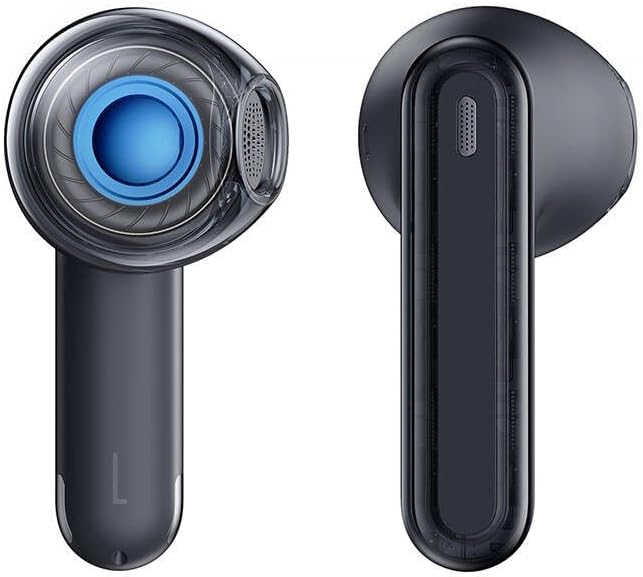
Figure 3: Left and Right Baseus Bowie E5x Earbuds
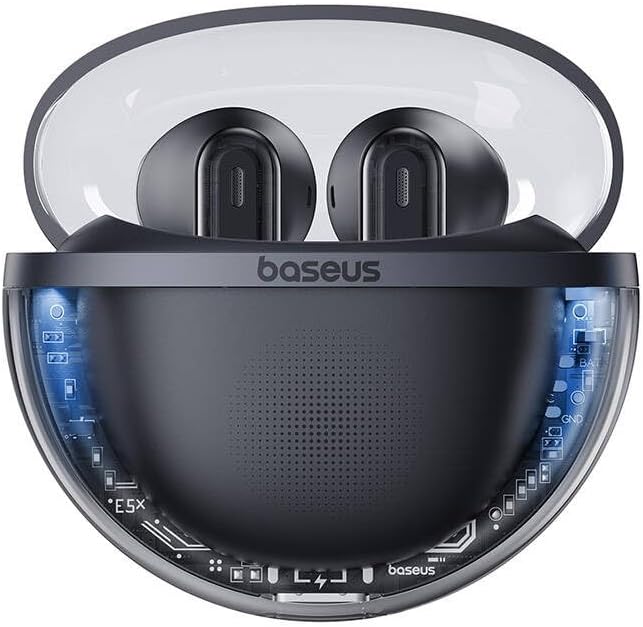
Figure 4: Baseus Bowie E5x Charging Case with Earbuds Inserted
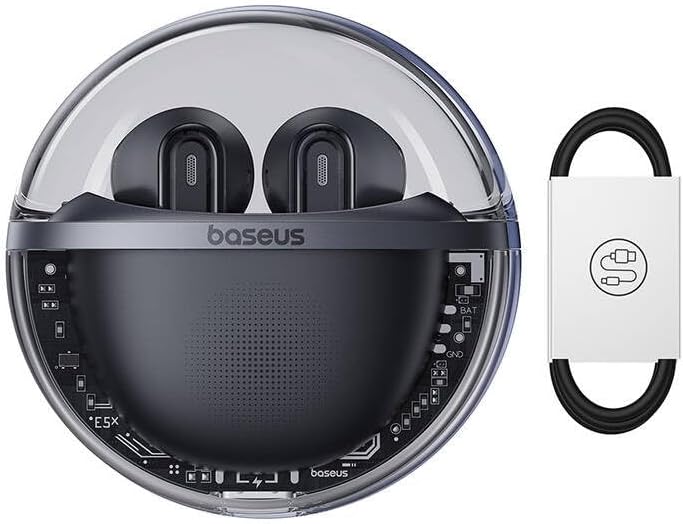
Figure 5: Close-up of an Earbud's Speaker
4. Podešavanje
4.1 Punjenje slušalica i futrole
- Početna naplata: Before first use, fully charge the charging case and earbuds. Place the earbuds into the charging case.
- Punjenje kućišta: Connect the provided USB-C cable to the charging port on the case and the other end to a USB power adapter (not included). The LED indicator on the case will show charging status.
- Punjenje slušalica: When placed in the charging case, the earbuds will automatically begin charging. The case's indicator lights will show the charging status of the earbuds.
4.2 Bluetooth uparivanje
- Uključeno: Open the charging case. The earbuds will automatically power on and enter pairing mode (indicated by flashing LED lights on the earbuds).
- Aktivirajte Bluetooth: Na vašem uređaju (pametnom telefonu, tabletu, računaru) omogućite Bluetooth.
- Odaberite uređaj: In your device's Bluetooth settings, search for available devices and select "Baseus Bowie E5x".
- Povežite se: Once selected, the earbuds will connect to your device. A voice prompt or steady LED light will confirm successful pairing.
- Ponovo poveži: Nakon početnog uparivanja, slušalice će se automatski povezati s posljednjim uparenim uređajem kada se izvade iz kutijice, pod uvjetom da je Bluetooth omogućen na uređaju.
5. Uputstvo za upotrebu
The Baseus Bowie E5x earphones feature intuitive touch controls:
| Funkcija | Akcija (Lijeva/Desna slušalica) |
|---|---|
| Power On | Open charging case / Long press touch area (if off) |
| Power Off | Place earbuds into charging case and close lid / Disconnect Bluetooth and wait |
| Pusti/Pauza | Double tap touch area |
| Next Track | Desna slušalica trostrukim dodirom |
| Previous Track | Triput dodirnite lijevu slušalicu |
| Odgovori/Završi poziv | Double tap touch area |
| Odbiti poziv | Dugi pritisak na dodirno područje u trajanju od 2 sekundi |
| Aktivirajte glasovnog asistenta | Dugi pritisak na dodirno područje u trajanju od 3 sekundi |
| Switch to Gaming Mode (Low Latency) | Specific gesture (refer to product packaging or Baseus app for exact control) |
Napomena: Specific touch controls for features like volume adjustment or gaming mode may vary. Refer to the official Baseus app or product packaging for the most accurate and customizable controls.
6. Održavanje
To ensure the longevity and optimal performance of your earphones, follow these maintenance tips:
- čišćenje: Redovno čistite slušalice i kućište za punjenje mekom, suhom krpom koja ne ostavlja dlačice. Nemojte koristiti jake hemikalije ili abrazivne materijale.
- Kontakti za punjenje: Provjerite da li su kontakti za punjenje i na slušalicama i unutar kućišta čisti i bez prljavštine kako biste osigurali pravilno punjenje.
- Skladištenje: Kada se ne koriste, slušalice čuvajte u kutijici za punjenje kako biste ih zaštitili od prašine i oštećenja.
- Izbjegavajte ekstremne uslove: Do not expose the earphones to extreme temperatures, humidity, or liquids.
7. Otkrivanje problema
If you encounter issues with your Baseus Bowie E5x earphones, try the following solutions:
- Nema zvuka:
- Provjerite jesu li slušalice napunjene.
- Check if Bluetooth is enabled on your device and connected to "Baseus Bowie E5x".
- Podesite jačinu zvuka i na uređaju i na slušalicama.
- Pokušajte ponovo upariti slušalice sa svojim uređajem.
- Earbuds Not Pairing with Each Other:
- Vratite obje slušalice u kutijicu za punjenje, zatvorite poklopac, pričekajte nekoliko sekundi, a zatim ponovo otvorite poklopac.
- Provjerite da li su obje slušalice dovoljno napunjene.
- Problemi s punjenjem:
- Provjerite USB-C kabel i adapter za napajanje.
- Očistite kontakte za punjenje na slušalicama i unutar kućišta.
- Provjerite je li sama kutijica za punjenje napunjena.
- Connection Drops/Unstable:
- Približite se povezanom uređaju.
- Izbjegavajte okruženja sa jakim elektromagnetnim smetnjama.
- Prekinite vezu i ponovo povežite Bluetooth vezu.
If the issue persists, consult the Baseus official website or customer support for further assistance.
8. Specifikacije
| Feature | Detalj |
|---|---|
| Brand | Baseus |
| Model | Bowie E5x |
| Boja | Crna |
| Uključene komponente | 1 package (Earphones, Charging Case, USB-C Cable, Manual) |
| Povezivanje | Pravi bežični stereo (TWS) |
| Port za punjenje | USB-C |
Napomena: Specifikacije su podložne promjenama bez prethodne najave.
9. Garancija i podrška
Baseus products come with a manufacturer's warranty. Please refer to the warranty card included in your package or visit the official Baseus webweb stranicu za detaljne uslove garancije specifične za vašu regiju.
For technical support, troubleshooting, or service inquiries, please contact Baseus customer support through their official webweb-mjesto ili kontakt informacije navedene na pakovanju vašeg proizvoda.
Službeno Webstranica: www.baseus.com


