Uvod
The Sonim XP5 Plus is a rugged, purpose-built communication device designed for demanding environments. It combines cellular and radio-like capabilities, making it ideal for critical communications. This manual provides essential information for setting up, operating, maintaining, and troubleshooting your Sonim XP5 Plus.
Sadržaj paketa
Provjerite da li se u paketu vašeg proizvoda nalaze svi artikli:
- Sonim XP5 Plus XP5900 Rugged Phone
- Adapter za napajanje
- Litijum-jonska baterija
- USB-C kabl
- Dokumentacija (Vodič za brzi početak, Sigurnosne informacije)
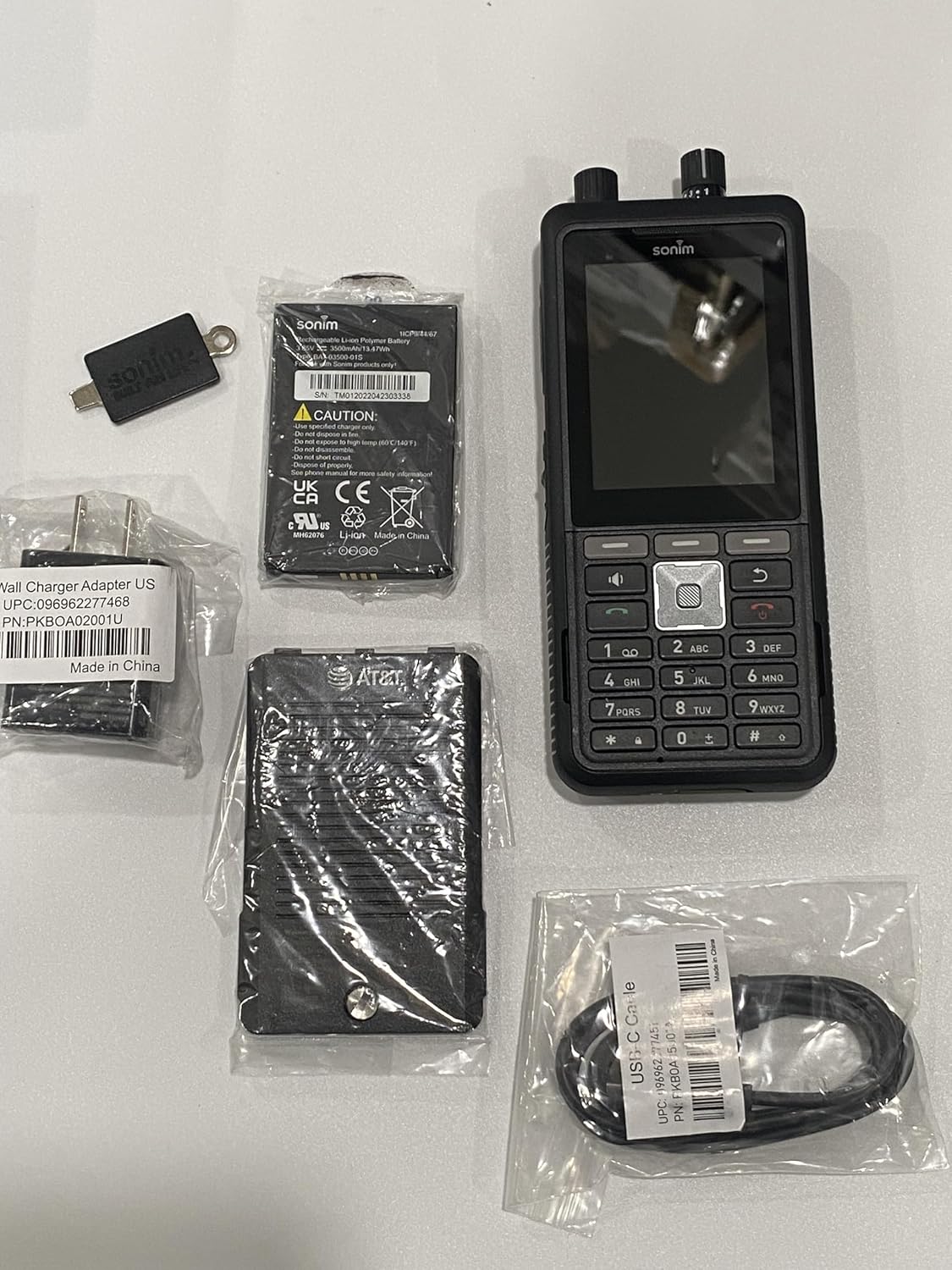
Image: The Sonim XP5 Plus phone, along with its included accessories: a battery, a wall charger adapter, and a USB-C cable. All components are individually packaged.
Product Overview
Familiarize yourself with the physical features and components of your Sonim XP5 Plus.

Slika: Višestruka views of the Sonim XP5 Plus phone. The front view shows the display and keypad, the back view shows the camera and speaker, and side views highlight the rugged design and side buttons.
Ključne komponente:
- Prikaz: 2.8-inch screen for clear visibility.
- Tastatura: Physical buttons for dialing and navigation.
- Dugme za razgovor (PTT): Large, dedicated button for instant communication.
- Volume Control Knobs: Top-mounted for easy adjustment.
- kamera: Rear-facing camera for capturing images.
- Zvučnici: Dual 100db+ speakers with noise cancellation for clear audio.
- Sonim SecureAudio Connector: For secure accessory connections.
- USB-C priključak: Za punjenje i prijenos podataka.
Setup
1. Instalacija baterije
- Pronađite poklopac pretinca za bateriju na stražnjoj strani telefona.
- Pažljivo skinite poklopac.
- Insert the Lithium Ion battery, aligning the gold contacts with the terminals in the phone.
- Replace the battery compartment cover, ensuring it is securely latched to maintain waterproofing.
2. Instalacija SIM kartice i MicroSD kartice
- With the battery removed, locate the SIM card slot(s) and microSD card slot. The phone supports Dual 4FF Nano SIM cards and up to 512GB microSD.
- Insert your Nano SIM card(s) into the designated slot(s) with the gold contacts facing down.
- If using, insert a microSD card into its slot until it clicks into place.
- Vratite bateriju i poklopac baterije.
3. Početno punjenje
- Spojite USB-C kabel na priključak za punjenje telefona.
- Connect the other end of the USB-C cable to the provided Power Adapter.
- Uključite adapter za napajanje u zidnu utičnicu.
- Allow the phone to charge completely before first use. A full charge takes approximately 2 hours.
Uputstvo za upotrebu
Uključivanje/isključivanje
- Za uključivanje: Pritisnite i držite dugme za napajanje dok se ne pojavi Sonim logo.
- Za isključivanje: Press and hold the Power button, then select "Power Off" from the options on the screen.
Upućivanje poziva
- From the home screen, use the keypad to dial the desired number.
- Press the green Call button to initiate the call.
- To end a call, press the red End Call button.
Push-to-Talk (PTT) Functionality
The Sonim XP5 Plus features enhanced PTT capabilities for instant communication.
- Dedicated PTT Button: Press and hold the large PTT button on the side of the device to transmit your voice. Release to listen.
- Channel Select Knob: Use the top-mounted knob to quickly switch between communication channels without looking at the screen.
- Dugme za kontrolu jačine zvuka: Adjust the speaker volume using the other top-mounted knob.

Slika: Krupni plan prednje strane view of the Sonim XP5 Plus, highlighting the screen interface, the physical keypad, and the two rotary knobs located at the top of the device for channel and volume control.
Razmjena poruka
Za slanje i primanje tekstualnih poruka:
- Idite na aplikaciju Poruke iz glavnog menija.
- Select "New Message" and enter the recipient's number or select from contacts.
- Unesite svoju poruku pomoću tastature.
- Press the Send button.
Održavanje
Čišćenje vašeg uređaja
- Koristite meku, damp cloth to wipe down the exterior of the phone.
- Izbjegavajte korištenje jakih kemikalija ili abrazivnih sredstava za čišćenje.
- Ensure all ports and covers are securely closed before cleaning with moisture.
Waterproofing Care
The Sonim XP5 Plus is designed to be waterproof. To maintain its integrity:
- Always ensure the battery cover and all port covers (e.g., USB-C port) are firmly sealed before exposing the phone to water or dust.
- Do not submerge the phone in water deeper or for longer than specified in the product specifications.
- If the phone has been exposed to saltwater, rinse it thoroughly with fresh water and dry it completely before charging or opening any covers.
Battery Care
- Use only Sonim-approved chargers and batteries.
- Izbjegavajte izlaganje baterije ekstremnim temperaturama.
- Nemojte bušiti, rastavljati ili kratko spajati bateriju.
Rješavanje problema
| Problem | Mogući uzrok / rješenje |
|---|---|
| Telefon se ne uključuje. | Battery may be depleted. Charge the phone for at least 30 minutes. Ensure battery is correctly installed. |
| Ne mogu upućivati ili primati pozive. | Check network signal strength. Ensure SIM card is properly inserted and activated. Contact your service provider. |
| Loš kvalitet zvuka tokom poziva. | Check volume settings. Ensure speakers/microphone are not obstructed. Move to an area with better network coverage. |
| Telefon ne reaguje. | Perform a soft reset by removing and reinserting the battery. If issue persists, contact support. |
| Baterija se brzo prazni. | Smanjite svjetlinu ekrana. Zatvorite nekorištene aplikacije. Ograničite korištenje pozadinskih podataka. |
Specifikacije
| Feature | Detalj |
|---|---|
| Naziv modela | XP5plus (XP5900) |
| Brand | Sonim |
| Operativni sistem | Proprietary (optimized for rugged use) |
| Veličina ekrana | 2.8 inča |
| Rezolucija | 240 x 320 |
| RAM memorija | 2 GB |
| Kapacitet memorije | 512 GB (proširivo putem microSD kartice) |
| Kapacitet baterije | 3500 Milliamp Sati |
| Vrijeme razgovora | 30 sata |
| Vrijeme punjenja | 2 sata |
| Wireless Technologies | Cellular (5G), Wireless |
| SIM Type | Dual 4FF Nano SIM |
| Posebne karakteristike | Push to Talk, Military Grade Ruggedness (MIL-STD-810H), Non-Incendive Class I, II and III Div 2 ratings, 100db+ speakers with Goodix Echo and Noise Cancellation Technology, Sonim SecureAudio Connector |
| Dimenzije (paket) | 7.5 x 3.5 x 2 inča |
| Težina artikla | 10 unce |
| Boja | Crna |
Garancija i podrška
For detailed warranty information, please refer to the warranty card included with your product or visit the official Sonim website. For technical support, product registration, or service inquiries, please contact Sonim customer service through their official channels.
Online podrška: www.sonimtech.com/support


