Uvod
The Linksys 5G AX1800 Mobile Hotspot is a portable device designed to provide high-speed 5G and WiFi 6 connectivity for multiple devices. With its ultra-thin design and long battery capacity, it allows you to stay connected on the go. This manual provides essential information for the proper setup, operation, maintenance, and troubleshooting of your mobile hotspot.
Ključne karakteristike uključuju:
- Portable 5G supersonic speed and bandwidth.
- WiFi 6 speeds up to 1.8 Gbps (AX1800).
- Supports connection for 15+ devices simultaneously.
- Ultra-thin and lightweight design for maximum convenience.
- Dugotrajna baterija za dugotrajnu upotrebu.
- Powered by leading-edge 5G technology by Qualcomm.
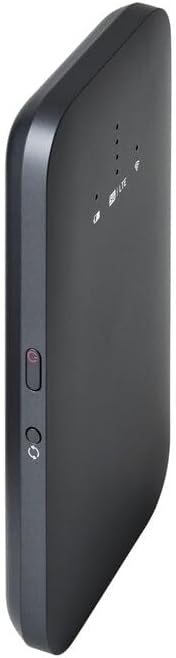
Slika 1: Prednja strana view of the Linksys 5G AX1800 Mobile Hotspot, showing LED indicators for battery, 5G/LTE, and Wi-Fi status.
Setup
1. Instalirajte SIM karticu
The Linksys 5G AX1800 Mobile Hotspot requires a Nano-SIM card for 5G/LTE connectivity. Ensure the device is powered off before inserting the SIM card.
- Locate the SIM card slot cover on the side of the device.
- Lagano otvorite poklopac.
- Insert the Nano-SIM card into the slot with the gold contacts facing down and the notched corner aligned correctly.
- Čvrsto zatvorite poklopac utora za SIM karticu.

Slika 2: Bočna strana view of the mobile hotspot, highlighting the SIM card slot cover.
2. Napunite uređaj
Before first use, fully charge the mobile hotspot. Use the provided charging cable and a compatible USB power adapter.
- Connect one end of the USB cable to the charging port on the device.
- Connect the other end to a USB power adapter or a computer's USB port.
- The battery indicator LED will show charging status. Allow several hours for a full charge.

Slika 3: Dno view of the mobile hotspot, showing the USB-C charging port.
3. Uključivanje/isključivanje
To power on the device, press and hold the power button located on the side until the LED indicators light up. To power off, press and hold the power button again until the indicators turn off.

Slika 4: Bočna strana view of the mobile hotspot, indicating the location of the power button.
Uputstvo za upotrebu
1. Povezivanje uređaja na Wi-Fi
Once powered on, the mobile hotspot will broadcast a Wi-Fi network. You can connect up to 15+ devices simultaneously.
- Na svom uređaju (pametnom telefonu, laptopu, tabletu) otvorite postavke Wi-Fi mreže.
- Traži dostupne Wi-Fi mreže.
- Select the network name (SSID) of your Linksys Mobile Hotspot. The default SSID and password are usually found on a sticker inside the device or on its packaging.
- Unesite lozinku za Wi-Fi kada se to od vas zatraži.
- Your device should now be connected to the internet via the mobile hotspot.
2. Razumijevanje LED indikatora
The LED indicators on the front of the device provide important status information:
- Indikator baterije: Shows the current battery level and charging status.
- 5G/LTE Indicator: Indicates the mobile network connection status (e.g., solid blue for 5G, solid green for LTE, blinking for searching).
- Wi-Fi indikator: Shows if the Wi-Fi network is active and broadcasting.
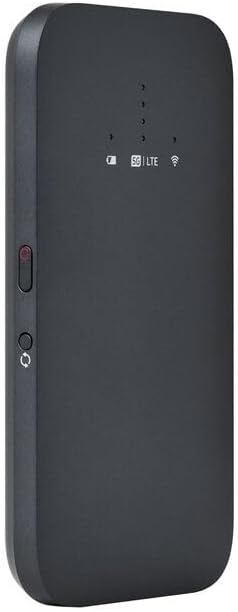
Slika 5: Ugaoni prednji dio view of the mobile hotspot, clearly showing the LED indicators for battery, 5G/LTE, and Wi-Fi.
3. Pristup Web Upravljačko sučelje
For advanced settings, such as changing the Wi-Fi name or password, managing connected devices, or checking data usage, you can access the device's web interfejs za upravljanje.
- Ensure your device is connected to the mobile hotspot's Wi-Fi network.
- Otvori a web browser (e.g., Chrome, Firefox, Safari).
- Enter the default IP address for the hotspot (usually
192.168.1.1or192.168.0.1, refer to the device's documentation or sticker for the exact address) into the address bar and press Enter. - Log in using the default username and password (also found on the device sticker or documentation). It is highly recommended to change the default password for security.
Održavanje
1. Održavanje baterije
- Izbjegavajte izlaganje uređaja ekstremnim temperaturama.
- Ne ostavljajte uređaj potpuno ispražnjen duži vremenski period.
- Use only the original or certified compatible charging accessories.
2. Čišćenje
Wipe the device with a soft, dry, lint-free cloth. Do not use liquid cleaners or aerosols directly on the device.
3. Ažuriranja firmvera
Periodically check for firmware updates through the web management interface. Keeping the firmware updated ensures optimal performance and security.
Rješavanje problema
Nema internetske veze
- Provjerite je li SIM kartica ispravno umetnuta i aktivirana s podatkovnim planom.
- Check the 5G/LTE indicator on the device. If it's blinking or off, the device may be searching for a network or have no signal.
- Restart the mobile hotspot and your connected device.
- Verify that your data plan has not been exhausted.
Spora brzina Wi-Fi mreže
- Move closer to the mobile hotspot to improve signal strength.
- Reduce the number of connected devices or data-intensive activities.
- Provjerite ima li zagušenja mreže u vašem području.
Device Not Connecting to Hotspot
- Ensure the Wi-Fi indicator on the hotspot is active.
- Dvaput provjerite lozinku za Wi-Fi.
- Restart both the hotspot and the device you are trying to connect.
Factory Reset
If issues persist, you may perform a factory reset. This will revert all settings to their default values, including Wi-Fi name and password. Refer to the device's specific instructions for the reset procedure, usually involving a small reset button.
Specifikacije
| Feature | Detalj |
|---|---|
| Brand | Linksys |
| Naziv modela | FGHSAX1800 |
| Broj modela stavke | FGHSAX1800-AH |
| Tehnologija povezivanja | 5G |
| Wi-Fi Standard | WiFi 6 (AX1800) |
| Brzina prijenosa podataka | Do 1.8 gigabita u sekundi |
| Klasa frekvencijskog opsega | Dual-Band |
| Antenna Type | Interni |
| Posebne karakteristike | Način pristupne točke |
| Uključene komponente | SLOT ZA SIM KARTICU |
| Voltage | 12 Volts |
| Dimenzije paketa | 14 x 7.5 x 1.55 cm |
| Težina artikla | 185 g |
Garancija i podrška
For warranty information and technical support, please refer to the warranty card included with your product or visit the official Linksys support webTamo obično možete pronaći često postavljana pitanja, preuzimanja upravljačkih programa i kontakt informacije za korisničku podršku.
Linksys Official Support: https://www.linksys.com/support


