1. Uvod
This manual provides detailed instructions for the setup, operation, and maintenance of your Peplink MAX BR1 Pro 5G Router. The MAX BR1 Pro 5G is an all-in-one solution designed for robust and reliable internet connectivity, featuring an x62 5G module, Wi-Fi 6, and 2x2 MU-MIMO technology.
2. Sadržaj paketa
Provjerite da li se u vašem paketu nalaze sve dolje navedene stavke:
- 1x BR1 Pro 5G Router
- 1x 12V2A Power Supply
- 4 LTE/5G antene
- 2x Wi-Fi dvofrekventne antene
- 1x GPS antena

Image: Contents of the Peplink MAX BR1 Pro 5G package, including the router, power supply, LTE/5G antennas, Wi-Fi antennas, and GPS antenna.
3. Značajke proizvoda
The Peplink MAX BR1 Pro 5G Router offers advanced features for reliable and high-speed connectivity:
- Brza 5G povezivost: Equipped with the new x62 Qualcomm Snapdragon 5G Module, supporting downlink/uplink datarates of 3.4 Gbps / 900 Mbps.
- Multi-WAN Ports: Includes 2x 10/100/1000M LAN ports and 1x 10/100/1000/2500M WAN port. The WAN port can also function as a LAN port.
- Wi-Fi 6: Simultaneous Dual-Band 2.4GHz/5GHz Wi-Fi 6 with 2x2 MU-MIMO for efficient wireless communication.
- Redundant SIM Slot: Features 1x 5G Modem with a redundant SIM slot for continuous cellular connectivity.
- Robust Throughput: Achieves 1 Gbps router throughput.
- SpeedFusion Technology: Provides advanced features like failover and bonding for enhanced reliability and performance.
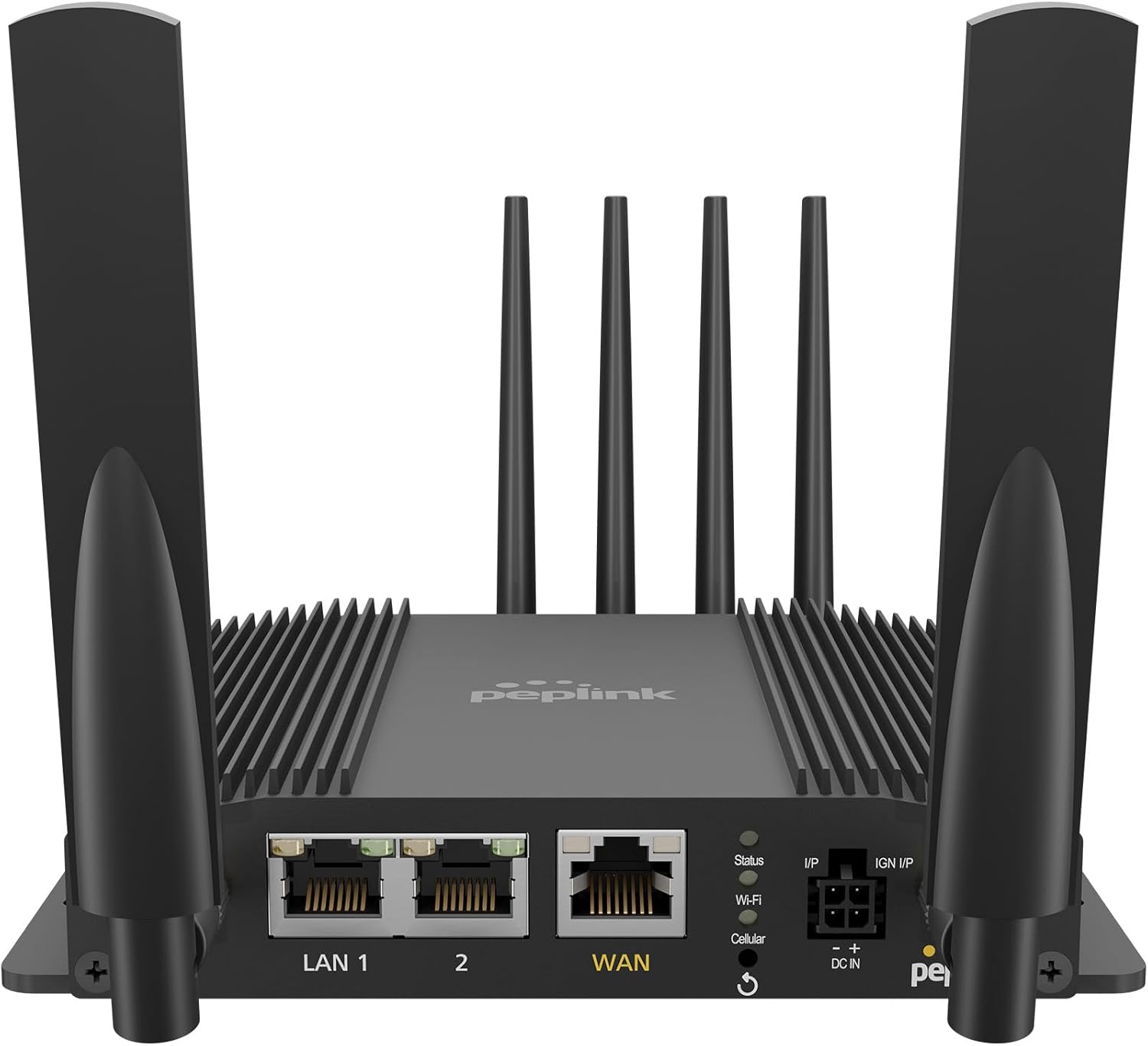
Slika: Front view of the Peplink MAX BR1 Pro 5G Router, showing the Ethernet ports (LAN 1, LAN 2, WAN), status indicators, and antenna connections.
4. Vodič za postavljanje
4.1. Device Overview i veze
Familiarize yourself with the router's ports and indicators:

Slika: Detaljna view of the Peplink MAX BR1 Pro 5G Router, showing the front panel with LAN/WAN ports, status LEDs, power input, and the rear panel with Cellular A-D and GPS antenna connectors, along with redundant SIM slots.
4.2. Ugradnja antene
- Connect the four LTE/5G antennas to the Cellular A, B, C, and D ports on the rear of the router.
- Connect the two Wi-Fi antennas to the Wi-Fi A and Wi-Fi B ports.
- Connect the GPS antenna to the GPS port.
4.3. Instalacija SIM kartice
The router supports redundant SIM slots. Insert your activated Nano-SIM card(s) into the designated SIM slots located on the side of the device. Ensure the SIM card is correctly oriented before insertion.
4.4. Uključivanje
- Connect the 12V2A power supply to the DC IN port on the router.
- Uključite napajanje u utičnicu.
- The router will automatically power on. Observe the status indicator lights on the front panel.
4.5. Početna konfiguracija
Pristupite ruteru web administration interface by connecting a computer to one of the LAN ports or via Wi-Fi. Open a web browser and navigate to the default IP address (typically 192.168.50.1 or as specified in the quick start guide). Follow the on-screen instructions for initial setup, including setting up your Wi-Fi network and cellular connections.
5. Uputstvo za upotrebu
5.1. Mrežna povezanost
The MAX BR1 Pro 5G can utilize multiple internet sources simultaneously, including 5G cellular, wired WAN, and Wi-Fi WAN. The router intelligently manages these connections to provide stable internet access.
- mobilni: The primary 5G modem provides high-speed cellular data. If multiple SIMs are installed, you can configure priority or failover in the web interfejs.
- Žičana WAN mreža: Connect an Ethernet cable from an external modem (e.g., Starlink, DSL, Cable) to the WAN port for an additional internet source.
- Wi-Fi WAN: The router can connect to an existing Wi-Fi network as a WAN source, extending its reach or providing another failover option.

Image: Network diagram illustrating the Peplink BR1 Pro 5G router integrating 5G/LTE cellular, Starlink via WAN, and Wi-Fi 6 for seamless internet connectivity and SpeedFusion VPN.
5.2. SpeedFusion Technology
The router incorporates Peplink's patented SpeedFusion technology, which allows for seamless failover between different internet connections and can bond multiple connections for increased bandwidth and reliability. Configure SpeedFusion settings via the web administrativni interfejs.
5.3. Wi-Fi konfiguracija
Manage your Wi-Fi networks (SSID, password, security settings) through the web interface. For optimal Wi-Fi performance, especially in congested environments, consider adjusting the regulatory domain setting. Some users have reported that setting the regulatory domain to "Canada" can unlock a wider range of legal Wi-Fi channels in the US, potentially improving signal quality and reducing interference.
6. Održavanje
6.1. Ažuriranja firmvera
Regularly check for and install firmware updates to ensure optimal performance, security, and access to new features. Firmware updates can be managed through the router's web administrativni interfejs.
6.2. Heat Management
The MAX BR1 Pro 5G is designed for passive cooling. Ensure the router is placed in a location with adequate airflow and is not obstructed. While the device is designed to operate within specified temperature ranges, prolonged exposure to high ambient temperatures or restricted airflow can affect its lifespan. If operating in consistently hot environments, consider additional cooling solutions.
6.3. Čišćenje
Clean the exterior of the router with a soft, dry cloth. Do not use liquid cleaners or aerosols.
7. Otkrivanje problema
- Nema internetske veze:
- Verify that all antennas are securely connected.
- Provjerite umetanje SIM kartice i status aktivacije.
- Confirm WAN cable connections if using wired internet.
- Pristupite web interface to check the status of each WAN connection and review evidencije događaja.
- Spore brzine:
- Ensure optimal antenna placement for cellular signal reception.
- Check for network congestion or data caps with your cellular provider.
- Review SpeedFusion settings if multiple WANs are configured.
- Problemi s Wi-Fi mrežom:
- Confirm Wi-Fi antennas are properly attached.
- Check Wi-Fi settings (SSID, password, channel) in the web interfejs.
- Consider changing Wi-Fi channels to avoid interference.
For more detailed troubleshooting or advanced diagnostics, refer to the comprehensive documentation available on the Peplink support website or contact Peplink technical support.
8. Tehničke specifikacije
| Broj modela | MAX-BR1-PRO-5GN-T-PRM |
| Dimenzije | 6 x 5 x 2 inča (152.4 x 127 x 50.8 mm) |
| Težina artikla | 3.21 funte (1.46 kg) |
| Tehnologija povezivanja | 5G, Wi-Fi 6 (2.4GHz/5GHz Dual-Band) |
| 5G modul | Qualcomm Snapdragon x62 |
| Downlink/Uplink Datarate (5G) | 3.4 Gbps / 900 Mbps |
| LAN portovi | 2x 10/100/1000M Ethernet |
| WAN port | 1x 10/100/1000/2500M Ethernet (can act as LAN) |
| Router Throughput | 1 Gbps |
| Wi-Fi Standard | Wi-Fi 6 (802.11ax), 2x2 MU-MIMO |
| Transmit Power (2.4GHz/5GHz) | 21 dBm / 22 dBm |
| SIM slotovi | Redundant SIM Slot (Nano-SIM) |
| Kompatibilni uređaji | Access Point, Personal Computer, Smartphone, Switch |
| Internet Service Providers | AT&T, T-Mobile, Verizon, FirstNet, US Cellular (compatibility may vary) |

Slika: Sa strane view of the Peplink MAX BR1 Pro 5G Router, showing its compact dimensions of 146.8 mm length, 129 mm width, and 29.3 mm height.
9. Garancija i podrška
9.1. Informacije o garanciji
For detailed warranty information, please refer to the warranty card included with your product or visit the official Peplink webSačuvajte dokaz o kupovini za slučaj reklamacije.
9.2. Tehnička podrška
If you encounter issues that cannot be resolved using this manual or the troubleshooting section, please contact Peplink technical support. Support resources, including FAQs, knowledge base articles, and contact information, are available on the official Peplink website.
Official Peplink Webstranica: www.peplink.com


