Powerwave Wireless Controller Purple Rush
Uputstvo za upotrebu
1. Uvod
Hvala na kupoviniasing the Powerwave Wireless Controller. This controller is designed to enhance your gaming experience on PlayStation 4 consoles, offering advanced features such as motion sensing, dual motor vibration, and a built-in speaker. Please read this manual carefully to ensure proper use and maintenance of your device.
This controller is compatible with PS4, PS4 Slim, and PS4 Pro models. Please note that PlayStation Lightbar, PSVR, turbo functionality, and PS5 compatibility are not supported.
2. Sadržaj paketa
- 1 x Powerwave Wireless Controller (Purple Rush)
- 1 x USB kabl za punjenje
- 1 x Korisnički priručnik (ovaj dokument)

Image: The Powerwave Wireless Controller shown within its retail packaging, highlighting the product and its box.
3. Karakteristike kontrolera
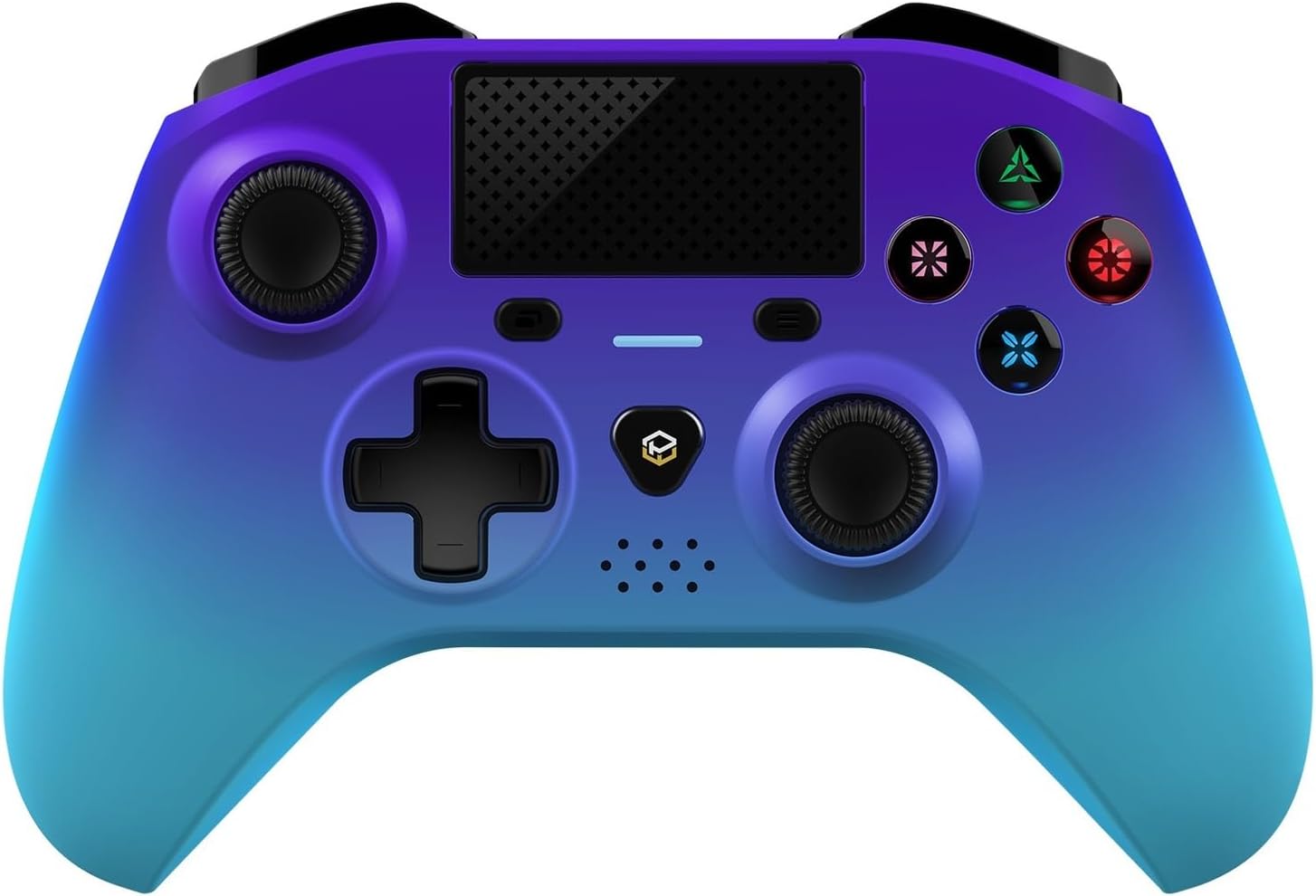
Slika: Detaljan prednji dio view of the Powerwave Wireless Controller in Purple Rush color, showcasing its buttons, joysticks, touchpad, and LED display.
- Bežično Bluetooth povezivanje: For seamless gaming without cables.
- LED Display Buttons: Illuminated buttons for enhanced visibility.
- Punjiva baterija: Built-in lithium polymer battery for extended playtime.
- Tehnologija detekcije pokreta: Integrated sensors for intuitive control in compatible games.
- Vibracija dvostrukog motora: Pruža impresivnu haptičku povratnu informaciju tokom igranja.
- Touchpad: Interactive surface for unique gameplay mechanics.
- Ugrađeni zvučnik: Enhances audio experience directly from the controller.
- 3.5mm Stereo Audio Jack: Za povezivanje slušalica ili slušalica sa mikrofonom.
4. Vodič za postavljanje
4.1 Punjenje kontrolera
- Connect the small end of the supplied USB charging cable to the micro-USB port on the front of the controller.
- Connect the larger end of the USB cable to an available USB port on your PlayStation 4 console or a compatible USB wall adapter (5V/1A recommended).
- The controller's LED indicator will show charging status. It will typically turn off or change color once fully charged.
4.2 Pairing with PlayStation 4
- Provjerite je li vaša PlayStation 4 konzola uključena.
- Connect the controller to the PS4 console using the supplied USB charging cable.
- Pritisnite Dugme PS (the button with the PlayStation logo) in the center of the controller.
- The controller will automatically pair with the console. Once paired, you can disconnect the USB cable for wireless play.
- To pair additional controllers, repeat the steps above.
Note: If the controller does not pair, ensure it is fully charged and try connecting it to a different USB port on the console.
5. Upravljanje kontrolerom
5.1 Osnovne kontrole
The Powerwave Wireless Controller features standard PlayStation layout buttons, including:
- Upravljačka tipkovnica (D-Pad): Za usmjereni unos.
- Dugmad za akcije (trougao, krug, krst, kvadrat): Za akcije u igri.
- Lijeva i desna analogna palica: Za precizno kretanje i kontrolu kamere.
- L1/R1 and L2/R2 Buttons: Dugmad za rame i okidač.
- Dugme ZA DIJELJENJE: For sharing gameplay moments.
- Dugme OPCIJE: For accessing in-game menus.
- PS dugme: For accessing the PS4 home screen and power options.
- Touchpad: Functions as a clickable button and multi-touch surface.
5.2 Napredne funkcije
- Prepoznavanje pokreta: Tilt and move the controller to interact with games that support motion controls.
- Vibraciona povratna informacija: Experience realistic vibrations during gameplay, such as impacts or explosions.
- Audio izlaz: Connect a 3.5mm headset to the audio jack for in-game sound and voice chat. Adjust volume through the PS4 system settings.
6. Održavanje i njega
- čišćenje: Koristite meku, suhu krpu za čišćenje kontrolera. Za tvrdokornu prljavštinu, lagano očistiteampNamočite krpu vodom. Ne koristite jake hemikalije ili abrazivna sredstva za čišćenje.
- Skladištenje: Kontroler čuvajte na hladnom i suhom mjestu, dalje od direktne sunčeve svjetlosti i ekstremnih temperatura.
- Održavanje baterije: Da biste produžili vijek trajanja baterije, izbjegavajte često potpuno pražnjenje kontrolera. Redovno ga punite, čak i ako se ne koristi duži period.
- Izbjegavajte kapi: Zaštitite kontroler od fizičkih udaraca i padova, koji mogu oštetiti unutrašnje komponente.
7. Otkrivanje problema
| Problem | Moguće rješenje |
|---|---|
| Kontroler se ne uključuje. | Ensure the controller is fully charged. Connect it to the PS4 via USB cable and try pressing the PS button. |
| Controller does not pair with PS4. |
|
| Kašnjenje ulaza ili prekid veze tokom bežične reprodukcije. |
|
| Vibration or motion sensing not working. | Check in-game settings and PS4 system settings to ensure these features are enabled. Some games may not support these features. |
8. Specifikacije
| Feature | Detalj |
|---|---|
| Povezivanje | Bežični Bluetooth |
| Kompatibilnost | PlayStation 4, PS4 Slim, PS4 Pro |
| Vrsta baterije | 1 litijum-polimerska baterija (uključena) |
| Dimenzije (cca.) | 17.5 x 15.6 x 6.9 cm |
| Težina (cca.) | 987 grama |
| Audio port | 3.5 mm stereo audio priključak |
| Identifikator modela (ASIN) | B0CKPF5X2N |
9. Garancija i podrška
For warranty information and customer support, please refer to the documentation provided with your purchase or visit the official Powerwave webSačuvajte dokaz o kupovini za slučaj reklamacije.
Za dodatnu pomoć, možete se obratiti i prodavaču kod kojeg ste proizvod kupili.
Nisu pronađeni službeni videozapisi prodavača za ovaj proizvod.


