1. Uvod
The Lenco SCD-860 is a versatile portable audio device featuring DAB+ and FM radio reception, Bluetooth connectivity for wireless audio streaming, and a top-loading CD player. It includes a 2.4-inch TFT color display, dual alarm functions, and stereo speakers. This manual provides essential information for the safe and efficient operation of your device.
2. Sigurnosne informacije
Molimo vas da pažljivo pročitate ova sigurnosna uputstva prije upotrebe uređaja i sačuvate ih za buduću upotrebu. Nepravilna upotreba može dovesti do strujnog udara, požara ili drugih opasnosti.
- Ne izlažite uređaj kiši ili vlazi kako biste spriječili požar ili strujni udar.
- Osigurajte odgovarajuću ventilaciju oko uređaja. Ne blokirajte ventilacijske otvore.
- Koristite samo strujni adapter koji je isporučen s jedinicom.
- Ne otvarajte uređaj casing. Za sve servisne radove obratite se kvalifikovanom osoblju.
- Odgovorno odložite baterije u skladu s lokalnim propisima.
3. Sadržaj paketa
Prilikom raspakivanja provjerite da li su svi artikli prisutni:
- Lenco SCD-860 Unit
- Kabel za naizmjeničnu struju
- Korisnički priručnik (ovaj dokument)
4. Proizvod je gotovview
Familiarize yourself with the main components and controls of your Lenco SCD-860.
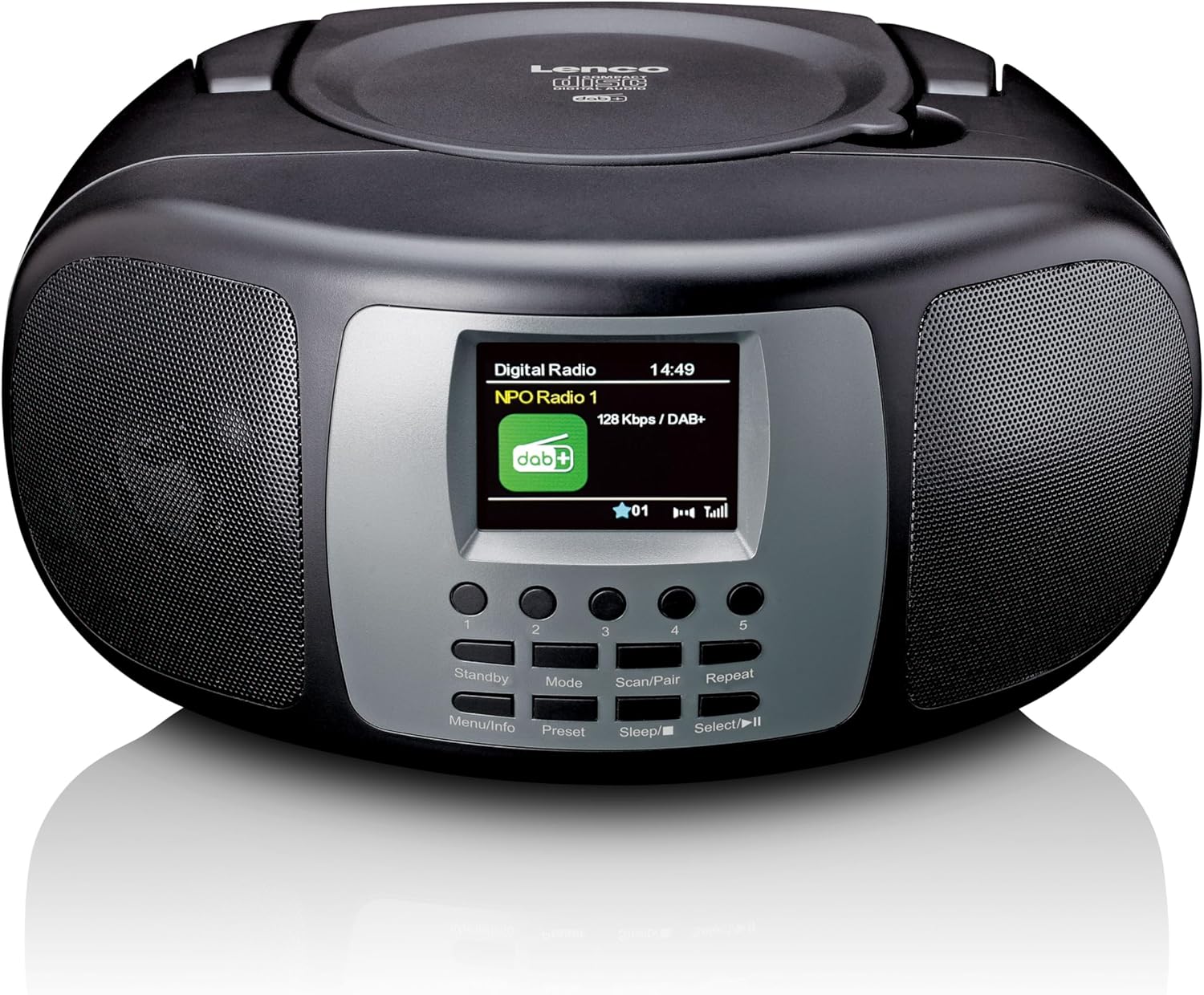
Slika 4.1: Prednja strana View. This image displays the front of the Lenco SCD-860, highlighting the central 2.4-inch TFT color display, the array of control buttons below it, and the two integrated speakers on either side. The top-loading CD compartment is visible on the upper surface.

Slika 4.2: Otvoren pretinac za CD. This image shows the Lenco SCD-860 with its top-loading CD compartment lid open, revealing a compact disc placed inside, ready for playback. The display and control buttons are also visible.

Figure 4.3: Left Side Controls. This image illustrates the left side of the Lenco SCD-860, featuring the headphone output jack, the power ON/OFF switch, and the rotary volume control knob.
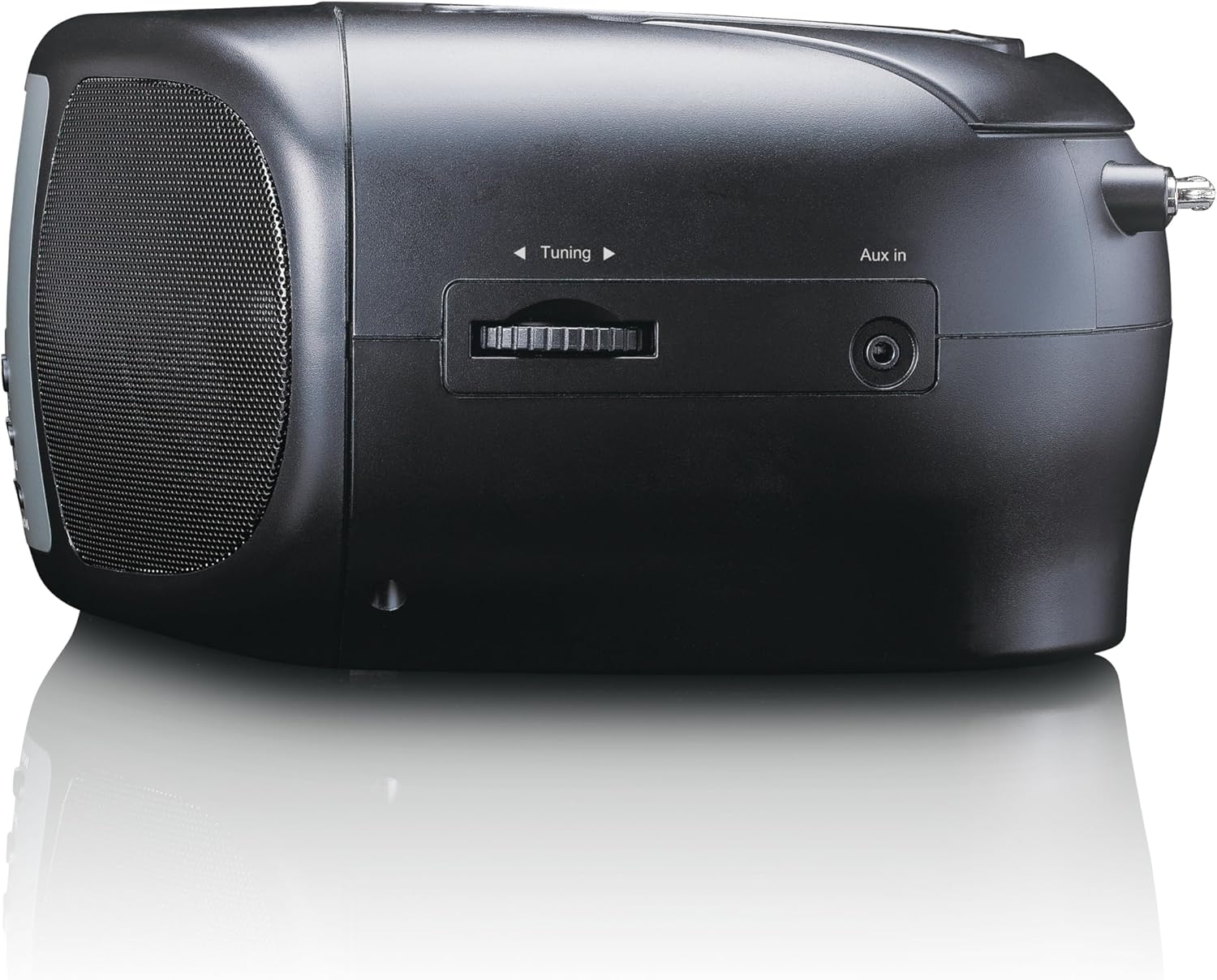
Figure 4.4: Right Side Controls. This image shows the right side of the Lenco SCD-860, highlighting the rotary tuning knob for radio frequency selection and the AUX input jack for connecting external audio devices.

Slika 4.5: Pozadi View. This image displays the rear of the Lenco SCD-860, featuring the AC power input socket and the fully extended telescopic antenna for improved radio reception.
4.1. Kontrolna dugmad
- Standby/Menu/Info: Power on/off, access menu, display information.
- Mode/Preset: Switch between modes (DAB+, FM, CD, Bluetooth, AUX), save/recall radio presets.
- Scan/Pair/Sleep: Scan for radio stations, pair Bluetooth devices, activate sleep timer.
- Repeat/Select/Play/Pause: Repeat CD track/all, confirm selection, play/pause CD/Bluetooth.
- Dugme za podešavanje: Adjust radio frequency, navigate menus.
- Gumb za jačinu zvuka: Podesite nivo audio izlaza.
- 1-5 Dugmad: Direct access to preset radio stations.
5. Podešavanje
5.1. Napajanje uređaja
The SCD-860 can be powered by AC mains or batteries.
5.1.1. AC napajanje
- Connect the supplied AC power cable to the AC IN socket on the rear of the unit (refer to Figure 4.5).
- Uključite drugi kraj kabla u standardnu zidnu utičnicu.
5.1.2. Napajanje baterije
For portable use, the unit requires 6 x 'C' size batteries (not included).
- Otvorite poklopac pretinca za baterije na dnu uređaja.
- Insert 6 'C' size batteries, ensuring correct polarity (+/-).
- Čvrsto zatvorite poklopac odeljka za baterije.
5.2. Podešavanje antene
For optimal DAB+ and FM radio reception, fully extend the telescopic antenna located at the rear of the unit (refer to Figure 4.5). Adjust its position for the best signal quality.
6. Uputstvo za upotrebu
6.1. Uključivanje/isključivanje
Povucite Snaga switch on the left side of the unit to the ON position. Press the Standby button on the front panel to turn the unit on or put it into standby mode.
6.2. Izbor načina
Pritisnite Mode button repeatedly to cycle through available modes: DAB+, FM, CD, Bluetooth, AUX.
6.3. Rad DAB+ radija
- Prebacite se na DAB+ način rada pomoću Mode dugme.
- The unit will automatically scan for available DAB+ stations upon first use or if no stations are found. To initiate a manual scan, press the Skeniraj dugme.
- Koristite Gumb za podešavanje to scroll through the list of available stations. Press Odaberite (often integrated with Repeat/Select/Play/Pause button) to confirm your selection.
- Da biste sačuvali stanicu kao predefinisanu, pritisnite i držite Preset button (often integrated with Mode button), then use the Gumb za podešavanje to select a preset number (1-5) and press Odaberite za potvrdu.
- To recall a preset, briefly press the corresponding numbered button (1-5).
6.4. Rad FM radija
- Prebacite se na FM način rada pomoću Mode dugme.
- Za automatsko skeniranje stanica, pritisnite i držite Skeniraj button. The radio will scan and stop at the next strong station.
- For manual tuning, rotate the Gumb za podešavanje za podešavanje frekvencije.
- Saving and recalling presets works similarly to DAB+ mode, using the Preset button and numbered buttons (1-5).
6.5. Bluetooth rad
- Prebacite se u Bluetooth način rada pomoću Mode dugme. Na ekranu će se prikazati "Bluetooth Pairing" ili slično.
- Activate Bluetooth on your external device (smartphone, tablet, etc.).
- Traži "SCD-860" in your device's Bluetooth list and select it to pair.
- Once paired, you can stream audio from your device to the SCD-860. Use the Pusti/Pauza button on the unit or your external device to control playback.
6.6. Rad CD plejera
- Prebacite se u CD način rada pomoću Mode dugme.
- Open the top-loading CD compartment cover (refer to Figure 4.2).
- Stavite CD sa stranom s etiketom okrenutom prema gore.
- Close the CD compartment cover. The unit will read the CD and begin playback automatically.
- Koristite Pusti/Pauza dugme za pauziranje ili nastavak reprodukcije.
- Pritisnite Ponovi button to cycle through repeat modes (repeat one track, repeat all tracks).
- The unit supports programmable CD playback for up to 20 tracks. Refer to the full manual for detailed programming instructions.
6.7. AUX ulaz
Povežite eksterni audio uređaj (npr. MP3 plejer) na AUX ulaz jack on the right side of the unit (refer to Figure 4.4) using a 3.5mm audio cable (not included). Switch to AUX mode using the Mode button. Audio will play through the SCD-860 speakers.
6.8. Funkcija alarma
The SCD-860 features a dual alarm function. Detailed instructions for setting and managing alarms are typically found in the full product manual. Generally, you will access the alarm settings via the Meni (long press Standby/Menu/Info) and use the Gumb za podešavanje i Odaberite button to configure alarm times, sources (buzzer, radio, CD), and volume.
6.9. Korištenje slušalica
Connect headphones to the 3.5mm headphone jack on the left side of the unit (refer to Figure 4.3) for private listening. The internal speakers will be muted automatically.
7. Održavanje
- čišćenje: Obrišite uređaj mekom, suhom krpom. Ne koristite abrazivna sredstva za čišćenje ili rastvarače.
- CD njega: CD-ove držite za rubove. Zaprljane CD-ove čistite mekom krpom koja ne ostavlja dlačice, brišući od centra prema van.
- Skladištenje: If not used for extended periods, remove batteries and store the unit in a cool, dry place.
8. Otkrivanje problema
| Problem | Mogući uzrok | Rješenje |
|---|---|---|
| Nema struje | Kabl za napajanje nije priključen; Baterije su prazne ili nepravilno umetnute. | Provjerite priključak AC kabla; Zamijenite baterije ili provjerite ispravan polaritet. |
| Nema zvuka | Volume too low; Headphones connected; Incorrect mode selected. | Increase volume; Disconnect headphones; Select correct mode (DAB+, FM, CD, Bluetooth, AUX). |
| Loš radio prijem | Antenna not extended or poorly positioned; Weak signal area. | Potpuno izvucite i podesite teleskopsku antenu; Pokušajte premjestiti uređaj na drugu lokaciju. |
| CD se ne reproducira | CD inserted incorrectly; CD is dirty or scratched; Incorrect mode. | Ensure CD is label-side up; Clean or replace CD; Select CD mode. |
| Bluetooth uparivanje nije uspjelo | Bluetooth not enabled on external device; SCD-860 not in pairing mode; Devices too far apart. | Enable Bluetooth on your device; Ensure SCD-860 is in Bluetooth mode; Move devices closer (within 10m). |
9. Specifikacije
| Feature | Opis |
|---|---|
| Broj modela | SCD-860BK |
| Brand | Lenco |
| Tehnologija povezivanja | Bluetooth |
| Posebne karakteristike | Bluetooth, DAB+/FM Radio, CD Player, Color Display, Dual Alarm |
| Kompatibilni uređaji | Headphones, Earphones, MP3 Player, Smartphone, Laptop, Speaker, Tablet, USB Stick |
| Izlazna snaga | 2 x 2 W RMS |
| Display | 2.4-inch TFT LCD Color Display |
| CD Memory | Programmable for 20 tracks |
| Podržani radio bendovi | DAB+ (Band III 174-240 MHz), FM |
| Izvor napajanja | AC Mains, 6 x 'C' Batteries (not included) |
| Veze | AUX Input, 3.5mm Audio Output (Headphone) |
| Dimenzije (D x Š x V) | 24 cm x 22 cm x 11.5 cm (otprilike) |
| Boja | Crna |
10. Garancija i podrška
For warranty information and technical support, please refer to the warranty card included with your product or visit the official Lenco webSačuvajte dokaz o kupovini za eventualne reklamacije.
For further assistance, please contact Lenco customer service through their official channels.


