1. Uvod
Thank you for choosing the Havit H2038U RGB Wired Gaming Headset. This manual provides essential information for setting up, operating, and maintaining your headset. Please read it carefully to ensure optimal performance and longevity of your product.
Važne informacije o sigurnosti:
- Izbjegavajte dugotrajno slušanje muzike na velikoj jačini zvuka kako biste spriječili oštećenje sluha.
- Ne izlažite slušalice ekstremnim temperaturama, vlazi ili korozivnim supstancama.
- Držite slušalice dalje od vode i tekućina.
- Ne pokušavajte rastavljati ili modificirati slušalice. To će poništiti garanciju.
2. Proizvod je gotovview
2.1 Sadržaj paketa
- Havit H2038U RGB Wired Gaming Headset
- Odvojivi mikrofon
- Korisnički priručnik (ovaj dokument)
2.2 Komponente slušalica
The Havit H2038U headset features a comfortable over-ear design with soft earcups and an adjustable headband. It includes a detachable microphone for clear communication and integrated RGB lighting for an enhanced gaming experience.

Slika 2.1: Front view of the Havit H2038U RGB Wired Gaming Headset. This image displays the white over-ear headphones with RGB lighting elements on the earcups and the adjustable headband.
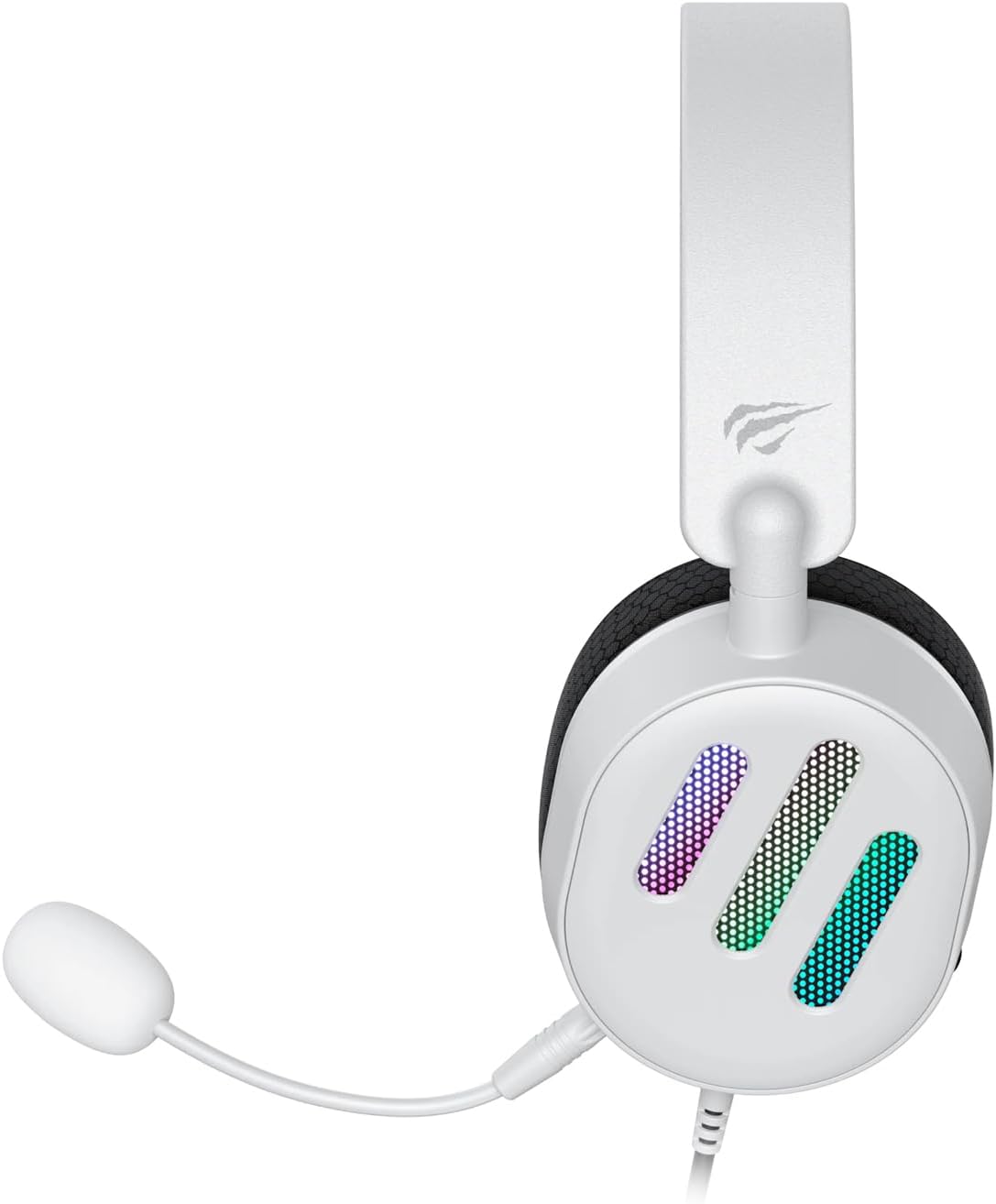
Slika 2.2: Side view of the Havit H2038U RGB Wired Gaming Headset, showing the detachable microphone connected to the left earcup. The volume control wheel is also visible on the earcup.

Slika 2.3: Top view of the Havit H2038U RGB Wired Gaming Headset, highlighting the adjustable headband and the soft, breathable earcups.
3. Podešavanje
The Havit H2038U headset utilizes a dual-connection system for full functionality: a 3.5mm jack for audio and a USB connection for RGB lighting and virtual 7.1 surround sound.

Slika 3.1: Close-up view illustrating the detachable microphone connection (3.5mm jack) and the USB connection for the Havit H2038U headset. This image also indicates 360-degree sound direction and 7.1 USB connectivity.
- Povežite mikrofon: Insert the detachable microphone into the 3.5mm microphone jack located on the left earcup until it clicks into place. Ensure it is securely connected.
- Connect for Audio: Plug the 3.5mm audio jack from the headset into the corresponding audio output port on your computer, gaming console, or mobile device.
- Connect for RGB Lighting and 7.1 Surround Sound: Plug the USB connector from the headset into an available USB port on your computer or gaming console. This connection powers the RGB lighting and enables the virtual 7.1 surround sound feature.
- Podešavanje veličine slušalica: Adjust the headband to ensure a comfortable and secure fit over your ears. The earcups should fully enclose your ears for optimal sound isolation.
- System Configuration (for PC):
- Audio izlaz: Go to your operating system's sound settings and ensure the Havit H2038U is selected as the default playback device.
- Ulaz za mikrofon: In the sound settings, select the Havit H2038U as the default recording device.
- 7.1 Surround zvuk: If applicable, install any necessary drivers from the Havit official website to enable and configure the virtual 7.1 surround sound feature.
4. Uputstvo za upotrebu
4.1 Kontrola jačine zvuka
The headset features an integrated volume control wheel, typically located on the left earcup or inline on the cable. Rotate the wheel to increase or decrease the audio volume.
4.2 Korištenje mikrofona
The detachable microphone can be positioned for optimal voice pickup. Adjust its flexible arm to bring the microphone close to your mouth, ensuring clear communication. For privacy, you may mute the microphone using software settings on your device if no physical mute button is present on the headset.
4.3 RGB osvjetljenje
The RGB lighting on the earcups is powered via the USB connection. Once connected, the lighting will activate automatically. Specific control options for lighting patterns or colors may be available through dedicated software, if provided by Havit.

Slika 4.1: The Havit H2038U RGB Wired Gaming Headset displayed with its active RGB lighting feature, showcasing the illuminated earcups.
4.4 Virtual 7.1 Surround Sound
When connected via USB, the headset supports virtual 7.1 surround sound. This feature enhances spatial audio awareness in games and media. Ensure relevant drivers are installed and configured through your system's sound settings or Havit's software for optimal experience.

Slika 4.2: An illustrative image demonstrating the virtual 7.1 surround sound capability of the Havit H2038U headset, enhancing immersive audio experiences.
5. Održavanje
5.1 Čišćenje
- Use a soft, dry cloth to wipe the exterior surfaces of the headset.
- For earcups, gently wipe with a slightly damp krpom i ostavite da se potpuno osuši na zraku prije upotrebe.
- Ne koristite jake hemikalije, rastvarače ili abrazivna sredstva za čišćenje.
5.2 Skladištenje
When not in use, store the headset in a clean, dry place, away from direct sunlight and extreme temperatures. Avoid tangling the cables to prevent damage.
6. Otkrivanje problema
| Problem | Mogući uzrok | Rješenje |
|---|---|---|
| Nema zvuka iz slušalica | 3.5mm jack not fully inserted; incorrect audio output selected; volume too low. | Ensure 3.5mm jack is fully connected. Check system sound settings to select Havit H2038U as default playback device. Increase volume using the headset's control wheel and system volume. |
| Mikrofon ne radi | Microphone not fully inserted; incorrect input device selected; microphone muted. | Ensure microphone is securely attached. Check system sound settings to select Havit H2038U as default recording device. Unmute microphone in software settings. |
| RGB osvetljenje ne radi | USB cable not connected; faulty USB port. | Provjerite je li USB kabel sigurno priključen u ispravan USB priključak. Pokušajte s drugim USB priključkom. |
| 7.1 Surround zvuk nije aktivan | USB cable not connected; drivers not installed/configured. | Ensure the USB cable is connected. Install and configure necessary drivers from the Havit official website. |
7. Specifikacije
| Feature | Specifikacija |
|---|---|
| Model | H2038U |
| Tehnologija povezivanja | Wired (3.5mm Jack + USB) |
| Form Factor slušalica | Preko uha |
| Impedansa | 24 Ohma |
| Frekvencijski odziv | 20 Hz - 20 kHz |
| Osjetljivost | 114 dB |
| Tip kontrole | Volume Control, Push Button |
| Materijal | Plastika |
| Težina artikla | 550 g |
| Dimenzije proizvoda | 11.2 x 21.9 x 28.5 cm |
| Boja | Bijelo |
| Posebne karakteristike | RGB Lighting, Detachable Microphone, Virtual 7.1 Surround Sound |
8. Garancija i podrška
Havit products are designed for reliability and performance. For information regarding warranty coverage, technical support, or service, please refer to the warranty card included with your product or visit the official Havit webSačuvajte račun kao dokaz o kupovini za reklamacije u slučaju reklamacije.
Kontakt informacije:
- Official Havit Webstranica: www.havit.com (Molimo provjerite regionalne webstranice za specifičnu podršku)


