Uvod
Thank you for choosing the HyperGear Stealth2 ANC Wireless Headphones. This manual provides detailed instructions for setting up, operating, and maintaining your headphones to ensure optimal performance and longevity. Please read this manual thoroughly before use.

Image: HyperGear Stealth2 ANC Wireless Headphones, Bone color, showcasing key features like Active Noise Cancelling, 40mm Neodymium Drivers, Deep HD Stereo Sound, up to 24-hour playing time, rapid charge, and lightweight foldable design.
Sadržaj paketa
Provjerite da li su sve stavke prisutne u paketu:
- HyperGear Stealth2 ANC Wireless Headphones
- USB-C kabl za punjenje
- Korisnički priručnik (ovaj dokument)
Product Overview
Familiarize yourself with the various components and controls of your headphones.

Image: Detailed diagram of the HyperGear Stealth2 ANC Wireless Headphones, highlighting the on-ear controls. Labels include Power On/Off, Enter Pairing Mode, Volume Up/Next Track, Play/Pause/Answer/End Call, Reject Call, Activate Voice Assistant, Gaming Mode On/Off, Volume Down/Previous Track, and Active Noise Cancellation On/Off. Also shows Quick Pairing and Auto Reconnection features.
Kontrole na uhu:
- Dugme za napajanje: Press and hold to power on/off. Press and hold to enter pairing mode.
- Dugme za pojačavanje zvuka / sljedeću pjesmu: Pritisnite za povećanje jačine zvuka. Pritisnite i držite za prelazak na sljedeću pjesmu.
- Multi-function Button (Play/Pause): Press to play/pause audio. Press to answer/end calls. Press and hold to reject calls. Double-press to activate voice assistant. Triple-press to toggle Gaming Mode.
- Dugme za smanjivanje jačine zvuka / prethodnu pjesmu: Pritisnite za smanjenje jačine zvuka. Pritisnite i držite za prelazak na prethodnu pjesmu.
- ANC dugme: Press to toggle Active Noise Cancellation on/off.
Setup
1. Punjenje slušalica
Prije prve upotrebe, potpuno napunite slušalice.
- Spojite priloženi USB-C kabel za punjenje na priključak za punjenje na slušalicama.
- Drugi kraj kabla priključite na USB izvor napajanja (npr. adapter za struju, USB priključak računara).
- The LED indicator will show charging status. It typically takes about 2 hours for a full charge.
- A 10-minute rapid charge can provide approximately 3 hours of playback.

Image: A person wearing HyperGear Stealth2 ANC Wireless Headphones on an airplane, illustrating battery life: 18 hours with ANC on, 24 hours with ANC off. Also highlights rapid charge: 10 minutes of charging provides 3 hours of playback.
2. Bluetooth uparivanje
Uparite slušalice sa svojim uređajem za bežični zvuk.
- Provjerite jesu li slušalice napunjene i isključene.
- Pritisnite i držite dugme za napajanje dok LED indikator ne zatreperi plavo i crveno, što označava režim uparivanja.
- Na svom uređaju (pametnom telefonu, tabletu, računaru) omogućite Bluetooth i potražite dostupne uređaje.
- Select "HyperGear Stealth2" from the list of found devices.
- Once connected, the LED indicator will show a solid blue light or flash slowly.
Brzo uparivanje: The headphones are designed for instant connection with your device in seconds after initial pairing.
Automatsko ponovno povezivanje: The headphones will remember and automatically reconnect to the last paired device when powered on and within range.
Uputstvo za upotrebu
Uključivanje/isključivanje
- To power on, press and hold the Power button until the LED indicator lights up.
- Da biste isključili napajanje, pritisnite i držite dugme za napajanje dok se LED indikator ne ugasi.
Otkazivanje aktivne buke (ANC)
- Pritisnite namjensko dugme ANC da biste uključili ili isključili aktivno poništavanje buke.
- When ANC is active, ambient noise is significantly reduced, providing a quieter listening experience.
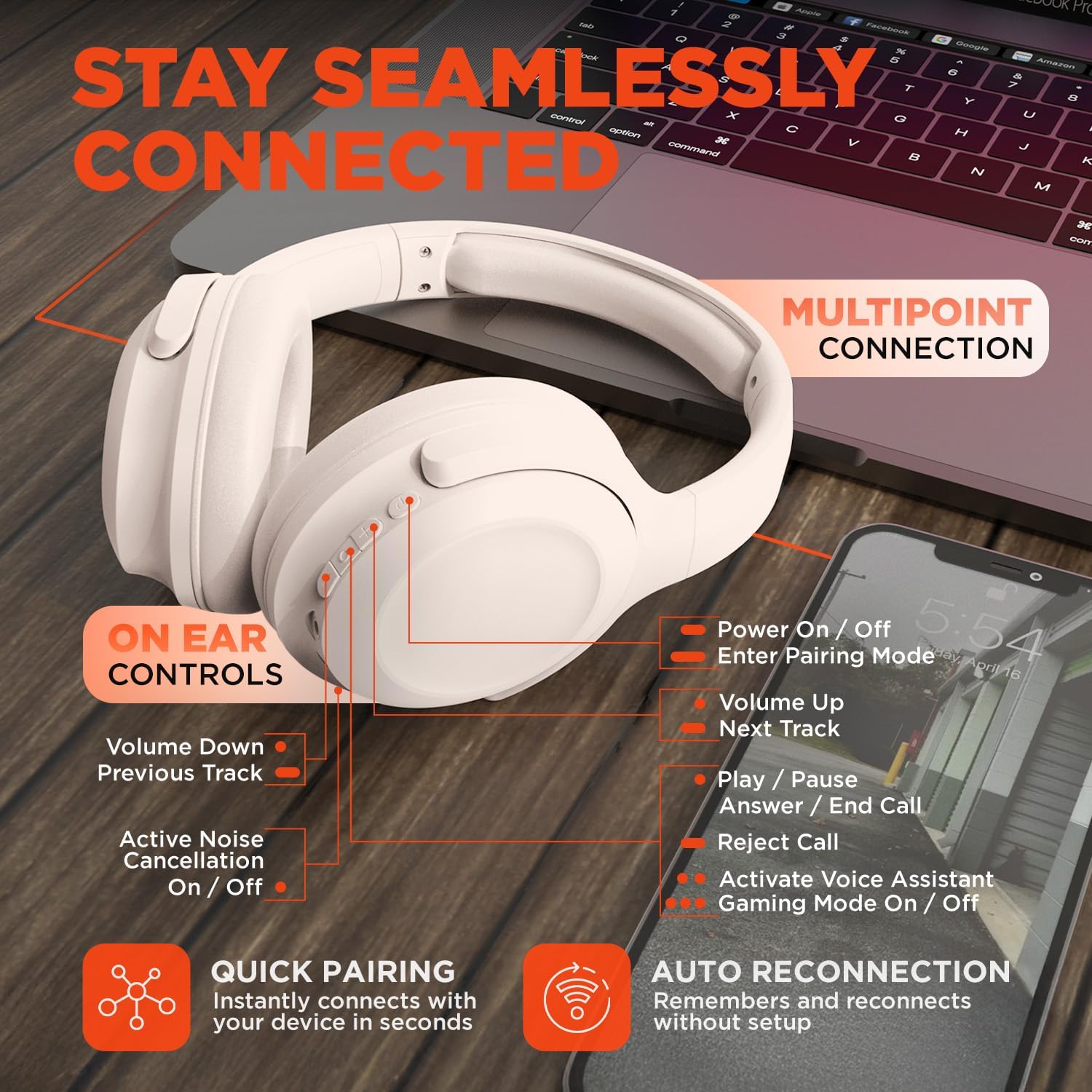
Image: HyperGear Stealth2 ANC Wireless Headphones highlighting "Pure Sound Anywhere" with Dual ANC Microphones for blocking unwanted noise and Adaptive Sound Control for real-time environment adjustment. Also shows compatibility with Siri and Google Assistant, and use cases for exercise, gaming, and travel.
Reprodukcija zvuka i pozivi
- Pusti/pauza: Pritisnite višenamjenski taster jednom.
- Sljedeća pjesma: Pritisnite i držite dugme za pojačavanje jačine zvuka.
- Prethodni zapis: Pritisnite i držite tipku za smanjivanje jačine zvuka.
- Kontrola jačine zvuka: Pritisnite tipke za pojačavanje ili smanjivanje jačine zvuka.
- Odgovori/Završi poziv: Pritisnite višenamjenski taster jednom.
- odbiti poziv: Pritisnite i držite višenamensko dugme.
Glasovni asistent
- Double-press the Multi-function button to activate your device's voice assistant (Siri, Google Assistant, etc.).
Način igranja
- Triple-press the Multi-function button to toggle the no-lag Gaming Mode. This mode optimizes audio synchronization for enhanced gameplay.
Multipoint Connection
The headphones support multipoint connection, allowing them to be connected to two Bluetooth devices simultaneously.
- Uparite slušalice s prvim uređajem kao što je opisano u odjeljku "Uparivanje putem Bluetootha".
- Isključite Bluetooth na prvom uređaju.
- Vratite slušalice u način rada za uparivanje i uparite ih s drugim uređajem.
- Ponovo omogućite Bluetooth na prvom uređaju. Slušalice bi sada trebale biti povezane s oba uređaja.
- Audio will play from the device that is actively playing content.

Image: HyperGear Stealth2 ANC Wireless Headphones positioned between a laptop and a smartphone, demonstrating the multipoint connection feature. This allows the headphones to stay seamlessly connected to multiple devices.
Održavanje
Pravilna njega osigurava dugotrajnost i performanse vaših slušalica.
- Keep the headphones dry. Do not expose them to water or excessive moisture. They are not water resistant.
- Očistite slušalice i traku za glavu mekom, suhom krpom. Izbjegavajte upotrebu jakih hemikalija ili abrazivnih materijala.
- Slušalice čuvajte na hladnom i suhom mjestu kada ih ne koristite. Sklopivi dizajn omogućava kompaktno skladištenje.
- Izbjegavajte ekstremne temperature.
- Ne pokušavajte rastavljati ili modificirati slušalice, jer će to poništiti garanciju.
Rješavanje problema
Ako naiđete na probleme, pogledajte sljedeća uobičajena rješenja.
| Problem | Rješenje |
|---|---|
| Headphones will not power on. | Provjerite jesu li slušalice potpuno napunjene. Povežite ih na izvor napajanja pomoću USB-C kabla. |
| Nije moguće uparivanje s uređajem. |
|
| Nema zvuka ili je jačina zvuka niska. |
|
| ANC nije efikasan. |
|
Specifikacije
| Feature | Detalj |
|---|---|
| Naziv modela | HyperGear Stealth2 ANC Headphones |
| Broj modela | 15860 |
| Tehnologija povezivanja | bežični (Bluetooth) |
| Bluetooth verzija | 5.2 |
| Bluetooth domet | 10 metara |
| Veličina audio drajvera | 40mm |
| Frekvencijski opseg | 20 Hz - 20,000 Hz |
| Kontrola buke | Aktivno poništavanje buke |
| Trajanje baterije | Do 24 sati (ANC isključen) |
| Vrijeme punjenja | 2 sata |
| Port za punjenje | USB-C |
| Materijal | Plastika |
| Težina artikla | 0.38 kilograma (13.3 unci) |
| Dimenzije proizvoda | 7.88 x 2.25 x 10.51 inča |
| Nivo vodootpornosti | Nije vodootporan |
| UPC | 633755158605 |
Garancija i podrška
HyperGear products are designed for reliability and performance. For warranty information and customer support, please refer to the warranty card included with your purchase or visit the official HyperGear website.
Politika povrata: This product typically includes a 30-day return policy for refunds or replacements. Please check your purchase details for specific terms.
Proizvođač: HYPERGEAR


