1. Uvod
This manual provides essential instructions for the safe and efficient operation of your eKids Disney Wish Karaoke Machine, Model WH-555. Please read this manual thoroughly before using the device and retain it for future reference.

Slika 1.1: Prednja strana view of the eKids Disney Wish Karaoke Machine with its wired microphone.
2. Sigurnosne informacije
Da biste osigurali siguran rad, molimo da se pridržavate sljedećih mjera opreza:
- Ne izlažite uređaj ekstremnim temperaturama, direktnoj sunčevoj svjetlosti ili vlazi.
- Ne potapajte jedinicu u vodu ili druge tečnosti.
- Za punjenje koristite samo priloženi USB kabl.
- Držite uređaj dalje od izvora toplote kao što su radijatori, grijalice, peći ili drugi uređaji (uključujući ampLifiers) koji proizvode toplotu.
- Ne pokušavajte rastavljati ili modificirati uređaj. Za sve servisne radove obratite se kvalifikovanom servisnom osoblju.
- This product is intended for use by children under adult supervision.
3. Sadržaj paketa
Provjerite da li su sve stavke prisutne u paketu:
- eKids Disney Wish Karaoke Machine (Model WH-555)
- Žični mikrofon
- USB kabl za punjenje
4. Proizvod je gotovview
Familiarize yourself with the various parts and controls of your karaoke machine.
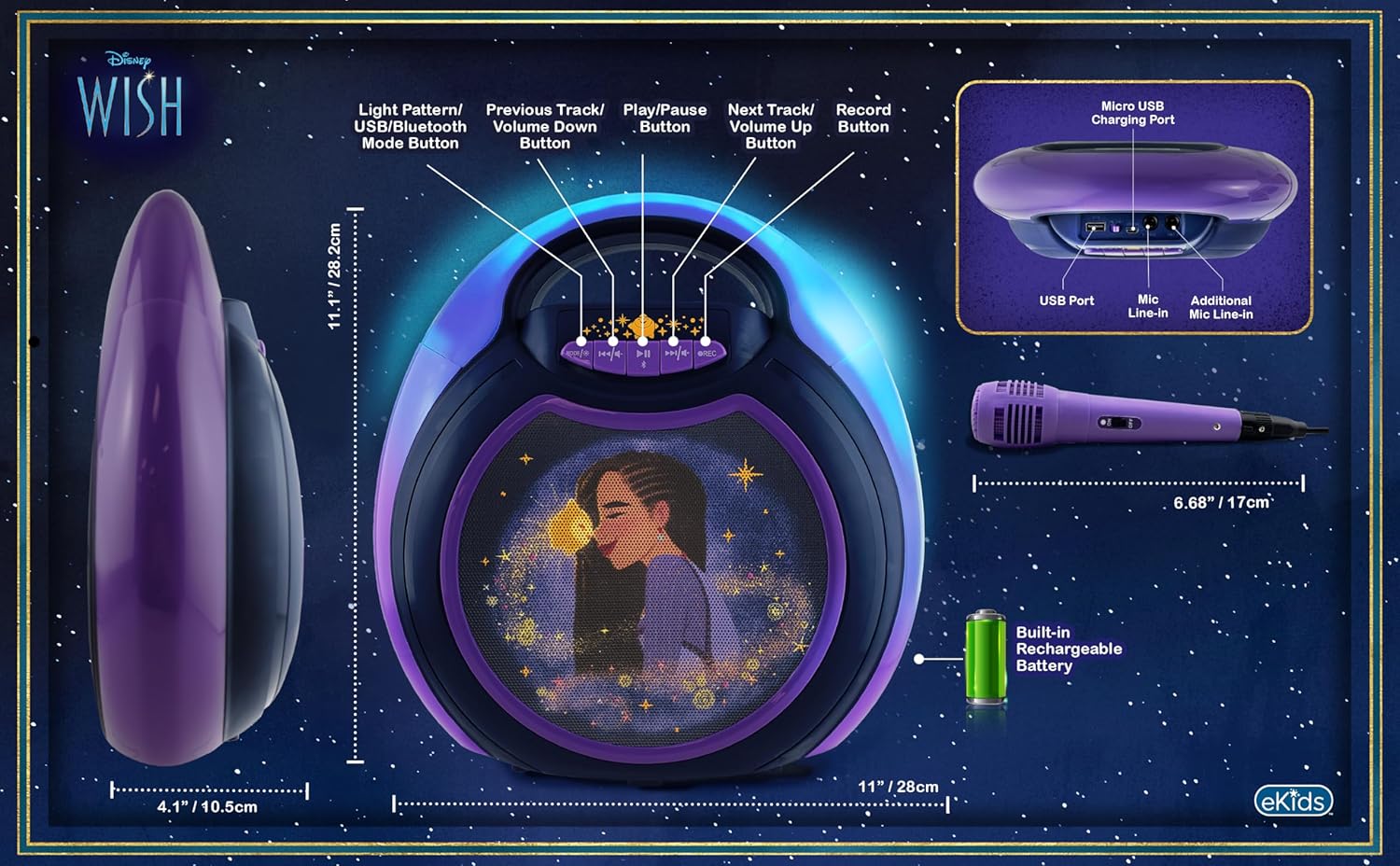
Image 4.1: Diagram of the eKids Disney Wish Karaoke Machine's controls, ports, and dimensions.
Kontrole i portovi:
- MODE / # Button: Switches between input modes (Bluetooth, USB) and adjusts light patterns.
- Dugme za prethodnu pjesmu / smanjenje jačine zvuka: Navigates to the previous track or decreases volume.
- Dugme za reprodukciju/pauzu: Reprodukuje ili pauzira audio.
- Dugme za sljedeću pjesmu / pojačavanje zvuka: Navigates to the next track or increases volume.
- Gumb REC: Initiates recording (requires USB flash drive).
- Micro USB priključak za punjenje: Za punjenje interne baterije.
- USB port: Za povezivanje USB fleš diska za snimanje ili reprodukciju.
- Mic Line-in: Primary port for the included wired microphone.
- Additional Mic Line-in: For connecting a second microphone (not included) for duets.
5. Podešavanje
5.1 Punjenje jedinice
Before first use, fully charge the karaoke machine. Connect the provided USB charging cable to the Micro USB Charging Port on the unit and to a standard USB power adapter (not included) or a computer's USB port. The charging indicator will illuminate during charging and turn off when fully charged.
5.2 Povezivanje mikrofona
Plug the wired microphone's connector into the 'Mic Line-in' port on the karaoke machine. For duet performances, an additional microphone (not included) can be connected to the 'Additional Mic Line-in' port.

Slika 5.1: Bočna strana view of the karaoke machine with the wired microphone connected.
6. Uputstvo za upotrebu
6.1 Uključivanje/isključivanje
Pritisnite i držite MODE / # dugme za uključivanje ili isključivanje uređaja.
6.2 Bluetooth uparivanje
When the unit is powered on, it will automatically enter Bluetooth pairing mode. The indicator light will flash. On your compatible device (smartphone, tablet, etc.), enable Bluetooth and select "eKids Wish Karaoke" from the list of available devices. A confirmation tone will sound when pairing is successful.

Image 6.1: Bluetooth compatibility with various devices.
6.3 Reprodukcija muzike
Once paired via Bluetooth, start playing music from your connected device. Use the Pusti / Pauziraj, Prethodna pjesma/Stišavanje zvuka, i Sljedeća pjesma / pojačavanje zvuka buttons on the karaoke machine to control playback.
6.4 Korištenje mikrofona
Ensure the microphone is connected to the 'Mic Line-in' port. Adjust the microphone's volume using the dedicated switch on the microphone itself. Sing into the microphone while music plays from the speaker.
6.5 Snimanje nastupa
To record your singing, insert a USB flash drive (not included) into the USB Port. Press the REC button to start recording. Press it again to stop recording. Recordings will be saved to the USB flash drive. Refer to the Product Overview (Image 4.1) for the location of the USB port.
6.6 Light Show Modes
Pritisnite MODE / # button repeatedly to cycle through different color-changing LED light show patterns.
6.7 Kontrola jačine zvuka
Adjust the main speaker volume using the Prethodna pjesma/Stišavanje zvuka i Sljedeća pjesma / pojačavanje zvuka buttons. The microphone has its own volume control switch.
7. Održavanje
7.1 Čišćenje
Obrišite uređaj mekom, suhom krpom. Ne koristite tekuća sredstva za čišćenje ili abrazivne materijale.
7.2 Skladištenje
When not in use, store the unit in a cool, dry place, away from direct sunlight and extreme temperatures.
8. Otkrivanje problema
- Nema napajanja: Ensure the unit is charged. Connect the USB charging cable and allow it to charge for a period.
- Nema zvuka: Check that the volume on both the karaoke machine and the connected Bluetooth device is turned up. Ensure the microphone is properly connected and its switch is on.
- Bluetooth se ne povezuje: Make sure Bluetooth is enabled on your device and the karaoke machine is in pairing mode. Try unpairing and re-pairing the device. Ensure no other devices are currently connected to the karaoke machine.
- Snimanje ne radi: Verify that a compatible USB flash drive is inserted into the USB port and has sufficient free space.
9. Specifikacije
| Broj modela | WH-555 |
| Dimenzije | 11.07 x 4.14 x 11.11 inča |
| Težina | 3.67 funte |
| Izvor napajanja | Napajanje na baterije (punjivo) |
| Voltage | 3 Volts |
| Povezivanje | Bluetooth, USB |
| Speaker Count | 1 |
| Posebne karakteristike | Light Up Speaker, Recording Function |
10. Garancija i podrška
For warranty information and customer support, please refer to the documentation included with your purchase or visit the official eKids webSačuvajte dokaz o kupovini za slučaj reklamacije.


