1. Proizvod je gotovview
The PELADN Mini PC WI-6 is a compact and powerful desktop computer designed for various applications, including light office work, 4K video playback, online education, and design tasks. It features the latest 12th Gen Alder Lake-N100 Processor, 16GB DDR4 RAM, and a 512GB M.2 PCIe SSD, offering efficient performance in a small form factor.

Slika 1.1: Prednja strana view of the PELADN Mini PC WI-6, showcasing its compact design and sleek blue finish.
Ključne karakteristike:
- Snažan procesor: Equipped with the 12th Gen Alder Lake-N100 Processor (4C/4T, up to 3.4GHz) for enhanced performance.
- AmpMemorija i pohrana: 16GB DDR4 RAM and 512GB M.2 SSD, with upgrade friendly options.
- 4K Dual Screen Display: Supports 4K video playback and dual 4K@60Hz displays via two HD 2.0 ports.
- Svestrano povezivanje: Features Gigabit Ethernet, 2.4G+5.0G dual-band WiFi, and Bluetooth 4.2.
- Kompaktan dizajn: Lightweight and portable, measuring 124mm x 112mm x 35mm, with VESA mount support.
- Efikasno hlađenje: Built-in fan cooling system to prevent overheating during multitasking.

Figure 1.2: Diagram illustrating the key features of the PELADN Mini PC, including processor, memory, storage, graphics, and connectivity options.
2. Sadržaj paketa
Molimo Vas da prilikom raspakivanja provjerite sadržaj paketa kako biste bili sigurni da su svi artikli prisutni i u dobrom stanju.
- 1 x PELADN Mini PC WI-6
- 1 x adapter za napajanje
- 1 x HD kabel
- 1 x Uputstvo za upotrebu
- 1 x Wall-Mounted Bracket (VESA mount)
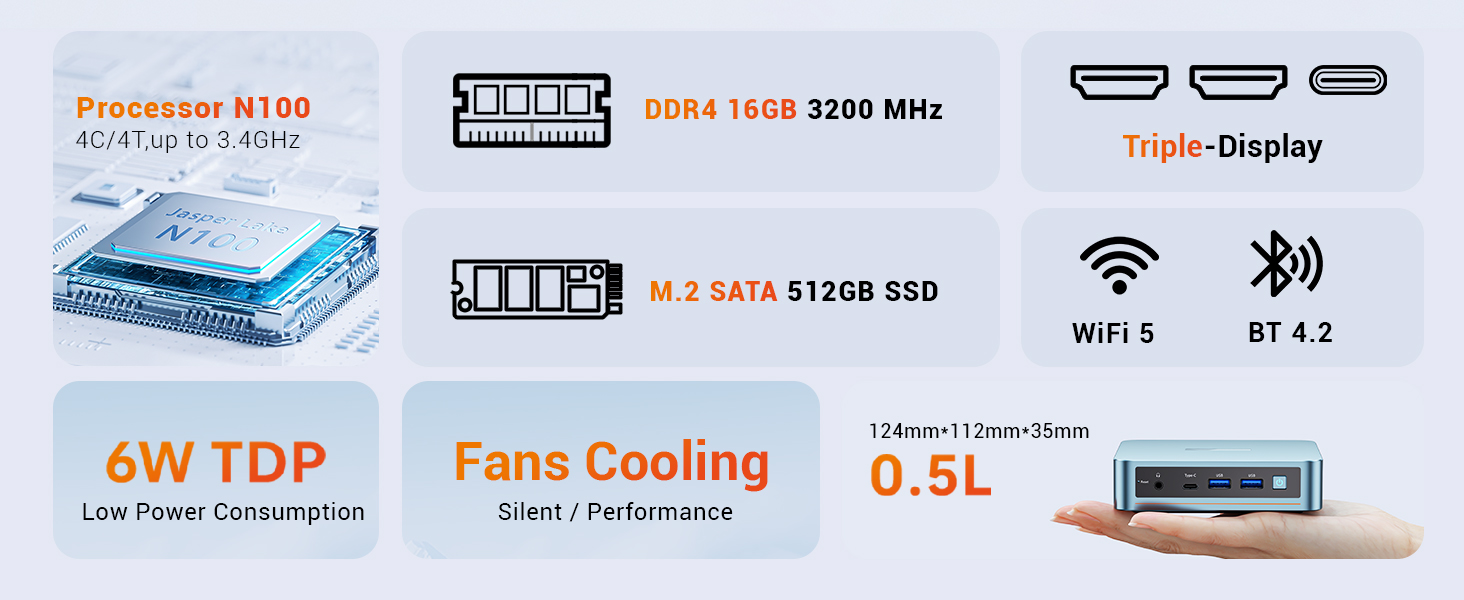
Figure 2.1: An illustration of the items included in the PELADN Mini PC package, such as the PC unit, power adapter, HD cable, user manual, and VESA mount.
3. Vodič za postavljanje
3.1 Povezivanje perifernih uređaja
Before powering on your Mini PC, connect the necessary peripherals.
- Poveži ekran: Use the provided HD cable to connect your monitor(s) to the HD ports on the back of the Mini PC. The device supports dual 4K@60Hz displays.
- Povežite tastaturu i miš: Plug your wired or wireless keyboard and mouse into the available USB ports (USB 2.0 or USB 3.0). For initial setup, a wired keyboard and mouse are recommended.
- Povežite mrežu: For a wired connection, plug an Ethernet cable into the RJ45 LAN port. For wireless, ensure your WiFi network is available.
- Priključite napajanje: Plug the power adapter into the DC 12V port on the Mini PC, then connect the adapter to a power outlet.

Slika 3.1: Detaljno view of the PELADN Mini PC's front and rear ports, including HD, USB 2.0, RJ45 LAN, DC 12V, Earphone, Type-C, and USB 3.0 ports.
3.2 Uključivanje i početno podešavanje
Once all peripherals are connected:
- Pritisnite dugme za napajanje koje se nalazi na prednjoj strani Mini PC-a.
- The device will boot up. As Windows 11 is pre-installed, you will be guided through the initial Windows setup process, including language selection, network configuration, and user account creation.
- Pratite uputstva na ekranu da biste dovršili podešavanje.
3.3 Instalacija VESA nosača (opciono)
The included VESA mount allows you to attach the Mini PC to the back of a compatible monitor or TV, saving desk space.
- Secure the VESA bracket to the Mini PC using the provided screws.
- Attach the Mini PC with the bracket to the VESA mounting holes on the back of your display, securing it with screws.

Figure 3.2: Step-by-step guide on how to install the PELADN Mini PC using the VESA mount, showing attachment to the back of a monitor.
4. Uputstvo za upotrebu
4.1 Osnovna upotreba
The PELADN Mini PC is optimized for everyday computing tasks.
- Kancelarijske aplikacije: Run Microsoft Office suite and other productivity software smoothly.
- Web Pregledavanje: Enjoy fast and responsive internet browsing.
- Reprodukcija 4K videa: Stream and play 4K content with ease, ideal for home theater setups.
- Multitasking: The N100 processor and 16GB RAM allow for efficient switching between multiple applications.

Figure 4.1: An image depicting the PELADN Mini PC in an office setting, demonstrating its suitability for business and everyday use.
4.2 Konfiguracija ekrana
Utilize the dual HD 2.0 ports for extended desktop or mirrored display setups.
- Connect two monitors to the HD ports for a dual-screen workspace.
- Adjust display settings (resolution, orientation) through Windows Display Settings.
4.3 Mreža i Bluetooth
The Mini PC offers flexible connectivity options:
- Wi-Fi: Connect to 2.4G or 5.0G wireless networks for internet access.
- Ethernet: For a stable and fast connection, use the Gigabit Ethernet port.
- Bluetooth 4.2: Pair Bluetooth-enabled devices such as headphones, speakers, or input devices.
5. Održavanje
5.1 Opšta njega
- Keep the Mini PC in a clean, dry environment, away from direct sunlight and extreme temperatures.
- Avoid placing objects on top of the unit that could obstruct airflow.
- Vanjski dio čistite mekom, suhom krpom. Ne koristite tekuća sredstva za čišćenje.
5.2 Sistem hlađenja
The PELADN Mini PC features a built-in cooling fan to maintain optimal operating temperatures. Ensure the ventilation holes are not blocked to allow proper airflow.

Slika 5.1: Eksplodirani view of the PELADN Mini PC, highlighting the internal components including the cooling fan and SSD, which contribute to its silent and efficient performance.
5.3 Ažuriranja softvera
Regularly update your Windows operating system and drivers to ensure system stability, security, and optimal performance.
- Idite na Postavke sustava Windows > Ažuriranje i sigurnost > Windows Update.
- Check for and install any available updates.
6. Otkrivanje problema
This section addresses common issues you might encounter with your PELADN Mini PC.
| Problem | Mogući uzrok | Rješenje |
|---|---|---|
| Nema napajanja/Ne uključuje se | Adapter za napajanje nije pravilno priključen; Problem sa utičnicom. | Ensure power adapter is securely connected to both the PC and the power outlet. Try a different outlet. |
| Nema prikaza na monitoru | HD cable loose or faulty; Incorrect input selected on monitor. | Check HD cable connections. Ensure monitor is set to the correct input source (e.g., HDMI 1, HDMI 2). Try a different HD cable or monitor. |
| Nema internet veze (Wi-Fi) | Wi-Fi onemogućen; Netačna lozinka; Problem sa ruterom. | Provjerite Wi-Fi postavke u Windowsu. Potvrdite Wi-Fi lozinku. Ponovo pokrenite ruter. |
| Nema internet veze (Ethernet) | Ethernet cable loose or faulty; Network driver issue. | Ensure Ethernet cable is securely connected. Try a different cable. Check network adapter status in Device Manager. |
| System slow or unresponsive | Previše pokrenutih aplikacija; Malo prostora za pohranu; Pregrijavanje. | Close unnecessary applications. Free up disk space. Ensure proper ventilation around the PC. |
For more advanced troubleshooting or persistent issues, please refer to the official PELADN support resources or contact customer service.
Napredne karakteristike:
- Automatsko uključivanje: Configure in BIOS for automatic startup.
- Wake on LAN (WoL): Enable in BIOS and network adapter settings to wake the PC remotely.
- PXE pokretanje: Preboot Execution Environment support for network booting.
7. Specifikacije
| Feature | Detalj |
|---|---|
| Brand | PELADN |
| Broj modela | WI-6 |
| Procesor | 12th Gen Intel Alder Lake-N100 (4C/4T, up to 3.4GHz, 6W TDP) |
| RAM | 16GB DDR4 (Max 3200MHz) |
| Skladištenje | 512GB M.2 PCIe SSD |
| Grafika | Intel UHD Graphics (750MHz max), Integrated |
| Display Output | 2 x HD 2.0 (Supports 4K@60Hz Dual Display) |
| USB portovi | 2 x USB 3.0, 2 x USB 2.0, 1 x Type-C (Data/Video) |
| Mreža | Gigabit Ethernet (RJ45), Wi-Fi 2.4G+5.0G |
| Bluetooth | Bluetooth 4.2 |
| Audio | 1 x Audio Jack (HP&MIC) |
| Operativni sistem | Windows 11 Pro (unaprijed instaliran) |
| Dimenzije (DxŠxV) | 4.88 x 4.41 x 1.38 inča (124 mm x 112 mm x 35 mm) |
| Težina | 1.76 funte |
| Boja | Plava |
8. Garancija i podrška
PELADN is committed to providing high-quality products and excellent customer service.
- garancija: The PELADN Mini PC comes with a 12-month (1 year) warranty from the date of purchase.
- Povratak: Enjoy a 30-day no-reason return and exchange policy.
- tehnička podrška: Professional technical staff are available to assist you.
- Vrijeme odgovora: Cilj nam je odgovoriti na sve upite u roku od 24 sata.
For support, please visit the official PELADN store or contact their customer service directly. You can find more information and contact details at the PELADN Store on Amazon.
Figure 8.1: An image detailing PELADN's customer support offerings, including technical support, 24-hour reply, 30-day return policy, and 12-month warranty.


