1. Uvod
Welcome to the user manual for your new SOYES XS16 Mini Smartphone. This compact and powerful device runs on Android 10.0, offering a full smartphone experience in a handheld size. Designed for portability and convenience, it features 4G network support, a 3.0-inch HD display, and essential functionalities for daily communication and entertainment. This manual will guide you through the setup, operation, maintenance, and troubleshooting of your device.
2. Šta se nalazi u kutiji
- SOYES XS16 Mini Smartphone
- USB kabel tipa C
- Izbacivač SIM ležišta
- Case za telefon
- Screen Protector
3. Proizvod je gotovview
The SOYES XS16 is engineered for portability without compromising on features. Its small form factor makes it ideal for easy carrying, fitting comfortably in your hand or pocket.

Figure 3.1: The SOYES XS16 Mini Smartphone, showcasing njegove kompaktne veličine kada se drži u ruci.
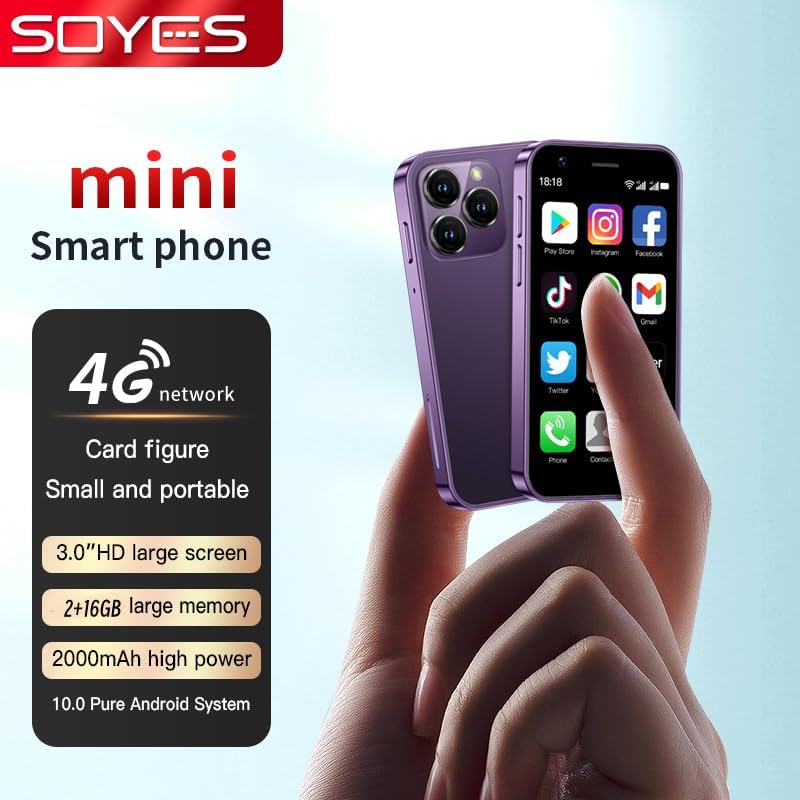
Slika 3.2: Gotovoview of the SOYES XS16, highlighting its 4G network capability, 3.0-inch HD screen, memory options, 2000mAh battery, and Android 10.0 system.

Figure 3.3: The SOYES XS16 is available in various colors, offering a sleek and modern design.

Figure 3.4: An illustration of the phone's advanced features, including its compact body, large HD screen, high-definition camera, flagship multi-core processor, and 2000mAh battery.

Figure 3.5: The phone offers ample storage space and features a convenient Type-C charging port for efficient power delivery.

Figure 3.6: Demonstrating the phone's small and portable design, comparable to the size of a credit card.

Figure 3.7: The SOYES XS16 runs on a pure Android Native System, ensuring compatibility with mainstream applications and smooth multitasking.

Figure 3.8: The phone's thin and light profile allows it to be easily carried in small bags or pockets.

Figure 3.9: A summary of the phone's flagship configuration and basic parameters.
Video o proizvodu
Video 3.1: Zvanična video prezentacija proizvodaasing the SOYES XS16 Mini Smartphone's design, features, and compact size.
4. Podešavanje
4.1. Instalacija SIM kartice
- Pronađite ladicu za SIM karticu sa strane telefona.
- Umetnite alat za izbacivanje SIM kartice u mali otvor pored ladice i lagano pritisnite dok ladic ne iskoči.
- Place your Nano-SIM card(s) into the designated slots on the tray. Ensure the gold contacts face downwards. The SOYES XS16 supports dual SIM cards.
- Pažljivo gurnite nosač nazad u telefon dok ne klikne na svoje mjesto.
4.2. Initial Power On & Language Selection
- Pritisnite i držite dugme za napajanje (nalazi se sa strane) dok se ekran ne upali.
- Follow the on-screen prompts to select your preferred language. The phone supports English, French, Spanish, Portuguese (Brazil), Italian, German, Dutch, Hungarian, Russian, Arabic, Greek, Romanian, Bulgarian, Vietnamese, Czech, Persian, Indonesian, Malay, Thai, Portuguese, Philippine, Hebrew, Korean, and Japanese.
- Complete the initial setup steps, including connecting to Wi-Fi and setting up your Google account.
4.3. Mrežna povezanost
The SOYES XS16 supports 4G, 3G, and 2G networks. Ensure your SIM card supports the following frequencies for optimal performance:
- 4G FDD: B1/B3/B5/B7/B8/B20 (2100/1800/850/2600/900/800MHz)
- 4G TDD: B39/B40 (2600/1900/2300MHz)
- 3G WCDMA: B1/B5/B8 (2100/850/900MHz)
- 2G GSM: B3/B5/B8 (1800/850/900MHz)
If you do not intend to use a SIM card, you can still use the phone by connecting to Wi-Fi.
5. Upravljanje vašim uređajem
5.1. Osnovna navigacija
The SOYES XS16 features a 3.0-inch IPS touchscreen. Navigate by tapping, swiping, and pinching. The Android 10.0 OS provides an intuitive user interface.
5.2. Pozivi i poruke
Use the Phone app to make calls and the Messaging app to send and receive SMS/MMS messages. The dual SIM support allows you to manage two numbers simultaneously.
5.3. Upotreba kamere
The phone is equipped with a 5MP rear camera and a 2MP front camera. Open the Camera app to capture photos and videos. Tap the screen to focus and press the shutter button to take a picture.
5.4. Upravljanje aplikacijama
Download and install applications from the Google Play Store. You can manage installed apps through the Settings menu, including permissions and storage usage.
5.5. Mogućnosti povezivanja
- Wi-Fi: Povežite se na bežične mreže za pristup internetu.
- Bluetooth: Uparite se s Bluetooth uređajima poput slušalica ili zvučnika.
- Mobile Hotspot: Share your phone's cellular data connection with other devices.
6. Održavanje
6.1. Punjenje
Charge your SOYES XS16 using the provided USB Type-C cable and a compatible power adapter. The 2000mAh battery provides sufficient power for its compact size. Avoid using damaged cables or chargers.
6.2. Ažuriranja softvera
Periodically check for system updates in the Settings menu to ensure your phone has the latest features and security patches.
6.3. Čišćenje
Za čišćenje ekrana i kućišta telefona koristite meku krpu koja ne ostavlja dlačice. Izbjegavajte upotrebu jakih hemikalija ili abrazivnih materijala.
6.4. Zaštita
Utilize the included screen protector and phone case to safeguard your device from scratches and minor impacts.
7. Otkrivanje problema
If you encounter issues with your SOYES XS16, refer to the following common problems and solutions:
- Telefon se ne uključuje: Provjerite je li baterija napunjena. Povežite telefon s punjačem najmanje 15 minuta prije nego što ga ponovo pokušate uključiti.
- Problemi s mrežnom vezom:
- Verify that your SIM card is correctly inserted and active.
- Check if your SIM card supports the phone's frequency bands (refer to Section 4.3).
- Ponovo pokrenite telefon.
- Go to Settings > Network & internet > Mobile network > Advanced > Access Point Names (APN) and ensure the correct APN settings for your carrier are selected or configured.
- If issues persist, contact your mobile carrier for assistance.
- Freezing or Glitching:
- Ponovo pokrenite telefon.
- Zatvorite aplikacije u pozadini.
- Clear cache for problematic apps (Settings > Apps & notifications > [App Name] > Storage & cache > Clear cache).
- Osigurajte da je na raspolaganju dovoljno prostora za skladištenje.
- Language Changed Unexpectedly: If the phone's language changes to an unfamiliar one, navigate to Settings (usually represented by a gear icon) > System > Languages & input > Languages, and select your desired language.
- Loš kvalitet zvuka: Ensure the speaker is not obstructed. Adjust volume settings.
- Difficulty Typing on Small Screen: Utilize predictive text features or consider using a stylus for more precise input if available.
If these steps do not resolve the issue, a factory reset may be necessary (Settings > System > Reset options > Erase all data (factory reset)). Upozorenje: A factory reset will erase all data on your phone. Back up important information before proceeding.
8. Specifikacije
| Dimenzije proizvoda | 3.52 x 1.79 x 0.45 inča |
| Težina artikla | 5.6 unce |
| Broj modela stavke | XS16 |
| Operativni sistem | Android 10.0 |
| Procesor | MTK6737 |
| RAM | 2 GB |
| Kapacitet memorije | 16 GB (also available in 3GB+64GB variant) |
| Veličina ekrana | 3.0 Inches HD |
| Rezolucija ekrana | 480 x 854 |
| Zadnja kamera | 5MP |
| Prednja kamera | 2MP |
| Kapacitet baterije | Litij polimer 2000 mAh |
| I/O interfejs | Tip-C |
| Bežične komunikacijske tehnologije | Mobilna mreža, Wi-Fi |
| Connectivity Technologies | Bluetooth, Wi-Fi, USB |
| Wireless Carrier | Otključano za sve prijevoznike |
| Phone Unlocking Method | Graphics + Password |
9. Jamstvo i podrška
For any questions or support regarding your SOYES XS16 Mini Smartphone, please contact the seller or manufacturer. Please refer to your purchase documentation for specific warranty details and contact information.


