1. Uvod
Thank you for choosing the GOOJODOQ Projector. This manual provides essential information for the safe and efficient operation of your new projector. Please read this manual thoroughly before using the product and keep it for future reference. This projector is designed to deliver a high-quality visual experience with its Full HD 1080p resolution, Android operating system, and versatile connectivity options.
2. Sigurnosne informacije
Da biste osigurali siguran rad i spriječili oštećenja, molimo vas da se pridržavate sljedećih sigurnosnih mjera opreza:
- Ne gledajte direktno u sočivo projektora kada je lamp je uključeno. Jarko svjetlo može uzrokovati oštećenje oka.
- Postavite projektor na stabilnu, ravnu površinu kako biste spriječili njegov pad.
- Osigurajte odgovarajuću ventilaciju oko projektora. Ne blokirajte ventilacijske otvore.
- Držite projektor dalje od vode, vlage i ekstremnih temperatura.
- Koristite samo adapter za napajanje koji dolazi s projektorom.
- Ne pokušavajte sami rastavljati ili popravljati projektor. Za sve servisne radove obratite se kvalifikovanom osoblju.
- Čuvati van domašaja djece.
3. Sadržaj paketa
Molimo Vas da provjerite sadržaj paketa kako biste bili sigurni da su svi artikli prisutni:
- GOOJODOQ Projector
- AC Power Cable (1.2M)
- HDMI Cable (1M)
- Daljinski upravljač
- Korisnički priručnik (ovaj dokument)
4. Proizvod je gotovview
4.1 Projector Components and Ports
Familiarize yourself with the various parts of your projector and their functions.

Figure 4.1: Projector Ports and Wireless Connectivity. This image illustrates the various input ports available on the projector, including USB and AV, along with icons indicating support for wireless screen mirroring from iOS and Android devices. It also shows common devices that can be connected, such as USB drives, hard drives, cameras, card readers, TV boxes, speakers, headphones, and earphones.
- USB port: Standard USB2.0 for connecting USB drives, external hard drives, etc.
- HDMI priključak: Standard HDMI2.0 for connecting devices like laptops, gaming consoles, TV boxes.
- Audio Port (φ3.5): Standard 3.5mm audio jack for connecting external speakers or headphones.
- AC priključak: For connecting the power cable (100~250V 50/60HZ).
- Objektiv: Projektuje sliku na ekran.
- Prsten za fokus: Ručno podešavanje za oštrinu slike.
- Otvori za ventilaciju: Za odvođenje toplote.
4.2 Funkcije daljinskog upravljača
The included remote control allows for convenient operation of the projector.
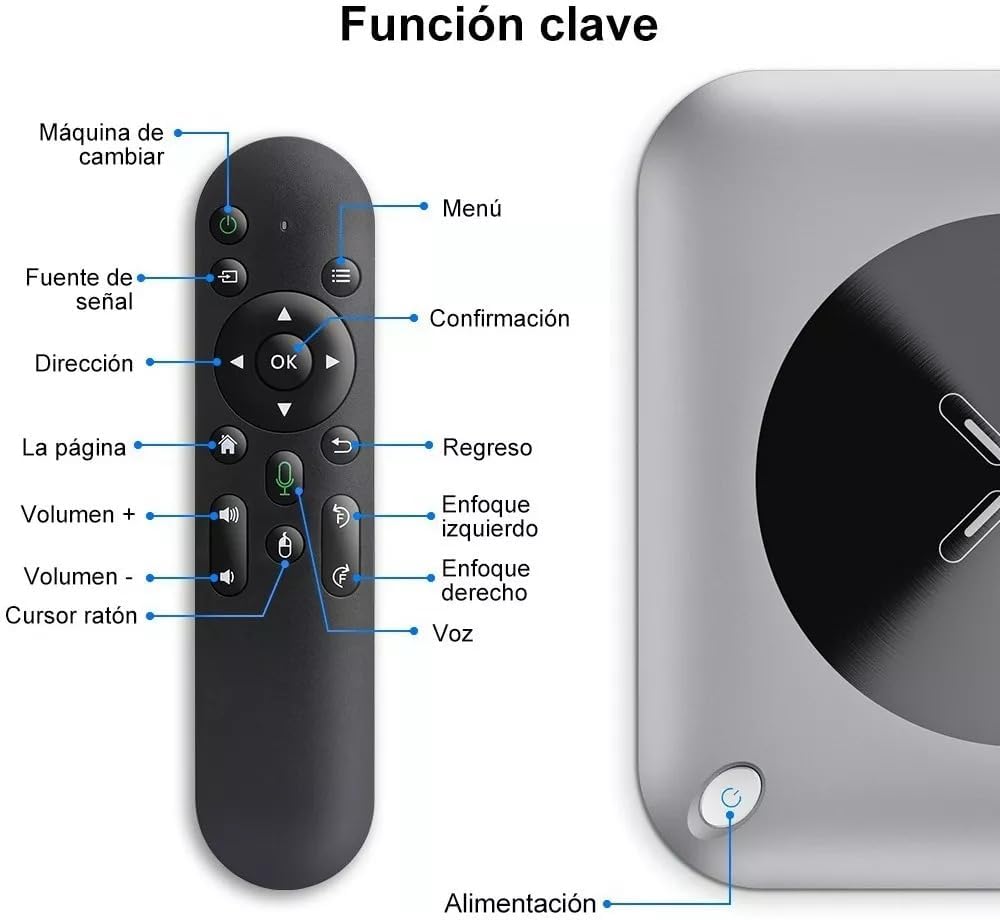
Figure 4.2: Remote Control Key Functions. This image displays the remote control for the GOOJODOQ projector, with various buttons labeled in Spanish. Key functions include power on/off, signal source selection, menu, navigation (direction and OK), home, return, volume control, mouse cursor, and voice control. The projector's power button is also indicated.
- Dugme za napajanje: Uključuje ili isključuje projektor.
- Tipka Izvor: Odabire ulazni izvor (HDMI, USB, itd.).
- Dugme menija: Pristupa meniju postavki projektora.
- Navigacijski gumbi (gore/dolje/lijevo/desno/OK): Navigacija kroz menije i potvrđivanje odabira.
- Dugme za početnu stranicu: Returns to the main Android interface.
- Dugme za povratak: Vraća se na prethodni ekran.
- Dugmad za jačinu zvuka (+/-): Podešava jačinu zvuka.
- Focus Buttons: Electronically adjusts focus (if applicable, otherwise manual focus).
- Mouse Cursor Button: Activates/deactivates mouse mode for easier navigation.
- Glasovno dugme: Activates voice control (if supported by the Android system).
5. Podešavanje
5.1 Postavljanje
Choose a suitable location for your projector. The ideal projection distance ranges from 1 to 4 meters, with an optimal screen size between 60-90 inches. The projector can be placed on a tabletop, mounted on a tripod, or ceiling-mounted.

Figure 5.1: Projection Distance and Mounting Options. This image illustrates recommended projection distances for various screen sizes (50", 72", 100", 120", 200") and shows different mounting configurations for the projector: ceiling mount, tripod mount, and tabletop placement. The recommended distance for a home cinema experience is 9.7 feet.
5.2 Priključak za napajanje
- Connect the supplied AC power cable to the projector's AC port.
- Uključite drugi kraj kabla za napajanje u utičnicu.
- Pritisnite dugme za napajanje na projektoru ili daljinskom upravljaču da biste ga uključili.
5.3 Fokus i korekcija trapezoidnog izobličenja
- Podešavanje fokusa: Okrećite prsten za fokusiranje na objektivu projektora dok projicirana slika ne postane jasna i oštra.
- Keystone korekcija: If the projected image appears trapezoidal (wider at the top or bottom), use the electronic keystone correction feature via the projector's menu or remote control to adjust the image shape to a perfect rectangle.
6. Uputstvo za upotrebu
6.1 Osnovni rad
- Uključivanje/isključivanje: Press the power button on the remote or projector.
- Odabir izvora ulaza: Press the "Source" button on the remote to cycle through available input sources (HDMI, USB, etc.).
- Kontrola jačine zvuka: Use the Volume +/- buttons on the remote to adjust audio output.
6.2 Povezivanje vanjskih uređaja
The projector supports various external devices:
- HDMI veza: Connect a laptop, Blu-ray player, gaming console, or TV box to the HDMI port using an HDMI cable. Select the HDMI input source.
- USB veza: Insert a USB flash drive or external hard drive into the USB port. The projector's media player will allow you to browse and play supported media files (MP4, 3GPP, MPEG, MPG, MKV, AVI, FLV, Mp3, WMA, OGG, AAC, APE, FLAC, WAV, BMP, JPG, GIF, PNG).
- Audio izlaz: Connect external speakers or headphones to the φ3.5 audio port for enhanced sound.
6.3 Wireless Screen Mirroring (Android & iOS)
The projector supports dual-band Wi-Fi (2.4G+5G) for seamless wireless screen mirroring from your smartphone or tablet.

Figure 6.1: Wireless Screen Mirroring in Action. This image shows the GOOJODOQ projector displaying a soccer game on a large screen, with a smartphone placed on top of the projector, indicating its screen is being mirrored wirelessly. This highlights the projector's capability for smartphone connectivity and large-screen entertainment.
- Provjerite jesu li vaš projektor i mobilni uređaj povezani na istu Wi-Fi mrežu.
- On the projector's main interface, select the "Screen Mirroring" or "Wireless Display" option.
- On your mobile device, enable screen mirroring (e.g., "Smart View" on Android, "Screen Mirroring" on iOS).
- Select the projector's name from the list of available devices.
- The content from your mobile device will now be displayed on the projector.
6.4 Android System Navigation
The projector runs on Android 9.0, providing a smart TV experience.

Figure 6.2: Android Smart TV Interface. This image shows a family enjoying content projected onto a wall, displaying the Android smart TV interface with various streaming app icons like Netflix, Disney+, and Prime Video. This demonstrates the projector's built-in smart capabilities and user-friendly interface for accessing entertainment.
- Use the remote control's navigation buttons to browse the Android interface.
- Access pre-installed apps or download new ones from the app store (if available).
- Adjust system settings such as Wi-Fi, display, and sound through the settings menu.
7. Održavanje
Pravilno održavanje osigurava dugotrajnost i optimalne performanse vašeg projektora.
- Čišćenje sočiva: Koristite meku krpu koja ne ostavlja dlačice, posebno dizajniranu za optička sočiva, da biste nježno obrisali sočivo projektora. Ne koristite abrazivna sredstva za čišćenje.
- Uklanjanje prašine: Regularly clean the projector's exterior with a soft, dry cloth. Use a can of compressed air to clear dust from ventilation openings.
- Skladištenje: Kada se projektor ne koristi duži period, čuvajte ga na hladnom i suhom mjestu, zaštićenom od prašine i direktne sunčeve svjetlosti.
- Isključeno ispravno: Always turn off the projector using the power button and allow it to cool down before unplugging or moving.
8. Otkrivanje problema
Ako naiđete na probleme s projektorom, pogledajte sljedeće uobičajene probleme i rješenja:
| Problem | Mogući uzrok | Rješenje |
|---|---|---|
| Nema projicirane slike | Power cable not connected; Projector not turned on; Incorrect input source selected; Lens cap on. | Check power connection; Press power button; Select correct input source; Remove lens cap. |
| Slika je mutna | Fokus nije podešen; Projektor je preblizu/predaleko od platna. | Podesite prsten za fokusiranje; Podesite udaljenost projekcije. |
| Slika je trapezoidna | Projektor nije okomit u odnosu na platno. | Use keystone correction feature in settings. |
| Nema zvuka | Volume too low; Muted; External speakers not connected properly; Audio format not supported. | Increase volume; Unmute; Check external speaker connection; Ensure audio format is supported. |
| Problemi sa Wi-Fi vezom | Netačna lozinka; Izvan dometa; Problemi s ruterom. | Potvrdite lozinku; Približite se ruteru; Ponovo pokrenite ruter i projektor. |
9. Specifikacije
Detailed technical specifications for the GOOJODOQ Projector:
| Feature | Opis |
|---|---|
| Brand | DXQ |
| Naziv modela | Projektor |
| Display Technology | LCD |
| Izvor svjetlosti | LED |
| Vijek trajanja izvora svjetlosti | 30,000 sati |
| Osvetljenost | 300 ANSI / 450 ANSI (12000 Lumens stated in title) |
| Standard Resolution | 1920x1080 / 60Hz (Full HD 1080p) |
| Podržana rezolucija | 1080x1920 / 60Hz |
| Kontrast Ratio | 1500:1 |
| Područje projekcije | 30-120 inča |
| Aspect Ratio | 4:3 / 16:9 |
| Idealna veličina | 60-90 inča |
| Udaljenost projekcije | 1-4 metara |
| Focus Mode | Manual Focus |
| Ispravka Keystone-a | Elektronska korekcija Keystone |
| Zvučnik | 4Ω 5W*1 (Built-in) |
| Wi-Fi način rada | 802.11/b/g/n + BT4.2 Dual Wi-Fi (2.4G+5G) |
| Luke | 1x Standard USB2.0, 1x Standard HDMI2.0, 1x Standard φ3.5 Audio Port |
| Ulaz naizmenične struje | 100~250V 50/60HZ |
| Operativni sistem | Android 9.0 |
| CPU | 3326 (1+8/2+16) |
| Podržani audio formati | Mp3 / WMA / OGG / AAC / APE / FLAC / WAV |
| Podržani video formati | MP4, 3GPP, MPEG, MPG, MKV, AVI, FLV (up to 1080p) |
| Podržani formati slika | BMP, JPG, GIF, PNG |
Note on Brightness: The product title mentions 12000 lumens, while specifications list 300 ANSI / 450 ANSI. Lumens and ANSI lumens are different measurements. ANSI lumens provide a more standardized measure of brightness.

Figure 9.1: Brightness and Contrast Comparison. This image visually compares the GOOJODOQ projector (right) with another projector (left), highlighting its superior brightness (12000 Lumens vs. 8000 Lumens) and contrast ratio (5000:1 vs. 2000:1), along with native 1080P resolution, demonstrating enhanced image quality.
10. Garancija i podrška
For warranty information and technical support, please refer to the warranty card included with your product or contact the manufacturer directly. Keep your purchase receipt as proof of purchase.
For further assistance, you may visit the official DXQ or GOOJODOQ webstranice ili kontaktirajte njihovu korisničku službu.


