1. Uvod
Thank you for choosing the ONIKUMA CW908 Wired Gaming Mouse. This manual provides detailed instructions on how to set up, operate, maintain, and troubleshoot your new gaming mouse. Please read this manual carefully before use to ensure optimal performance and longevity of your device.
2. Proizvod je gotovview
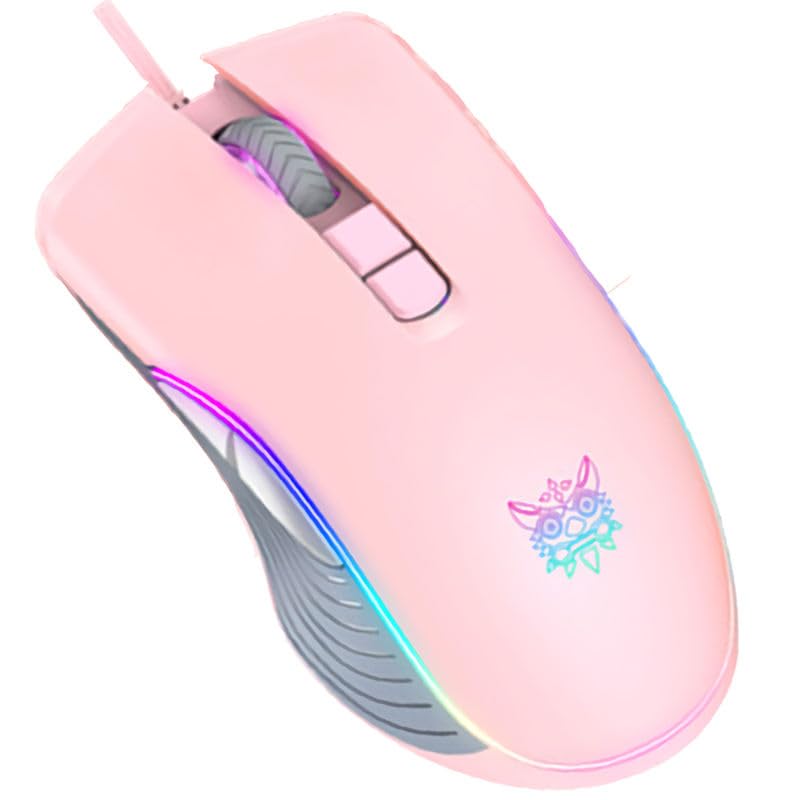
The ONIKUMA CW908 is a high-performance wired gaming mouse designed for comfort and precision. It features 7 programmable buttons, adjustable DPI up to 7200, and vibrant RGB lighting. Its ergonomic and lightweight design ensures comfortable use during extended gaming sessions.
2.1 Komponente miša
- Lijevi klik na dugme: Standardna primarna funkcija klika.
- Desni klik: Standardna funkcija sekundarnog klika.
- Točak za pomicanje: Za skrolovanje i funkciju klika srednjim tasterom miša.
- Dugme za podešavanje DPI-ja: Ciklično mijenja DPI postavke.
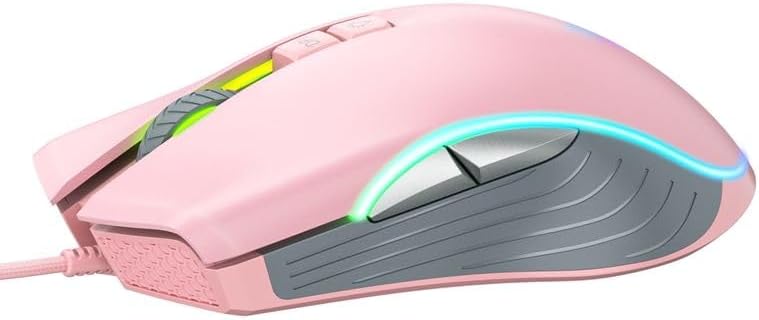
- Dugme naprijed: Navigira naprijed u web preglednike ili aplikacije.
- Dugme za nazad: Navigacija unazad web preglednike ili aplikacije.
- RGB rasvjeta: Integrated LED lighting for aesthetic appeal.
- USB konektor: For wired connection to your computer.
2.2 Slike proizvoda
3. Upute za postavljanje
Setting up your ONIKUMA CW908 mouse is a simple plug-and-play process.
- Raspakujte miš: Pažljivo izvadite miš iz ambalaže.
- Povežite se na računar: Plug the USB connector of the mouse into an available USB port on your personal computer or laptop.
- Instalacija drajvera: Your operating system (Windows 7, Windows 98, Linux, or newer versions) should automatically detect and install the necessary drivers. This process may take a few moments.
- Spremno za upotrebu: Once the drivers are installed, the mouse will be ready for immediate use. The RGB lighting will illuminate.
4. Uputstvo za upotrebu
The ONIKUMA CW908 mouse offers intuitive controls for both general use and gaming.
4.1 Osnovni rad
- Pomjerajte miš po ravnoj površini da biste kontrolirali kursor na ekranu.
- Use the Left Click Button for primary actions (e.g., selecting items, opening files).
- Use the Right Click Button for secondary actions (e.g., opening context menus).
- Roll the Scroll Wheel up or down to navigate through documents or web pages. Press the Scroll Wheel for its middle-click function.
4.2 DPI podešavanje
The mouse features an adjustable DPI (Dots Per Inch) setting, allowing you to change cursor sensitivity on the fly. The CW908 supports up to 7200 DPI.
- Pritisnite Dugme za podešavanje DPI-ja (usually located behind the scroll wheel) to cycle through different DPI levels.
- Each press will switch to a predefined DPI setting, indicated by a change in the RGB lighting color or pattern (if applicable).
- Select the DPI level that best suits your task, whether it's precise aiming in games or fast navigation across multiple monitors.
4.3 Bočna dugmad
The Forward and Backward buttons on the side of the mouse provide quick navigation.
- The Dugme naprijed typically moves forward in web pretraživači ili file istraživači.
- The Dugme za nazad typically moves backward in web pretraživači ili file istraživači.
5. Prilagođavanje postavki
While the ONIKUMA CW908 offers plug-and-play functionality, advanced customization for button remapping or more intricate RGB control may require dedicated software. Please check the official ONIKUMA website for any available software downloads specific to the CW908 model.
- DPI postavke: As mentioned, the DPI button cycles through preset levels. Software, if available, may allow for custom DPI steps.
- Programiranje dugmadi: With compatible software, the 7 buttons can often be remapped to perform specific functions, macros, or keyboard shortcuts, enhancing your gaming and productivity.
- RGB rasvjeta: Software can provide more granular control over RGB effects, colors, and brightness, beyond the default cycling modes.
6. Održavanje
Proper maintenance ensures the longevity and performance of your gaming mouse.
- čišćenje: Koristite meku, suhu krpu za brisanje površine miša. Za tvrdokornu prljavštinu, lagano obrišiteampOperite krpu vodom ili blagim rastvorom za čišćenje. Izbjegavajte jake hemikalije.
- Čišćenje senzora: Povremeno se prašina ili ostaci mogu nakupiti oko optičkog senzora na donjoj strani miša. Koristite pamučni štapić ili komprimirani zrak da nježno očistite područje senzora.
- Održavanje kablova: Avoid sharply bending or pulling the USB cable. Store the mouse in a way that prevents the cable from being crimped or damaged.
- Skladištenje: Kada se ne koristi, miš čuvajte na čistom i suhom mjestu, dalje od ekstremnih temperatura.
7. Otkrivanje problema
If you encounter issues with your ONIKUMA CW908 mouse, refer to the following common problems and solutions:
| Problem | Mogući uzrok | Rješenje |
|---|---|---|
| Miš ne reaguje | Labava USB veza, neispravan USB port, problem s upravljačkim programom. | Provjerite je li USB kabel sigurno priključen. Pokušajte s drugim USB priključkom. Ponovo pokrenite računar. Provjerite Upravitelj uređaja za status upravljačkih programa. |
| Kretanje kursora je nepravilno ili neravnomjerno | Prljav optički senzor, neodgovarajuća površina podloge za miša. | Clean the optical sensor on the underside of the mouse. Use a clean, uniform-colored mouse pad. |
| DPI dugme ne mijenja osjetljivost | Button malfunction, software conflict. | Ensure the mouse is properly connected. If using custom software, check its settings. Try on another computer to rule out system issues. |
| RGB osvetljenje ne radi | Problem sa napajanjem, podešavanje softvera. | Ensure the mouse is receiving power via USB. If using custom software, check lighting settings. |
8. Specifikacije
| Feature | Detalj |
|---|---|
| Brand | ONIKUMA |
| Model | CW908 |
| Tehnologija povezivanja | USB Wired |
| Otkrivanje pokreta | Optički |
| DPI (tačke po inču) | Do 7200 (podesivo) |
| Broj dugmadi | 7 |
| Posebne karakteristike | LED Lighting (RGB), Comfortable Design, Lightweight |
| Preporučena upotreba | Gaming |
| Kompatibilni uređaji | Lični računar, laptop |
| Kompatibilnost operativnog sistema | Linux, Windows 7, Windows 98 (and newer Windows versions) |
| Stil | Moderna |
| Boja | Pink |
9. Garancija i podrška
ONIKUMA products are manufactured to high-quality standards. For specific warranty information, please refer to the warranty card included with your product or visit the official ONIKUMA website. If you require technical support or have questions not covered in this manual, please contact ONIKUMA customer service through their official channels.


