1. Uvod
This manual provides essential information for setting up, operating, and maintaining your NiPoGi P1 Mini PC. The NiPoGi P1 is a compact and efficient desktop computer designed for various professional and personal uses, including home, school, and office environments.
It features an AMD Ryzen 4300U processor, 16GB DDR4 RAM, and a 512GB M.2 2280 SSD, pre-installed with Windows 11 Pro. The device supports triple 4K@60Hz display output and offers robust connectivity options including Wi-Fi 5 and Bluetooth 4.2.
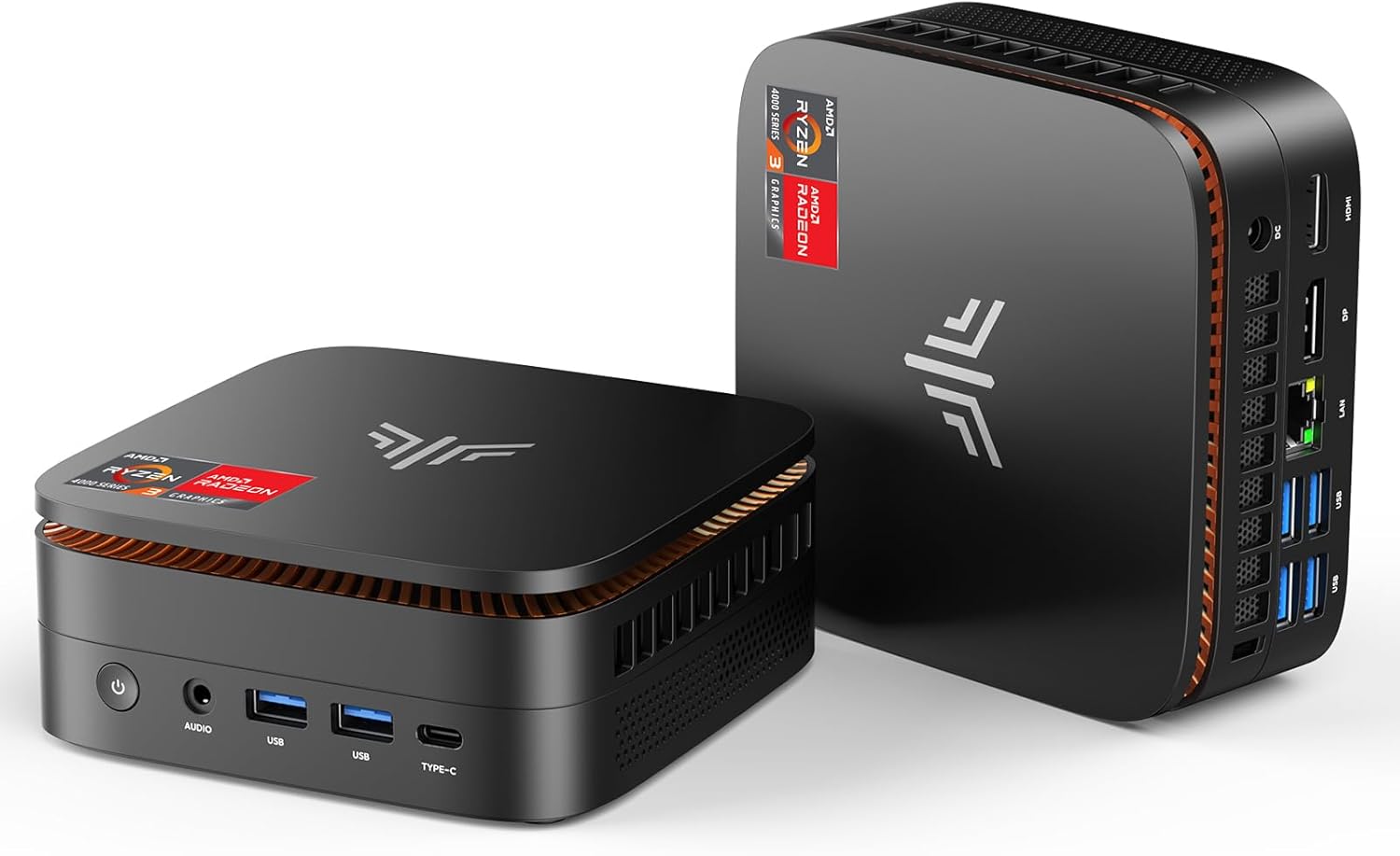
Figure 1: NiPoGi P1 Mini PC, showcasing svojim kompaktnim dizajnom i prednjim priključcima.

Slika 2: Gotovoview of NiPoGi P1 Mini PC's core features including AMD Ryzen 4300U, 16GB DDR4, 512GB SSD, Wi-Fi 5, Bluetooth 4.2, and triple 4K display support.
Video 1: NiPoGi P1 Mini PC Product Overview. Ovo preview video provides a brief visual introduction to the Mini PC's design and main functionalities.
2. Podešavanje
2.1 Initial Boot and System Configuration
Upon the first startup, you will be prompted to select your preferred language and country. Following this, you will need to create a user account to complete the initial Windows 11 Pro setup.
2.2 BIOS Settings for Automatic Power On
To configure the Mini PC to automatically power on after a power outage:
- Power on the Mini PC.
- Odmah pritisnite Izbriši key on your keyboard to enter the BIOS setup utility.
- Idite do Boot option using the arrow keys.
- Locate the "Restore AC Power Loss" setting.
- Change its value from "Power Off" to "Power On".
- Go to the "Save & Exit" tab.
- Select "Save Changes and Exit" and confirm by selecting "Yes".
Video 2: BIOS Setting for Auto Power On. This preview video demonstrates the steps to enable automatic power-on after a power loss.
2.3 Operating System Reinstallation (Advanced)
If you need to reinstall the operating system, follow these steps:
- Prepare a USB flash drive (16GB or larger).
- Download the necessary OS files from the provided link (if applicable) or official sources.
- Format the USB drive to NTFS file system and rename it to "WINPE".
- Copy the unzipped OS system files to the formatted USB drive.
- Insert the prepared USB drive into the Mini PC.
- Power on the Mini PC and repeatedly press F7 to enter the boot device selection menu.
- Select the USB drive (e.g., "UEFI: WINPE") to boot from it and initiate the OS installation process.
Video 3: How to Install the System with U Disk. This preview video guides you through the process of preparing a USB drive and reinstalling the operating system.
2.4 Postavljanje trostrukog ekrana
The NiPoGi P1 supports connecting up to three displays simultaneously via HDMI 2.0, DisplayPort 1.4, and USB 3.2 Type-C. This allows for enhanced multitasking and visual experiences.
To configure dual or triple displays:
- Connect your monitors to the available HDMI, DisplayPort, and/or Type-C ports.
- Kada se povežete, pritisnite WIN + P on your keyboard to quickly open the projection settings.
- Choose your desired display mode:
- Duplikat: Shows the same content on all connected displays.
- Produžite: Extends your desktop across multiple displays, allowing for different content on each screen.
- Samo drugi ekran: Displays content only on the secondary monitor.

Figure 3: Illustration of the NiPoGi P1 Mini PC connected to three 4K displays, demonstrating its multi-monitor capability.
Video 4: How to Set Up Different or Same Views on Dual Screen Display. This preview video demonstrates how to configure your dual monitor setup for extended or duplicated views.
3. Uputstvo za upotrebu
3.1 Povezivanje
The NiPoGi P1 Mini PC offers a comprehensive set of interfaces for various peripherals and network connections:
- USB portovi: 2x USB 3.2 Gen 2 (10 Gbps) and 4x USB 3.2 Gen 1 for high-speed data transfer and peripheral connections.
- Video izlazi: 1x HDMI 2.0, 1x DisplayPort 1.4, and 1x USB 3.2 Gen 2 Type-C (with DP1.4 video output) for triple 4K@60Hz display support.
- Mreža: RJ45 1000M Ethernet port for stable wired network connection.
- Bežični: Dual-band Wi-Fi 5 (802.11a/b/g/n/ac) for fast and stable wireless internet, and Bluetooth 4.2 for connecting wireless devices like keyboards, mice, and headphones.
- Audio: 3.5mm audio jack.

Slika 4: Detaljno view of the NiPoGi P1 Mini PC's various input/output ports, including USB, HDMI, DisplayPort, Type-C, LAN, and audio jack.
3.2 Napredne funkcije
The Mini PC supports several advanced features for convenience and flexibility:
- Wake on LAN (WoL): Allows you to wake up the computer remotely over a network connection.
- PXE Boot: Enables booting the computer from a network server.
- RTC Wake: Allows scheduling the computer to wake up at a specific time.
- Automatsko uključivanje: Configures the computer to automatically power on when AC power is restored (refer to Section 2.2 for setup).
4. Održavanje
4.1 Sistem hlađenja
The NiPoGi P1 Mini PC is equipped with an efficient dual-fan cooling system designed for optimal heat dissipation while maintaining quiet operation (below 38 dB). This ensures stable performance even under load.

Figure 5: Diagram illustrating the internal dual-fan cooling system of the NiPoGi P1 Mini PC, highlighting efficient heat dissipation.
4.2 Proširenje skladišnog prostora
The Mini PC features two M.2 2280 SSD slots (one for SATA/NVMe PCIe 3.0 and one for SATA), allowing flexible storage expansion up to 4TB. You can also add a 2.5-inch SSD or HDD in the empty base for additional storage.

Figure 6: Visual representation of the NiPoGi P1 Mini PC's storage expansion capability, showing the addition of an SSD.
5. Otkrivanje problema
5.1 Blue Screen Error (CRITICAL_PROCESS_DIED)
If you encounter a "CRITICAL_PROCESS_DIED" blue screen error, it may indicate a system file corruption. In such cases, a clean reinstallation of Windows is recommended. Please refer to Section 2.3 for detailed instructions on how to reinstall the operating system using a USB drive.
5.2 Prekid napajanja
If the Mini PC does not power on automatically after a power interruption, ensure that the "Restore AC Power Loss" setting in the BIOS is set to "Power On". Refer to Section 2.2 for instructions on configuring this setting.
6. Specifikacije
| Feature | Detalj |
|---|---|
| Brand | NiPoGi |
| Broj modela | P1 |
| Proizvođač procesora | AMD |
| Tip procesora | Ryzen 3 (AMD Ryzen 4300U) |
| Brzina procesora | 3.7 GHz (Max Turbo Frequency) |
| RAM kapacitet | 16 GB DDR4 (proširivo do 64 GB) |
| Kapacitet tvrdog diska | 512 GB SSD (Expandable up to 4 TB) |
| Grafički koprocesor | AMD Radeon Graphics 1400MHz (Integrated) |
| Maksimalna rezolucija | 3840 x 2160 (4K@60Hz) |
| Povezivanje | Wi-Fi 5 (802.11a/b/g/n/ac), Bluetooth 4.2, Gigabit Ethernet (RJ45) |
| Luke | 2x USB 3.2 Gen 2, 4x USB 3.2 Gen 1, 1x HDMI 2.0, 1x DisplayPort 1.4, 1x USB 3.2 Type-C (DP1.4), 1x 3.5mm Audio Jack, 1x DC IN |
| Operativni sistem | Windows 11 Pro |
| Dimenzije | 12.8 x 12.8 x 5.1 cm |
| Težina | 500 g |
| Potrošnja energije | 15 Watts (TDP 28W) |
7. Garancija i podrška
NiPoGi offers lifetime technical support for your P1 Mini PC. Additionally, the product comes with a 12-month satisfaction guarantee. For any inquiries or assistance, please contact NiPoGi customer support.


