1. Uvod
The Thermaltake Smart BM3 750W is an 80 PLUS Bronze certified semi-modular power supply designed to meet ATX 3.0 standards. It features a PCIe Gen 5.0 (12VHPWR) connector to support modern graphics cards, a 120mm Fluid Dynamic Bearing (FDB) fan with Smart Zero Fan function for quiet operation, and high-quality Japanese main electrolytic capacitors for enhanced durability. This power supply is built with industrial-grade protections to ensure stable and reliable performance for your system.

Figure 1: Thermaltake Smart BM3 750W Power Supply
Ključne karakteristike:
- 80 PLUS Bronze certified for high efficiency.
- Fully compatible with Intel ATX 3.0 standards.
- PCIe Gen 5.0 compliant with one 12VHPWR connector (300W).
- High-quality Japanese 105°C/221°F main capacitor.
- 120mm Fluid Dynamic Bearing (FDB) fan with Smart Zero Fan function.
- Built-in Industrial Grade Protection (OCP/OVP/UVP/OPP/OTP/SCP).
- Semi-modular flat cable design for improved cable management.
2. Postavljanje i instalacija
This power supply features a semi-modular design, allowing you to connect only the necessary cables for your system, reducing clutter and improving airflow within your PC case. Ensure your system is powered off and unplugged before installation.
2.1. Instalacija napajanja
- Mount the power supply into the designated PSU bay in your PC case. Secure it with the provided screws.
- Connect the 24-pin ATX main power cable to your motherboard.
- Connect the 4+4-pin ATX 12V CPU power cable(s) to your motherboard.
- Connect the appropriate PCIe 6+2-pin or 12+4-pin (12VHPWR) cables to your graphics card(s).
- Connect SATA 5-pin cables to your storage devices (SSDs/HDDs) and peripheral 4-pin cables to other components as needed.
- Uvjerite se da su svi priključci sigurni i pravilno postavljeni.

Figure 2: Semi-Modular Flat Cable Design and Connector Quantities
Cable Description: The power supply includes flat, black cables for easy routing and improved aesthetics. The semi-modular design means you only attach the cables your system requires, minimizing internal clutter.

Figure 3: Various GPU Power Connector Configurations
2.2. PCIe Gen 5.0 (12VHPWR) Connector
The Smart BM3 750W is equipped with a native 16-pin (12VHPWR) PCIe connector capable of delivering up to 300W for PCIe 5.0 graphics cards. This ensures compatibility with next-generation GPUs.

Figure 4: PCIe Gen 5.0 Ready Power Supply
2.3. ATX 3.0 Compatibility
This power supply is fully compatible with Intel ATX 3.0 specifications, supporting up to 200% power excursion and achieving 60% low load efficiency, while complying with required power supply timing standards.
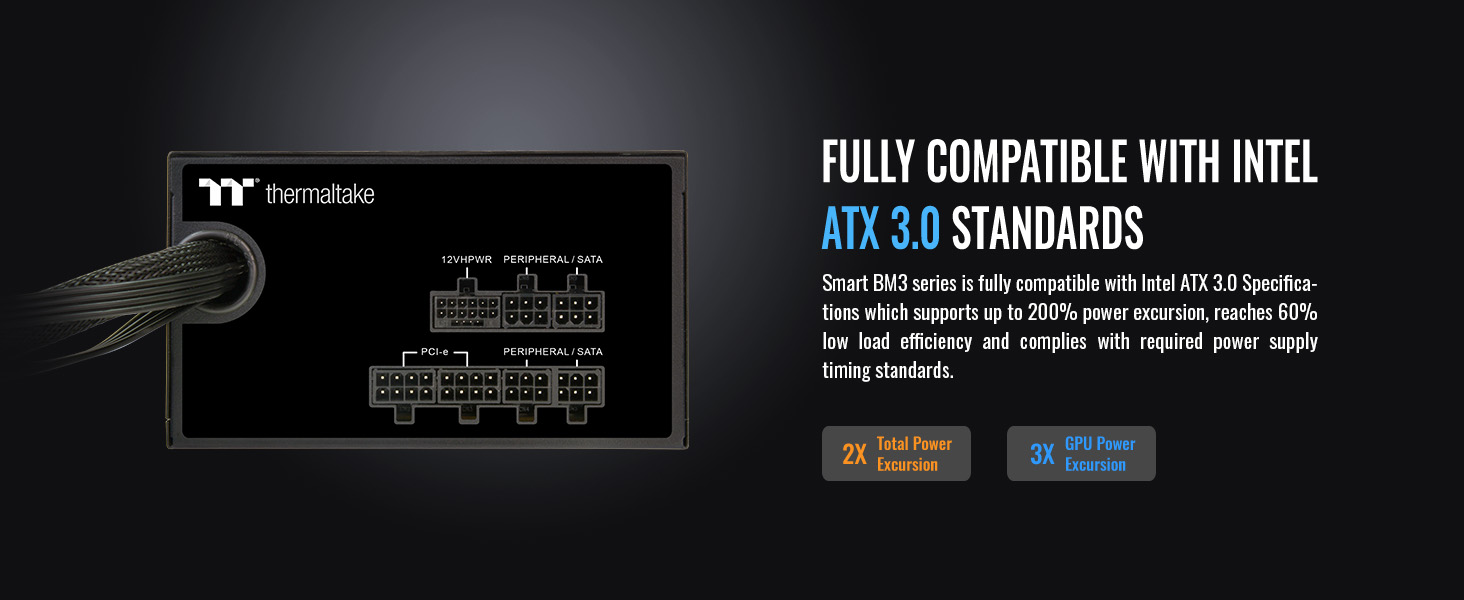
Figure 5: ATX 3.0 Compatibility Features
3. Uputstvo za upotrebu
3.1. Smart Zero Fan Function
The Smart Zero Fan function ensures silent operation by preventing the 120mm FDB fan from spinning until the power supply load exceeds 20%. This minimizes undesired noise during low-load conditions. A physical switch on the back of the PSU allows you to enable or disable this function.

Figure 6: Smart Zero Fan Switch
3.2. Uključivanje/isključivanje
After all components are securely connected, plug the AC power cord into the power supply and a wall outlet. Flip the main power switch on the PSU to the 'ON' position to power your system.
4. Održavanje
To ensure optimal performance and longevity of your power supply:
- Keep the power supply and surrounding area free from dust and debris. Use compressed air to clean the fan and vents periodically.
- Osigurajte adekvatan protok zraka unutar kućišta računara kako biste spriječili pregrijavanje.
- Avoid operating the power supply in high humidity or extreme temperature environments.
5. Otkrivanje problema
Ako imate problema s napajanjem, razmotrite sljedeće:
- Nema napajanja: Double-check all power connections, including the AC power cord, 24-pin ATX, and CPU power cables. Ensure the main power switch on the PSU is in the 'ON' position.
- Nestabilnost sistema: Verify that all modular cables are correctly and firmly plugged into the power supply and components. Ensure your system's power requirements do not exceed the PSU's capacity.
- Ventilator se ne okreće: If the Smart Zero Fan function is enabled, the fan will not spin until the PSU load exceeds 20%. This is normal operation. If the fan never spins under load, check the Smart Zero Fan switch position.
- pregrijavanje: Ensure proper ventilation in your PC case. Clean any dust buildup on the PSU fan and vents.
6. Specifikacije
| Feature | Detalj |
|---|---|
| P/N | PS-SPD-0750MNFABU-3 |
| Model | SPD-750AH2CLB |
| Watts | 750W |
| Max Output Capacity | 750W |
| Boja | Crna |
| Dimenzije (ŠxVxD) | 150 mm x 86 mm x 140 mm |
| PFC (korekcija faktora snage) | Aktivni PFC |
| Snaga dobar signal | 100-150 msec |
| Vrijeme čekanja | 17msec |
| Ulazna struja | 15A-6A |
| Opseg ulazne frekvencije | 50Hz/60Hz |
| Ulazni voltage | 100-240V~ |
| Radna temperatura | 5°C do +40°C |
| Radna vlažnost | 20% do 85%, bez kondenzacije |
| Temperatura skladištenja | -40°C do +55°C |
| Vlažnost skladištenja | 10% do 95%, bez kondenzacije |
| Sistem za hlađenje | 12cm FDB Fan |
| Efikasnost | Meet 80 PLUS® Bronze at 115Vac input |
| MTBF | 100,000 sati minimum |
| Sigurnosno odobrenje | FCC/ICES/CB/cTUVus/S-mark |
| PCI-E 6+2PIN Connectors | 4 |
| PCI-E 12+4PIN (12VHPWR) Connector | 1 (300W) |
| Zaštitne karakteristike | OCP/OVP/UVP/OPP/OTP/SCP |
Izlazna specifikacija

Figure 7: Detailed Output Specification Table
7. Garancija i podrška
The Thermaltake Smart BM3 750W Power Supply comes with a 5 godine garancije, ensuring long-term reliability and peace of mind. For technical support, warranty claims, or additional product information, please visit the official Thermaltake webstranice ili kontaktirajte njihovu korisničku službu.
Sigurnosne informacije: High voltages exist inside the power supply. Do not open the power supply case unless you are an authorized service technician or electrician. Doing so will void the warranty. Ensure all cables are plugged in properly. Loose and improper connections could damage the power supply and your system. Please use only genuine Thermaltake modular cables with Thermaltake power supply models. Third-party cables might not be compatible and could cause serious damage to your system and power supply.
8. Zvanični videozapisi proizvoda
8.1. RAPID REVIEW Thermaltake Smart BM3 850W Power Supply
Video Description: A detailed review of the Thermaltake Smart BM3 850W Power Supply, highlighting its features and performance. This video is relevant for the 750W model as it shares similar features and design.
8.2. Thermaltake Smart RGB Silent Power Supply
Video Description: This video showcases the Thermaltake Smart RGB Silent Power Supply, demonstrating its quiet operation and RGB lighting features. While this specific model is RGB, the video provides insight into the quiet fan technology also present in the Smart BM3 series.
8.3. Thermaltake GT Snow PSU Unboxing & PC Installation
Video Description: An unboxing and PC installation guide for the Thermaltake GT Snow PSU. This video offers visual guidance on the installation process that is generally applicable to other Thermaltake power supplies, including the Smart BM3 series.


