1. Uvod
This manual provides comprehensive instructions for the Cuifati H310 LGA 1151 Micro ATX DDR4 Motherboard, covering installation, operation, maintenance, troubleshooting, and detailed technical specifications. Please read this manual thoroughly before installing or operating your motherboard to ensure proper functionality and longevity.
Ključne karakteristike:
- Wide CPU Compatibility: Supports 8th and 9th generation Intel Core CPUs (LGA 1151 socket).
- Dual Channel DDR4 Memory: Features two DDR4 DIMM slots, supporting up to 32GB total memory at speeds of 1066, 1333, and 1600MHz.
- Stabilno napajanje: Equipped with a three-phase power supply and all solid-state capacitors for reliable power delivery to motherboard components.
- High-Speed Chipset: Utilizes the Intel H310 chipset for stable and efficient performance across various computing tasks.
- Integrirana grafika: Includes an integrated graphics processor with DVI, HDMI, and VGA display ports for multi-monitor setups.

Slika 1: Od vrha prema dolje view of the Cuifati H310 LGA 1151 Micro ATX DDR4 Motherboard.
2. Postavljanje i instalacija
Follow these steps carefully to install your Cuifati H310 motherboard and its components.
2.1 Izgled matične ploče

Figure 2: Detailed layout of the Cuifati H310 motherboard with key components labeled, including power connectors, memory slots, PCIe slots, and I/O interfaces.
2.2 Instalacija CPU-a
- Pronađite LGA 1151 CPU socket na matičnoj ploči.
- Gently push down the load lever and pull it away from the socket to open the CPU retention frame.
- Align the triangular mark on your Intel LGA 1151 CPU with the corresponding mark on the socket. Carefully place the CPU into the socket without forcing it.
- Zatvorite okvir za zadržavanje i vratite polugu za opterećenje u zaključani položaj.
- Instalirajte hladnjak procesora prema uputama proizvođača.

Slika 3: Krupni plan view of the LGA 1151 CPU socket on the motherboard, ready for CPU installation.
2.3 Instalacija memorije (RAM)
- Pronađite dva DDR4 DIMM utora.
- Otvorite kopče na oba kraja memorijskog utora.
- Poravnajte zarez na DDR4 memorijskom modulu s ključem u DIMM utoru.
- Čvrsto umetnite memorijski modul u utor dok se kopče ne uklope na svoje mjesto. Provjerite da li su obje kopče potpuno zatvorene.

Figure 4: Illustration highlighting the DDR4 memory slots, supporting dual-channel architecture.
2.4 Storage Device Installation (SATA)
- Locate the four SATA 3.0 (6Gb/s) ports on the motherboard.
- Spojite jedan kraj SATA podatkovnog kabela na SATA priključak na matičnoj ploči.
- Drugi kraj SATA podatkovnog kabela spojite na vaš SATA tvrdi disk ili SSD.
- Connect a SATA power cable from your power supply unit (PSU) to the storage device.
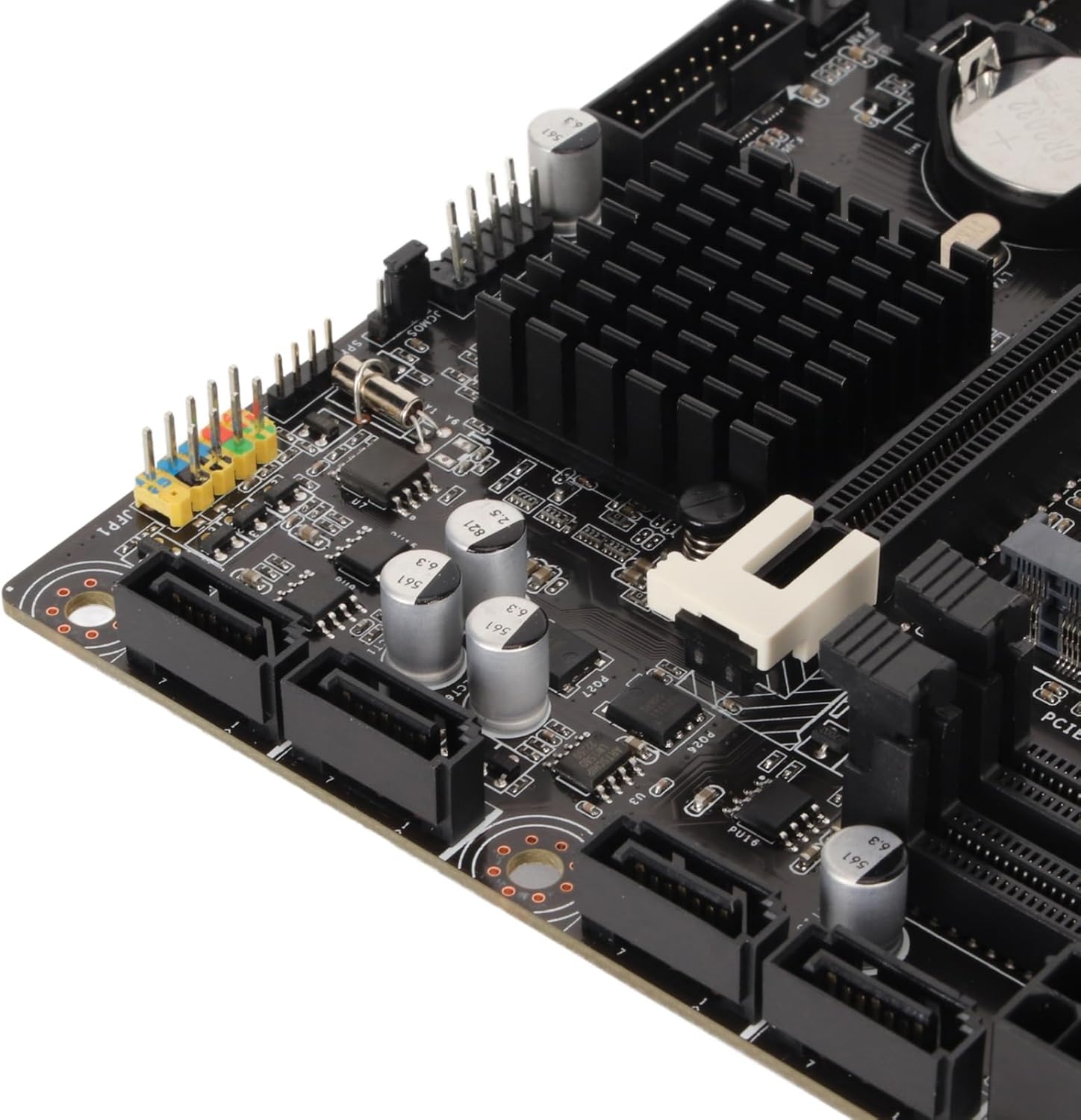
Slika 5: Krupni plan view of the four SATA 3.0 ports on the motherboard, used for connecting storage devices.
2.5 Instalacija grafičke kartice (PCIe)
- Locate the PCIe x16 slot (the longest PCIe slot).
- Uklonite odgovarajući poklopac utora za proširenje s kućišta računara.
- Align your graphics card with the PCIe x16 slot and press down firmly until it is securely seated and the retention clip locks.
- Secure the graphics card to the PC case with a screw.
- Connect any necessary PCIe power cables from your PSU to the graphics card.
2.6 Povezivanje napajanja
- Spojite 24-pinski ATX glavni konektor za napajanje sa vašeg napajanja na matičnu ploču.
- Connect the 8-pin ATX 12V power connector from your PSU to the motherboard.
2.7 I/O Shield Installation
Before mounting the motherboard into your PC case, ensure you install the I/O shield into the case's rear opening. This protects the rear ports and prevents dust ingress.

Figure 6: Rear I/O panel of the Cuifati H310 motherboard, showing various ports including USB, LAN, and audio jacks.
3. Uputstvo za upotrebu
3.1 Prvo pokretanje i podešavanje BIOS-a
- Nakon što sastavite računar, povežite monitor, tastaturu i miš.
- Power on your system. During startup, repeatedly press the DEL key (or as indicated on screen) to enter the BIOS/UEFI setup.
- In the BIOS, configure settings such as boot order, date/time, and enable XMP for your RAM if applicable. Save changes and exit.
- Install your operating system (e.g., Windows 10) from a bootable USB drive or DVD.
3.2 Instalacija drajvera
After installing your operating system, install the necessary drivers for your motherboard components. These typically include chipset drivers, audio drivers, LAN drivers, and integrated graphics drivers. Drivers can usually be found on the Cuifati support website or on an included driver CD/USB drive.
3.3 Integrated Graphics Output
The motherboard supports multiple display outputs (DVI, HDMI, VGA). You can connect up to three monitors simultaneously using these ports, provided your CPU has integrated graphics capabilities.

Slika 7: Krupni plan view of the DVI, HDMI, and USB ports on the rear I/O panel.
4. Održavanje
- Neka bude čisto: Regularly clean your PC case and motherboard to prevent dust buildup, which can lead to overheating and component failure. Use compressed air to gently remove dust.
- Ažuriranja BIOS-a: Periodically check the Cuifati website for BIOS updates. BIOS updates can improve system stability, compatibility, and performance. Follow the update instructions carefully.
- Ažuriranja drajvera: Redovno ažurirajte upravljačke programe kako biste osigurali optimalne performanse i kompatibilnost s novim softverom i hardverom.
5. Otkrivanje problema
Ako naiđete na probleme s matičnom pločom, razmotrite sljedeće uobičajene korake za rješavanje problema:
- Nema napajanja/Nema pokretanja:
- Ensure all power cables (24-pin ATX, 8-pin ATX 12V) are securely connected.
- Verify your PSU is switched on and functioning correctly.
- Check front panel connections (power button, reset button).
- Bez prikaza:
- Confirm your monitor is connected to the correct graphics output (integrated or dedicated GPU).
- Reseat your graphics card and RAM modules.
- If using a dedicated GPU, ensure it is properly powered.
- Nestabilnost/Padovi sistema:
- Provjerite temperaturu CPU-a i GPU-a.
- Ensure RAM modules are correctly installed and compatible.
- Update BIOS and drivers.
- BIOS Q-Flash Plus Button: The motherboard features a BIOS Q-Flash Plus button on the rear I/O panel, allowing you to update the BIOS without a CPU, RAM, or graphics card installed. Refer to the manufacturer's website for detailed instructions on using this feature.
6. Specifikacije
| Feature | Detalj |
|---|---|
| Brand | Cuifati |
| CPU Socket | LGA 1151 |
| Kompatibilni procesori | Intel Core i3/i5/i7/i9 8th/9th Gen |
| Tip čipseta | Intel H310 |
| Tehnologija RAM memorije | DDR4 |
| Brzina memorije | 1600 MHz (Supports 1066, 1333, 1600MHz) |
| Maksimalni kapacitet RAM-a | Up to 32GB (2 x 16GB DIMM slots) |
| Kompatibilni uređaji | Personal Computer |
| Platforma | Windows 10 |
| Interfejsi za pohranu | 4 x SATA 3.0 (6Gb/s) ports |
| Display Outputs | DVI, HDMI, VGA |
| USB portovi (stražnji) | 4 x USB 2.0, 2 x USB 3.2 Gen 1, 1 x USB 3.2 Gen 2, 1 x USB 3.2 Gen 1 Type-C |
| LAN | 1 x Gigabit Ethernet |
| Audio | Integrisani zvuk visoke definicije |
| Težina artikla | 1.13 funte |
| Dimenzije paketa | 10.24 x 7.87 x 1.97 inča |
| Broj modela | Cuifati0ohk6rbtdm |
7. Garancija i podrška
For warranty information, technical support, and the latest driver/BIOS downloads, please visit the official Cuifati website. Sačuvajte račun o kupovini za reklamacije.
For additional product information and visual guides, please refer to the product overview video below:
Video 1: Zvanični proizvod je završenview for the Cuifati H310 Motherboard. This video provides a visual guide to the motherboard's features and components.


